
1. פּראָדוקט איבערview
The CYCLAMI S2 Nylon Out Front Bike Computer Mount is designed to securely hold your cycling computer and compatible accessories, positioning them conveniently in front of your handlebars. This mount is constructed from reinforced nylon for durability and features a low wind drag design.
שליסל פֿעיִקייטן:
- Wide Compatibility: Supports XOSS, iGPSPORT, CooSpo, and Garmin Edge series cycling computers (e.g., Edge Touring, Edge 830, Edge 130 Plus, Edge 530).
- Handlebar Fit: Designed for circular bike handlebars with diameters between 1" and 1.25" (25.4mm-31.8mm).
- Out Front Positioning: Places your device forward for improved visibility and reduced distraction.
- Durable Construction: Made from reinforced nylon for strength and longevity.
- Water Resistance: Designed to withstand various weather conditions.

Image 1.1: The CYCLAMI S2 mount showcasing its multifunctionality with a bike computer and a headlight.

Image 1.2: Illustration of the mount's low wind drag design, optimizing aerodynamics.
2. וואָס איז אין דער קעסטל
ווען איר עפנט אייער פעקל, ביטע זיכער מאכן אז אלע קאמפאנענטן זענען דא:
- 1 x CYCLAMI S2 Out Front Bike Computer Mount (Nylon)
- 1 x Allen Wrench (for installation)
- Various adapters for different cycling computers (e.g., Garmin, XOSS, iGPSPORT)
- מאַונטינג סקרוז און ייַזנוואַרג
3. ינסטאַללאַטיאָן גייד
Follow these steps to correctly install your CYCLAMI S2 Out Front Bike Computer Mount:
- Prepare Handlebar: Ensure your bike handlebar is clean and free of obstructions in the desired mounting area. The mount is compatible with circular handlebars of 1" to 1.25" (25.4mm-31.8mm) diameter.
- שטעלט דעם בארג: Place the mount around your handlebar, ensuring the CYCLAMI logo faces forward and the computer interface is positioned correctly.
- באַוואָרענען די קלamp: Use the provided Allen wrench to tighten the screws on the mount's clamp. Tighten evenly until the mount is secure and does not rotate freely. Do not overtighten.
- אַדזשאַסטירן ווינקל (אפציאָנעל): The mount allows for slight angle adjustment. Loosen the main screw slightly, adjust to your preferred viewing angle, and then re-tighten securely.
- Attach Computer Adapter: Select the appropriate adapter for your cycling computer (Garmin, XOSS, iGPSPORT). Attach it to the top of the mount using the small screws provided. Rotate left to tighten the adapter.
- Attach Bottom Extension (Optional): If you plan to attach a headlight or action camera below the computer, use the bottom extension piece and secure it with the provided screws.
- אָנקלאַפּן דיין מיטל: Twist your cycling computer onto the adapter until it locks into place. If using a headlight, attach it to the bottom extension.

Image 3.1: Visual guide for installing the CYCLAMI S2 mount, detailing each step from overview to completion.
Video 3.1: This video demonstrates the installation process of the CYCLAMI S2 bike computer mount, including attaching the mount to the handlebar, adjusting its angle, and securing various compatible cycling computers and headlights.
4. אַפּערייטינג ינסטרוקטיאָנס
Once installed, the CYCLAMI S2 mount provides a stable platform for your devices.
- Attaching a Device: Align your compatible cycling computer or accessory with the installed adapter on the mount. Gently push down and twist clockwise until it clicks securely into place.
- Detaching a Device: To remove your device, twist it counter-clockwise until it releases from the adapter, then lift it off.
- Headlight/Camera Attachment: If using the bottom extension, ensure your headlight or action camera is compatible with the mounting interface and securely fastened.
5. פּראָדוקט פֿעיִקייטן
The CYCLAMI S2 mount offers several design advantagעס:
- ימפּרוווד וויזאַביליטי: Positions your bike computer further forward, allowing for easier viewing of data without diverting attention from the road.
- פּלאַץ אָפּטימיזאַטיאָן: Frees up valuable handlebar space by integrating multiple devices (computer and light) into one streamlined mount.
- שטאַרק מאַטעריאַל: Constructed from reinforced nylon, providing a strong and stable platform for your electronics, even on challenging terrain.
- אַעראָדינאַמיש פּלאַן: Engineered to minimize wind resistance, contributing to a smoother ride.
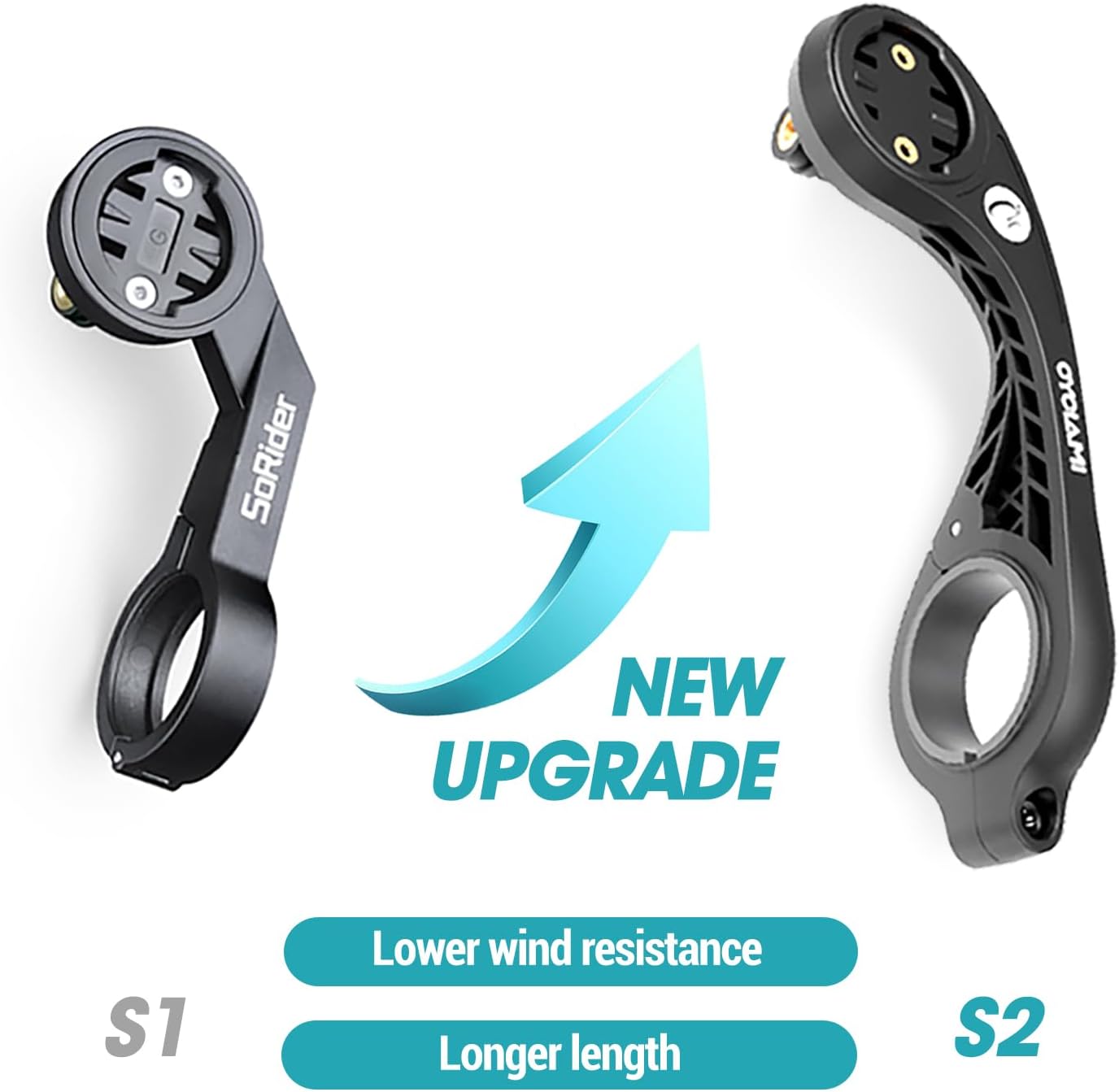
Image 5.1: A visual comparison between the S1 and S2 mounts, illustrating the S2's improved design for lower wind resistance and increased length.

Image 5.2: The mount demonstrating its excellent water resistance, suitable for various weather conditions.
6. ספּעסאַפאַקיישאַנז
| אַטריביוט | דעטאַל |
|---|---|
| סאָרט | CYCLAMI |
| מאָדעל נאָמען | S2 |
| קאָליר | שוואַרץ |
| מאַטעריאַל | פארשטארקט ניילאָן |
| מאַונטינג טיפּ | האַנדלעבאַר |
| קאָמפּאַטיבלע האַנדלער דיאַמעטער | 1" - 1.25" (25.4 מ"מ - 31.8 מ"מ) |
| קאַמפּאַטאַבאַל דעוויסעס | Garmin Edge (Touring, 830, 130 Plus, 530), XOSS, iGPSPORT, CooSpo |
| וואַסער קעגנשטעל מדרגה | וואָטערפּרוף |
| פּונקט וואָג | 0.07 קילאָגראַמס |
Note: Not compatible with Wahoo/Bryton devices or handlebars outside the specified diameter range.
7. וישאַלט
To ensure the longevity and optimal performance of your CYCLAMI S2 mount, follow these simple maintenance guidelines:
- רייניקונג: Wipe the mount regularly with a damp cloth to remove dirt and grime. Avoid using harsh chemicals or abrasive cleaners, which can damage the nylon material.
- דורכקוק: Periodically check all screws and connections to ensure they are tight. Vibrations from cycling can sometimes loosen fasteners. Re-tighten with the Allen wrench if necessary.
- סטאָרידזש: ווען נישט אין באַנוץ פֿאַר לענגערע פּעריאָדן, האַלט די מאַונט אין אַ קיל, טרוקן אָרט אַוועק פון דירעקט זונשייַן.
8. טראָובלעשאָאָטינג
If you encounter any issues with your CYCLAMI S2 mount, refer to the following common problems and solutions:
| פּראָבלעם | מעגלעך סיבה | לייזונג |
|---|---|---|
| מאָנטירן סליידס אויף די האַנטל | Clamp screws are loose. | פאַרשטייַפן די קלamp screws evenly with the Allen wrench. Ensure the handlebar diameter is within the compatible range. |
| Device does not attach securely | Incorrect adapter used or adapter not fully tightened. | Verify you are using the correct adapter for your device. Ensure the adapter is twisted fully and locked onto the mount. |
| Mount feels flimsy | די שרויפן זענען נישט אינגאנצן צוגעצויגן. | Check all mounting screws, including those for the computer adapter and bottom extension, and tighten them securely. |
אויב די פראבלעם בלייבט, ביטע קאנטאקטירט קאסטומער סופארט.
9. וואָראַנטי און שטיצן
The CYCLAMI S2 Out Front Bike Computer Mount comes with a 1 יאָר וואָראַנטי as specified in the product details. For any warranty claims or technical support, please refer to your purchase documentation or contact the seller directly.
פֿאַר ווייטערדיקע הילף, קענט איר באַזוכן די CYCLAMI Store on Amazon.