
CYCLAMI S6-Adjustable
CYCLAMI S6-Adjustable Out Front Bike Mount Instruction Manual
Model: S6-Adjustable
הקדמה
This manual provides detailed instructions for the installation, operation, and maintenance of your CYCLAMI S6-Adjustable Out Front Bike Mount. Please read this manual thoroughly before use to ensure proper functionality and safety.
פּראָדוקט איבערview
The CYCLAMI S6-Adjustable Out Front Bike Mount is designed for secure attachment of various GPS cycling computers and accessories to your bicycle handlebars or seatpost. Its adjustable design accommodates different handlebar types and allows for flexible positioning of your devices.
שליסל פֿעיִקייטן:
- וניווערסאַל קאַמפּאַטאַבילאַטי: Compatible with Garmin Edge, iGPSPORT, XOSS, CooSpo Magene, and CYCPLUS GPS devices.
- ווערסאַטאַל מאַונטינג: Suitable for round tube handlebars, flat handlebars, road bikes, mountain bikes, and folding bikes. Can also be mounted on seatposts.
- אַדזשאַסטאַבאַל גרייס: Fits handlebar diameters from 2cm to 4.5cm using an adjustable strap.
- גרינג ינסטאַלירונג: Quick-release design requires no special tools.
- Stable & Non-slip: Provides a secure and stable platform for your devices.
- אַדזשאַסטאַבאַל אָריענטירונג: Features a 4-hole screw position for easy adjustment of installation direction (vertical or sidewise).
- דוראַבאַל מאַטעריאַל: Made of nylon fiber material, resistant to deformation and high temperatures.
וואָס איז אין די קעסטל
- Out Front Bike Mount (S6 Bracket)
- פּאַד
- שרויף היטל
- שליסל
- סקרוז

Image: All components included in the CYCLAMI S6-Adjustable Bike Mount package.
סעטאַפּ און ינסטאַלירונג
1. Installing on a Round Handlebar
The S6-Adjustable mount is designed for quick installation on round handlebars of various sizes. No tools are required for this step.
- Place the main bracket of the mount onto your desired position on the round handlebar.
- Wrap the adjustable strap around the handlebar and secure it into the locking mechanism on the bracket.
- Ensure the mount is tight and stable.
Video: Demonstrates the quick installation of the S6-Adjustable mount on a round handlebar, including attaching a bicycle computer and a light.

Image: The S6-Adjustable mount securely attached to a round handlebar, ready for device attachment.
2. Mounting to a One-Piece Handlebar
The mount can also be securely attached to one-piece handlebars. This method may require adjusting the base orientation.
- Attach the mount to the one-piece handlebar using the adjustable strap, ensuring a snug fit.
- If needed, adjust the orientation of the device base. Use the provided wrench to remove the screws holding the device base.
- Rotate the device base by 45 degrees to achieve the desired orientation (e.g., vertical or sidewise).
- Reinstall the screws using the wrench to secure the base in the new orientation.

בילד: עקספּלאָדירט view demonstrating the 90-degree rotatable base for adjusting device orientation.

Image: Close-up of the mount's base showing the four screw holes for adjusting device orientation.
3. Mounting to a Seatpost
The S6-Adjustable mount can also be used on a seatpost for mounting tail lights or radar tail lights.
- Position the mount on the seatpost.
- Secure the mount using the adjustable strap, ensuring it is firmly attached.
- Attach your tail light or radar tail light to the mount.
- Utilize the locking end closure to prevent loosening due to vibrations during your ride.
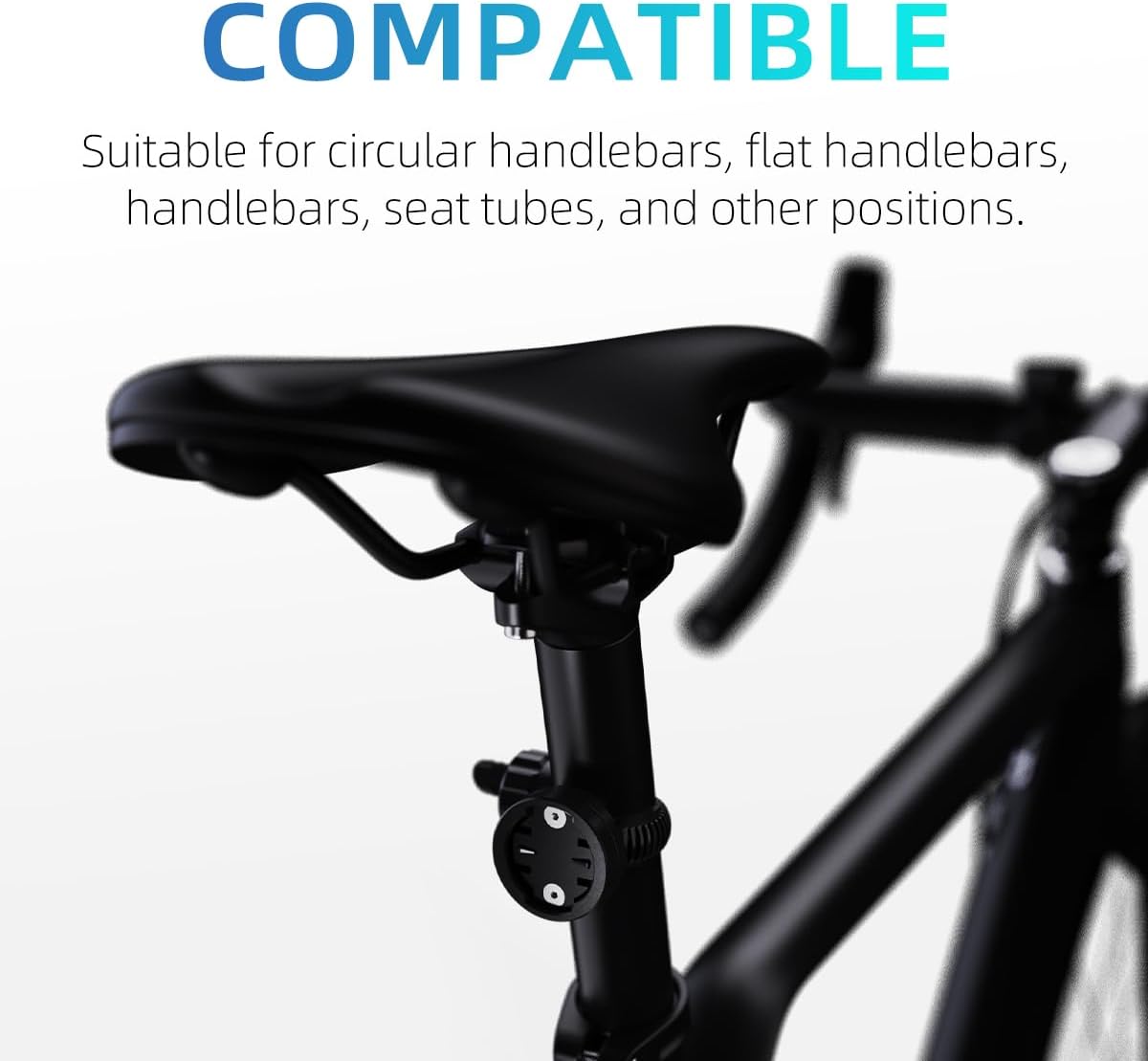
Image: The S6-Adjustable mount on a seatpost, demonstrating its versatility for rear-mounted accessories.
אַפּערייטינג ינסטראַקשאַנז
Attaching and Detaching Devices:
- To attach a compatible device (e.g., Garmin Edge, iGPSPORT, XOSS, CooSpo Magene, CYCPLUS GPS), align the device's mounting tabs with the slots on the S6 mount.
- Gently push the device onto the mount and rotate it clockwise until it clicks securely into place.
- To detach, press the release tab (if present on your device) and rotate the device counter-clockwise, then pull it off the mount.
Using with Lights and Other Accessories:
The S6 mount can also accommodate bicycle lights and other accessories that use a compatible Garmin-style base. Some lights may require an adapter (not included) to fit the mount.

בילד: עקסamples of compatible devices such as GPS units, spotlights, and radar taillights mounted on the S6-Adjustable bracket.
וישאַלט
- רייניקונג: ווישן די באַרג מיט אַדamp cloth to remove dirt and grime. Avoid harsh chemicals that may damage the nylon fiber material.
- דורכקוק: Regularly check the adjustable strap and locking mechanism for any signs of wear or damage. Ensure all screws are tight.
- סטאָרידזש: Store the mount in a cool, dry place when not in use.
טראָובלעשאָאָטינג
- Device feels loose: Ensure the adjustable strap is tightened sufficiently. If the device base is rotatable, check that the screws are securely fastened after adjusting the orientation.
- Mount slides on handlebar: Re-tighten the adjustable strap. Ensure the mount is positioned on a clean, dry section of the handlebar. The non-slip design should prevent excessive movement.
- Difficulty attaching/detaching device: Ensure the device's tabs are correctly aligned with the mount's slots. Do not force the device; a gentle push and twist should secure it.
ספּעסאַפאַקיישאַנז
| שטריך | דעטאַל |
|---|---|
| סאָרט | CYCLAMI |
| מאָדעל נאָמען | S6-US |
| קאָליר | שוואַרץ |
| קאַמפּאַטאַבאַל דעוויסעס | Garmin Edge, iGPSPORT, XOSS, CooSpo Magene, CYCPLUS GPS, Universal GPS Systems |
| מאַונטינג טיפּ | Handlebar, Seatpost |
| אַדזשאַסטאַבאַל גרייס | 2cm - 4.5cm (handlebar diameter) |
| מאַטעריאַל | Nylon Fiber |
| פּונקט וואָג | 0.03 קילאָגראַמס |
| וואַסער קעגנשטעל מדרגה | וואָטערפּרוף |
וואָראַנטי און שטיצן
וואָראַנטי אינפֿאָרמאַציע:
The CYCLAMI S6-Adjustable Out Front Bike Mount comes with a 1 יאָר וואָראַנטי from the date of purchase. This warranty covers manufacturing defects and material flaws under normal use. It does not cover damage caused by misuse, accidents, unauthorized modifications, or normal wear and tear.
קונה שטיצן:
For any questions, technical assistance, or warranty claims, please contact our customer support team. You can typically find contact information on the product packaging or through the retailer where you purchased the product. Please have your purchase receipt and product model number ready when contacting support.
You can also visit the official CYCLAMI store for more information and support: CYCLAMI Store on Amazon
Ask a question about this manual
Ask about setup, troubleshooting, compatibility, parts, safety, or missing instructions. Manuals+ will review the question and use this page’s manual context to help answer it.