
1. פּראָדוקט איבערview
The YoYoFit Smartwatch HT15 is a versatile wearable device designed to enhance your daily life with communication, health monitoring, and fitness tracking features. It connects seamlessly with your smartphone to keep you informed and active.
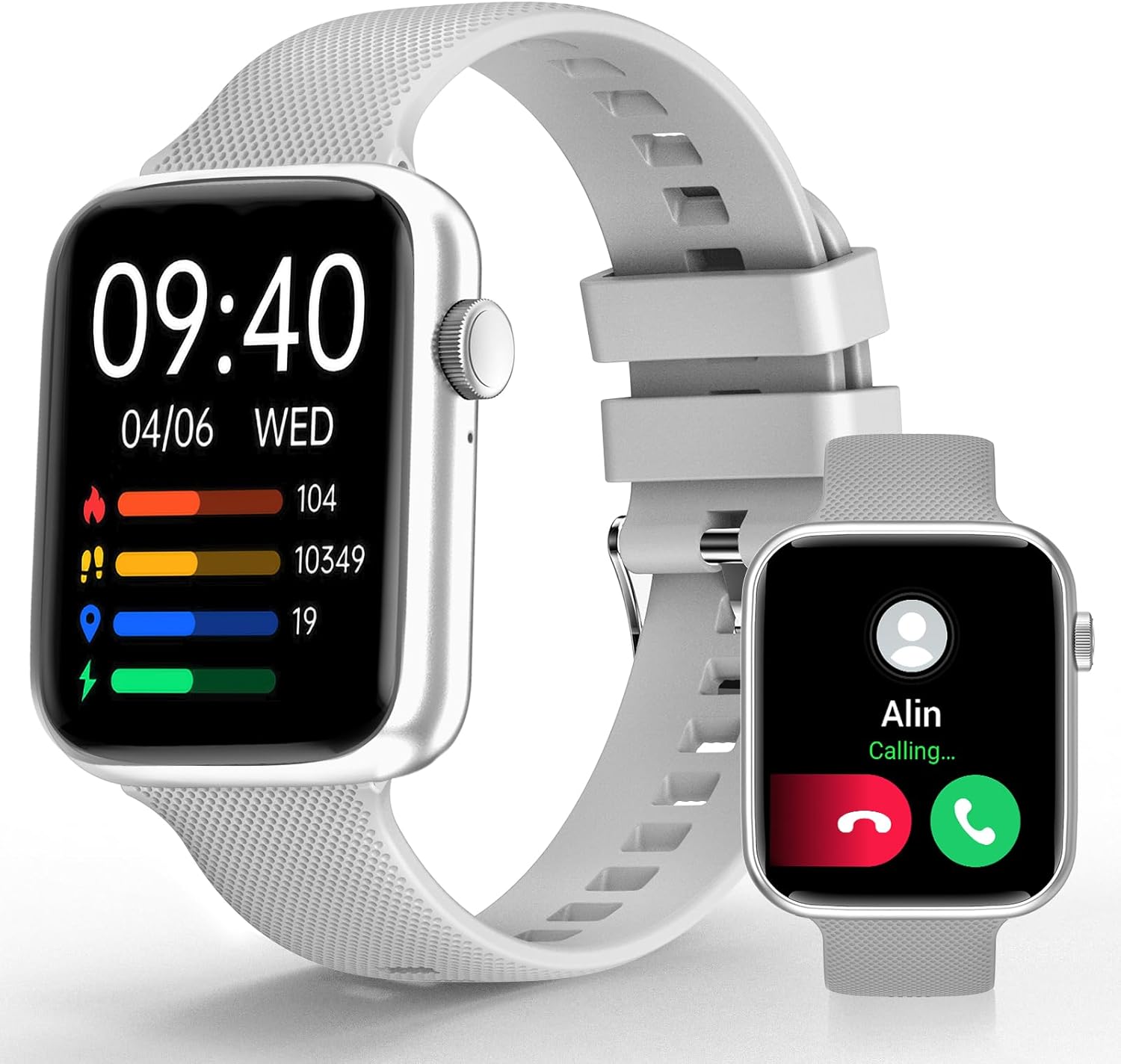
Image 1: YoYoFit Smartwatch HT15. This image displays the smartwatch in grey, showing the time, date, and various activity metrics like heart rate, steps, and calories. An inset image shows an incoming call notification.
2. פּעקל אינהאַלט
זיכער מאַכן אַז אַלע זאכן זענען פאַראַן אין פּעקל:
- YoYoFit Smartwatch HT15 (Grey)
- וואַך באַנד
- מאַגנעטיק טשאַרדזשינג קאַבלע
- באַניצער מאַנואַל (דעם דאָקומענט)
3. סעטאַפּ גייד
3.1 אויפלאָדן די סמאַרטוואַטש
פארן ערשטן באנוץ, לאדט גוט אויף אייער סמאַרטוואַטש. פארבינדט דעם מאַגנעטישן טשאַרדזשינג קאַבל צו די טשאַרדזשינג פונקטן אויף דער הינטערשטער זייגער און שטעקט דעם USB עק אין א מאַכט אַדאַפּטער (נישט אַרייַנגערעכנט) אדער א קאָמפּיוטער'ס USB פּאָרט.
- טשאַרדזשינג צייט: בעערעך 2 שעה.
- Battery Life: Up to 7-10 days of normal use, 15+ days on standby.

Image 2: Smartwatch charging. The image illustrates the magnetic charging cable connected to the smartwatch, with text indicating "Up to 7 days+ for normal use" and "Up to 15 days+ on low power setting."
3.2 אַפּ דאַונלאָוד און פּערינג
To unlock all features, download and connect your smartwatch to the "FitCloudPro" app.
- Scan the QR code in the manual or search for "FitCloudPro" in the App Store (iOS) or Google Play Store (Android).
- ינסטאַלירן די אַפּ אויף דיין סמאַרטפאָנע.
- מאַכן זיכער אַז בלועטאָאָטה איז ענייבאַלד אויף דיין טעלעפאָן.
- Open the "FitCloudPro" app and follow the on-screen instructions to add your device.
- Select "HT15" from the list of available devices.
- באַשטעטיקן די פּאָרינג בעטן אויף ביידע דיין טעלעפאָן און די סמאַרטוואַטש

Image 3: App download and pairing steps. This image shows a sequence of smartphone screens demonstrating how to download the "FitCloudPro" app, enable Bluetooth, search for the device, and confirm the pairing request.
3.3 קאַמפּאַטאַבילאַטי
The YoYoFit Smartwatch HT15 is compatible with:
- אַנדרויד 5.1 און העכער
- יאָס 8.5 און העכער
- Requires Bluetooth 5.0 for connection.
4. אַפּערייטינג ינסטרוקטיאָנס
4.1 יקערדיק נאַוויגאַציע
The smartwatch features a 1.85-inch HD color full touch screen. Swipe across the screen to navigate through menus and functions. The side button typically serves as a power button or a return-to-home function.

Image 4: Smartwatch screen details. This image focuses on the 1.85-inch HD touch screen, emphasizing its full-color display and touch functionality.
4.2 רוף פונקציאָנאַליטעט
Once paired via Bluetooth, you can manage calls directly from your wrist:
- ענטפֿערן / מאַכן קאַללס: Use the built-in speaker and microphone to answer incoming calls or dial out from your watch.
- אַרטיקלען: Read incoming messages and social media notifications.
- קאָנטאַקט: Store frequently used contacts for quick dialing.
- רופן געשיכטע: View your recent call logs.

Image 5: Stay Connected On-wrist. This image shows a woman using the smartwatch to answer a call, alongside visual representations of message notifications, built-in mic & speaker, and reminder functions.
4.3 געזונט מאָניטאָרינג
The smartwatch provides comprehensive health tracking:
- הארץ ראטע: קאָנטינויִערלעכע מאָניטאָרינג איבערן טאָג.
- בלוט זויערשטאָף (SpO2): מעסט בלוט זויערשטאָף לעוועלס.
- בלוט דרוק: מאָניטאָרס בלוט דרוק לעוועלס.
- שלאָף טראַקינג: Automatically tracks sleep patterns (deep sleep, light sleep, awake time) and provides quality analysis.
- מענסטרואל ציקל טראַקינג: Records and reminds you of your menstrual period.
Note: This device is not a medical device. Health data is for reference only and should not be used for medical diagnosis or treatment.

Image 6: Keep Track of Your Health. This image shows the smartwatch displaying heart rate, blood pressure, and blood oxygen measurements, with a person wearing the watch.

Image 7: Tools for Better ZZZs. This image illustrates the smartwatch's sleep tracking capabilities, showing deep sleep, light sleep, and awake times, along with smart alarm and Do Not Disturb settings.
4.4 טעטיקייט טראַקינג
The HT15 tracks your daily activity and supports 18 sports modes:
- טעגלעכע מעטריקס: Accurately tracks steps, distance, and calories burned.
- ספּאָרט מאָדעס: Includes walking, running, cycling, hiking, yoga, basketball, football, and more. Exercise data is recorded and displayed separately for each workout.

Image 8: Sweat the Smart Way. This image features a woman exercising, with the smartwatch displaying various sports modes (e.g., walking, running, cycling) and all-day activity tracking metrics like steps, calories, and distance.
4.5 קינסטלעכע אינטעליגענץ שטימע אַסיסטאַנט
Utilize the built-in AI voice assistant for hands-free control:
- Set reminders and alarms.
- קאָנטראָלירן מוזיק ווידערשפּיל.
- Get weather updates.
- Ask questions and receive translations.
4.6 אַנדערע פּראַקטישע פֿעיִקייטן
- קוסטאָמיזאַבלע וואַך פנימער: Choose from 100+ cloud watch faces or upload personal photos via the FitCloudPro app.
- וועטער פאָרעקאַסט: Check current weather conditions directly on your wrist.
- טיימער און סטאַפּוואַטש: Useful for workouts or daily tasks.
- מוזיק קאָנטראָל: Play, pause, skip tracks on your connected phone.
- געפֿינען טעלעפֿאָן: Locate your misplaced smartphone by triggering an alert sound.
- אַלאַרמס: Set multiple customizable alarms.
- Sedentary & Drink Water Reminders: Prompts to stay active and hydrated.
- ווייַט אַפּאַראַט קאָנטראָל: ניצט אייער זייגער צו ווייטנס אַקטיוויזירן אייער טעלעפאָן'ס קאַמעראַ.

Image 9: More Practical Features. This image highlights the smartwatch's diverse functionalities, including customizable watch faces, weather display, music control, timer, stopwatch, and the "Find Phone" feature.
5. וישאַלט
5.1 רייניקן אייער סמאַרטוואַטש
Regularly clean your smartwatch and watch band to ensure optimal performance and hygiene.
- Wipe the screen and watch body with a soft, damp, לינט-פֿרייַ שטאָף.
- For the silicone strap, you can use mild soap and water, then rinse thoroughly and dry completely.
- ויסמיידן ניצן האַרב קעמיקאַלז אָדער אַברייסיוו מאַטעריאַלס.
5.2 וואַסער קעגנשטעל
The smartwatch is designed to withstand daily activities like hand washing and sweating. However, it is not recommended for swimming or showering, as prolonged exposure to water or hot steam may damage the device.
6. טראָובלעשאָאָטינג
6.1 אַפּאַראַט טוט זיך נישט אָן
- זיכער מאַכן אַז די זייגער איז גאָר אויפגעלאָדן. פֿאַרבינדט עס צום מאַגנעטישן טשאַרדזשער פֿאַר לפּחות 30 מינוט.
- Press and hold the side button for several seconds to power on.
6.2 פּראָבלעמען מיטן צוזאַמענשטעלן
- מאַכן זיכער אַז בלועטאָאָטה איז ענייבאַלד אויף דיין סמאַרטפאָנע.
- זייט זיכער אז די סמאַרטוואַטש איז אין דערגרייך פון אייער טעלעפאָן.
- ריסטאַרט ביידע דיין טעלעפאָן און סמאַרטוואַטש
- Forget the device in your phone's Bluetooth settings and try pairing again through the "FitCloudPro" app.
- Check if the "FitCloudPro" app has necessary permissions enabled on your phone.
6.3 אומגענויע געזונטהייט מעסטונגען
- זייט זיכער אז די זייגער טראָגט גוט אויף אייער האַנטגעלענק, נישט צו ענג אדער צו לויז.
- רייניקט די סענסארן אויף דער הינטערשטער זייגער.
- פֿאַרמײַדן איבערגעטריבענע באַוועגונג בעת מעסטונגען.
- Remember that readings are for reference and not for medical use.
6.4 נאטיפיקאציעס דערשייַנען נישט
- Verify that the smartwatch is connected to your phone via Bluetooth.
- Check notification settings within the "FitCloudPro" app to ensure desired apps are enabled.
- Confirm that your phone's notification settings allow the "FitCloudPro" app to display alerts.
7. ספּעסאַפאַקיישאַנז
| שטריך | דעטאַל |
|---|---|
| מאָדעל נומער | HT15 |
| פאַרשטעלן גרייס | 1.85 Inches HD Color Display |
| פּראָדוקט דימענשאַנז | 10 X 1.52 X 0.43 אינטשעס |
| פּונקט וואָג | 3.68 אונסעס |
| באַטערי טיפּ | ליטיום פּאָלימער (1 פארלאנגט, אַרייַנגערעכנט) |
| באַטאַרייע קאַפּאַציטעט | 0.18 Amp שעהן |
| קאַנעקטיוויטי | בלועטאָאָטה 5.0 |
| אָפּערייטינג סיסטעם | Android (compatible with Android 5.1+), iOS (compatible with iOS 8.5+) |
| ספּעציעלע פֿעיִקייטן | Heart Rate Monitor, Activity Tracker, Bluetooth Call Function, Blood Oxygen Monitor, Sleep Monitor, AI Voice Assistant |

Image 10: Smartwatch dimensions. This diagram provides detailed measurements of the smartwatch (1.8" x 1.52" x 0.43") and indicates the suitable wrist size range (4.9" ~ 8.3").
8. פּראָדוקט ווידעאָ
Video 1: YoYoFit Smart Watch for Men and Women. This video provides a visual overview of the smartwatch's features and functionalities, including its design, health tracking, and connectivity options.