
IXITAB FS8233Pro
FS8233Pro Touch Smart Digital Multimeter User Manual
Model: FS8233Pro | Brand: IXITAB
1. הקדמה
The IXITAB FS8233Pro is an advanced, automatic smart digital multimeter designed for professional electricians and DIY enthusiasts. Featuring an intelligent sensing touch screen, this device offers convenient operation and clear display for various electrical measurements. Its rechargeable lithium battery ensures long-lasting performance without the need for frequent battery replacements. The FS8233Pro is equipped with intelligent anti-burning fuse protection and a durable silicone protective case, enhancing both safety and hardware longevity. This manual provides comprehensive instructions for safe and effective use of your multimeter.
2. זיכערקייַט אינפֿאָרמאַציע
שטענדיק האַלטן זיך צו זיכערהייט מיטלען ווען איר ניצט עלעקטרישע טעסט עקוויפּמענט. אויב איר טוט דאָס נישט, קען דאָס פירן צו שאָדן אָדער שאָדן צום אַפּאַראַט.
- נישט איבערשרייטן די מאַקסימום אַרייַנגאַנג ווערטן ספּעציפֿיצירט פֿאַר יעדן מעסטונג קייט.
- זיכער מאַכן אַז די טעסט דראָטן זענען אין גוטן צושטאַנד און ריכטיק פֿאַרבונדן איידער איר מאַכט מעסטונגען.
- Avoid using the multimeter in wet environments or with wet hands.
- דו זאלסט נישט פּרווון צו מעסטן וואָלtage or current on circuits exceeding the device's rated capacity.
- שטענדיק אָפּשטעקן די מאַכט צום קרייַז איידער איר מעסט קעגנשטעל, קאַפּאַסיטאַנס, אָדער קאָנטינויִטעט.
- זייט פארזיכטיג ווען איר ארבעט מיט לעבעדיגע קרייזן.
- זעט די לאקאלע עלעקטרישע קאָודן און זיכערהייט סטאַנדאַרדן.
3. פּעקל אינהאַלט
באַשטעטיקן אַז אַלע זאכן זענען פאַראַן אין דיין פּעקל:
- 1 x FS8233Pro Digital Multimeter
- 1 x ינסטרוקטיאָן מאַנואַל
- 1 x טשאַרדזשינג קאַבל (USB)
- 1 x פּאָר פון טעסט לידז

Image: The FS8233Pro multimeter shown with its standard accessories, including the red and black test leads and a USB charging cable.
4. פּראָדוקט איבערview
The FS8233Pro features a large, clear LCD display and intuitive touch controls for ease of use.

בילד: א נאָענטע בילד view of the FS8233Pro's front panel, highlighting its large digital display and touch-sensitive buttons for various functions like HOLD, AUTO, NCV, Live, and input jacks.
4.1 שליסל פֿעיִקייטן:
- Intelligent Sensing Touch Screen: For convenient operation and clear display.
- קריקאָנלאָדלעך ליטהיום באַטערי: Long life, USB charging.
- אָטאַמאַטיק דעטעקשאַן: Eliminates the need for manual gear shifting.
- Intelligent Anti-Burning Fuse: Enhanced safety protection.
- סיליקאָנע פּראַטעקטיוו קעיס: Prevents shock and protects hardware.
- באַקלייט: Allows clear viewינג אין טונקל טנאָים.
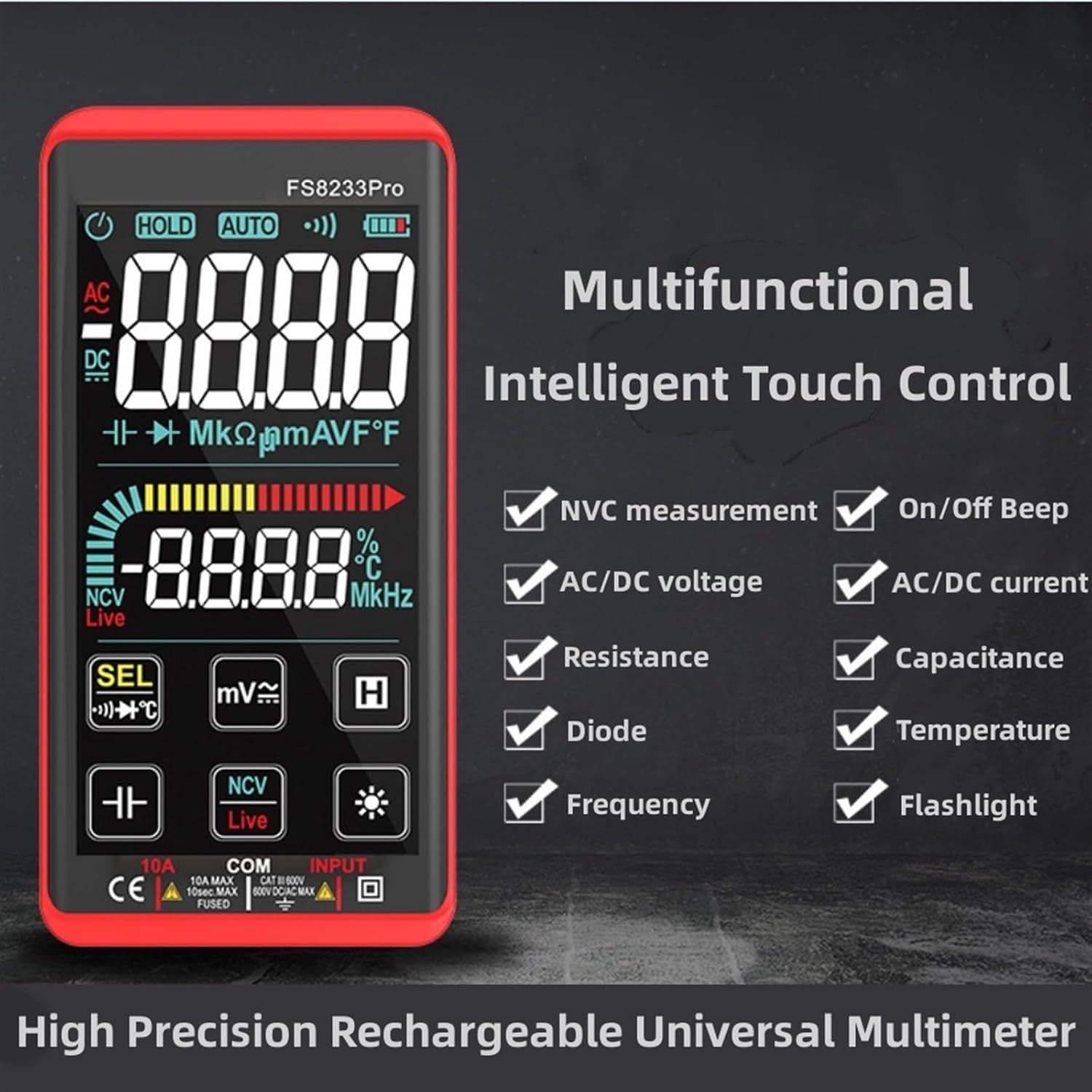
Image: A promotional image showcasing the multifunctional intelligent touch control features of the FS8233Pro, including NVC measurement, AC/DC voltage, resistance, diode, frequency, on/off beep, AC/DC current, capacitance, temperature, and flashlight.
5. סעטאַפּ
5.1 ערשט טשאַרדזשינג
Before first use, fully charge the multimeter's internal lithium battery. Connect the provided USB charging cable to the multimeter's charging port and to a standard USB power adapter (not included) or a computer USB port. The battery indicator on the display will show charging status.
5.2 פֿאַרבינדן טעסט דראָטן
Insert the red test lead into the "INPUT" jack and the black test lead into the "COM" (common) jack. Ensure they are securely inserted.
6. אַפּערייטינג ינסטרוקטיאָנס
The FS8233Pro features automatic detection, simplifying measurement selection. Simply turn on the device and it will automatically identify the measurement type for most common functions.

Image: A hand interacting with the touch-sensitive display of the FS8233Pro multimeter, demonstrating its "Intelligent Movement Touch Sensing" for sensitive and fast measurements.
6.1 מאַכט אויף / אַוועק
Press the power button (usually indicated by a power symbol) to turn the multimeter on or off. The device will automatically shut down after approximately 15 minutes of inactivity to conserve battery life.
6.2 אַק בtage (ACV) מעסטונג
- פֿאַרבינדט די טעסט דראָטן פּאַראַלעל צום AC וואָלומעןtagE מקור.
- The multimeter will automatically detect AC voltage.
- Range: 0.5V-750V (Accuracy: 1%+5)
6.3 דק חלקtage (DCV) מעסטונג
- פֿאַרבינדט די טעסט־לידער פּאַראַלעל צום גלייכשטראָם־וואָלוקטוםtage source, observing polarity.
- The multimeter will automatically detect DC voltage.
- Range: 0.5V-1000V (Accuracy: 0.5%+3)
6.4 קעגנשטעל מעזשערמאַנט
- זיכער מאַכן אַז די קרייַז איז דעענערדזשייזד איידער איר מעסט די קעגנשטעל.
- פֿאַרבינדט די טעסט־לידער אַריבער דעם קאָמפּאָנענט וואָס מע דאַרף מעסטן.
- Range: 0.1Ω-99.999MΩ (Accuracy: 1%+3)
6.5 אָפטקייַט מעזשערמאַנט
- פֿאַרבינדט די טעסט־לידלעך צום סיגנאַל־מקור.
- Range: 40Hz-10000Hz (Accuracy: 0.5%+3)
6.6 מעאַסורעמענט קאַפּאַציטעט
- זיכער מאַכן אַז דער קאַפּאַסיטאָר איז אויסגעלאָדן איידער מעסטן.
- פֿאַרבינדט די טעסט דראָטן אַריבער די קאַפּאַסיטאָר טערמינאַלן.
- Range: 10nF-60000μF (Accuracy: 4.5%+5)
6.7 טעמפּעראַטור מעזשערמאַנט
- Use the appropriate temperature probe (if included, or purchased separately) and connect it to the multimeter.
- Range: -40°C to 1000°C (Accuracy: 2%+5)
6.8 On & Off Beep (Continuity)
- פֿאַרבינדט די טעסט־לידער אַריבער דעם קרייַז אָדער קאָמפּאָנענט.
- If the resistance of the tested circuit is less than 50Ω, the auxiliary buzzer will sound, indicating continuity.
6.9 דייאָוד טעסט
- פֿאַרבינדט די טעסט דראָטן אַריבער די דיאָד.
- The display will show the approximate diode forward voltagE ווערט.
6.10 NCV (נישט-קאָנטאַקט וואָלומען)tagה) דעטעקשאַן
- Select the NCV function.
- Bring the top of the multimeter close to the AC voltagE מקור.
- There are three alarm modes (visual and audible) according to the detected voltagע שטאַרקייט.
6.11 Live Line Identification
- Select the Live function.
- Insert the red test lead into the suspected live line.
- If it is a live line, "Live" will appear on the screen, and an alarm sound will be emitted.
7. וישאַלט
7.1 רייניקונג
ווישט אויס דעם מולטימעטער'ס קasinג מיט אַדamp cloth. Do not use abrasive cleaners or solvents. Ensure the device is off and disconnected from any power source before cleaning.
7.2 סטאָרידזש
Store the multimeter in a cool, dry place, away from direct sunlight and extreme temperatures. If storing for extended periods, ensure the battery is partially charged (around 50%) to prolong its lifespan.
7.3 באַטערי קער
The built-in lithium battery is designed for long life. Avoid fully discharging the battery frequently. Recharge as needed. If the device will not be used for a long time, charge it every 3 months to maintain battery health.
8. טראָובלעשאָאָטינג
| פּראָבלעם | מעגלעך סיבה | לייזונג |
|---|---|---|
| מולטימעטער גייט נישט אן. | באַטערי איז דיפּליטיד. | לאָדט אויף דעם מולטימעטער מיטן צוגעשטעלטן USB קאַבל. |
| ומפּינקטלעך רידינגז. | Incorrect measurement mode; Damaged test leads; Environmental interference. | Ensure correct mode is selected (though often automatic); Check test leads for damage; Move away from strong electromagnetic fields. |
| קיין קאנטינעויטעט ביפּ. | Resistance is too high; Test leads not making good contact. | Ensure resistance is below 50Ω; Re-seat test leads firmly. |
| Automatic shutdown occurs too quickly. | Inactivity timer. | The device is designed to shut down after approximately 15 minutes of inactivity. This is normal operation. |
9. ספּעסאַפאַקיישאַנז
| פּאַראַמעטער | קייט / ווערט | אַקיעראַסי |
|---|---|---|
| AC Voltage (ACV) | 0.5V-750V | (1% + 5) |
| DC VoltagE (DCV) | 0.5V-1000V | (0.5% + 3) |
| קעגנשטעל | 0.1Ω-99.999MΩ | (1% + 3) |
| אָפטקייַט | 40Hz-10000Hz | (0.5% + 3) |
| קאַפּאַסיטאַנס | 10nF-60000μF | (4.5% + 5) |
| טעמפּעראַטור | -40°C צו 1000°C | (2% + 5) |
| Continuity Beep Threshold | <50Ω | N/A |
| אָטאַמאַטיק שאַטדאַון | בעערעך. 15 מינוט פון ינאַקטיוויטי | N/A |
| מאַכט מקור | קריקאָנלאָדלעך ליטהיום באַטערי | N/A |
| פאַבריקאַנט | IXITAB | N/A |
| מאָדעל | FS8233Pro | N/A |
10. וואָראַנטי און שטיצן
For warranty information and technical support, please refer to the contact details provided by your retailer or visit the official IXITAB webזייטל. האַלט אייער קויף קוויטל ווי אַ באַווייַז פון קויפן פֿאַר וואָראַנטי קליימז.
For additional assistance, you may contact the seller directly through the platform where the product was purchased.
Ask a question about this manual
Ask about setup, troubleshooting, compatibility, parts, safety, or missing instructions. Manuals+ will review the question and use this page’s manual context to help answer it.