
1. הקדמה
This manual provides detailed instructions for the safe and efficient operation of your Xprinter XP-P323B Portable Thermal Printer. Please read this manual thoroughly before using the device to ensure proper functionality and to prevent damage. The XP-P323B is designed for printing receipts and labels, offering portability and high-speed capabilities for various business needs.
2. זיכערקייַט אינפֿאָרמאַציע
- Do not expose the printer to water or excessive moisture.
- פֿאַרמײַדט צו לאָזן דעם דרוקער פאַלן אָדער אים אויסשטעלן צו שטאַרקע קלאַפּן.
- ניצט נאָר דעם ספּעציפֿירטן מאַכט אַדאַפּטער און אַקסעסאָריעס.
- האַלט דעם דרוקער אַוועק פון היץ קוועלער און דירעקט זונשייַן.
- פּרוּווט נישט צו צענעמען אָדער פאַרריכטן דעם דרוקער אַליין. קאָנטאַקט קוואַליפֿיצירטע סערוויס פּערסאָנעל.
- פאַרזיכערן געהעריק ווענאַליישאַן בעשאַס אָפּעראַציע.
3. פּעקל אינהאַלט
באַשטעטיקן אַז אַלע זאכן זענען פאַראַן אין פּעקל:
- Xprinter XP-P323B Portable Thermal Printer
- Power Adapter (not explicitly listed but standard)
- USB Cable (not explicitly listed but standard)
- Sample Thermal Paper Roll (not explicitly listed but standard)
- באַניצער מאַנואַל (דעם דאָקומענט)
4. פּראָדוקט איבערview
The Xprinter XP-P323B is a compact and efficient thermal printer designed for various printing tasks. It supports NV logo download and picture printing (BMP format), along with concentration adjustment for print quality.
4.1. Printer Components

פיגורע 1: פראָנט view of the Xprinter XP-P323B Portable Thermal Printer, showing the power button, display, and a sample label being printed.
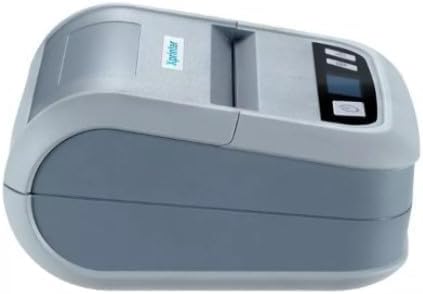
פיגורע 2: זייַט view of the Xprinter XP-P323B, highlighting its compact design and the Xprinter logo.
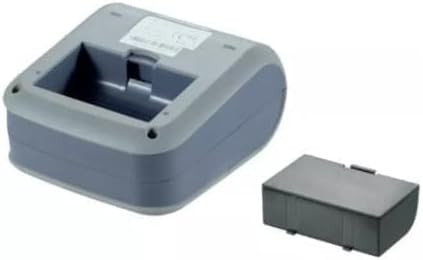
פיגורע 3: אונטערסייד view of the Xprinter XP-P323B, showing the base and the removable battery compartment.
5. סעטאַפּ
5.1. טשאַרדזשינג די באַטערי
- Connect the power adapter to the printer's charging port.
- צאַפּן די מאַכט אַדאַפּטער אין אַ וואַנט ווענטיל.
- The charging indicator light will illuminate. Allow the printer to charge fully before first use.
5.2. Loading Thermal Paper/Labels
- Open the paper compartment cover by gently pushing the release latch.
- Insert the thermal paper roll with the printing surface facing the print head. Ensure the roll is seated correctly.
- Pull a small amount of paper out past the print head.
- פֿאַרמאַכט דעם דעקל פֿונעם פּאַפּיר־אָפּטייל פֿעסט ביז עס קליקט אַרײַן אין פּלאַץ.
5.3. זיך פֿאַרבינדן צו אַ מיטל
The XP-P323B supports USB and Bluetooth connectivity.
5.3.1. וסב קאַנעקשאַן
- פאַרבינדן די דרוקער צו דיין קאָמפּיוטער מיט די צוגעשטעלט וסב קאַבלע.
- Install the necessary printer drivers (available from the Xprinter website or included software).
5.3.2. Bluetooth Connection (for Smartphones/iOS)
- פאַרזיכערן אַז די דרוקער איז פּאַוערד אויף.
- On your smartphone or iOS device, go to Bluetooth settings and enable Bluetooth.
- זוכן פֿאַר available devices and select 'XP-P323B' (or similar name).
- Enter the pairing PIN if prompted (refer to printer documentation for default PIN, often '0000' or '1234').
- Once paired, you can use a compatible printing application to send print jobs.
6. אפערירן דעם דרוקער
6.1. גרונטלעכע דרוקעריי
- Ensure the printer is connected to your device and has paper loaded.
- Open the document or image you wish to print on your connected device.
- Select the print option within your application.
- Choose 'XP-P323B' as the printer.
- Adjust print settings as needed (e.g., paper size, print quality).
- אָנהייבן די דרוק אַרבעט.
6.2. NV Logo and Picture Printing
The printer supports downloading and printing NV (Non-Volatile) logos and BMP format pictures. This functionality typically requires specific software or commands. Refer to the advanced programming guide or software documentation for detailed instructions on how to upload and print custom logos or images.
6.3. Adjusting Print Concentration
Print concentration can be adjusted to optimize print quality. This setting is usually accessible through the printer driver software on a computer or within the settings of a compatible mobile printing application. Consult your software's help section for specific steps.
7. וישאַלט
7.1. רייניקונג די פּרינטער
- עקסטעריע: ווישט אָפּ די אויסערלעכע זייט פון דעם דרוקער מיט אַ ווייכן, טרוקענעם שטאָף.amp שטאָף. דו זאלסט נישט נוצן האַרב קעמיקאַלז אָדער אַברייסיוו קלינערז.
- דרוק קאָפּ: The thermal print head should be cleaned periodically to ensure optimal print quality. Use a cotton swab lightly dampened with isopropyl alcohol. Gently wipe the print head surface. Allow it to dry completely before closing the cover and resuming operation.
- פּאַפּיר וועג: אַראָפּנעמען יעדן פּאַפּיר שטויב אָדער דעבריס פֿון דעם פּאַפּיר וועג מיט אַ ווייכן באַרשט אָדער קאָמפּרעסירטע לופט.
7.2. סטאָרידזש
When not in use for extended periods, store the printer in a cool, dry place, away from direct sunlight and extreme temperatures. Remove the paper roll if storing for a very long time to prevent dust accumulation.
8. טראָובלעשאָאָטינג
| פּראָבלעם | מעגלעך סיבה | לייזונג |
|---|---|---|
| דרוקער גייט נישט אן | Low battery; Power adapter not connected; Faulty power adapter | Charge the battery; Ensure power adapter is securely connected; Try a different power outlet or adapter |
| קיין דרוק ארויסגאַנג | No paper; Paper loaded incorrectly; Printer not connected; Driver issue | Load paper correctly; Re-establish connection; Reinstall printer drivers |
| נעבעך דרוק קוואַליטעט | Dirty print head; Low print concentration; Low battery | Clean the print head; Adjust print concentration in software; Charge the battery |
| בלועטאָאָטה קשר פיילז | Bluetooth off on device; Incorrect pairing PIN; Printer out of range | Enable Bluetooth; Re-enter correct PIN; Move device closer to printer |
9. ספּעסאַפאַקיישאַנז
| סאָרט | Xprinter |
| מאָדעל נומער | XP-P323B |
| נומער דימענשאַנז (ד רענטגענ וו רענטגענ ה) | 15 ד רענטגענ 7 וו רענטגענ 10 ה סענטימעטער |
| קאַנעקטיוויטי טעכנאָלאָגיע | וסב |
| דרוקער טעכנאָלאָגיע | טערמאַל |
| ספּעציעלע פֿעיִקייטן | פּאָרטאַטיוו |
| קאָליר | גרוי |
| קאַמפּאַטאַבאַל דעוויסעס | סמאַרטפאָנעס |
| קאָנטראָללער טיפּ | יאָס |
| מאַקסימום מעדיע גרייס | 4 X 6 אינטש |
| דרוק מידיאַ | לאַבעלס |
| פּאַפּיר גרייס | 4 X 6 אינטש |
| דרוקער רעזולטאַט | מאָנאָטשראָמע |
| Maximum Print Speed (Black and White) | 40 mm/s (estimated from context) |
| פּונקט וואָג | 300 גראַמז |
10. וואָראַנטי און שטיצן
For warranty information and technical support, please refer to the warranty card included with your product or visit the official Xprinter webזייטל. האַלט אייער קויף קוויטל ווי אַ באַווייַז פון קויפן פֿאַר וואָראַנטי קליימז.