
1. הקדמה
This manual provides detailed instructions for the installation, operation, and maintenance of your Xprinter XP-370B Thermal Barcode Sticker Printer. Please read this manual thoroughly before using the printer to ensure proper functionality and to prevent damage.
2. זיכערקייַט אינפֿאָרמאַציע
- שטענדיק פֿאַרבינדן דעם דרוקער צו אַ געערדטער עלעקטרישער אַוטלעט.
- Do not expose the printer to water or high humidity.
- פֿאַרמײַדט צו שטעלן דעם דרוקער אין דירעקטער זון אָדער לעבן היץ־קוואַלן.
- Use only Xprinter approved accessories and power adapters.
- האַלטן די דרוקער אַוועק פון קינדער.
- Do not attempt to disassemble or repair the printer yourself. Contact qualified service personnel for assistance.
3. פּעקל אינהאַלט
באַשטעטיקן אַז אַלע זאכן זענען פאַראַן אין פּעקל:
- Xprinter XP-370B Thermal Barcode Sticker Printer
- מאַכט אַדאַפּטער
- וסב קאַבלע
- שנעלע אָנהייב גייד (אויב אַרייַנגערעכנט)
4. פּראָדוקט איבערview
The Xprinter XP-370B is a compact and efficient thermal printer designed for barcode and sticker printing. It features high-speed printing capabilities and supports various connectivity options.

פיגור 4.1: פאָרנט-רעכטס view of the Xprinter XP-370B Thermal Barcode Sticker Printer.

פיגורע 4.2: זייַט view illustrating the power button and top cover key for accessing the media compartment.
5. סעטאַפּ
5.1 אַנפּאַקינג און פּלייסמאַנט
- קערפאַלי אַראָפּנעמען די דרוקער פון זייַן פּאַקקאַגינג.
- שטעלט דעם דרוקער אויף א סטאַבילער, גלאַטער ייבערפלאַך מיט גענוג ווענטילאַציע.
- Ensure there is enough space around the printer for cable connections and media loading.
5.2 קאַנעקטינג די פּרינטער
- פֿאַרבינדט דעם מאַכט אַדאַפּטער צום דרוקער'ס מאַכט פּאָרט און דערנאָך שטעקט עס אַרײַן אין אַ מאַכט אַוטלעט.
- Connect the printer to your computer using the provided USB cable. The printer also supports Serial, Ethernet, and Bluetooth connectivity options depending on the model.
- Turn on the printer using the power button located on the side (refer to Figure 4.2).
5.3 Loading Print Media
- Press the top cover key (refer to Figure 4.2) to open the printer's top cover.
- Place the roll of thermal labels into the media compartment. The maximum label diameter supported is 100mm.
- Adjust the paper guide to fit the width of your labels securely.
- Pull a small length of labels past the print head.
- Close the top cover until it clicks into place.
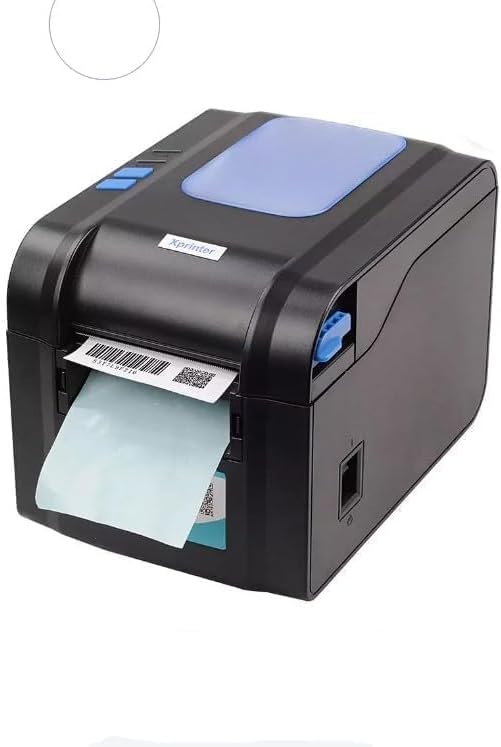
Figure 5.3: The printer demonstrating a label being fed out after printing.
5.4 דרייווער ינסטאַלירונג
- For Windows systems, insert the driver CD (if provided) or download the latest drivers from the official Xprinter webזייטל. גיי נאך די אינסטרוקציעס אויפן עקראַן פאר אינסטאַלאַציע.
- For Android and iOS devices, download the appropriate printing application from your device's app store.
6. אַפּערייטינג ינסטרוקטיאָנס
6.1 יקערדיק פּרינטינג
- Ensure the printer is powered on and connected to your device.
- עפֿנט דאָס דאָקומענט אָדער אַפּליקאַציע פֿון וועלכער איר ווילט דרוקן.
- Select the Xprinter XP-370B from your list of available printers.
- Adjust print settings such as label size, orientation, and density as needed.
- Initiate the print command. The printer will begin printing at speeds up to 152mm/s.
7. וישאַלט
7.1 רייניקונג די פּרינטער
- אויסלעשן און ארויסנעמען דעם דרוקער פון דער נעץ איידער איר רייניגט.
- ניצן אַ ווייך, לינט-פֿרייַ שטאָף דampened with isopropyl alcohol to gently clean the print head.
- Clean the exterior of the printer with a soft, dry cloth.
- דו זאלסט נישט נוצן אַברייסיוו קלינערז אָדער סאָלוואַנץ.
8. טראָובלעשאָאָטינג
- דרוקער רעאגירט נישט: Check power connection, USB/Serial/Ethernet/Bluetooth connection, and ensure drivers are correctly installed.
- שלעכטע דרוק קוואַליטעט: Clean the print head, ensure correct media type is used, and check print density settings.
- פּאַפּיר קלעם: Open the top cover, carefully remove any jammed labels, and re-load the media correctly.
- עטיקעטן נישט צופירן: Ensure labels are loaded correctly and the paper guide is adjusted properly. Check for any obstructions.
9. ספּעסאַפאַקיישאַנז
| שטריך | באַשרייַבונג |
|---|---|
| סאָרט | Xprinter |
| מאָדעל נומער | XP-370B |
| דרוקער טעכנאָלאָגיע | טערמאַל |
| קאַנעקטיוויטי טעכנאָלאָגיע | USB, Serial, Bluetooth, Ethernet (options vary) |
| מאַקסימום פּרינט ספּיד | אַרויף צו 152 מם / s |
| מאַקסימום מעדיע גרייס | 4 X 6 אינטש |
| Maximum Label Diameter | 100 מם |
| דרוק מידיאַ | לאַבעלס |
| דרוקער רעזולטאַט | מאָנאָטשראָמע |
| נומער דימענשאַנז (ד רענטגענ וו רענטגענ ה) | 15 ד רענטגענ 7 וו רענטגענ 10 ה סענטימעטער |
| פּונקט וואָג | 300 ג |
| שטיצט אַפּערייטינג סיסטעמס | ווינדאָוס, אַנדרויד, יאָס |
10. וואָראַנטי און שטיצן
For warranty information and technical support, please refer to the documentation provided with your purchase or visit the official Xprinter webזייטל. האַלט אייער קויף קוויטל ווי אַ באַווייַז פון קויפן פֿאַר וואָראַנטי קליימז.