
Restmo O-HTB-1A
RESTMO Sprinkler Timer User Manual
Model: O-HTB-1A
Brand: Restmo
הקדמה
The RESTMO Sprinkler Timer is an advanced ball valve water timer designed for efficient and automatic watering of gardens, lawns, and various irrigation systems. It is particularly effective with zero or low water pressure setups, including rain barrels. This multi-functional timer offers automatic, manual, and rain delay modes, providing flexible control over your watering schedule.

Figure 1: RESTMO Sprinkler Timer, showing the main unit with LCD display and control dial.
פֿעיִקייטן
- Zero and Low Pressure Watering: Optimized to work efficiently with low-pressure drip irrigation systems and zero-pressure setups, such as rain barrels, due to its ball valve mechanism.
- Multi-Functional Watering Modes: Includes Auto, Manual, and Rain Delay modes for versatile watering control.
- Easy Setup and Operation: Features an oversized dial and a large, easy-to-read LCD screen for intuitive programming of watering duration, frequency, and start times.
- דוראַבאַל קאַנסטראַקשאַן: Built with a robust ball valve and rated IP54 for water and leak resistance.
- ברייט אַפּלאַקיישאַן: Suitable for garden hoses, outdoor faucets, lawn sprinkler controllers, greenhouse mist systems, pool filling, birdbath drippers, and pet drinking systems.

Figure 2: Key features highlighting zero water pressure compatibility, ball valve, ease of use, and various watering modes.
פּעקל אינהאַלט
- 1 x RESTMO Sprinkler Timer (Model O-HTB-1A)
- 1 x באַניצער מאַנואַל
- Note: 2 x AA Alkaline Batteries are not included.
ספּעסאַפאַקיישאַנז
| באַשרייַבונג | ווערט |
|---|---|
| וואָטערינג אָפטקייַט | 1-23 hours or 1-7 days |
| וואָטערינג געדויער | 1 מינוט צו 4 שעה 59 מינוט |
| רעגן פארלענגערונג אָפּציעס | 12 / 24 / 48 / 72 שעה |
| אַרבעט דרוק | 0 - 120 PSI (0 - 8 Bar) |
| מאַקסימום לויפן קורס | 10 גפּם (35 לפּם) |
| ארבעטן טעמפּעראַטור | 38 - 120°F (3 - 50°C) |
| באַטערי טיפּ | 2 x AA אַלקאַליין באַטעריעס (נישט אַרייַנגערעכנט) |
| אומגעפערע באַטעריע לעבן | 1 יאָר |
| דימענסיעס (L X W X H) | 4.7 X 4.3 X 2.2 אינטשעס (12 X 11 X 5.5 סענטימעטער) |
| וואָג | 9 אַז (254 ג) |
| וואָטערפּרוף רייטינג | IP54 |
| קראַן קאָמפּאַטאַביליטי | Standard 3/4" Garden Hose & Faucet |

פיגורע 3: עקספּלאָדעד view of the timer showing components like filter washer, LCD screen, ball valve, and control buttons, along with key specifications.
סעטאַפּ
- ינסטאַלירן באַטעריז: Open the battery compartment. Insert 2 x AA alkaline batteries (not included), ensuring correct polarity. Close the compartment securely. Important: Do not moisten the battery or battery compartment. Keep your hands dry during installation.
- Attach to Faucet: Connect the timer to your standard 3/4" garden faucet. Ensure the connection is tight to prevent leaks. The timer is designed to work with 0-120 PSI water pressure.
- צוטשעפּען קישקע: Connect your garden hose or irrigation system to the bottom outlet of the timer.
- Turn on Faucet: Fully open your faucet to allow water pressure to the timer. The timer's ball valve will control the water flow according to your programmed schedule.
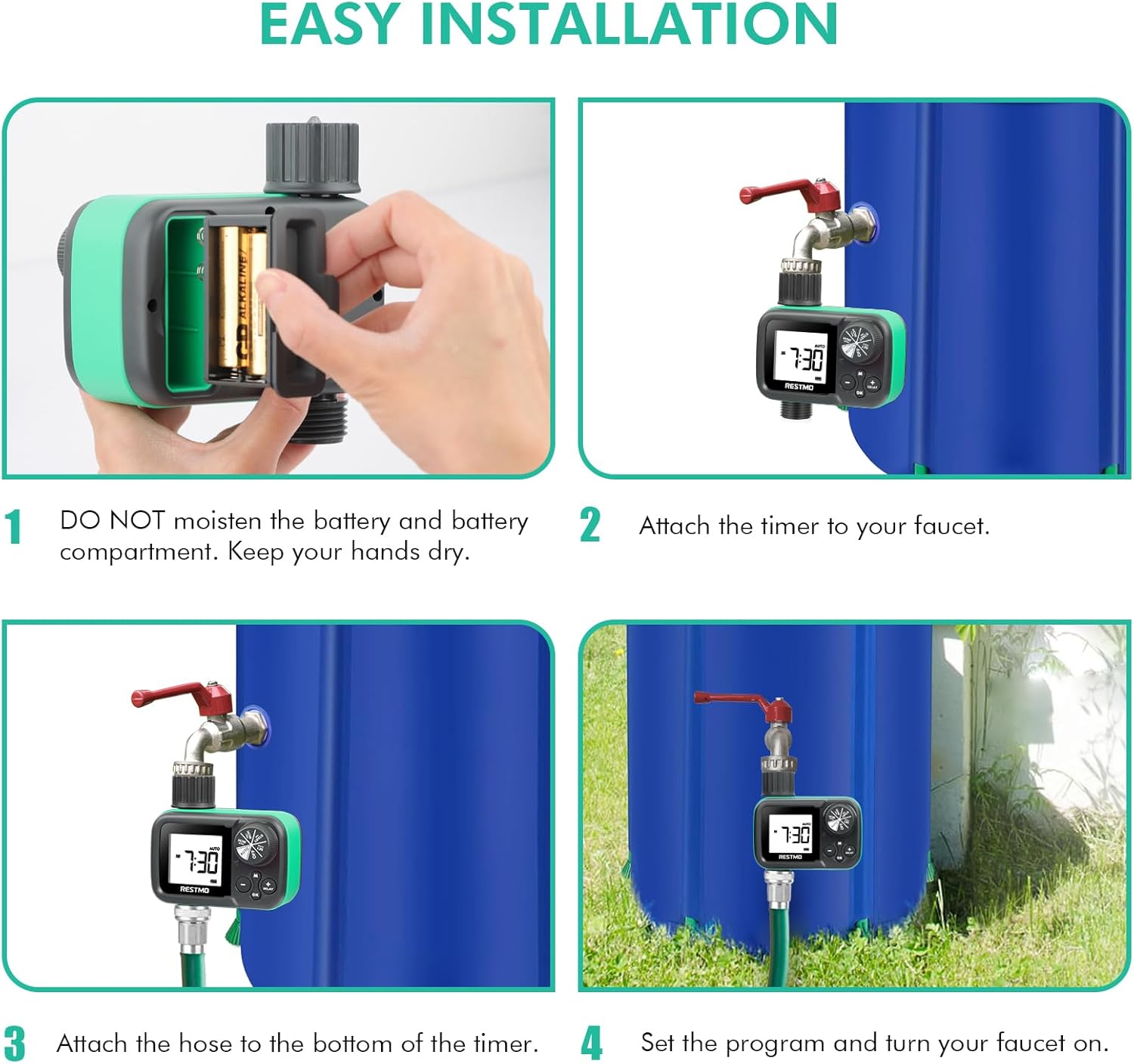
Figure 4: Visual guide for installing the timer, including battery insertion, attaching to faucet, connecting the hose, and turning on the faucet.
אָפּעראַציע
The RESTMO Sprinkler Timer features a large dial for selecting different settings and buttons for adjustment. Rotate the dial to navigate through the programming options.
Dial Positions:
- שטעלן זייגער: שטעלן די קראַנט צייט.
- אָנהייב צייט: שטעלן די געוואלט אָנהייב צייַט פֿאַר וואָטערינג.
- ווי לאנג: Set the duration of each watering cycle (1 minute to 4 hours 59 minutes).
- ווי אָפֿט: Set the frequency of watering (every 1-23 hours or every 1-7 days).
- אָטאַמאַטיק: Activates the automatic watering schedule based on your settings.
- OFF: Turns off all watering functions.
פּראָגראַממינג סטעפּס:
- שטעלן זייגער: Rotate the dial to "SET CLOCK". Use the + און - buttons to adjust the current time. Press OK צו באַשטעטיקן.
- שטעלן אָנהייב צייט: Rotate the dial to "START TIME". Use the + און - buttons to set the desired time for watering to begin. Press OK צו באַשטעטיקן.
- שטעלן וואַסערונג געדויער (ווי לאַנג): Rotate the dial to "HOW LONG". Use the + און - buttons to set how many minutes or hours the timer should water. Press OK צו באַשטעטיקן.
- שטעלן וואַסערונג אָפטקייט (ווי אָפט): Rotate the dial to "HOW OFTEN". Use the + און - buttons to set how often the watering cycle should repeat (e.g., every 12 hours, every 2 days). Press OK צו באַשטעטיקן.
- אַקטאַווייט אָטאַמאַטיק מאָדע: Once all settings are confirmed, rotate the dial to "AUTO". The timer will now operate according to your programmed schedule.
מאַנואַל וואָטערינג:
To initiate manual watering outside of the programmed schedule:
- Ensure the dial is set to "AUTO" and the timer is not in "DELAY" mode.
- דרוק די M (Manual) button.
- ניצן די + און - buttons to set the desired manual watering duration (1 minute to 299 minutes).
- דרוק OK to start manual watering. The timer will water for the set duration and then return to its automatic schedule.
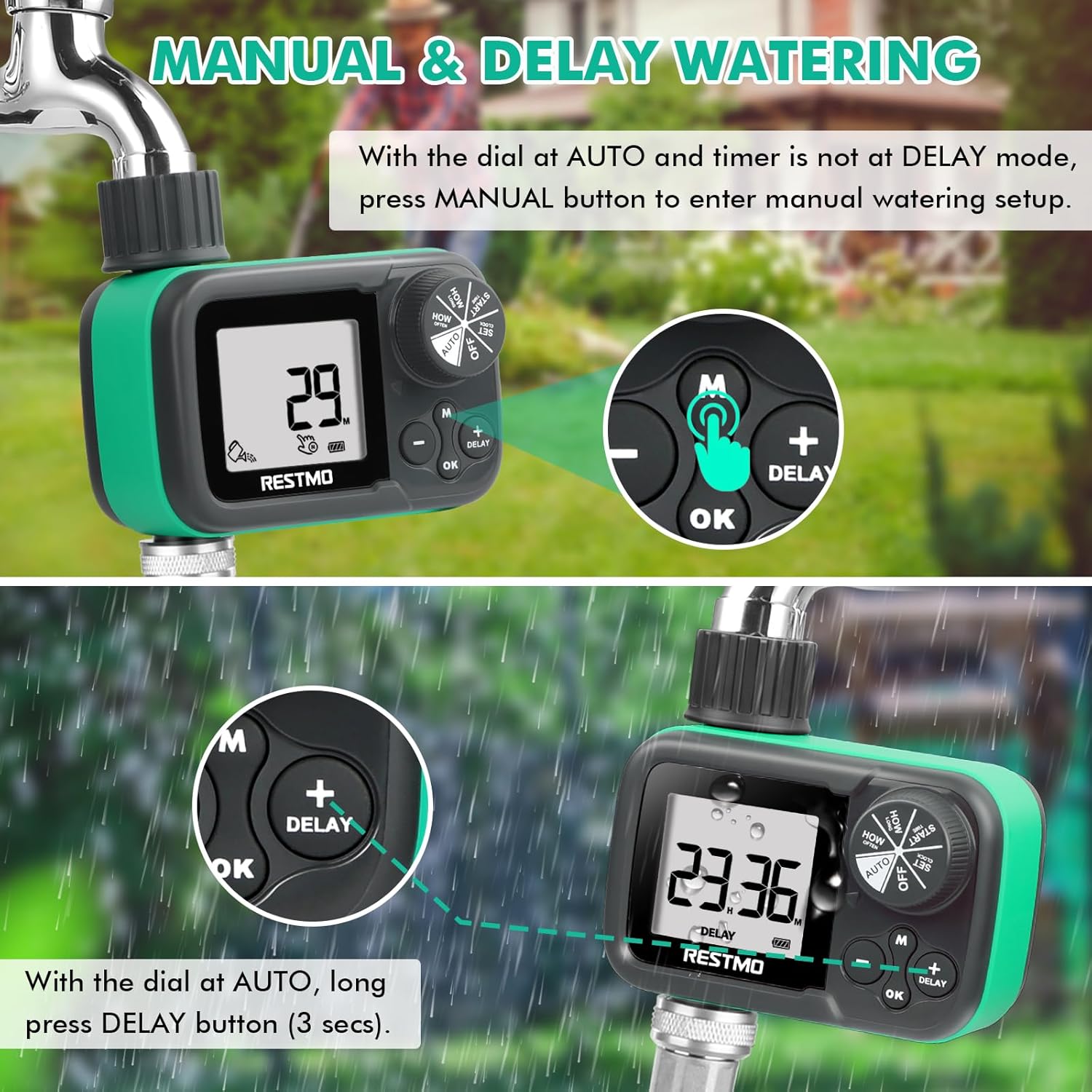
Figure 5: Visual guide for activating manual watering and rain delay functions.
Rain Delay Function:
To temporarily pause your watering schedule due to rain or other reasons:
- Ensure the dial is set to "AUTO".
- לאנג דריקן די פאַרהאַלטן button (for 3 seconds).
- ניצן די + און - buttons to select the desired delay period (12, 24, 48, or 72 hours).
- The timer will pause for the selected duration and then resume its programmed schedule automatically.
וישאַלט
- ווינטער סטאָרידזש: To prevent freezing damage, remove the timer from the faucet before the first frost. Dry the timer thoroughly and store it indoors in a dry, protected area during winter months.
- באַטערי פאַרבייַט: Replace batteries annually or when the low battery indicator appears on the LCD screen to ensure continuous operation.
- Filter Washer: Periodically check the filter washer at the inlet connection for debris. Clean if necessary to maintain optimal water flow and prevent blockages.
- רייניקונג: Clean the exterior of the timer with a soft, damp טוך. ניצט נישט קיין שרײַבנדיקע רייניגער און טונקט נישט אײַן דעם אַפּאַראַט אין וואַסער.

Figure 6: Important warning regarding winter storage to prevent freezing damage.
טראָובלעשאָאָטינג
| פּראָבלעם | מעגלעך סיבה | לייזונג |
|---|---|---|
| Timer not turning on / LCD blank | טויטע אדער נישט ריכטיק אינסטאלירטע באַטעריעס. | Replace with fresh AA alkaline batteries, ensuring correct polarity. |
| No water flow / Low water flow | Faucet not fully open; clogged filter washer; low water pressure (if not using rain barrel); incorrect program setting. | Ensure faucet is fully open. Check and clean the filter washer. Verify water pressure is within 0-120 PSI. Confirm program settings are correct and timer is in "AUTO" mode. |
| וואַסער ליקאַדזש פון קאַנעקשאַנז | Loose connections; missing or damaged washer. | Tighten all connections. Ensure rubber washers are properly seated and not damaged. Replace if necessary. |
| Timer not watering at scheduled time | Incorrect clock or start time setting; timer in "OFF" or "DELAY" mode; low battery. | Verify clock and start time. Ensure dial is set to "AUTO". Check battery level. |
וואָראַנטי & שטיצן
RESTMO is committed to customer satisfaction and product quality.
- וואָראַנטי: The product comes with a 100% satisfaction guarantee, a 45-day money-back guarantee, and an 18-month worry-free replacement service.
- קונה שטיצן: For any questions, issues, or support needs, please reach out to our 24/7 local customer service team.
קאָנטאַקט אינפֿאָרמאַציע:
- בליצפּאָסט: support@restmo-link.com
- Phone (Toll-Free): +1 866-876-6888
- טעלעפאָנירן: +1 929-329-4398

Figure 7: Product packaging displaying contact details for customer support and key specifications.
Ask a question about this manual
Ask about setup, troubleshooting, compatibility, parts, safety, or missing instructions. Manuals+ will review the question and use this page’s manual context to help answer it.