
1. הקדמה און קאָמפּאַטאַביליטי
This manual provides detailed instructions for the installation, operation, and maintenance of your autoabc Wireless CarPlay/Android Auto 8.9-inch Linux Touchscreen Multimedia Radio Receiver. This device is designed to upgrade your vehicle's infotainment system while retaining original car functionalities.
1.1. קאָמפּאַטאַביליטי מיט פֿאָרמיטלען
This product is specifically designed for the following BMW models with a CCC-System:
- BMW 3 Series: E90, E91, E92, E93 (2005-2010)
- BMW 5 Series: E60, E63, E64 (2005-2010)
וויכטיק: Please verify your vehicle's system is a CCC-System before purchase and installation. If you are unsure, consult a professional or contact autoabc customer support.

Image 1.1: Compatibility chart for BMW E-series models and CCC system.
2. שליסל פֿעיִקייטן
The autoabc Multimedia Radio Receiver offers a range of advanced features to enhance your driving experience:
- Wireless and Wired CarPlay/Android Auto: Seamlessly integrate your smartphone for navigation, music, calls, and more using intelligent voice assistants.
- High-Definition 8.9-inch Touchscreen: A 1920 x 720 resolution LED display provides a clear and vibrant visual experience.
- Original Feature Retention: Maintains all original car functions, including radio, amplifier, joystick control, rearview camera, and vehicle information display (speed, fuel, oil pressure, safety warnings).
- עטלעכע קאָנטראָל מעטהאָדס: Supports control via the original car knob, steering wheel buttons, and the new touchscreen interface.
- סקרין שפּיגל: Features Airplay and Autolink for mirroring your phone's screen, and supports USB media playback.
- אַפּאַראַט שטיצן: Compatible with factory original reverse cameras, parking radar, and aftermarket front view DVR (AHD/CVBS).

Image 2.1: Control methods supported by the system, including original car knob, steering wheel buttons, and the new touchscreen. Also highlights camera support.

Image 2.2: Visual representation of screen mirroring capabilities (Airplay, Autolink) and USB media playback.
3. סעטאַפּ און ייַנמאָנטירונג
3.1. Pre-Installation Notice: AUX Function Activation
Due to the age of some compatible car models, the AUX function may not be active by default. It is crucial to activate the AUX function in your car before using this product to ensure audio output. You can activate the AUX function using a dedicated activator tool or by seeking assistance from a car dealership or a qualified car repair shop.
3.2. ינסטאַלירונג איבערview
Installation involves replacing the original display screen and connecting the new unit with the provided cables. While the installation is designed to be straightforward, professional installation is recommended if you are not familiar with car electronics. An installation video may be available; please check the product page or contact customer support for guidance.
אַרייַנגערעכנט קאַמפּאָונאַנץ:
- הויפּט ווייַז אַפּאַראַט
- מאַכט קאַבלע
- וסב קאַבלע
- AUX קאַבלע
- באַניצער מאַנואַל
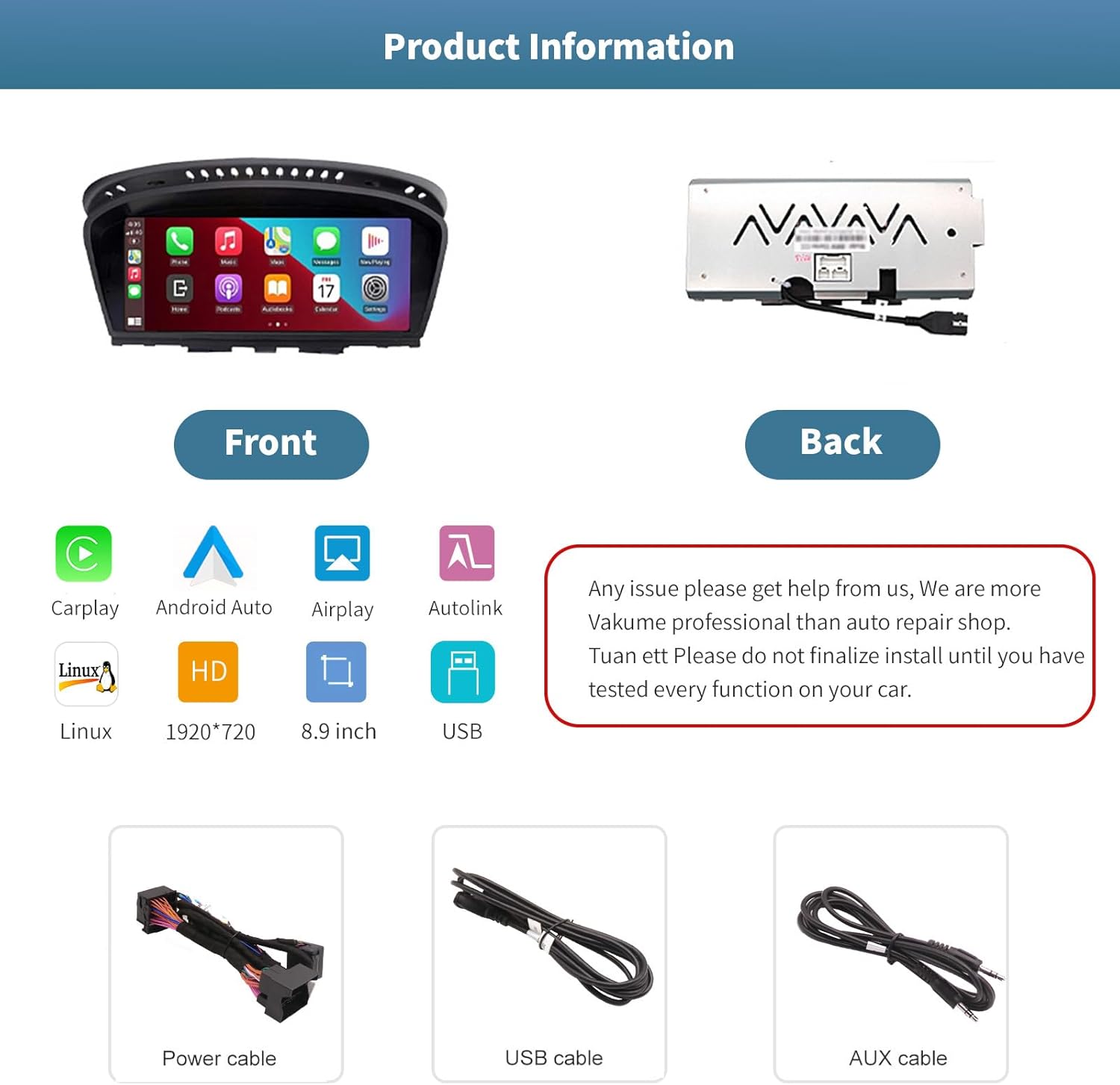
בילד 3.1: פאָרנט און הינטן views of the autoabc multimedia receiver, along with the included power, USB, and AUX cables.
באַמערקונג: Do not finalize the installation until you have tested every function on your car. For any installation issues, please contact autoabc support.
4. אָפּעראַציע
4.1. וועקסלען צווישן סיסטעמען
The unit allows for one-button switching between your original BMW iDrive system and the new Linux-based multimedia system. This ensures you can access all original car functions while enjoying the new features.

Image 4.1: Interface showing the option to switch between the original car system and the new Linux system.
4.2. ניצן קאַרפּליי און אַנדרויד אויטאָ
Once connected wirelessly or via USB, CarPlay or Android Auto will launch, providing access to your phone's navigation, communication, and entertainment apps directly on the 8.9-inch touchscreen. Use voice commands or the touchscreen for safe operation while driving.

Image 4.2: The autoabc multimedia receiver installed in a BMW, showcasing the CarPlay/Android Auto interface.
4.3. Screen Mirroring (Airplay/Autolink)
Utilize Airplay for iOS devices or Autolink for Android devices to mirror your smartphone's screen onto the unit's display. This allows you to view photos, videos, and other content directly from your phone.
4.4. Customizing the Startup Screen
You can personalize the startup logo of your unit. Follow these steps:
- Create a PNG image with a resolution of 1920 x 720 pixels.
- Rename the image file to 'updatelogo.png'.
- Place the 'updatelogo.png' file in the root directory of a USB drive.
- Insert the USB drive into the reserved USB port on the unit. A prompt will confirm the logo change is successful.
- Restart the car to apply the new startup logo.

Image 4.3: Step-by-step guide for customizing the unit's startup logo.
5. וישאַלט
To ensure the longevity and optimal performance of your autoabc multimedia receiver, follow these general maintenance guidelines:
- סקרין רייניקונג: ניצט אַ ווייכע, לינט-פֿרייע שטאָף צו פֿאָרזיכטיק ווישן דעם טאָוטשסקרין. פֿאַר שווערע פֿלעקן, אַ ביסל ווישןampווישט דעם שטאָף מיט וואַסער אָדער אַ פאַרשטעלן-זיכער רייניגער. פֿאַרמייַדט שטרענגע כעמיקאַלן אָדער אַברייסיוו מאַטעריאַלן.
- ויסמיידן עקסטרעם טעמפּעראַטורעס: Do not expose the unit to extreme heat or cold for extended periods, as this can affect its electronic components.
- קאַבלע פאַרוואַלטונג: Ensure all cables are securely connected and not pinched or strained, which could lead to damage or intermittent connectivity.
6. טראָובלעשאָאָטינג
If you encounter issues with your autoabc multimedia receiver, refer to the following common problems and solutions:
- קיין אַודיאָ רעזולטאַט:
- Ensure the AUX function in your car's original system is activated. This is a common requirement for audio output.
- Check all audio cable connections, especially the AUX cable.
- פּראָבלעמען מיט קאַרפּליי/אַנדרויד אויטאָ פֿאַרבינדונג:
- Verify your phone's Bluetooth and Wi-Fi are enabled and correctly paired with the unit.
- ריסטאַרט ביידע דיין טעלעפאָן און די מאַשין ס אינפאָטאַינמענט סיסטעם.
- זיכער מאַכן אַז אייער טעלעפאָן'ס אָפּערייטינג סיסטעם איז אַרויף צו דאַטע.
- Microphone Echo or Poor Call Quality:
- Check for any obstructions near the microphone.
- Adjust the microphone sensitivity settings if available in the unit's menu.
- Ensure your phone's volume is not excessively high, which can cause feedback.
- Screen Not Responding to Touch:
- ריסטאַרט די אַפּאַראַט.
- זיכער מאַכן אַז דער עקראַן איז ריין און פריי פון שמוץ.
- AirPlay/Autolink Connection Failure:
- Ensure both the unit and your phone are connected to the same Wi-Fi network (if applicable for the mirroring method).
- Follow the specific connection steps for AirPlay or Autolink as detailed in the unit's on-screen instructions or a supplementary guide.
If these steps do not resolve the issue, please contact autoabc customer support for further assistance.
7. ספּעסאַפאַקיישאַנז
| שטריך | באַשרייַבונג |
|---|---|
| ווייַז גרייס | 8.9 אינטשעס |
| ווייַז האַכלאָטע | 1920 X 720 |
| אָפּערייטינג סיסטעם | Linux (supports Android Auto, CarPlay) |
| קאַנעקטיוויטי טעכנאָלאָגיע | Bluetooth, Wireless (for CarPlay/Android Auto) |
| ספּעציעלע שטריך | טאָוטשסקרעען |
| קאָנטראָל מעטאָד | Touchscreen, Voice Command, Original Car Knob, Steering Wheel Buttons |
| מאַונטינג טיפּ | טאַפליע בארג |
| פּונקט וואָג | 3.12 פונט (1.42 קילאָגראַמס) |
| פּעקל דימענשאַנז | 11.81 X 7.24 X 6.73 אינטשעס |
8. וואָראַנטי און שטיצן
autoabc is committed to providing excellent customer service and support for your product.
8.1. וואָראַנטי אינפֿאָרמאַציע
- One-Year Global Warranty: Your product is covered by a one-year global warranty from the date of purchase.
- 12 Months Replacement: Replacement is available within 12 months for eligible issues.
- 60 Days No Worry Return: Enjoy a 60-day return policy for your peace of mind.
8.2. טעכניש שטיצן
- LIFETIME Technical Service Support: autoabc provides lifetime technical support for your product.
- 24-Hour Quick Reply: Expect a quick response to your inquiries within 24 hours.
- קאָנטאַקט אונדז: For any questions, issues, or technical assistance, please contact us via Amazon Email. Our team is ready to provide reliable online technical support.

בילד 8.1: איבערview of autoabc's customer support and warranty commitments.