
1. הקדמה
This manual provides detailed instructions for the setup, operation, maintenance, and troubleshooting of your Andonstar AD246SM-Plus Digital Microscope. Please read this manual thoroughly before using the device to ensure proper functionality and to prevent damage.
2. פּעקל אינהאַלט
באַשטעטיקט אַז אַלע זאכן וואָס זענען אויסגערעכנט אונטן זענען אַרייַנגערעכנט אין אייער פּעקל:
- מיקראָסקאָפּ קס 1
- Metal stand x1
- Extension Base x1
- Tool holder x1
- Soldering Clamp x1
- Soldering mat x1
- Lens A x1 (18X-720X)
- Lens D x1 (1800X-2040X)
- Lens L x1 (60X-240X)
- וסב קאַבלע קס1
- Switch cable x1
- HDMI קאַבלע קס1
- רימאָוט קאָנטראָל קס 1
- Slide holder x1
- Slides kit x5
- Observation box x1
- פּינצעט x1
- 32G Micro SD card x1
- ינסטראַקשאַנז x1
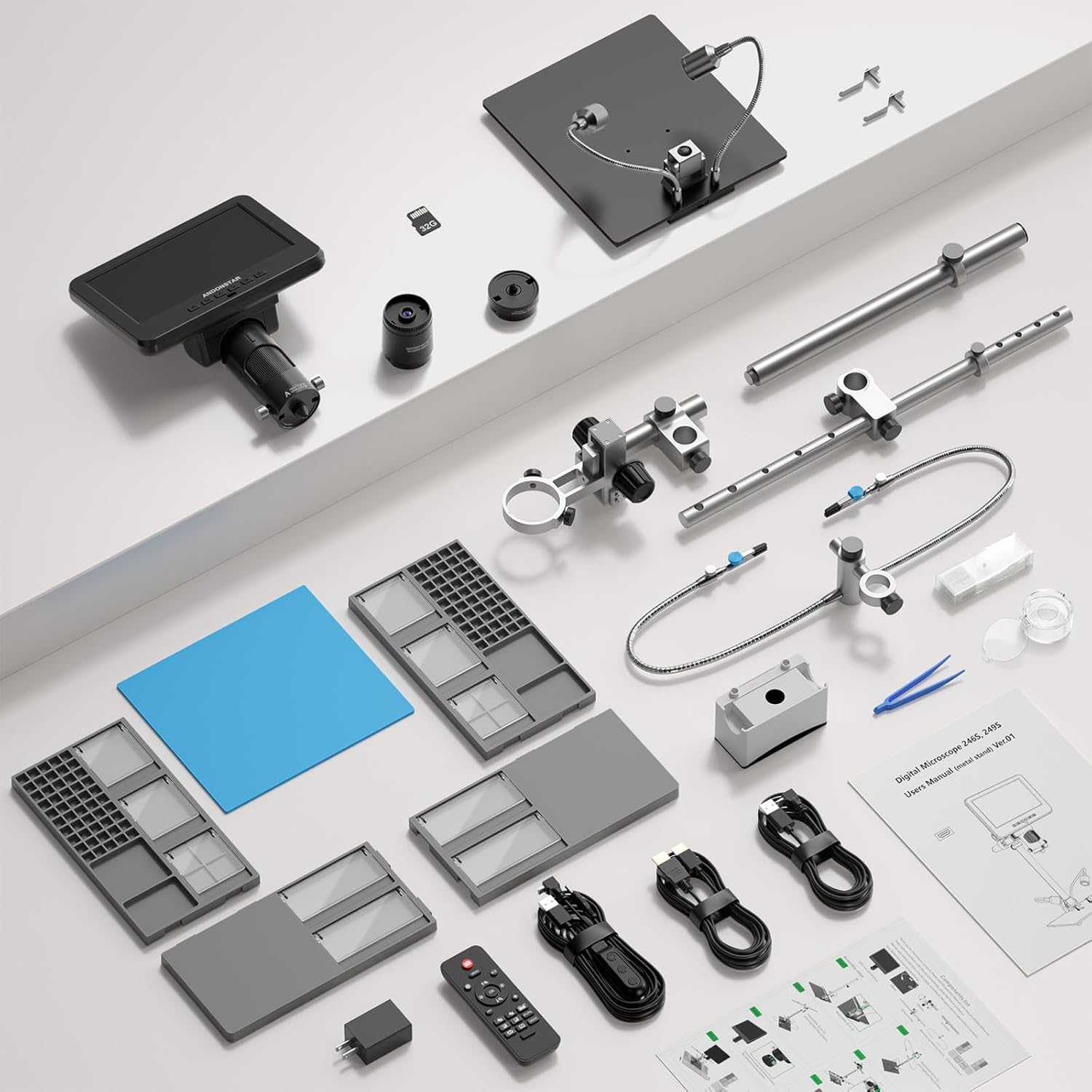
Image: All components included in the Andonstar AD246SM-Plus Digital Microscope package, laid out for inspection.
3. סעטאַפּ אינסטרוקציעס
3.1 Assembling the Stand and Workstation
- Place the main metal stand base on a stable surface.
- Attach the extension base components to the main stand base to create a larger workspace. Ensure they are securely interlocked.
- Mount the flexible helping hands with clamps onto the designated slots on the extension base. Adjust their position as needed.
- Install the tool holder bar onto the main stand's vertical pole.
- Place the soldering mat in the center of the extended base.

Image: The fully assembled workstation of the Andonstar AD246SM-Plus microscope, showing the extended base, helping hands, and tool holder.

Image: A visual guide illustrating the step-by-step assembly process for the microscope stand and its extended base components.
3.2 Attaching the Microscope Unit
- Carefully attach the microscope unit to the adjustable holder on the vertical pole of the stand.
- Tighten the securing screws to ensure the microscope is firmly in place.
- Connect the flexible LED lights to the stand and position them to illuminate the working area.

Image: The microscope unit mounted on its stand, with the flexible LED lights positioned for optimal illumination of the observation area.
3.3 אײַנצושאַלטן און ערשטע פֿאַרבינדונג
- Connect the power adapter to the microscope and a power outlet.
- דרוק די מאַכט קנעפּל צו קער אויף די מיקראָסקאָפּ.
- פֿאַר גרעסערע viewing, connect the microscope to an external display (monitor or TV) using the provided HDMI cable or to a PC via USB.

Image: The Andonstar AD246SM-Plus microscope displaying its view on a large external monitor via HDMI connection, illustrating the dual-screen capability.
Video: This video demonstrates the assembly process of the Andonstar AD246SM-Plus digital microscope, including attaching the base, helping hands, and the microscope unit itself. It also shows the microscope in operation with different lenses.
4. אַפּערייטינג ינסטרוקטיאָנס
4.1 Lens Selection and Usage
The AD246SM-Plus comes with three interchangeable lenses, each designed for specific observation distances and magnification ranges:
- Lens A (18X-720X): Ideal for observing larger objects such as coins, stamps, circuit boards, and stones. Observation distance: 12mm-320mm.
- Lens L (60X-240X): Suitable for PCB/SMD soldering and general circuit board observation. Observation distance: 90mm-300mm.
- Lens D (1800X-2040X): Designed for microscopic slides and very fine details. Observation distance: 4mm-5mm.
To change a lens, gently twist the current lens counter-clockwise to remove it, then align the new lens and twist clockwise until secure.

Image: Microscope with Lens A, demonstrating its use for magnifying a coin, suitable for larger objects.

Image: Microscope with Lens L, showing a magnified view of a circuit board, ideal for soldering tasks.

Image: Microscope with Lens D, displaying a highly magnified view of a microscopic slide, for very fine details.
4.2 Focusing and Magnification Adjustment
Use the focus knob on the microscope body to achieve a clear image. Adjust the distance between the lens and the object by moving the microscope unit up or down on the stand for optimal magnification and clarity.
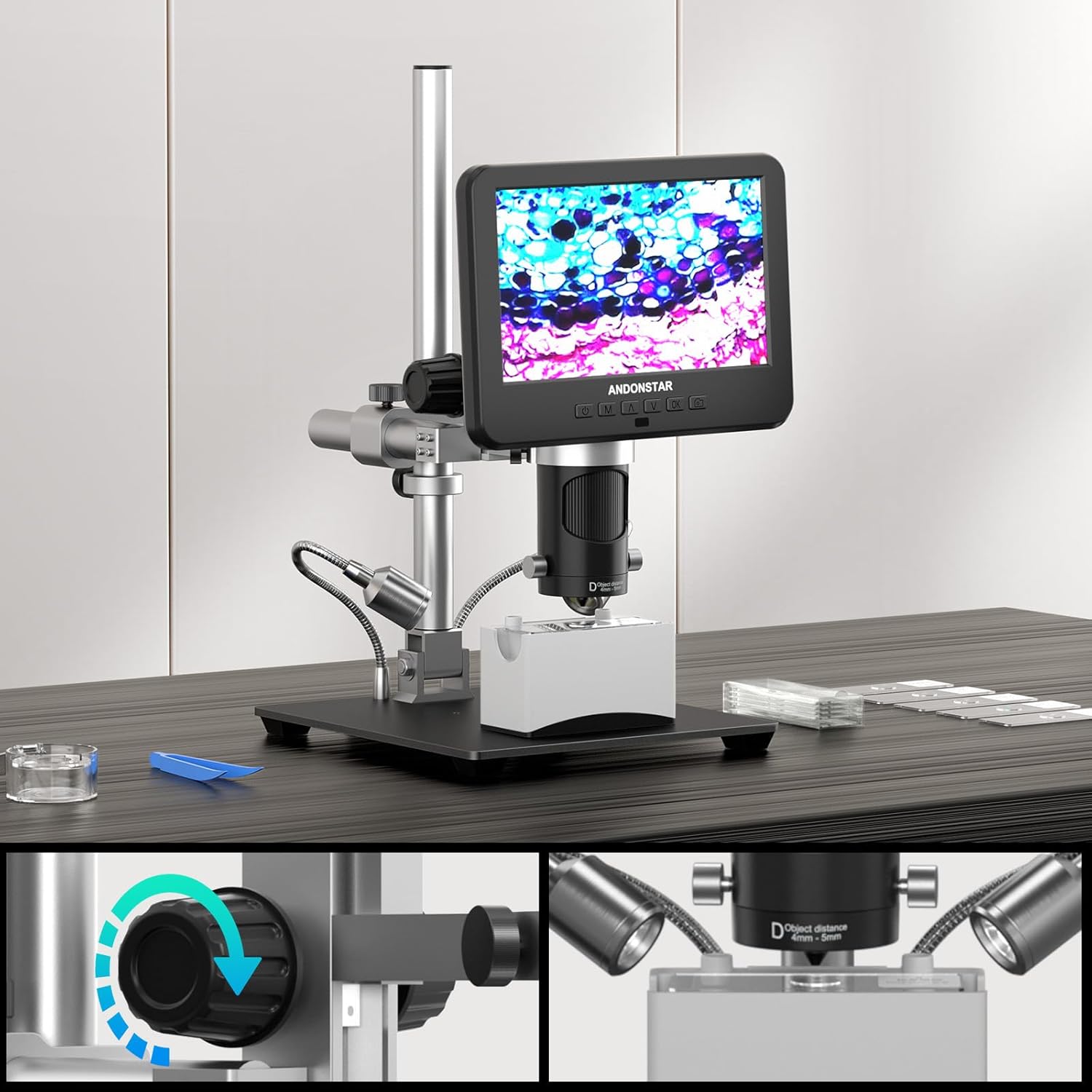
בילד: נאָענט-אַרויף view of the microscope's focus knob and the mechanism for adjusting the object distance, crucial for clear magnification.
4.3 LED Lighting and Remote Control
The built-in 8 LED lights provide adjustable brightness and lighting angles. Use the remote control to capture images and record videos without disturbing the microscope, ensuring stable and clear results.
5. וישאַלט
- רייניקונג לענסעס: Use a soft, lint-free cloth and lens cleaning solution to clean the lenses. Avoid abrasive materials.
- אַלגעמיינע רייניקונג: ווישט אָפּ דעם מיקראָסקאָפּ קערפּער און שטעלט עס מיט אַ טרוקענעם אָדער אַ ביסל פֿײַכטןamp שטאָף. דו זאלסט נישט נוצן האַרב קעמיקאַלז.
- סטאָרידזש: האַלט דעם מיקראָסקאָפּ אין אַ טרוקענער, שטויב-פֿרײַער סביבה ווען ער איז נישט אין באַנוץ.
- Soldering Mat: The silicone soldering mat is resistant to heat, dirt, and oil. Clean it regularly to maintain its protective properties.
6. טראָובלעשאָאָטינג
| פּראָבלעם | מעגלעך סיבה | לייזונג |
|---|---|---|
| קיין בילד אויף פאַרשטעלן | Power not connected; Microscope not turned on; HDMI/USB cable loose or faulty. | Check power connection; Press power button; Reconnect or replace cables. |
| בלערי בילד | Incorrect focus; Wrong lens for object distance; Object too far/close. | Adjust focus knob; Select appropriate lens (A, L, or D); Adjust microscope height. |
| פליקערנדיקער עקראַן אָדער נישט-סטאַביל בילד | Loose cable connection; Power supply issue; Interference. | Ensure all cables are securely connected; Try a different power outlet; Minimize electronic interference. |
| ווייַט קאָנטראָל נישט ארבעטן | Batteries depleted; Obstruction between remote and microscope. | Replace remote control batteries; Ensure clear line of sight to the microscope's IR receiver. |
7. ספּעסאַפאַקיישאַנז
- מאָדעל: AD246SM-Plus (SXWL-246S-M-Plus)
- ווידעא האַכלאָטע: Ultra HD 2880x2160 24fps; Full HD 1920x1080 60fps/30fps; HD 1280x720 120fps
- פאַרגרעסערונג: Up to 2000X (with Lens D)
- Lenses Included:
- Lens A: 18X-720X (Object distance: 12mm-320mm)
- Lens L: 60X-240X (Object distance: 90mm-300mm)
- Lens D: 1800X-2040X (Object distance: 4mm-5mm)
- ווייַז: Integrated screen, supports HDMI output for larger field of view, USB output for PC connection.
- לייטינג: 8 אַדזשאַסטאַבאַל געפירט לייץ
- שטיין: Upgraded Plus Stand with Extension Base (30cm x 40cm x 33cm)
- נאָך פֿעיִקייטן: Soldering helping hands, tool holder, 100 grids compartment screw box, silicone soldering mat, IR remote control, 32G Micro SD card.
- נומער וואָג: 7.39 פונט
- פּעקל דימענשאַנז: 17.5 X 10.8 X 6 אינטשעס
- פאַבריקאַנט: Andonstar
- קאָליר: שוואַרץ
- מאַטעריאַל: מעטאַל
8. וואָראַנטי און שטיצן
For warranty information and technical support, please refer to the official Andonstar webזייטל אדער קאנטאקט זייער קאסטומער סערוויס גלייך. האלט אייער קויף קוויטל פאר גאראנטיע טענות.
איר קענען באַזוכן די Andonstar Store on Amazon פֿאַר מער פּראָדוקט אינפֿאָרמאַציע און שטיצע רעסורסן.