
הקדמה
Thank you for choosing the Vieta Pro Karaoke Party Microphone. This device combines a high-quality microphone with an integrated speaker, designed for an engaging karaoke experience. It features True Wireless technology, allowing two microphones to connect to a single device, and offers various sound modes and connectivity options.
פּעקל אינהאַלט
- Vieta Pro Karaoke Party Microphone with Integrated Speaker
- טשאַרדזשינג קאַבל (USB-C)
- באַניצער מאַנואַל

Image: The retail box of the Vieta Pro Karaoke Party Microphone, showing the product and its features.
פּראָדוקט איבערview
Familiarize yourself with the main components and controls of your Vieta Pro Karaoke Party Microphone.

בילד: פראָנט view of the Vieta Pro Karaoke Party Microphone, highlighting the control buttons for power, volume, mode, and Bluetooth.
קאָנטראָלס און פּאָרץ:
- מאַכט קנעפּל: דריקן און האַלטן צו אנצינדן/אויסלעשן. קורץ דריקן צו בייטן מאָדעס.
- באַנד קנעפּלעך (+/-): סטרויערן די רעדנער באַנד.
- מאָדע קנעפּל (M): Cycle through sound effects or modes.
- בלועטאָאָטה קנעפּל: אָנהייבן בלוטוט פּערינג.
- וסב- C פּאָרט: פֿאַר טשאַרדזשינג די מיטל.
- 3.5mm Audio Jack (Input): פֿאַרבינדן עקסטערנע אַודיאָ קוועלער.
- 3.5mm Audio Jack (Output): פאַרבינדן כעדפאָונז אָדער פונדרויסנדיק ספּיקערז.
- ליכט מאָדע קנעפּל: Change or turn off LED lighting effects.
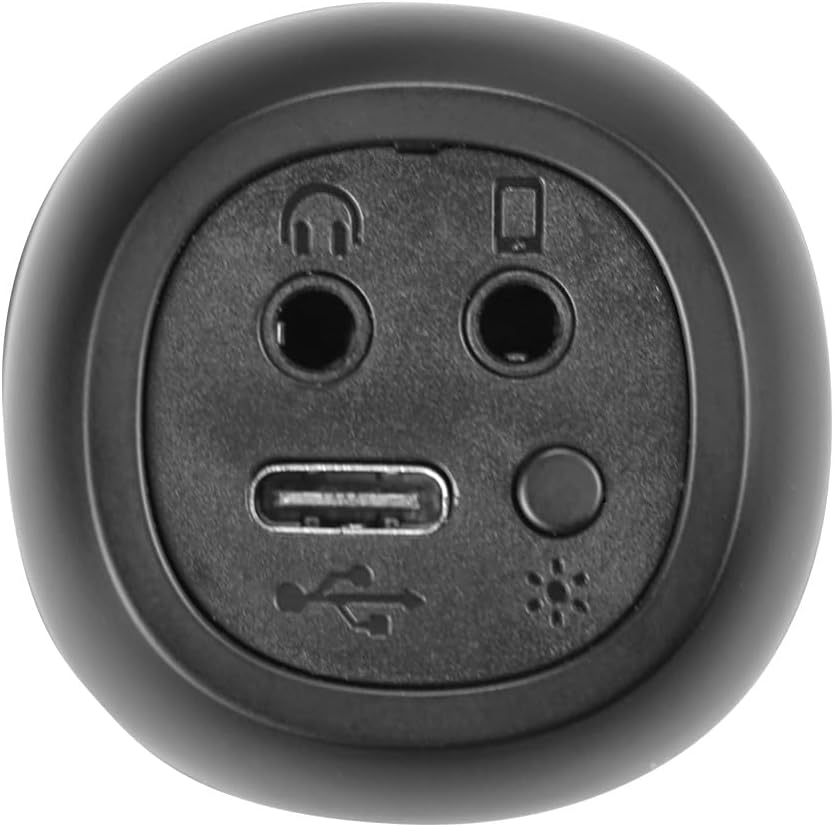
בילד: נאָענט-אַרויף view of the bottom of the microphone, showing the USB-C charging port, 3.5mm audio input/output jacks, and the light mode button.
סעטאַפּ און קאַנעקשאַן
1. אויפלאָדן דעם מיקראָפאָן
Before first use, fully charge the microphone. Connect the provided USB-C cable to the microphone's USB-C port and the other end to a USB power adapter (not included) or a computer's USB port. The battery indicator light will show charging status.
2. פּאָווערינג אויף / אויסגעלאשן
דריקן און האַלטן די מאַכט קנעפּל for approximately 3 seconds to turn the microphone on or off. A sound prompt will indicate the power status.
3. בלועטאָאָטה פּערינג
- Turn on the microphone. It will automatically enter Bluetooth pairing mode, indicated by a flashing Bluetooth light.
- אויף אייער סמאַרטפאָון, טאַבלעט, אָדער קאָמפּיוטער, אַקטיווירט בלועטוט און זוכט פֿאַר פֿאַראַן דעוויסעס.
- Select "Vieta Pro Karaoke Party" from the list of devices.
- Once connected, a sound prompt will confirm successful pairing, and the Bluetooth light will stop flashing.
4. True Wireless Connection (Connecting Two Microphones)
To use two Vieta Pro Karaoke Party microphones simultaneously with one device:
- Ensure both microphones are powered on and not connected to any other Bluetooth device.
- On one microphone (this will be the primary), double-press the בלועטאָאָטה קנעפּל. It will enter True Wireless pairing mode.
- The primary microphone will search for the second microphone. Once connected, a sound prompt will confirm the True Wireless connection.
- Now, connect the primary microphone to your device via Bluetooth as described in step 3. Both microphones will now output audio from your device.

Image: Two individuals holding and using Vieta Pro Karaoke Party Microphones, demonstrating the True Wireless feature.
5. דראָטיקע פֿאַרבינדונג (AUX)
Connect an external audio source (e.g., MP3 player) to the microphone using a 3.5mm audio cable (not included) plugged into the 3.5mm audio input jack.
אַפּערייטינג ינסטראַקשאַנז
1. אַדזשאַסטינג באַנד
ניצן די באנד + און באַנד - buttons on the microphone to adjust the speaker output volume. You can also control the volume from your connected device.
2. Changing Sound Modes/Effects
דרוק די מאָדע קנעפּל (M) repeatedly to cycle through the four available sound configuration modes or voice effects. Experiment to find your preferred sound.
3. Voice Reduction Feature
This feature allows you to reduce the vocal track of a song, making it easier to sing along. To activate or deactivate this feature, refer to the specific instructions in the full manual or experiment with the מאָדע קנעפּל (M) or a dedicated button if present (not explicitly detailed in provided data, but mentioned as a feature).
4. רעקאָרדינג
The microphone supports one-touch recording. Connect the microphone to a compatible recording device (e.g., smartphone with a recording app) via Bluetooth or the 3.5mm output jack. Press the dedicated רעקאָרדינג קנעפּל (if available, or refer to the full manual for specific button assignment) to start and stop recording.
5. LED לייטינג עפֿעקטן
דרוק די ליכט מאָדע קנעפּל (located near the ports at the bottom) to change the LED lighting patterns or turn them off.

Image: Close-up of the Vieta Pro Karaoke Party Microphone's speaker grille, showing the integrated LED lighting effects.
וישאַלט
- רייניקונג: Use a soft, dry cloth to clean the microphone's surface. Do not use abrasive cleaners or solvents.
- סטאָרידזש: האַלט דעם מיקראָפאָן אין אַ קיל, טרוקן אָרט אַוועק פון דירעקט זונשייַן און עקסטרעמע טעמפּעראַטורן.
- באַטערי זאָרגן: כדי צו פארלענגערן די לעבן פון די באַטעריע, זאָלט איר נישט אָפט אויסלאָדן די באַטעריע. לאָדט דאָס אַפּאַראַט רעגולער אויף, אפילו אויב עס ווערט נישט גענוצט פֿאַר לענגערע צייטן.
- וואַסער ויסשטעלן: די דעווייס איז נישט וואַסערפּרוף. פֿאַרמייַדט אויסשטעלונג צו וואַסער אָדער הויכער פֿײַכטקייט.
טראָובלעשאָאָטינג
| פּראָבלעם | מעגלעך סיבה | לייזונג |
|---|---|---|
| קיין מאַכט | באַטערי איז דיפּליטיד. | טשאַרדזשינג די מיקראָפאָן מיט די וסב-C קאַבלע. |
| קענען ניט פאַרבינדן דורך בלועטאָאָטה | Bluetooth is off on the device; microphone is already connected to another device; microphone is out of range. | Ensure Bluetooth is enabled on your device. Disconnect from other devices. Move microphone closer to your device (within 10 meters). Restart both devices. |
| קיין געזונט רעזולטאַט | Volume is too low; microphone is muted; incorrect input source. | Increase volume on both the microphone and your connected device. Check if the microphone is in the correct operating mode. |
| True Wireless connection fails | One or both microphones are already paired; microphones are too far apart. | Ensure both microphones are unpaired from other devices. Place them close to each other during True Wireless pairing. Follow True Wireless pairing steps carefully. |
ספּעסאַפאַקיישאַנז
| שטריך | דעטאַל |
|---|---|
| מאָדעל נאָמען | קאַראַאָקע פּאַרטיי |
| סאָרט | Vieta Pro |
| קאַנעקטיוויטי טעכנאָלאָגיע | אמת וויירלעס, בלועטוט |
| קאַנעקטער טיפּ | יו-עס-בי-סי, 3.5 מ"מ דזשעק |
| מאַכט רעזולטאַט | 18 וו |
| באַטערי לעבן | אַרויף צו 10 שעה |
| באַטערי טיפּ | 1 ליטיום-יאָן (אַרייַנגערעכנט) |
| אָפטקייַט ראַנגע | 50 צו 15,000 הז |
| ימפּידאַנס | 600 אָהמס |
| פּאָליאַר מוסטער | ונידירעקטיאָנאַל |
| קאַמפּאַטאַבאַל דעוויסעס | פערזענלעכע קאָמפּיוטער, סמאַרטפאָנע |
| ספּעציעלע פֿעיִקייטן | Volume Control, 1-Touch Recording, Lighting Modes, Battery Indicator, Radio |
| וואָג | 337 גראַמז |
| מאַטעריאַל | פּלאַסטיק |
וואָראַנטי און שטיצן
For warranty information and technical support, please contact the manufacturer, FRAMASON AUDIO SA, or your local retailer. Keep your proof of purchase for any warranty claims.
Manufacturer: FRAMASON AUDIO SA