
הקדמה
Thank you for choosing the DiGGiNGSOUND T015 Digital Bluetooth Rechargeable Hearing Aids. This manual provides detailed instructions for the proper setup, operation, and maintenance of your new hearing aids. Please read this manual thoroughly before using the device to ensure optimal performance and longevity.
פּראָדוקט איבערview
The DiGGiNGSOUND T015 hearing aids are designed to amplify sound for individuals with mild to moderate-severe hearing loss. They feature Bluetooth connectivity, a rechargeable design, and digital 16-channel sound processing for clear audio. The compact and lightweight design ensures comfortable wear.

Image: The DiGGiNGSOUND T015 hearing aids shown in their white charging case. The left earbud is marked with 'L' and the right earbud has a red ring, indicating their respective sides.

Image: An illustration highlighting key features: Superior Sound, Digital 16-Channel processing, Hands-Free Calling, One-Touch Control, and an ultra-light weight of 0.15 oz per earphone.
פּעקל אינהאַלט
ביטע טשעק די פּאַקעט פֿאַר די פאלגענדע זאכן:
- DiGGiNGSOUND T015 Hearing Aids (Left and Right)
- פּאָרטאַטיוו טשאַרדזשינג קאַסע
- וסב טיפּע- C טשאַרדזשינג קאַבלע
- רייניקונג באַרשט
- באַניצער מאַנואַל (דעם דאָקומענט)
סעטאַפּ גייד
1. ערשטע אויפלאָדונג
פארן ערשטן באַנוץ, זאָלט איר גאָר אויפלאָדן די הערן-אַפּאַראַטן און דעם אויפלאָדן-קעסטל.
- Place both hearing aids into their respective slots in the charging case. Ensure the L (left) and R (right) indicators align.
- פֿאַרבינדט דעם צוגעשטעלטן USB טיפּ-C קאַבל צום טשאַרדזשינג פּאָרט אויף דער קעיס און שטעקט דעם אַנדערן עק אין אַ USB מאַכט אַדאַפּטער (נישט אַרייַנגערעכנט) אָדער אַ קאָמפּיוטער'ס USB פּאָרט.
- The indicator lights on the charging case will show the charging status. A full charge typically takes approximately 2 hours.
- Once fully charged, disconnect the charging cable. The case can provide 2-3 full charges for both units, offering up to 24 hours of working time.

Image: Details on the portable wireless charging case, showing charging time (≤2 hours), hearing aid usage time (>7 hours), music time (>8 hours), call time (>5 hours), and total working time (24 hours).
2. טראָגן די הערן אַפּאַראַטן
Identify the left (L) and right (R) hearing aids. Gently insert each hearing aid into your ear canal until it feels secure and comfortable. The devices are designed to automatically turn on when placed in the ear.
3. בלועטאָאָטה פּערינג
The hearing aids can be paired with your smartphone or other Bluetooth-enabled devices for calls and music.
- Ensure the hearing aids are charged and in your ears.
- עפֿענען די בלועטאָאָטה סעטטינגס אויף דיין מיטל.
- זוכן פֿאַר available devices and select "DiGGiNGSOUND T015" (or similar name).
- אַמאָל פארבונדן, וועט איר הערן אַ באַשטעטיקונג טאָן.
אַפּערייטינג ינסטראַקשאַנז
Volume Adjustment (Hearing Ampלאַפאַקיישאַן)
The T015 hearing aids offer 3 levels of hearing amplification. You can adjust the level by a single touch on the earpiece.
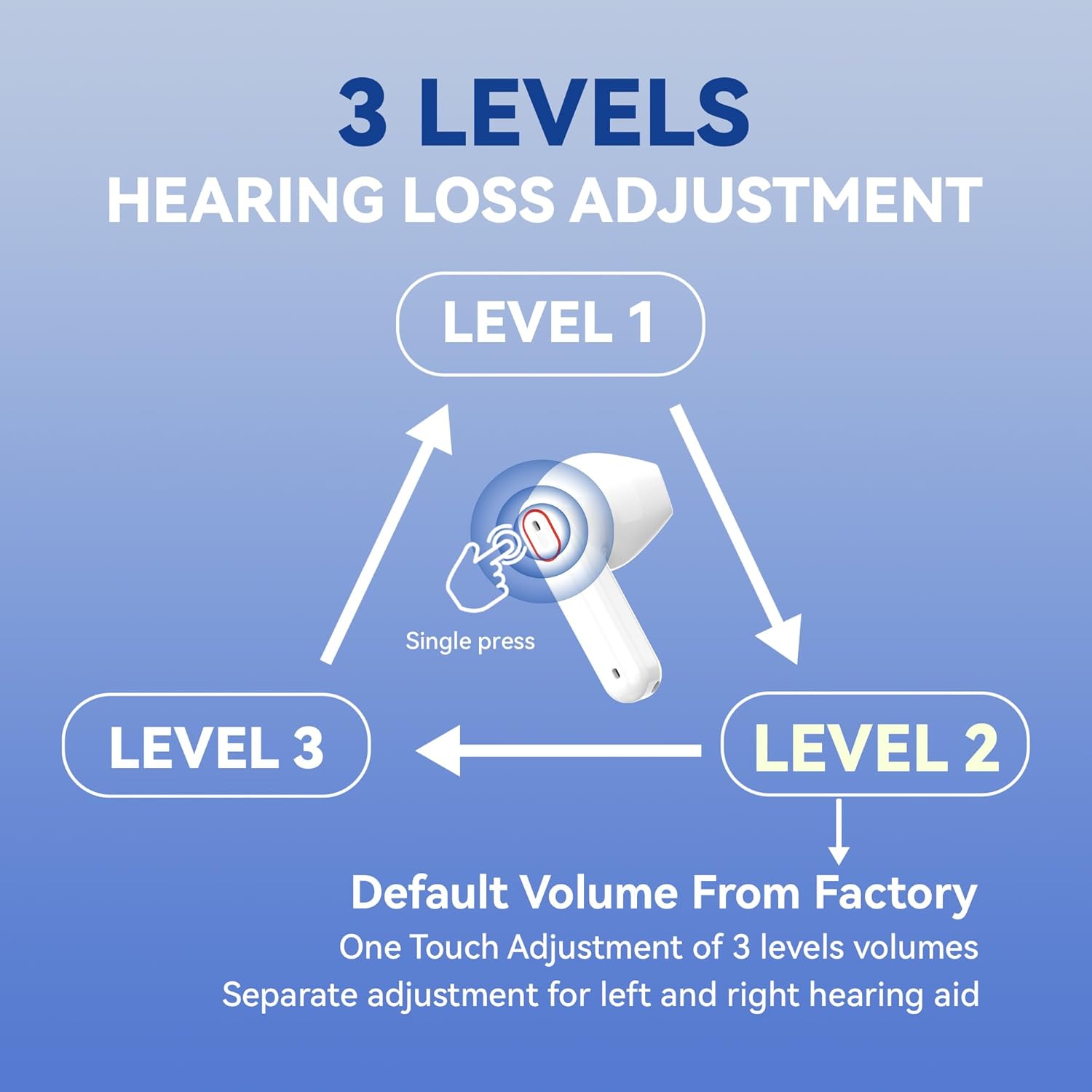
Image: A diagram illustrating the three volume levels (Level 1, Level 2, Level 3) and how to cycle through them with a single press on the earpiece. Separate adjustment is possible for each hearing aid.
- איין פרעסע: Tap the touch control area on either hearing aid to cycle through Level 1, Level 2, and Level 3. A voice prompt will announce the current level.
- The default volume from the factory is Level 1.
- Each hearing aid can be adjusted independently.

Image: Visual representation of the hearing aids' ability to amplify clear sound up to 35dB, suitable for mild to moderate-severe hearing loss.

בילד: עקסamples of the DiGGiNGSOUND T015 hearing aids being used in different environments, such as watching TV, during daily communication, at family gatherings, and while working.
Smart Touch Control (Bluetooth Functions)
The hearing aids feature smart touch controls for managing calls and other functions when connected via Bluetooth.
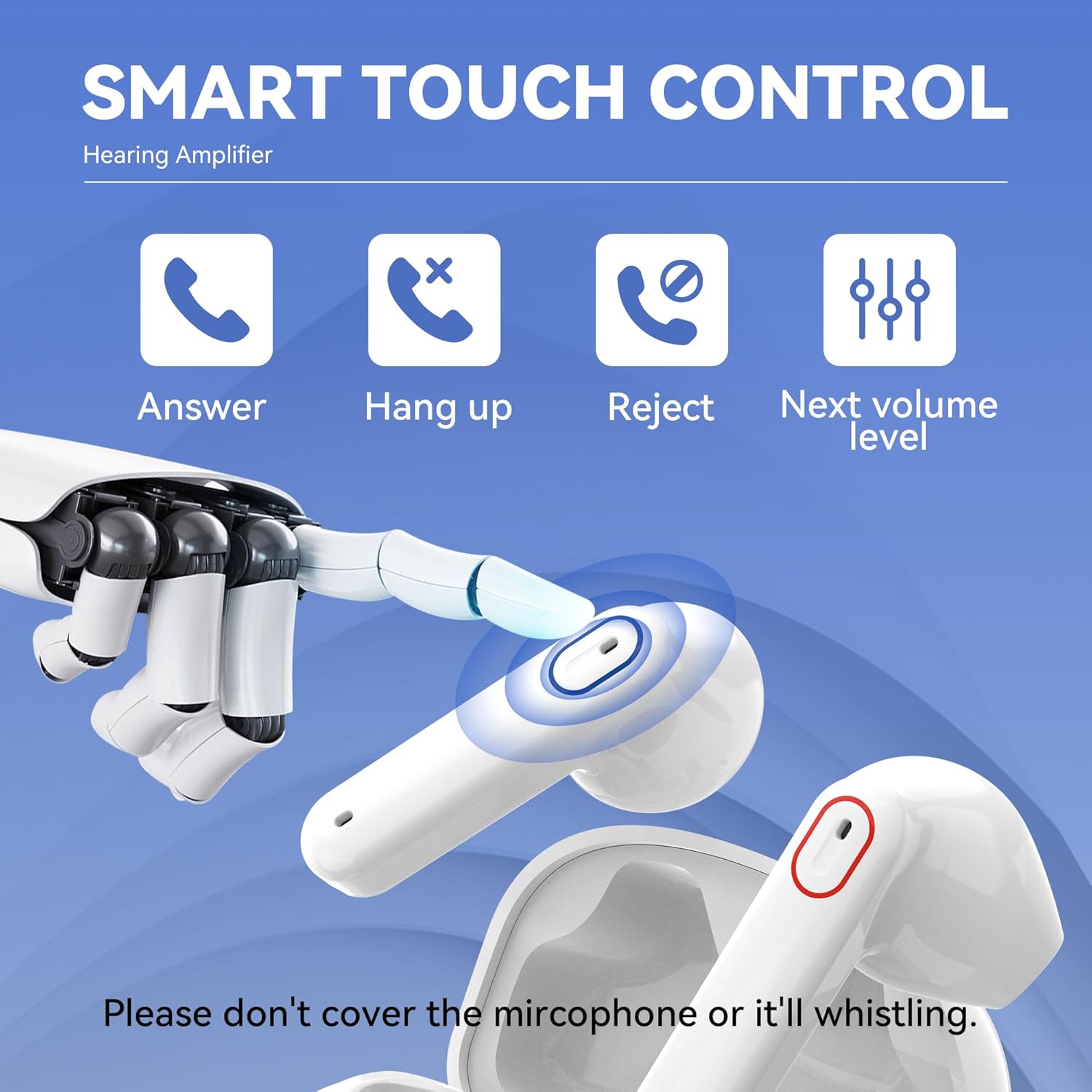
Image: An illustration demonstrating the smart touch control on the hearing aid, showing icons for Answer, Hang up, Reject calls, and adjusting to the Next volume level. It also warns not to cover the microphone.
- ענטפער רופן: Single press the touch control area.
- אויפהערן רופן: Single press the touch control area during a call.
- אָפּוואַרפן רופן: Press and hold the touch control area.
- Next Volume Level: Single press to cycle through amplification levels (as described above).
Important: Do not cover the microphone area on the hearing aid, as this may cause whistling or feedback.
וישאַלט און זאָרג
Proper maintenance ensures the longevity and optimal performance of your hearing aids.
- רייניקונג: Use the provided cleaning brush to gently remove any earwax or debris from the earpieces and sound outlets. Wipe the hearing aids and charging case with a soft, dry cloth. Do not use water or cleaning solutions directly on the devices.
- סטאָרידזש: When not in use, store the hearing aids in their charging case to protect them from dust and damage.
- ויסמיידן נעץ: Keep the hearing aids and charging case dry. Avoid exposure to excessive moisture, humidity, or extreme temperatures.
- באַטערי זאָרגן: Recharge the hearing aids regularly, even if not used daily, to maintain battery health.
טראָובלעשאָאָטינג
אויב איר טרעפט זיך מיט פראבלעמען, ביטע זעט די פאלגנדע אלגעמיינע פראבלעמען און לייזונגען:
| פּראָבלעם | מעגלעך סיבה | לייזונג |
|---|---|---|
| קיין געזונט אָדער שוואַך געזונט | Low battery; Earwax blockage; Incorrect volume level. | Charge the hearing aids; Clean the earpiece and sound outlet; Adjust to a higher volume level. |
| פײַפֿן אָדער פֿידבעק ראַש | Improper fit; Microphone covered; Volume too high. | Re-insert the hearing aid for a snug fit; Ensure nothing is covering the microphone; Reduce the volume level. |
| קענען ניט פאַרבינדן דורך בלועטאָאָטה | Hearing aids not in pairing mode; Bluetooth off on device; Already connected to another device. | Ensure hearing aids are on; Turn Bluetooth off and on again on your device; Disconnect from other devices. |
| טשאַרדזשינג פאַל ניט טשאַרדזשינג | Loose cable connection; Faulty cable/adapter. | Check USB-C cable connection; Try a different USB-C cable or power adapter. |
אויב די פראבלעם בלייבט נאך פרובירן די לייזונגען, ביטע קאנטאקטירט קאסטומער סופארט.
ספּעסאַפאַקיישאַנז
- מאָדעל: T015
- סאָרט: דיגגינגסאָונד
- קאָליר: ווייַס
- מאַטעריאַל: סיליקאָנע
- פּראָדוקט דימענשאַנז: 1.38 X 0.7 X 0.04 אינטשעס
- Weight (per earphone): בעערעך 0.15 אונסעס
- Ampליפיקאַטיאָן: אַרויף צו 35 דב
- טשאַנאַלז: 16-channel digital sound processing
- טשאַרדזשינג צייט: Approximately 2 hours (for case and aids)
- געהער Amplification Time: אַרויף צו 7 שעה
- מוזיק פּלייינג צייט: אַרויף צו 8 שעה
- רופן צייט: אַרויף צו 5 שעה
- Total Working Time (with charging case): אַרויף צו 24 שעה
- קאַנעקטיוויטי: בלועטאָאָטה
וואָראַנטי און שטיצן
DiGGiNGSOUND products come with a standard manufacturer's warranty. For specific warranty details, please refer to the warranty card included in your product packaging or visit the official DiGGiNGSOUND webפּלאַץ.
For technical support, troubleshooting assistance, or any questions regarding your DiGGiNGSOUND T015 hearing aids, please contact our customer service team:
- בליצפּאָסט: support@diggingsound.com
- Webפּלאַץ: www.diggingsound.com
Please have your model number (T015) and purchase information ready when contacting support.