
1. הקדמה
This manual provides comprehensive instructions for the proper setup, operation, and maintenance of the Sartorius GL2202i-2S Gold Scale. Adhering to these guidelines will ensure accurate and reliable performance of your precision weighing instrument.
2. זיכערקייַט אינפֿאָרמאַציע
אָבסערווירן די פאלגענדע זיכערהייט מיטלען צו פאַרמייַדן שאָדן און שעדיקן צו די מיטל:
- Operate the scale only in a stable, level environment free from excessive vibrations, drafts, and extreme temperature fluctuations.
- Do not expose the scale to corrosive chemicals or liquids.
- Ensure the power supply matches the specifications indicated on the device.
- Avoid dropping or subjecting the scale to heavy impacts.
- Only qualified personnel should perform repairs or internal adjustments.
3. פּראָדוקט איבערview
The Sartorius GL2202i-2S is a precision gold scale designed for accurate weighing applications. Key components include the weighing pan, digital display, and control panel.
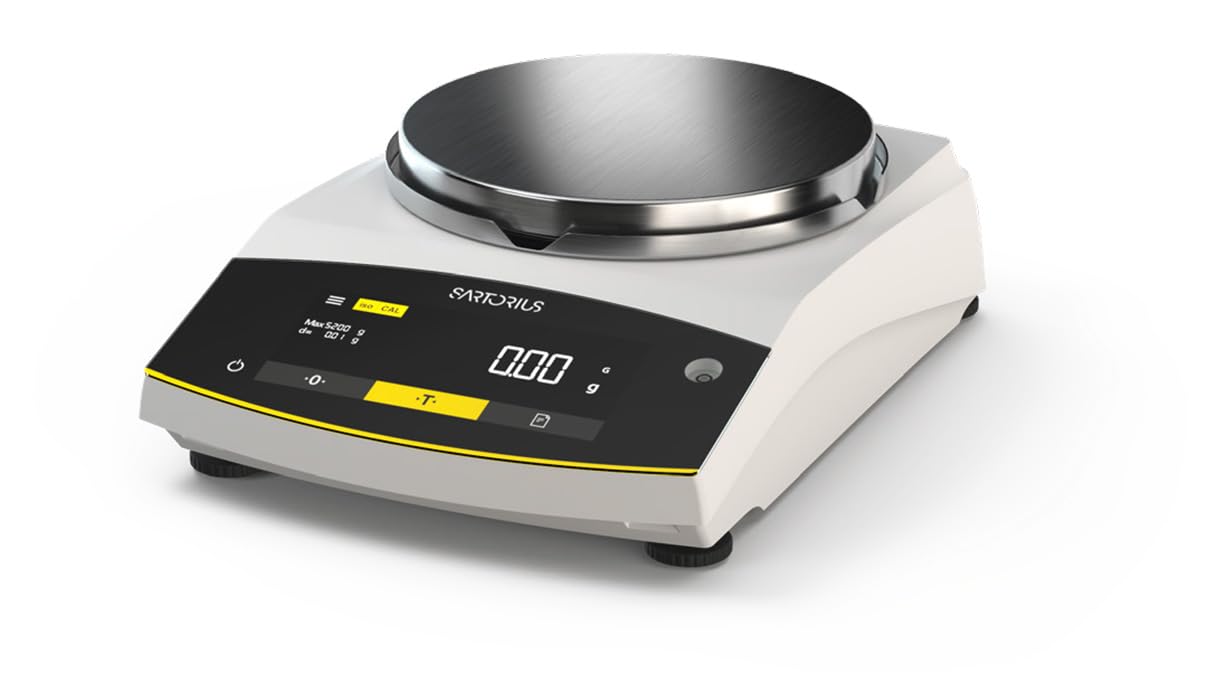
Figure 1: Sartorius GL2202i-2S Gold Scale. This image shows the scale's stainless steel weighing pan, the digital display, and the control buttons for operation.
הויפּט קאַמפּאָונאַנץ:
- Weighing Pan: Stainless steel platform for placing items to be weighed.
- דיגיטאַל ווייַז: Hybrid display (LED and touch technology) showing weight readings and operational status.
- קאָנטראָל פּאַנעל: Buttons for power, tare, calibration, and menu navigation.
- לעוועלינג פֿיס: Adjustable feet to ensure the scale is perfectly level.
4. סעטאַפּ
4.1 אַנפּאַקינג
Carefully remove the scale and all accessories from the packaging. Retain the original packaging for future transport or storage.
4.2 פּלייסמאַנט
Place the scale on a firm, stable, and level surface. Avoid locations subject to:
- Direct sunlight or heat sources.
- Strong air currents (drafts from doors, windows, or air conditioning).
- Vibrations from machinery or heavy traffic.
- Rapid temperature changes.
4.3 לעוועלינג די וואָג
Adjust the leveling feet located at the bottom of the scale until the air bubble in the level indicator (usually located near the display) is centered. This ensures accurate weighing results.
4.4 מאַכט קאַנעקשאַן
Connect the provided power adapter to the scale's power input and then to a suitable electrical outlet. Allow the scale to warm up for at least 30 minutes after initial power-on for optimal stability.
5. אַפּערייטינג ינסטרוקטיאָנס
5.1 מאַכט אויף / אַוועק
דרוק די מאַכט button (often marked with a circle and a vertical line) to turn the scale on or off. The display will show a self-test sequence before settling at zero.
5.2 גרונטלעכע וואָג
- Ensure the display reads 0.00 ג before placing any item on the pan.
- Carefully place the item to be weighed onto the center of the weighing pan.
- Wait for the reading to stabilize. The stable reading will be displayed.
- Remove the item from the pan.
5.3 טאַרע פֿונקציע
The tare function allows you to weigh items in a container by subtracting the container's weight.
- Place the empty container on the weighing pan.
- דרוק די Tare button (often marked with a 'T' or '->0<-'). The display will reset to 0.00 ג.
- Add the item to be weighed into the container. The display will show the net weight of the item.
- Remove both the item and container from the pan.
6. קאַלאַבריישאַן
The Sartorius GL2202i-2S features an automatic, built-in calibration and adjustment function. Regular calibration ensures the highest level of accuracy. Refer to the on-screen prompts or the scale's specific menu for initiating the automatic calibration process. Ensure the scale is stable and free from any load during calibration.
7. וישאַלט און רייניקונג
7.1 רייניקונג
To maintain the scale's performance and appearance:
- Disconnect the scale from the power supply before cleaning.
- ווישן די יקסטיריער סערפאַסיז מיט אַ ווייך, דamp שטאָף און אַ מילד וואַשפּולווער.
- ניצט נישט קיין שרײַבנדיקע רייניגער, סאָלווענטן אדער שטרענגע כעמיקאַלן, ווײַל די קענען שאַטן די ענדיקונג אדער אינעווייניקסטע קאָמפּאָנענטן.
- Ensure no liquids enter the scale's housing or display area.
- The stainless steel weighing pan can be removed and cleaned separately with appropriate cleaning agents.
7.2 סטאָרידזש
If storing the scale for an extended period, ensure it is clean, dry, and stored in its original packaging or a protective container in a stable environment.
8. טראָובלעשאָאָטינג
די סעקציע באהאנדלט אלגעמיינע פראבלעמען וואס איר קענט באגעגענען. פאר פראבלעמען וואס זענען נישט דא אויסגערעכנט, קאנטאקטירט קאסטומער סופארט.
| פּראָבלעם | מעגלעך סיבה | לייזונג |
|---|---|---|
| Display shows "Err" or unstable readings. | Scale not level, vibrations, drafts, overload, or internal error. | Check leveling, move to a stable location, ensure no load exceeds capacity, restart the scale. |
| די וואָג גייט נישט אָן. | Power cable disconnected, faulty outlet, or power adapter issue. | Verify power cable connection, try a different outlet, check power adapter. |
| ומפּינקטלעך רידינגז. | Needs calibration, environmental factors, or dirty pan. | Perform calibration, ensure stable environment, clean weighing pan. |
9. ספּעסאַפאַקיישאַנז
- מאָדעל: GL2202i-2S
- סאָרט: סאַרטאָריוס
- Capacity x Readability: 2200 גקס 0.01 ג
- פּאַן גרייס: 180 mm (Diameter)
- וואָג: בעערעך 12.00 לב (5.44 קג)
- ווייַז טיפּ: Hybrid (LED and Touchscreen)
- ספּעציעלע שטריך: Automatic, built-in calibration and adjustment function
- קאָליר: ווייַס
10. וואָראַנטי און שטיצן
For warranty information, technical support, or service inquiries, please refer to the documentation provided with your purchase or contact Sartorius customer service directly. Keep your purchase receipt and model number readily available when contacting support.