
Amazon Fire TV Stick HD
אַמאַזאָן פייער טעלעוויזיע סטיק HD באַניצער מאַנואַל
Model: Fire TV Stick HD
הקדמה
Welcome to the user manual for your new Amazon Fire TV Stick HD. This guide provides detailed instructions on how to set up, operate, maintain, and troubleshoot your device, ensuring you get the most out of its streaming and smart home capabilities.

Image: The Amazon Fire TV Stick HD and its accompanying Alexa Voice Remote. The stick is compact and plugs directly into an HDMI port, while the remote features dedicated buttons for navigation, voice control, and popular streaming services.
וואָס איז אין די קעסטל
Upon unboxing your Fire TV Stick HD, you should find the following components:
- Fire TV Stick HD device
- אַלעקסאַ ווויס רימאָוט
- מאַכט קאַבל און מאַכט אַדאַפּטער
- HDMI פאַרברייטער
- 2 AAA batteries (for the remote)
- שנעל אָנהייב גייד

Image: The retail packaging for the Amazon Fire TV Stick HD, showing the device, remote, and box. This illustrates all the items included in the product package.
סעטאַפּ גייד
Follow these steps to set up your Fire TV Stick HD:
- פֿאַרבינדט דעם פֿײַער טיווי סטיק: Plug the Fire TV Stick HD directly into an available HDMI port on your high-definition television. If space is limited or for better Wi-Fi reception, use the included HDMI extender.
- מאַכט אויף: פֿאַרבינדט דעם מאַכט קאַבל צום פֿײַער טיווי סטיק און דערנאָך שטעקט דעם מאַכט אַדאַפּטער אין אַ וואַנט ווענטיל.
- אַרײַנשטעלן באַטעריעס אין ווײַטקאָנטראָל: Open the battery compartment on the back of the Alexa Voice Remote and insert the two AAA batteries, ensuring correct polarity.
- סעלעקטירן HDMI אַרייַנשרייַב: Turn on your TV and select the correct HDMI input source where the Fire TV Stick is connected.
- גיי די אינסטרוקציעס אויף דער סקרין: The Fire TV Stick will guide you through the initial setup process, including connecting to your Wi-Fi network and logging into your Amazon account.
- Pair Remote (if necessary): If your remote does not automatically pair, press and hold the Home button on the remote for 10 seconds until it pairs with your Fire TV Stick.
Operating Your Fire TV Stick HD
קול קאָנטראָל מיט Alexa
The Alexa Voice Remote allows you to control your Fire TV Stick using voice commands. Press and hold the microphone button on the remote, then speak your command. You can search for content, launch apps, control playback, and more.

Image: The Alexa Voice Remote, highlighting its voice control button and dedicated app buttons for services like Prime Video and Netflix. This remote simplifies content discovery and access.
סטרימינג אינהאַלט
Access a vast library of movies, TV shows, and live TV from various streaming services. The Fire TV Stick HD supports Full HD (1080p) resolution for a clear viewינג דערפאַרונג.
- קינאָ און טעלעוויזיע שאָוז: Stream from popular services like Netflix, Prime Video, Disney+, Vix, and many more. Subscription fees may apply for certain services.
- פרייער אינהאַלט: Enjoy over 50,000 free movies and TV episodes from ad-supported streaming apps such as Vix, Tubi, and Pluto TV.
- מוזיק: Listen to millions of songs from Amazon Music, Spotify, Pandora, and other music streaming platforms.
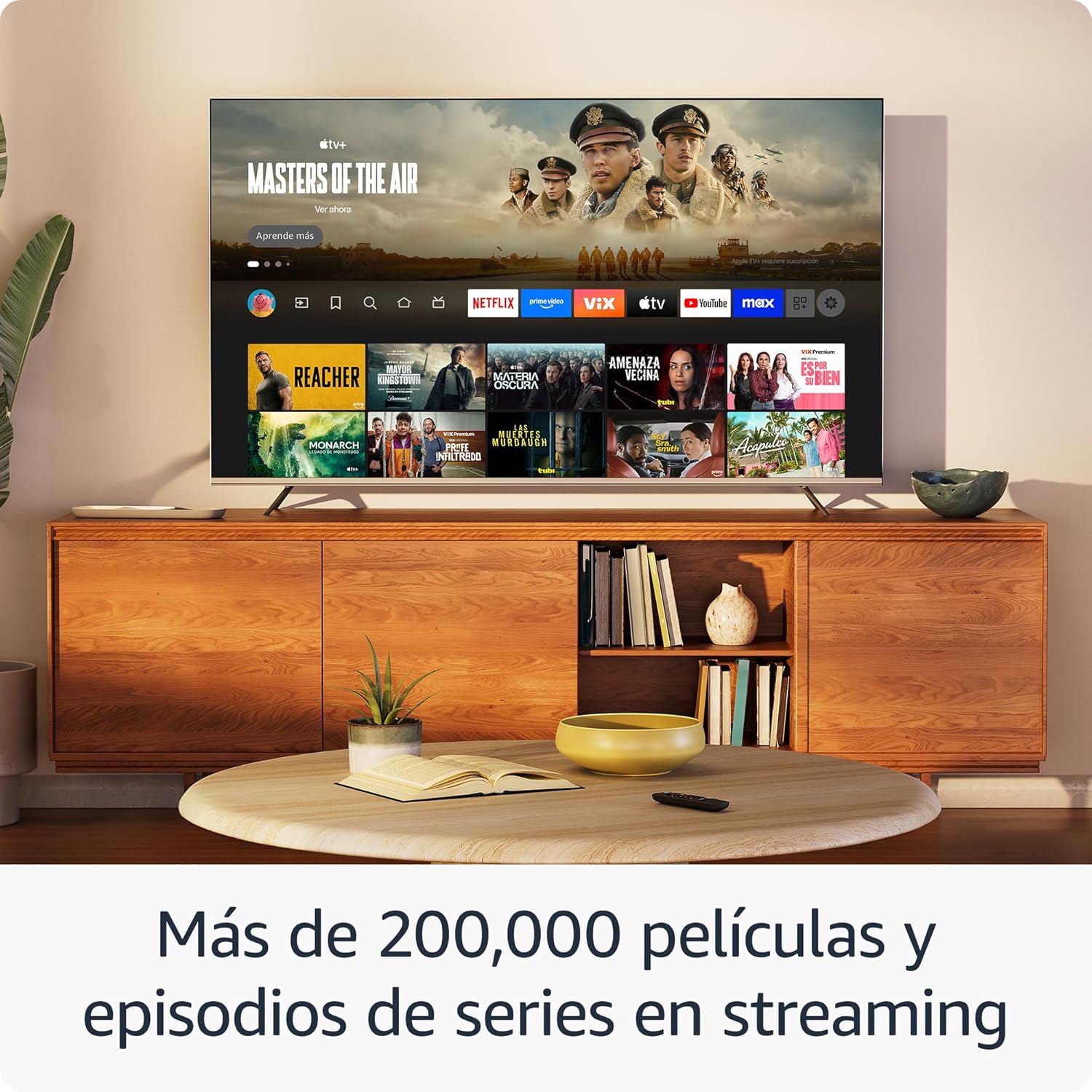
בילד: א טעלעוויזיע עקראַן שאָוasing the Fire TV interface with various streaming applications like Netflix, Prime Video, and Disney+. This demonstrates the wide range of entertainment options available.

Image: A visual comparison illustrating the difference in picture quality between Standard Definition (SD), High Definition (HD), and 4K resolution. The Fire TV Stick HD delivers content in crisp HD.
סמאַרט היים קאָנטראָל
Use your Fire TV Stick HD and Alexa Voice Remote to control compatible smart home devices. You can ask Alexa to check the weather, dim lights, view live camera feeds, and more.

Image: A television screen displaying the smart home control dashboard, showing icons for thermostat, smart camera, and light. This illustrates how the Fire TV Stick can integrate with and manage smart home devices.
וישאַלט
To ensure the longevity and optimal performance of your Fire TV Stick HD:
- רייניקונג: Gently wipe the device and remote with a soft, dry, lint-free cloth. Avoid using liquid cleaners or aerosols.
- סוויווע: Keep the device in a well-ventilated area, away from direct sunlight, heat sources, and moisture.
- ווייכווארג דערהייַנטיקונגען: The device automatically receives software security updates. Ensure your device is connected to the internet to receive these updates.
טראָובלעשאָאָטינג
If you encounter issues with your Fire TV Stick HD, try the following solutions:
- קיין מאַכט / קיין אַרויסווייַז:
- Ensure the power cable is securely connected to both the Fire TV Stick and the power adapter, and the adapter is plugged into a working wall outlet.
- Verify your TV is on the correct HDMI input channel.
- פרובירט אן אנדערן HDMI פארט אויף אייער טעלעוויזיע.
- ווייַט ניט ריספּאַנדינג:
- טוישט די AAA באַטעריעס אין די ווייַט קאָנטראָל.
- פאַרבינדט ווידער די ווייַט קאָנטראָל דורך דריקן און האַלטן די היים קנעפּל פֿאַר 10 סעקונדעס.
- זיכער מאַכן אַז עס זענען נישטאָ קיין שטערונגען צווישן דעם ווײַטקאָנטראָל און דעם פֿײַער טיווי סטיק.
- Wi-Fi קאַנעקטיוויטי ישוז:
- ריסטאַרט דיין Wi-Fi ראַוטער און מאָדעם.
- Go to Settings > Network on your Fire TV Stick and try reconnecting to your Wi-Fi network.
- Ensure your Fire TV Stick is within range of your Wi-Fi router.
- Partial Incompatibility with Roku TVs (as reported by some users):
- Some Roku TV models may not automatically switch to the Fire TV Stick's HDMI input upon power-on. You may need to manually select the HDMI input using your Roku TV's remote.
ספּעסאַפאַקיישאַנז
| שטריך | באַשרייַבונג |
|---|---|
| Dimensions (Stick) | 86 X 30 X 13 מם (3.4 "רענטגענ 1.2" X 0.5") |
| Weight (Stick) | 32.0 ג (1.1 אַז) |
| פּראַסעסער | קוואַד-קאָר 1.7 GHz |
| אינערלעכער סטאָרידזש | 8 גיגאבייט |
| Wi-Fi קאַנעקטיוויטי | Dual-band, dual-antenna Wi-Fi (MIMO) compatible with 802.11a/b/g/n/ac |
| בלועטאָאָטה | בלועטוט 5.0 און בלועטוט נידעריק ענערגיע |
| Voice Compatibility | Alexa Voice Remote (included) or free Fire TV app |
| IR מיטל קאָנטראָל | Controls TV, soundbar, AV receiver (power, volume) via included Alexa Voice Remote |
| וואָלקן סטאָרידזש | פרייע וואָלקן סטאָרידזש פֿאַר דיגיטאַל אינהאַלט געקויפט פֿון אַמאַזאָן |
| פּאָרץ | HDMI output; Micro USB for power only |
| אַודיאָ סופּפּאָרט | Dolby encoded audio (AC-3, E-AC-3) HDMI pass-through |
| ווידעא פֿאָרמאַטירונגען | HDR10, HDR10+, HLG, H.265, H.264, Vp9 |
| רעזולטאַט האַכלאָטע | 1080p און 720p ביז 60 fps |
| סיסטעם רעקווירעמענץ | HD TV with HDMI input, Wi-Fi internet connection, power outlet |
| Compatible TVs | HD TVs with HDMI and 1080p or 720p at 60/50 Hz capability |
| אַקסעסאַביליטי פֿעיִקייטן | קולView screen reader, Closed Captions (not for all content) |
| רימאָוט דימענשאַנז | 38.68 X 141.3 X 17.6 מם |
| ווייַט ווייט | 45 ג (אָן באַטעריז) |
| ווייַט באַטעריז | 2 AAA באַטעריז (אַרייַנגערעכנט) |
| ווייַט קאָמפּאַטיביליטי | Fire TV Stick HD, Fire TV Stick 4K (1st Gen and later) |
וואָראַנטי און שטיצן
אייער Amazon Fire TV Stick HD קומט מיט א 1-יאָר לימיטעד וואָראַנטי and included service. For detailed terms and conditions regarding the use of your Fire TV Stick, please refer to the official Amazon webפּלאַץ.
ווייכווארג זיכערהייט דערהייַנטיקונגען: This device is guaranteed to receive software security updates for at least four years after it is no longer available for purchase as a new unit on Amazon websites. For more information on your specific device's updates, you can check your Amazon account's "Manage Your Content and Devices" section.
For further assistance or support, please visit the official Amazon support pages or contact Amazon customer service.
Ask a question about this manual
Ask about setup, troubleshooting, compatibility, parts, safety, or missing instructions. Manuals+ will review the question and use this page’s manual context to help answer it.