
הקדמה
This manual provides comprehensive instructions for the installation, operation, and maintenance of the Zapco HB-410-ADSP 10-Channel DSP / 8-Channel Class D Amplifier. The HB-410-ADSP is designed to integrate advanced digital sound processing with efficient amplification, offering a versatile solution for car audio systems. Please read this manual thoroughly before using the device to ensure proper functionality and longevity.

בילד: פראָנט view of the Zapco HB-410-ADSP ampלײַכטער, ווײַזןasinג זײַן קאָמפּאַקטן דיזײַן און בראַנדינג.
פֿעיִקייטן און ספּעסאַפאַקיישאַנז
שליסל פֿעיִקייטן:
- 10-Channel Digital Sound Processor (DSP): Equipped with a 31-band equalizer for precise audio tuning.
- 8-קאַנאַל קלאַס ד Ampלייבער: Delivers 70 Watts (Max) per channel.
- אַרייַנשרייַב אָפּציעס: Includes 4-channel high-level inputs and 2-channel RCA inputs for versatile source connectivity.
- רעזולטאַט אָפּציעס: Features 10-channel RCA outputs for system expansion.
- פּלוג און שפּיל קאַמפּאַטאַבילאַטי: Designed for straightforward integration into existing audio systems.
- Bluetooth 5.1 Streaming: Enables wireless audio playback from compatible devices.
- Integrated Music Player: Supports various audio formats including MP2, MP3, MP4, WMA, APE, FLAC, AAC, M4A, WAV, AIF, and AIFC.
- DSP Control Tools: Accessible via PC software and a dedicated mobile application.
טעכניש ספּעסאַפאַקיישאַנז:
| מאָדעל נומער | HB-410-ADSP |
| Ampלייווער מאַכט | 8 x 70 Watt (Max) |
| נומער פון טשאַנאַלז | 10 (DSP), 8 (Ampלייבער) |
| פּראָדוקט דימענשאַנז (L x W x H) | 160 מם X 115 מם X 45 מם (6.3 X 4.53 X 1.77 אינטשעס) |
| וואָג | אומגעפער 6 פונט |
| מאַונטינג טיפּ | ייבערפלאַך בארג |
| בלועטאָאָטה ווערסיע | 5.1 |
| שטיצט אַודיאָ פֿאָרמאַטירונגען | MP2, MP3, MP4, WMA, APE, FLAC, AAC, M4A, WAV, AIF, AIFC |
סעטאַפּ און ינסטאַלירונג
Proper installation is crucial for optimal performance. It is recommended that installation be performed by a qualified professional. Ensure the vehicle's battery is disconnected before beginning any wiring.
קשר איבערview:
- מאַכט קאַנעקשאַנז: Connect the +12V, GND, and REM (Remote Turn-On) wires to the appropriate terminals.
- הויך-מדרגה ינפּוץ: Use the 4-channel high-level inputs for direct connection to factory head unit speaker outputs.
- RCA אַרייַנשרייַב: Utilize the 2-channel RCA inputs for aftermarket head units or other audio sources.
- RCA אַוטפּוץ: The 10-channel RCA outputs allow for connection to additional amplifiers or external audio processors.
- רעדנער אַוטפּוץ: Connect your speakers to the designated speaker output terminals.
- פּיסי וסב: Connect to a computer for DSP software control and configuration.

בילד: דעטאַילעד view of the Zapco HB-410-ADSP's input and output terminals, including RCA, high-level, power, and USB connections.
אַפּערייטינג ינסטראַקשאַנז
The HB-410-ADSP offers extensive control over your audio system through its Digital Sound Processor and integrated features.
Digital Sound Processor (DSP) Control:
The DSP can be configured using either a PC application or a mobile application. Both interfaces provide access to the 31-band equalizer and other DSP tools for fine-tuning your audio.
- פּיסי ווייכווארג: פאַרבינדן די amplifier to your computer via the PC USB port. Install the Zapco DSP software to access the full graphical user interface (GUI) for detailed adjustments.
- מאָביל אַפּ: Download the Zapco Harmony DSP mobile application from your device's app store. Connect via Bluetooth to control basic DSP functions and the integrated music player.
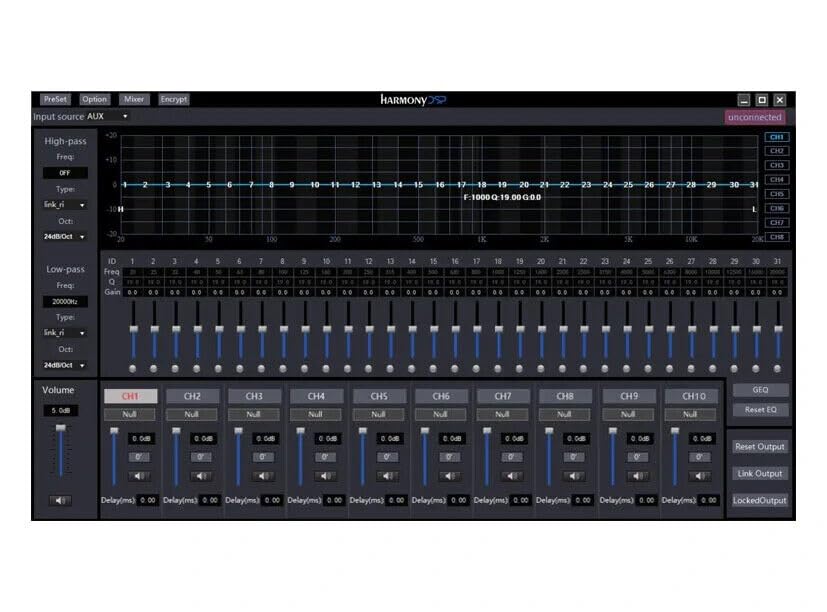
בילד: Screenshot of the Zapco Harmony DSP PC software, showing the 31-band equalizer and channel controls for precise audio tuning.
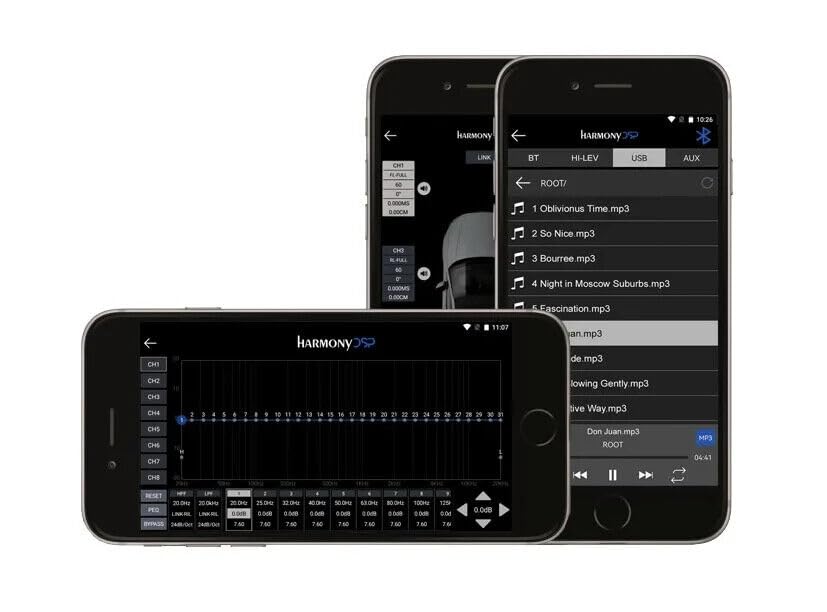
בילד: Screenshots of the Zapco Harmony DSP mobile application on a smartphone, illustrating the interface for Bluetooth streaming and DSP adjustments.
בלועטאָאָטה סטרימינג:
To stream audio wirelessly, enable Bluetooth on your mobile device and pair it with the HB-410-ADSP. The device name will typically appear as "Zapco HB-410-ADSP" or similar. Once paired, you can play audio from your device through the ampליפער.
Integrated Music Player:
די amplifier includes a built-in music player that supports various file formats. You can manage and play music files directly through the mobile application.
וישאַלט
The Zapco HB-410-ADSP is designed for durability and requires minimal maintenance. Follow these guidelines to ensure its continued performance:
- רייניקונג: ניצן אַ ווייך, טרוקן שטאָף צו ריין די יקסטיריער פון די ampליפיער. פֿאַרמײַדט ניצן שאַרפֿע כעמיקאַלן אָדער אַברייסיוו רייניגער.
- ווענטילאַטיאָן: פאַרזיכערן אַז די ampדי ווענטילאַציע עפענונגען פון דעם ליפיער זענען נישט פארשטאפט צו פאַרמייַדן איבערהיצונג.
- פֿאַרבינדונגען: קאָנטראָלירט פּעריִאָדיש אַלע וויירינג פֿאַרבינדונגען צו זיכער מאַכן אַז זיי זענען זיכער און פֿרײַ פֿון קעראָוזשאַן.
- סוויווע: ינסטאַלירן די amplifier in a location that is protected from excessive moisture, dust, and extreme temperatures.
טראָובלעשאָאָטינג
If you encounter issues with your Zapco HB-410-ADSP, refer to the following common problems and solutions:
- קיין מאַכט:
- Check all power connections (+12V, GND, REM) for proper contact and voltage.
- Verify that the vehicle's battery is charged.
- Inspect any inline fuses for continuity.
- קיין אַודיאָ רעזולטאַט:
- Ensure all input and output cables are securely connected.
- Check the source device (head unit, phone) for audio output.
- Verify DSP settings; ensure channels are not muted or gain is not set too low.
- Confirm speaker connections are correct and speakers are functional.
- פאַרקרימט אַודיאָ:
- Reduce input gain if the signal is clipping.
- טשעק די רעדנער אימפּעדאַנס קאָמפּאַטיביליטי מיט די ampליפער.
- Review DSP equalizer and crossover settings for anomalies.
- Mobile App Issues (Input/Output Mapping):
- Some users have reported inconsistencies with input channel mapping to outputs when using the mobile application. If precise mapping is required, it is recommended to use the PC software for configuration.
- Ensure the mobile app is updated to the latest version.
- בלועטאָאָטה קאַנעקטיוויטי פּראָבלעמס:
- פאַרזיכערן די amplifier is in pairing mode or discoverable.
- Delete previous pairings on your mobile device and re-attempt pairing.
- Move the mobile device closer to the amplifier to rule out range issues.
וואָראַנטי און שטיצן
For warranty information, please refer to the documentation provided with your purchase or visit the official Zapco website. If you require technical assistance or have questions not covered in this manual, please contact Zapco customer support through their official channels.
אָנליין רעסורסן: For additional support and software downloads, visit the Zapco Store on Amazon or the official Zapco webפּלאַץ.