
hosabely SK80
hosabely SK80 Audio Interface User Manual
מאָדעל: SK80
1. הקדמה
Thank you for choosing the hosabely SK80 Audio Interface. This device is designed to enhance your audio experience for live streaming, podcasting, recording, and gaming. It features 48V phantom power, noise reduction, customizable sound pads, and various audio effects. Please read this manual carefully to understand the product's functions and ensure proper operation.

פיגורע 1: פראָנט view of the hosabely SK80 Audio Interface.
2. פּעקל אינהאַלט
באַשטעטיקן אַז אַלע זאכן זענען פאַראַן אין דיין פּעקל:
- 1 x hosabely SK80 Live Sound Card (Audio Interface)
- 1 x וסב טשאַרדזשינג קאַבלע
- 2 x אַודיאָ קייבאַלז
- 1 x ענגליש באַניצער מאַנואַל (דעם דאָקומענט)
Note: Microphone is not included. The device is not compatible with USB microphones.
3. פּראָדוקט איבערview
3.1. קאָנטראָל פּאַנעל אויסלייג

פיגורע 2: דעטאַילעד view of the SK80 Audio Interface control panel.
The SK80 features a comprehensive control panel with various knobs and buttons for audio adjustment and effect activation. Key areas include:
- Microphone Volume Controls: Separate knobs for high, middle, and low frequencies, plus overall microphone volume.
- Tone Volume & Recording Controls: Adjust tone and recording levels.
- Line Volume & Instrumental Volume: Controls for line input and instrument input.
- Sound Effects Pads: Buttons for various live sound effects and customizable pads.
- Reverb & Voice Changer Controls: Knobs and buttons for reverb modes and voice modulation.
- 48V פאַנטאָם מאַכט קנעפּל: אַקטיוויזירט פאַנטאָם מאַכט פֿאַר קאָנדענסער מיקראָפאָנען.
- ראַש רעדוקציע קנעפּל: Engages the noise reduction feature.
- Bluetooth (BT) On/Off: Toggles Bluetooth connectivity.
3.2. קאָנעקטיוויטי פּאָרטן
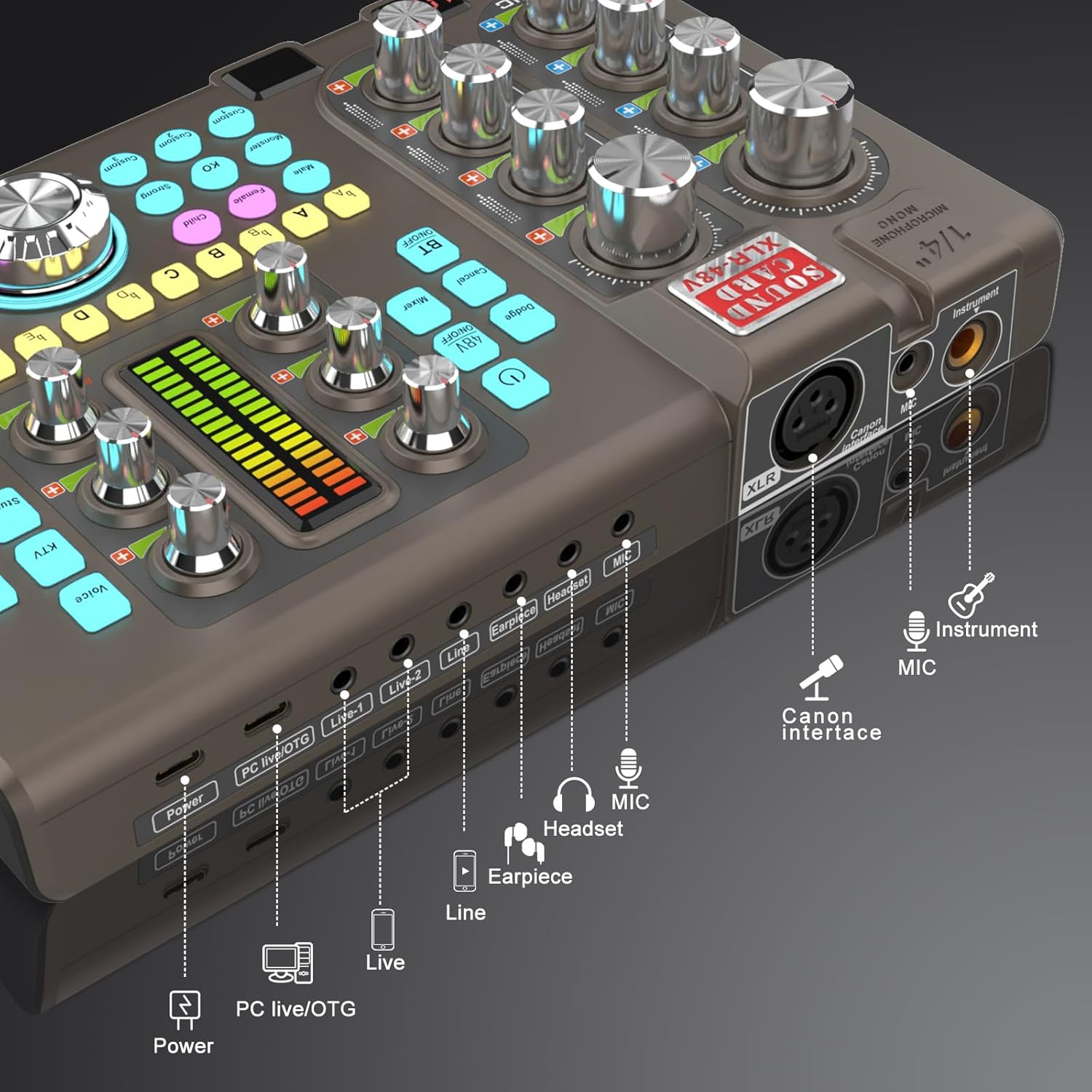
Figure 3: Labeled input and output ports on the SK80 Audio Interface.
The rear panel provides essential connection points:
- מאַכט פּאָרט: USB-C for power supply.
- PC Live/OTG Port: USB-C for connection to a computer or OTG-compatible smartphone/tablet.
- Live 1, Live 2, Line-1, Line-2 Ports: 3.5mm audio output ports for connecting to streaming devices or other audio equipment.
- Earpiece Port: 3.5mm output for monitoring audio with an earpiece.
- העאַדסעט פּאָרט: 3.5mm output for connecting a headset.
- מיקראָפאָן פּאָרט: 3.5mm input for a microphone.
- XLR-48V Interface: XLR input for condenser microphones requiring 48V phantom power.
- Instrument Port: 1/4" (6.35mm) input for connecting instruments like guitars.
4. סעטאַפּ
4.1. פּאַוערינג אויף די מיטל
- Connect the USB Charging Cable to the מאַכט port on the SK80 and to a USB power adapter (not included) or a computer USB port.
- Press and hold the power button on the control panel to turn on the device.
4.2. קאַנעקטינג מייקראָופאָונז

Figure 4: XLR-48V and Instrument input ports.
- For Condenser Microphones (requiring 48V Phantom Power): Connect your XLR microphone cable to the XLR-48V Interface port. Press the 48V אויף / אַוועק button on the control panel to activate phantom power. (Note: 48V is off by default to conserve battery. A light indicator will confirm activation.)
- For Dynamic Microphones or Microphones with 3.5mm Jack: פאַרבינדן דיין מיקראָפאָן צו די MIC פּאָרט ניצנדיק אַ 3.5 מם אַודיאָ קאַבל.
4.3. קאַנעקטינג ינסטראַמאַנץ
פֿאַרבינדט אײַער אינסטרומענט (למשל, גיטאַר) צום ינסטרומענט port using a 1/4" (6.35mm) cable.
4.4. Connecting to a Computer or Smartphone
- דורך וסב: Use the USB Charging Cable to connect the PC Live/OTG port to your computer. The device will be recognized as an audio input/output device.
- דורך בלועטאָאָטה: דרוק די BT אויף / אַוועק button on the control panel. On your smartphone or tablet, search for and connect to the SK80 via Bluetooth settings.
4.5. פֿאַרבינדן מאָניטאָרינג דעוויסעס
- פאַרבינדן כעדפאָונז צו די העאַדסעט port for monitoring your audio.
- Connect an earpiece to the עאַרפּיעסע port for discreet monitoring.
5. אַפּערייטינג ינסטרוקטיאָנס
5.1. אַדזשאַסטירן אַודיאָ לעוועלס

Figure 5: Audio adjustment knobs.
- ניצן די MIC VOL knobs (High, Middle, Low) to fine-tune your microphone's equalization.
- סטרויערן די Tone Vol knob for overall microphone tone.
- Control the output level with the רעקאָרדינג קנופּ.
- סטרויערן די שורה וואָל for line input sources and Instrumental Vol for connected instruments.
- די מאָניטאָר וואָל knob controls the volume of your monitoring headphones/earpiece.
5.2. Using Reverb Effects
The SK80 offers 6 reverb modes: VOICE, KTV, STUDIO, CONCERT, CORRECT, and MC. Select your desired mode using the dedicated buttons. Adjust the reverb depth and width using the corresponding knobs.
5.3. Customizing Sound Pads

Figure 6: Customizable sound pads.
The SK80 features 3 customizable sound pads. Each pad can record up to 30 seconds of audio. To record:
- דריקן און האַלטן איינער פון די מנהג buttons (Custom 1, 2, or 3) until it starts blinking.
- Record your desired audio (e.g., from a microphone, connected device, or Bluetooth input).
- דרוק די זעלבע מנהג button again to stop recording. The button will stop blinking.
- דרוק די מנהג button once to play the recorded sound. You can adjust the volume of each pad.
5.4. Voice Changer Functions
Transform your voice using the קול טשאַנגער feature. Select from Male, Female, Child, or Monster voices. Adjust the VOICE CHANGE knob to modify the pitch and create various vocal effects.
5.5. ראַש רעדוקציע

Figure 7: Noise reduction display.
אַקטאַווייט די ראַש רעדוקציע button to minimize environmental background noise. The device features a 15-level noise reduction system. The display shows the current noise reduction level.
5.6. Live Sound Effects
The SK80 includes 11 dynamic live sound effects (e.g., Dodge, Muffled, Play In, Laughter, Kiss, Gunfire). Press the corresponding buttons to trigger these effects during your live stream or recording. Each effect typically lasts for approximately 4 seconds.
6. וישאַלט
- האַלט דאָס אַפּאַראַט ריין דורך עס אָפּווישן מיט אַ ווייכן, טרוקענעם שטאָף. פֿאַרמייַדט ניצן פֿליסיקע רייניגער אָדער סאָלווענטן.
- האַלט דעם אַפּאַראַט אין אַ קיל, טרוקן אָרט אַוועק פון דירעקט זונשייַן און עקסטרעמע טעמפּעראַטורן.
- ויסמיידן דראַפּינג אָדער אונטערטעניק די מיטל צו שטאַרק ימפּאַקץ.
- The built-in 3000mAh battery provides approximately 3-5 hours of operation. Recharge the device when the battery indicator is low.
7. טראָובלעשאָאָטינג
- קיין סאָונד רעזולטאַט:
- Check all cable connections (microphone, headphones, output to PC/streaming device).
- Ensure volume knobs (MIC VOL, Recording, Monitor Vol) are turned up.
- Verify that the correct audio input/output device is selected on your computer or streaming software.
- מיקראָפאָן איז נישט ארבעטן:
- אויב איר ניצט אַ קאָנדענסער מיקראָפאָן, זאָרגט אַז 48V פאַנטאָם מאַכט איז אַקטיוויירט.
- Check microphone cable integrity.
- Confirm the microphone is properly connected to the correct input port (XLR or 3.5mm MIC).
- Static or Noise in Audio:
- Activate the Noise Reduction feature.
- קוק פֿאַר פרייַ קאַבלע קאַנעקשאַנז.
- זיכער מאַכן אַז קיין שטאַרקע עלעקטראָמאַגנעטישע שטערונג קוואלן זענען נישט אין דער נאָענט.
- Adjust input gain levels to avoid clipping.
- בלועטאָאָטה קאַנעקטיוויטי ישוז:
- Ensure the BT ON/OFF button is activated.
- Make sure the SK80 is discoverable and within range of your device.
- פּרוּווט אָפּצופּאַרן און ווידער צופּאַרן דעם דעווייס.
8. ספּעסאַפאַקיישאַנז
| נומער מאָדעל נומער | SK80 |
| סאָרט | hosabely |
| קאַנעקטיוויטי טעכנאָלאָגיע | בלועטאָאָטה, וסב |
| נומער פון טשאַנאַלז | 4 |
| פּונקט וואָג | 1.67 פונט (0.76 קג) |
| פּעקל דימענשאַנז | 12.28 X 7.56 X 2.36 אינטשעס |
| באַטערי טיפּ | ליטהיום פּאָלימער (3000 מאַה) |
| קאַמפּאַטאַבאַל דעוויסעס | Smartphone, PC, Guitar |
| אַפּערייטינג סיסטעם שטיצן | לינוקס, ווינדאָוס, מאַקאָס |
| שטיצט ווייכווארג | Ableton Live, FL Studio, Pro Tools, Logic Pro, Cubase (and others) |
9. וואָראַנטי און שטיצן
For any questions or issues regarding your hosabely SK80 Audio Interface, please refer to the seller's contact information provided at the point of purchase. Please retain your proof of purchase for warranty claims.
Ask a question about this manual
Ask about setup, troubleshooting, compatibility, parts, safety, or missing instructions. Manuals+ will review the question and use this page’s manual context to help answer it.