
1. הקדמה
Thank you for choosing the DATOUBOSS 2000W/4000W Pure Sine Wave Inverter. This device is designed to convert 24V DC battery power into stable 230V AC power, suitable for a wide range of household appliances, power tools, and electronic devices. Its pure sine wave output ensures compatibility with sensitive electronics, providing clean and reliable electricity for your home, RV, or outdoor activities.
This manual provides essential information for the safe and efficient operation of your inverter. Please read it thoroughly before use and keep it for future reference.
2. זיכערקייַט אינסטרוקציעס
ווארענונג: נישט נאכפאלגן די זיכערהייט אינסטרוקציעס קען רעזולטירן אין עלעקטרישן שאק, פייער, ערנסטע שאָדן, אדער טויט.
- Ensure the inverter is connected to a 24V DC power source only. Connecting to an incorrect voltagעס קען שעדיקן די אַפּאַראַט.
- דו זאלסט נישט ויסשטעלן די ינווערטער צו וואַסער, רעגן, שניי אָדער שפּריץ.
- Operate the inverter in a well-ventilated area. Do not block the ventilation openings.
- Avoid operating the inverter near flammable materials or in environments with explosive gases.
- עפֿנט נישט דעם אינווערטער גasinז. עס זענען נישטאָ קיין טיילן וואָס דער באַניצער קען סערוויסן אינעווייניק. לאָזט איבער אַלע סערוויסינג צו קוואַליפֿיצירטע פּערסאָנעל.
- פאַרזיכערן געהעריק גראַונדינג פון די ינווערטער.
- דיסקאָנעקט דעם ינווערטער פון דער באַטאַרייע איידער איר דורכפירן קיין וישאַלט אָדער רייניקונג.
- האַלטן אויס פון דערגרייכן פון קינדער.

בילד: אינערלעך view of the inverter highlighting various protection mechanisms such as undervoltagע, איבערוואָלtage, overload, short circuit, overheating, and reverse polarity protection.
3. פּעקל אינהאַלט
ביטע טשעק די פּאַקעט פֿאַר די פאלגענדע זאכן:
- 1 x DATOUBOSS 2000W Pure Sine Wave Inverter
- 1 x Pair of Battery Cables (Red for Positive, Black for Negative)
- 1 x רימאָוט קאָנטראָל
- 1 x באַניצער מאַנואַל (דאָס דאָקומענט)

Image: The inverter unit, remote control, battery connection cables, and a separate LCD display module.
4. פּראָדוקט איבערview
Familiarize yourself with the components of your DATOUBOSS inverter:

Image: Detailed diagram of the inverter's front panel, indicating the LCD display, AC output socket, USB 2.1A port, Type-C port, GND (ground) terminal, and power switch.
- LCD ווייַז: ווייזט באַטאַרייע וואָלtagE, אַק רעזולטאַט וואָלtage, output power, and frequency.
- AC Output Socket: Standard European socket for connecting AC appliances.
- וסב פּאָרץ: Includes USB 2.1A and Type-C ports for charging small electronic devices.
- ערד טערמינאַל (GND): פֿאַר זיכערהייט גראַונדינג.
- מאַכט סוויטש: צו דרייען דעם ינווערטער אן/אויס.
- קאָאָלינג פאַנס: Integrated smart fans for heat dissipation.
5. סעטאַפּ און ייַנמאָנטירונג
- קלייַבן אַ אָרט: Select a dry, well-ventilated area away from direct sunlight, heat sources, and flammable materials. Ensure sufficient space around the inverter for proper airflow.
- באַטערי קשר:
- Ensure the inverter is OFF before connecting to the battery.
- פאַרבינדן די רויט באַטעריע קאַבל צו די positive (+) terminal of the inverter and the positive (+) terminal of your 24V battery.
- פאַרבינדן די שוואַרץ באַטעריע קאַבל צו די נעגאַטיוו (-) terminal of the inverter and the נעגאַטיוו (-) terminal of your 24V battery.
- זיכער מאַכן אַז אַלע פֿאַרבינדונגען זענען פֿעסט און זיכער צו פֿאַרמייַדן לויזע פֿאַרבינדונגען און פֿינקען.
- גראָונדינג: Connect the ground terminal of the inverter to a proper earth ground using a suitable grounding wire. This is crucial for safety.
- רימאָוט קאָנטראָל קאַנעקשאַן: Plug the remote control cable into the designated port on the inverter.

Image: The inverter with devices connected to its AC output and USB/Type-C ports, demonstrating its connectivity.
6. אַפּערייטינג ינסטרוקטיאָנס
- מאַכט אויף: After all connections are secure, press the power button on the inverter or the ON button on the remote control. The LCD display will light up, showing the battery voltage and output status.
- פֿאַרבינדן אַפּפּליאַנסעס: Plug your AC appliances into the AC output socket. For USB-powered devices, use the USB or Type-C ports.
- מאָניטאָרינג: דער LCD דיספּלעי גיט אינפֿאָרמאַציע אין רעאַל-צייט:
- באַטערי וואָלtagE (DC): ווייזט דעם איצטיקן באַנדtage of your 24V battery.
- אַק רעזולטאַט וואָלtagE (AC): דיספּלייז די רעזולטאַט וואָלtagE (למשל, 230 וו).
- רעזולטאַט מאַכט (וו): ווײַזט אָן דעם איצטיקן מאַכט קאָנסומפּציע פֿון פֿאַרבונדענע דעוויסעס.
- אָפטקייַט (הז): Shows the output frequency (50Hz or 60Hz).
- מאַכט אַוועק: To turn off the inverter, press the power button on the unit or the OFF button on the remote control. Disconnect appliances before turning off the inverter for safety.
וויכטיק: Ensure the total power consumption of your connected devices does not exceed the inverter's continuous power rating (2000W). The inverter has a peak power rating of 4000W for starting inductive loads, but continuous operation should remain within 2000W.
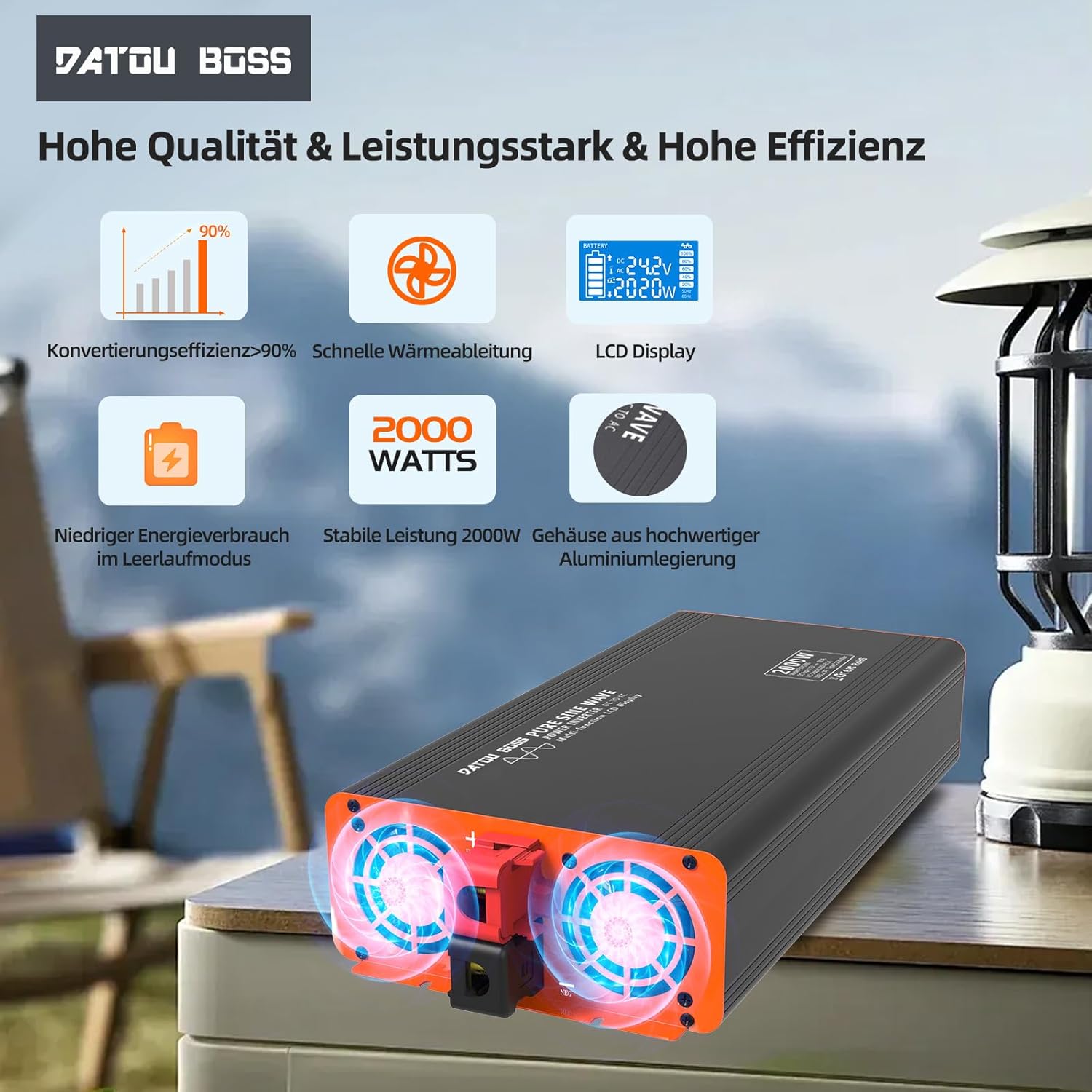
Image: Close-up of the inverter's cooling fans, showing their operation for efficient heat dissipation.
7. וישאַלט
- רייניקונג: Regularly clean the exterior of the inverter with a soft, dry cloth. Do not use liquid cleaners or solvents.
- ווענטילאַטיאָן: Ensure the cooling vents are free from dust and debris. Blocked vents can lead to overheating.
- פֿאַרבינדונגען: Periodically check battery cable connections to ensure they remain tight and free from corrosion.
- סטאָרידזש: אויב איר לייגט אַוועק דעם ינווערטער פֿאַר אַ לענגערע צייט, זאָלט איר עס אָפּשטעקן פֿון דער באַטאַרייע און עס אַוועקלייגן אין אַ קיל, טרוקן אָרט.
8. טראָובלעשאָאָטינג
| פּראָבלעם | מעגלעך סיבה | לייזונג |
|---|---|---|
| דער אינווערטער טוט זיך נישט אן. | קיין באַטעריע פֿאַרבינדונג, נידעריק באַטעריע וואָלומעןtage, loose cables, blown fuse. | Check battery connections, charge battery, tighten cables, check internal fuses (professional service recommended). |
| קיין אַק רעזולטאַט. | Overload, short circuit, overheating, low/high battery voltage. | Reduce load, check for short circuits, allow inverter to cool, check battery voltage. |
| Cooling fan constantly running. | הויכע אינעווייניקסטע טעמפּעראַטור צוליב שווערער לאַסט אָדער שלעכטע ווענטילאַציע. | Ensure adequate ventilation, reduce load. Fan activates automatically when temperature exceeds 55°C. |
| LCD דיספּלעי ווײַזט טעות קאָד. | Specific protection activated (e.g., overvoltage, ונדעראָלtagע, איבערלאַסטונג). | Refer to the display for the specific error and consult the relevant section of this manual or contact support. |
9. ספּעסאַפאַקיישאַנז
| שטריך | באַשרייַבונג |
|---|---|
| מאָדעל נאָמען | 2000W 24V EU |
| קעסיידערדיק מאַכט | 2000 וואטס |
| שפּיץ מאַכט | 4000 וואטס |
| אַרייַנשרייַב וואָלtage | 24 וואלטס דק |
| רעזולטאַט חלקtage | 230 וואלטס אַק |
| רעזולטאַט וואַוועפאָרם | ריין סיין וואַווע |
| קאַנווערזשאַן עפיקאַסי | > 95% |
| וסב רעזולטאַט | USB 2.1A, Type-C |
| דימענסיעס (L X W X H) | 36 ל רענטגענ 17 וו רענטגענ 8 ה סענטימעטער |
| קאָאָלינג | Smart Integrated Fan |
| פּראַטעקשאַנז | נידעריק וואָלtage, איבער וואָלtage, Overheat, Overload, Short Circuit, Reverse Polarity |
| רעקאָממענדעד ניצט | Office, Home, Vehicle (RV, Camping, Car) |

Image: A clear representation of the LCD display interface, detailing battery level, DC input voltagE, אַק רעזולטאַט וואָלtage, power output, and frequency indicators.
10. וואָראַנטי און שטיצן
דאַטובאָסס פּראָדוקטן ווערן פאַבריצירט לויט הויכע קוואַליטעט סטאַנדאַרדן. פֿאַר וואָראַנטי אינפֿאָרמאַציע, טעכנישע שטיצע, אָדער סערוויס פֿראַגעס, ביטע קאָנטאַקט דיין הענדלער אָדער דעם פאַבריקאַנט גלייך. האַלט דיין קויף קוויטל ווי אַ באַווייַז פון קויפן.
For further assistance, please visit the official DATOUBOSS webפּלאַץ אָדער קאָנטאַקט זייער קונה סערוויס אָפּטיילונג.