
Vertiv EXS20KN
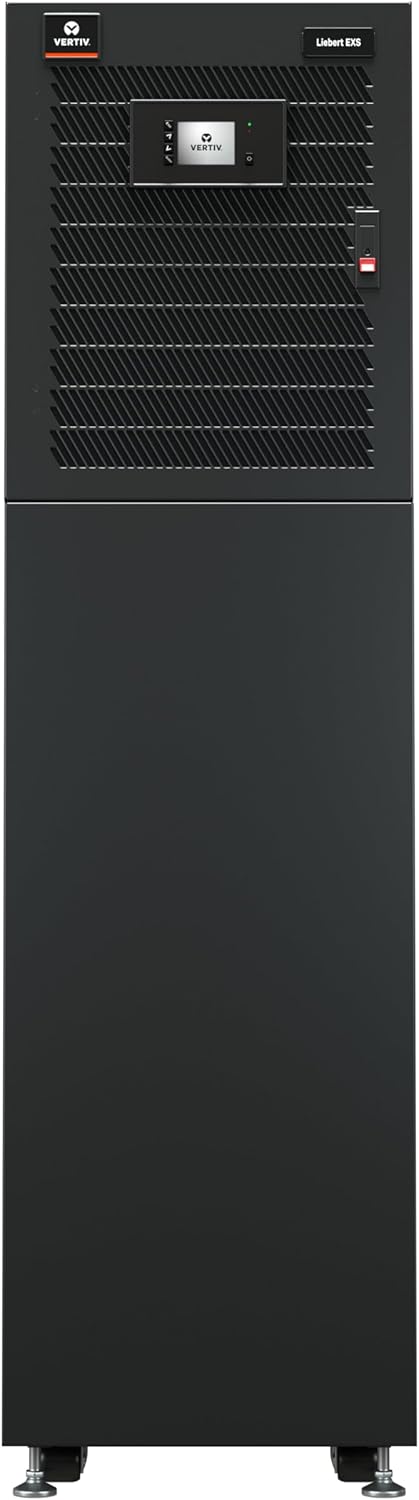
ווערטיוו ליבערט EXS UPS (מאָדעל EXS20KN) 20kVA/20kW - אינסטרוקציע מאַנואַל
Uninterruptible Power Supply for Critical IT Infrastructure
1. הקדמה
The Vertiv Liebert EXS is a compact, monolithic Uninterruptible Power Supply (UPS) designed to provide continuous, conditioned, and regulated output voltage. This UPS utilizes true on-line, double-conversion technology, ensuring a clean sine wave input power for sensitive equipment. It is suitable for powering IT devices in small data rooms, IT closets, VoIP systems, branch storage, and security systems. The Liebert EXS offers economical, efficient, and reliable three-phase power for critical loads up to 20kVA, featuring a unity power factor and high power-density in an optimized, standalone design.
2. זיכערקייַט אינפֿאָרמאַציע
Before installing, operating, or performing maintenance on the Vertiv Liebert EXS UPS, read and understand all safety instructions provided in the packaging and on the unit itself. Failure to follow these instructions may result in electric shock, fire, or serious injury. This equipment contains high voltage and stored energy. Only qualified personnel should perform installation and service.
- עלעקטריקאַל סכנה: Do not open the UPS enclosure. There are no user-serviceable parts inside.
- וואָג סכנה: The UPS unit is heavy. Use appropriate lifting equipment and techniques during installation to prevent injury. Refer to specifications for item weight.
- באַטערי זיכערקייַט: Batteries can present a risk of electrical shock and high short-circuit current. Observe precautions when working with batteries.
- ווענטילאַטיאָן: Ensure adequate airflow around the UPS. Do not block ventilation openings.
3. פּראָדוקט פֿעיִקייטן
The Vertiv Liebert EXS UPS incorporates several key features designed for optimal performance and reliability:
- Reliable 3-Phase Power: Provides the highest level of power protection for critical systems.
- Online Double Conversion Technology: Ensures continuous power conditioning and high availability for IT systems.
- High Operating Efficiency: Achieves over 93% efficiency in double conversion mode and 99% in ECO mode, reducing energy consumption and heat dissipation.
- Advanced Battery Monitoring: Capable of monitoring battery capacity, temperature, humidity, access, and leaks for enhanced battery health and longevity.
- 1.0 Output Power Factor: Delivers more usable power to connected loads, optimizing power utilization.
- Integrated Maintenance Bypass Cabinet (MBC): Facilitates UPS maintenance or replacement without requiring a shutdown of connected equipment.
- סאָליד פּלאַן: Space-saving footprint provides optimized space utilization and flexible installation.
- Factory Installed Network Card: Includes a Liebert IS-UNITY DP card for remote management capabilities.
- Internal Battery Cabinets with Auto-Detection: Ensures accurate reporting of available runtime when used with external battery cabinets.

4. סעטאַפּ און ייַנמאָנטירונג
The Vertiv Liebert EXS UPS is designed for ease of installation. However, due to its weight and electrical requirements, professional installation is recommended.
4.1 אַנפּאַקינג און דורכקוק
- Carefully unpack the UPS unit and all accessories.
- Inspect the unit for any shipping damage. Report any damage to the carrier and your Vertiv representative immediately.
- באַשטעטיקן אַז אַלע קאָמפּאָנענטן וואָס זענען ליסטעד אין דעם פּאַקינג צעטל זענען פאַראַן.
4.2 פּלאַץ צוגרייטונג
- Ensure the installation site meets environmental requirements (temperature, humidity) as specified in the technical data.
- Confirm that the floor can support the weight of the UPS unit (refer to specifications).
- Provide adequate clearance around the unit for ventilation and maintenance access.
4.3 עלעקטריקאַל קאַנעקשאַנז
All electrical connections must be performed by a qualified electrician in accordance with local and national electrical codes.
- פאַרבינדן די אַרייַנשרייַב מאַכט צו די דעזיגנייטיד טערמינאַלס.
- Connect the output power to the critical load distribution panel.
- פאַרזיכערן געהעריק גראַונדינג פון די אַפּאַראַט.

4.4 ערשט סטאַרטאַפּ
- After all electrical connections are secure, close the input circuit breaker.
- Follow the on-screen prompts on the UPS display for initial configuration.
- Verify proper operation and status indicators.

5. אָפּעראַציע
The Liebert EXS UPS operates automatically to protect connected equipment. The front panel display provides real-time status and allows for configuration adjustments.
5.1 פראָנט פּאַנעל ווייַז
The LCD display provides information on input/output voltage, load level, battery status, and alarm conditions. Navigate through menus using the control buttons adjacent to the display.
5.2 אַפּערייטינג מאָדעס
- אָנליין מאָדע: The UPS continuously converts AC input to DC to charge batteries and then converts DC back to AC for the output, providing maximum protection.
- עקאָ מאָדע: An energy-saving mode where the UPS operates in bypass, providing power directly from the utility, and switches to online mode upon power disturbance.
- באַטערי מאָדע: When utility power fails, the UPS automatically switches to battery power to maintain output.
5.3 אויסשליסן פּראָצעדורן
To safely shut down the UPS, follow these steps:
- Power down all connected equipment.
- Initiate a UPS shutdown via the front panel display or management software.
- Once the UPS is off, open the input circuit breaker to fully isolate the unit from the power source.
6. וישאַלט
Regular maintenance ensures the longevity and reliable operation of your Vertiv Liebert EXS UPS.
6.1 רוטינע קאָנטראָלן
- Periodically check the UPS status on the front panel display for any alarms or warnings.
- פאַרזיכערן די ווענטאַליישאַן אָופּאַנינגז זענען קלאָר פון אַבסטראַקשאַנז.
- Inspect power cables for any signs of damage.
6.2 באַטערי וישאַלט
The Liebert EXS features advanced battery monitoring. However, periodic battery health checks by qualified personnel are recommended. Batteries have a finite lifespan and will require replacement.
6.3 Integrated Maintenance Bypass
The integrated maintenance bypass cabinet allows for safe servicing of the UPS without interrupting power to critical loads. Refer to the detailed service manual for procedures on utilizing the maintenance bypass.
7. טראָובלעשאָאָטינג
This section provides general guidance for common issues. For complex problems, contact Vertiv technical support.
| פּראָבלעם | מעגלעך סיבה | לייזונג |
|---|---|---|
| UPS not turning on | No input power; UPS fault | Check input circuit breaker; verify power source; contact support if fault persists. |
| UPS beeping continuously | On battery power; overload; battery fault | Check utility power; reduce load; check battery status on display. |
| פארבונדענע עקוויפּמענט באַקומט נישט קיין מאַכט | UPS in bypass; output breaker tripped; UPS fault | Check UPS operating mode; reset output breaker; contact support. |
| הויך טעמפּעראַטור שרעק | Blocked ventilation; high ambient temperature | Clear obstructions; ensure adequate room cooling. |
8. Specifications (Model EXS20KN)
| באַשרייַבונג | ווערט |
|---|---|
| מאָדעל נומער | EXS20KN |
| קאַפּאַציטעט | 20kVA / 20kW |
| אַרייַנשרייַב וואָלtage | 208/120VAC (220/127VAC) 3-Phase 4 Wire |
| רעזולטאַט חלקtage | 208 וואלטס |
| פּראָדוקט דימענשאַנז (ד רענטגענ וו רענטגענ ה) | 29.5" x 17.3" x 62.9" (74.9 ס״מ x 43.9 ס״מ x 159.8 ס״מ) |
| פּונקט וואָג | 734 פונט (333 קג) |
| באַטאַרייע צעל זאַץ | פירן זויער |
| קאָליר | שוואַרץ |
| פאַבריקאַנט | ווערטיוו |
| ערשטער דאַטע בנימצא | 14טן דעצעמבער 2023 |
9. וואָראַנטי און שטיצן
9.1 פּראָדוקט וואָראַנטי
The Vertiv Liebert EXS UPS comes with comprehensive coverage, including a standard 1-year warranty. A 3-year extended warranty option may also be available. Please refer to your purchase documentation or contact Vertiv for specific warranty terms and conditions.
9.2 טעכניש שטיצן
For technical assistance, troubleshooting beyond this manual, or warranty claims, please contact Vertiv customer support. Contact information can typically be found on the Vertiv official webוועבזייטל אדער אין אייער פּראָדוקט דאָקומענטאַציע.
ווערטיוו אפיציעל Webפּלאַץ: www.vertiv.com
Ask a question about this manual
Ask about setup, troubleshooting, compatibility, parts, safety, or missing instructions. Manuals+ will review the question and use this page’s manual context to help answer it.