
1. פּראָדוקט איבערview
The POLONO P31S is a compact and portable thermal label printer designed for various labeling needs in home, office, and school environments. It connects wirelessly via Bluetooth to your smartphone or tablet, allowing you to design and print labels using the dedicated mobile application. This device features a built-in cutter and operates without ink, utilizing thermal printing technology for clear, durable labels.
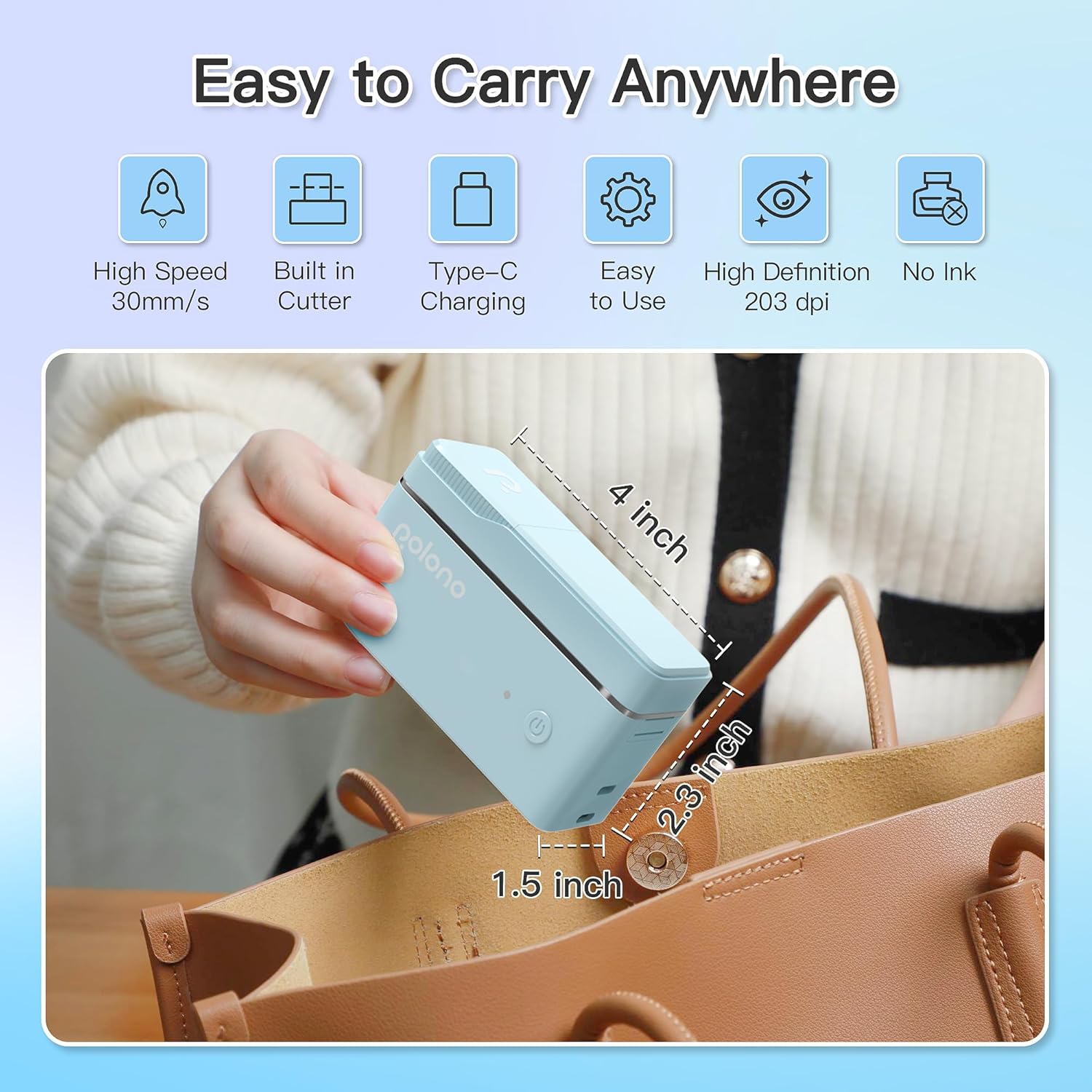
פיגורע 1: POLONO P31S Label Printer highlighting its compact design and dimensions (approximately 4 inches long, 2.3 inches high, 1.5 inches wide).
שליסל פֿעיִקייטן:
- פּאָרטאַטיוו און לייטווייט פּלאַן.
- Bluetooth connectivity for wireless printing.
- Thermal printing technology (no ink required).
- Built-in label cutter.
- Supports various label types including text, QR codes, barcodes, and images.
- קריקאָנלאָדלעך באַטאַרייע.
2. זיכערקייַט אינפֿאָרמאַציע
Please read and understand all safety instructions before using the POLONO P31S label printer to prevent injury or damage to the device.
- דו זאלסט נישט דיסאַסעמבאַל, פאַרריכטן אָדער מאָדיפיצירן די מיטל.
- האַלטן די מיטל אַוועק פון וואַסער, נעץ און עקסטרעם טעמפּעראַטורעס.
- Use only POLONO-approved label tapes to ensure optimal performance and prevent damage.
- פֿאַרמײַדט צו אָנרירן דעם דרוק קאָפּ גלייך נאָכן דרוקן, ווײַל ער קען זײַן הייס.
- האַלטן אויס פון דערגרייכן פון קינדער.
- Use the provided charging cable or a certified equivalent.
3. פּעקל אינהאַלט
באַשטעטיקן אַז אַלע זאכן זענען פאַראַן אין פּעקל:
- POLONO P31S Label Printer
- Label Tape Roll (starter roll)
- וסב טשאַרדזשינג קאַבלע
- באַניצער מאַנואַל (דעם דאָקומענט)
4. סעטאַפּ
4.1 טשאַרדזשינג די מיטל
Before first use, fully charge the label printer. Connect the provided USB charging cable to the printer's charging port and to a USB power adapter (not included) or a computer's USB port. The indicator light will show charging status.
4.2 Installing Label Tape
- עפֿנט דעם דעקל פֿון דעם עטיקעט־אָפּטייל.
- Insert the label tape roll with the printing surface facing up, ensuring it is properly seated.
- Pull a small portion of the label tape out, extending it past the cutter blade.
- פֿאַרמאַכט דעם דעקל פֿונעם עטיקעט־אָפּטייל זיכער.

פיגורע 2: Proper installation of POLONO P31S label tape. Ensure the green sticker on the tape is not removed or damaged, as it contains chip technology for optimal performance. Do not pull the label out directly; use the cutting blade.
4.3 אַפּ דאַונלאָוד און בלועטוט פֿאַרבינדונג
- Download the "Labelnize" app from the Apple App Store or Google Play Store.
- Turn on the POLONO P31S label printer by pressing and holding the power button.
- געבן בלועטאָאָטה אויף דיין סמאַרטפאָנע אָדער טאַבלעט.
- Open the "Labelnize" app. The app will prompt you to allow Bluetooth access. Grant permission.
- Within the app, search for available devices and select "P31S" to connect.
- Once connected, the app will indicate a successful connection, and you are ready to create labels.
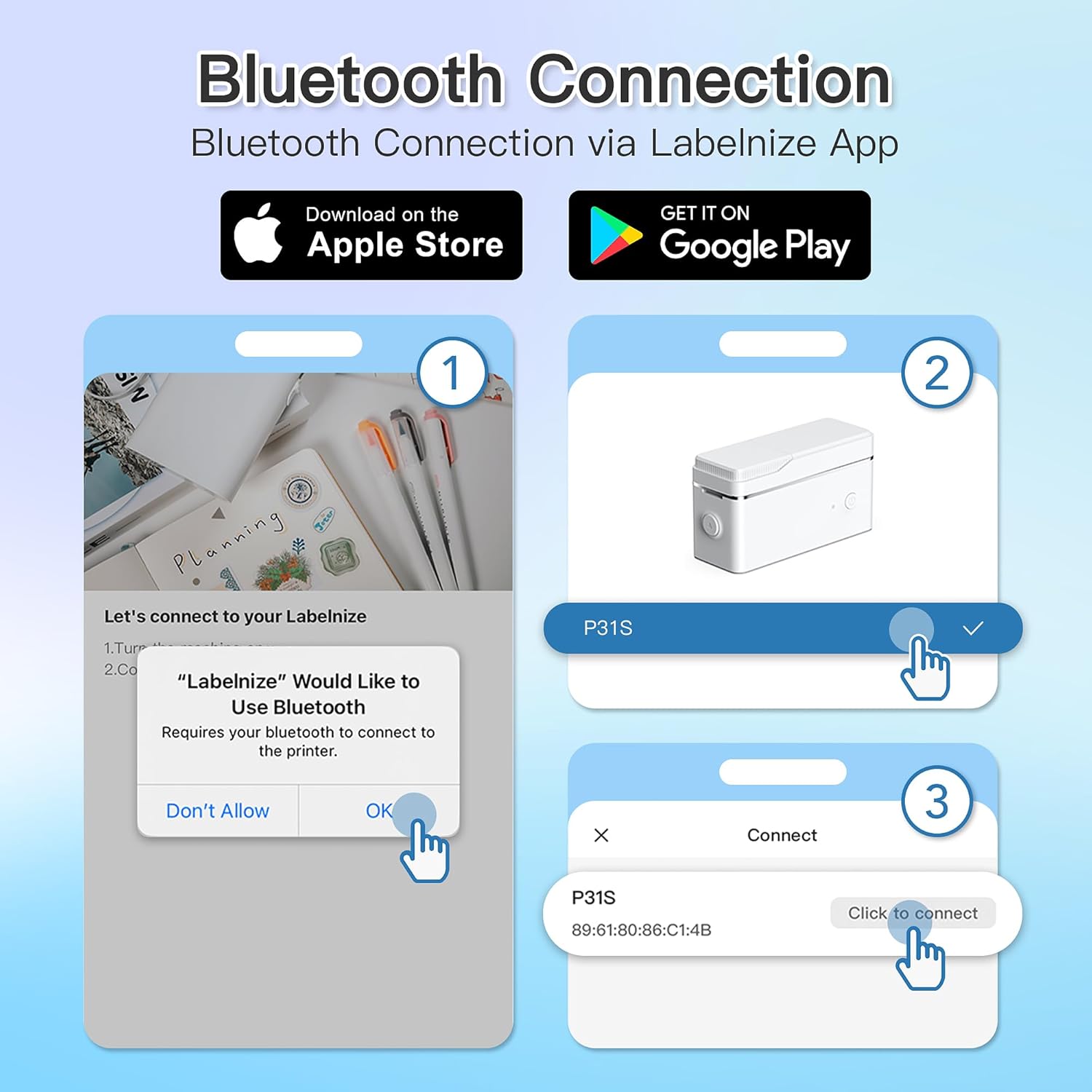
פיגורע 3: Steps for Bluetooth connection via the Labelnize App. Download the app, allow Bluetooth access, select "P31S" from the device list, and click "Connect".
5. אַפּערייטינג ינסטרוקטיאָנס
5.1 Creating Labels with the Labelnize App
The Labelnize app offers a variety of tools to design your labels:
- טעקסט: Enter custom text, choose from over 90 fonts, adjust size, style (bold, italic), and alignment.
- גרענעץ: Select from over 95 border designs to frame your labels.
- Icons/Graphics: Access a library of over 670 tab icons and other graphics to enhance your labels.
- QR Code/Barcode: Generate QR codes or barcodes for various applications.
- בילדער: Insert images from your device's gallery.
- מוסטערן: ניצט פאַר-דיזיינד טעמפּלאַטן פֿאַר געוויינטלעכע לייבאַלינג אויפגאַבן.

פיגורע 4: The Labelnize app interface for creating labels, offering extensive customization options including borders, fonts, and icons. The app supports multiple languages.
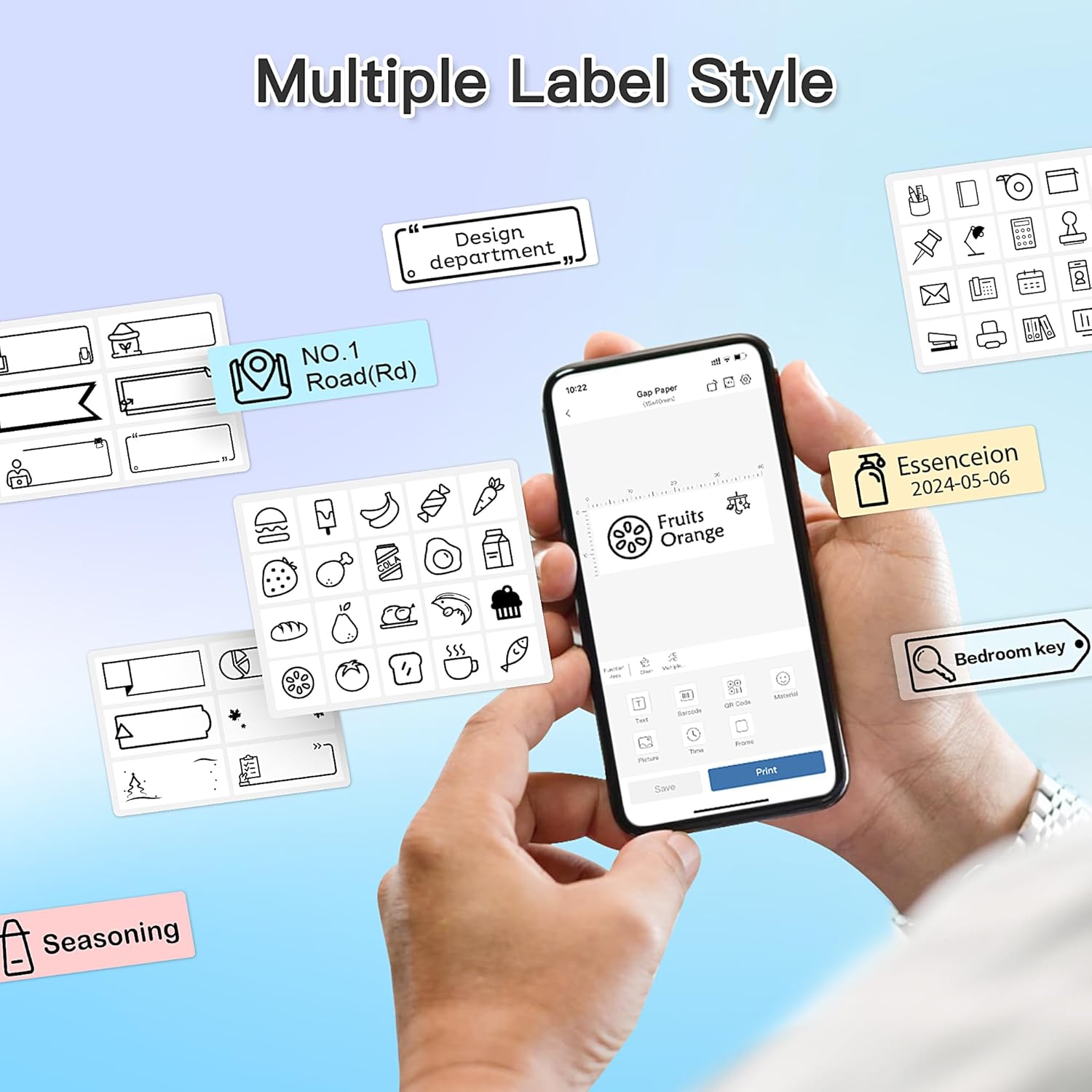
פיגורע 5: Examples of diverse label styles achievable with the POLONO P31S, demonstrating the flexibility in design for different organizational needs.
5.2 דרוקן עטיקעטן
After designing your label in the Labelnize app:
- Review אייער לייבל דיזיין אויף די אַפּ פאַרשטעלן.
- דריקט דעם "דרוק" קנעפל אין דער אפליקאציע.
- Confirm print settings (e.g., number of copies) if prompted.
- The printer will automatically feed and print the label.
5.3 ניצן דעם איינגעבויטן שניידער
The POLONO P31S features a built-in cutter for clean and precise label separation. After printing, gently press the cutter button or lever (depending on model variation) to cut the label. Do not pull the label manually to tear it, as this may damage the printer or result in uneven cuts.
6. וישאַלט
6.1 רייניקן דעם דרוק קאָפּ
To maintain print quality, clean the print head periodically:
- Turn off the printer and disconnect the power cable.
- עפֿנט דעם דעקל פֿון דעם עטיקעט־אָפּטייל.
- ווישט אָפּ דעם דרוק קאָפּ מיט אַ וואַטע שטעכל, לײַכטampמיט יסאָפּראָפּיל אַלקאָהאָל.
- לאָזט דעם דרוק קאָפּ גאָר טרוקן ווערן איידער איר מאַכט צו דעם דעקל און צינדט אָן דעם דרוקער.
6.2 באַטערי קער
- Charge the battery regularly, even if the printer is not used frequently, to prolong its lifespan.
- פֿאַרמײַדט פֿולשטענדיק אויסלאָדן די באַטעריע פֿאַר לענגערע פּעריאָדן.
- סטאָר די דרוקער אין אַ קיל, טרוקן אָרט ווען ניט אין נוצן.
7. טראָובלעשאָאָטינג
| פּראָבלעם | מעגלעך סיבה | לייזונג |
|---|---|---|
| דער דרוקער צינדט זיך נישט אן. | נידעריק באַטאַרייע אָדער קיין מאַכט. | טשאַרדזש די דרוקער מיט די צוגעשטעלט וסב קאַבלע. |
| קען נישט פאַרבינדן דורך בלוטוט. | Bluetooth is off, printer is off, or app issue. | Ensure printer is on, Bluetooth is enabled on your device, and restart the Labelnize app. Try re-pairing. |
| נעבעך דרוק קוואַליטעט. | Dirty print head, incorrect label tape, or low battery. | Clean the print head (Section 6.1). Ensure you are using POLONO P31S compatible label tape. Charge the printer. |
| Label jam. | Improper tape installation or foreign object. | Turn off the printer, open the cover, carefully remove any jammed tape. Reinstall tape correctly. |
| דרוקער רעאגירט נישט. | צייטווייליגע ווייכווארג פראבלעם. | Restart the printer and the Labelnize app. |
8. ספּעסאַפאַקיישאַנז
| שטריך | דעטאַל |
|---|---|
| מאָדעל | P31S |
| דרוק טעכנאָלאָגיע | טערמאַל |
| קאַנעקטיוויטי | בלועטאָאָטה |
| דרוק האַכלאָטע | 203 רענטגענ 203 DPI |
| מאַקסימום דרוק גיכקייט (מאָנאָכראָם) | 15 פּיפּיעם |
| מאַקס מידיאַ גרייס | Label rolls (2 inches / 24 millimeters) |
| טינט קאָליר | Black (thermal print) |
| מאַכט מקור | 1 ליטהיום פּאָלימער באַטאַרייע (אַרייַנגערעכנט) |
| פּראָדוקט דימענשאַנז | 7.2 רענטגענ 7.4 רענטגענ 12.7 סענטימעטער; 260 ג |
| אַרייַנגערעכנט קאַמפּאָונאַנץ | לאַבעלס |
9. וואָראַנטי און שטיצן
For warranty information and technical support, please refer to the official POLONO webזייטל אדער קאנטאקט זייער קאסטומער סערוויס. האלט אייער קויף קוויטל אלס באווייז פון קויפן פאר גאראנטיע פארלאנגען.
באַאַמטער Webפּלאַץ: www.polono.com (באַמערקונג: דאָס איז אַ פּלאַץ האָלדער URL, ביטע באשטעטיגט דעם אמת'ן באאמטן website for POLONO products.)