
1. הקדמה
Thank you for choosing the ieGeek 5MP Outdoor Wi-Fi Security Camera. This manual provides essential information for the proper installation, operation, and maintenance of your camera. Please read these instructions carefully before use and retain them for future reference. This camera is designed to provide reliable outdoor surveillance with advanced features for enhanced security.
2. פּראָדוקט איבערview
The ieGeek 5MP Outdoor Wi-Fi Security Camera offers high-definition monitoring with flexible connectivity and smart detection capabilities.
שליסל פֿעיִקייטן:
- 5MP HD רעזאָלוציע: Provides clear and vivid images and videos with 2880x1600 resolution and 4x digital zoom.
- Dual-Band Wi-Fi (2.4/5 GHz): Supports both 2.4 GHz and 5 GHz Wi-Fi for stable and faster network connection.
- 360° PTZ Monitoring: Pan (355° horizontal) and Tilt (120° vertical) functionality allows for comprehensive area coverage.
- קאָליר נאַכט זעאונג: Three night vision modes (color, infrared, smart) with a range of up to 15 meters (50 feet).
- PIR הומאַנאָיד דעטעקציע: Advanced human detection reduces false alarms caused by non-human movements.
- געזונט און ליכט שרעק: Deters intruders with customizable sound and light alerts.
- 24/7 קאָנטינויִערלעכע רעקאָרדינג: Supports continuous recording and event-based recording.
- לאקאלע און וואָלקן סטאָרידזש: Compatible with Micro SD cards (up to 128GB, not included) and cloud storage options.
- טיילן מיט קייפל באַניצער: Share camera access with family members via the dedicated app.
- IP65 וועטער קעגנשטעל: דיזיינד פֿאַר דרויסנדיק נוצן, קעגנשטעליק צו שטויב און וואַסער.
קאַמעראַ קאָמפּאָנענטן:
The camera unit typically includes the main camera body, dual Wi-Fi antennas, a power input port, and a Micro SD card slot.
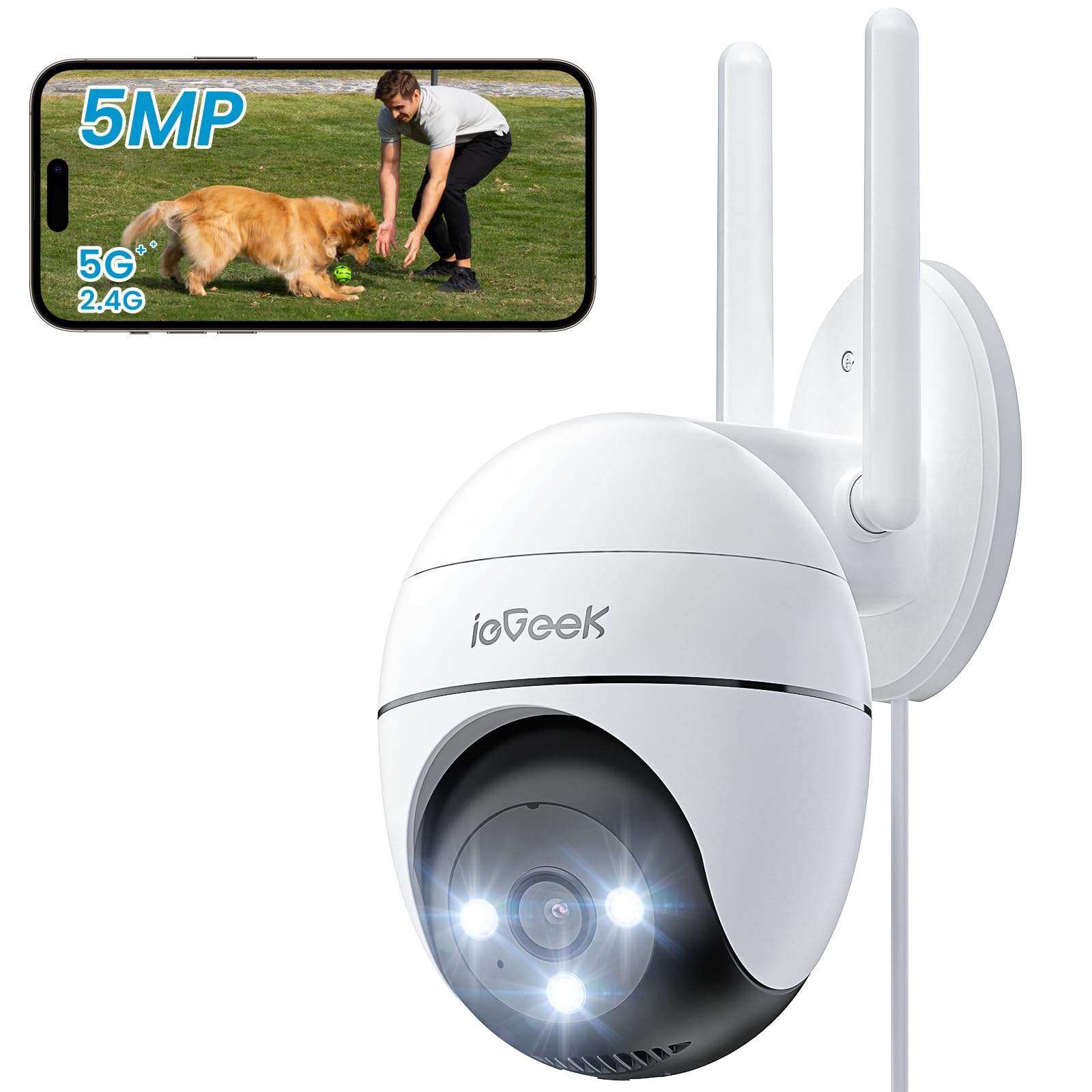
Figure 2.1: ieGeek 5MP Outdoor Wi-Fi Security Camera (Model ZS-GQ4)

פיגורע 2.2: איבערview of ieGeek 5MP Camera Features including PTZ, 24/7 recording, 2-way audio, humanoid tracking, Alexa compatibility, local and cloud storage, multi-user sharing, customizable alert areas, AI detection, and acoustic/light alarms.

Figure 2.3: The camera features a 5dBi antenna for improved Wi-Fi signal strength and stability.
3. סעטאַפּ אינסטרוקציעס
3.1 פּעקל אינהאַלט
- ieGeek 5MP Outdoor Wi-Fi Security Camera
- מאַכט אַדאַפּטער
- מאַונטינג סקרוז און אַנגקערז
- באַניצער מאַנואַל
3.2 אַפּ דאַונלאָוד און חשבון רעגיסטראַציע
- אָפּלאָדירן די ieGeek קאַם or CloudEdge app from your smartphone's app store (iOS/Android).
- Register for an account using your email address and create a secure password.
3.3 אַפּאַראַט קאַנעקשאַן
- Power on the camera by connecting it to a power outlet using the provided adapter.
- Open the ieGeek Cam/CloudEdge app and tap the "+" icon to add a new device.
- Follow the on-screen instructions to connect the camera to your 2.4 GHz or 5 GHz Wi-Fi network. Ensure your phone is connected to the same Wi-Fi network during setup.
- סקענט דעם QR קאוד וואס ווערט געוויזן אויף אייער טעלעפאן מיט דער קאמערא לענס ווען געבעטן.
- אַמאָל פארבונדן, קענט איר געבן אייער קאַמעראַ אַ נאָמען און אָנהייבן לעבן viewing.

Figure 3.1: Connecting the power adapter to the camera.
3.4 גשמיות ינסטאַלירונג
- Choose a suitable outdoor location with a clear view and strong Wi-Fi signal.
- Use the provided mounting template to mark drill holes.
- Drill holes, insert anchors, and secure the camera base with screws.
- סטרויערן די אַפּאַראַט ווינקל ווי דארף.

Figure 3.2: Ensure optimal Wi-Fi signal strength at the chosen installation location for stable performance.
4. אַפּערייטינג ינסטרוקטיאָנס
4.1 לעבן View און PTZ קאָנטראָל
- Open the ieGeek Cam/CloudEdge app and select your camera to view די לעבן קאָרמען.
- Use the on-screen joystick or swipe gestures to control the camera's pan (horizontal 355°) and tilt (vertical 120°) movements.

Figure 4.1: Control the camera's 355° horizontal and 120° vertical rotation directly from your smartphone app.
4.2 נאַכט זעאונג מאָדעס
די קאַמעראַ אָפפערט דריי נאַכט זעאונג מאָדעס:
- קאָליר נאַכט זעאונג: Utilizes built-in spotlights to provide full-color images in low-light conditions.
- ינפרערעד נאַכט זעאונג: ניצט אינפֿראַרויט על־אי־דיס פֿאַר שוואַרץ־ווײַסע בילדער אין פֿולשטענדיקער פֿינצטערניש.
- Smart Night Vision: Automatically switches between infrared and color night vision upon detection of motion.
4.3 באַוועגונג דעטעקציע און אַלאַרמס
- PIR הומאַנאָיד דעטעקציע: Configure sensitivity levels in the app to minimize false alarms.
- קוסטאָמיזאַבלע דעטעקשאַן זאָנעס: Set specific areas for motion detection to focus on critical zones.
- געזונט און ליכט שרעק: When motion is detected, the camera can activate a siren and/or spotlights to deter intruders. You can choose between silent, spotlight only, siren only, or both siren and spotlight modes.

Figure 4.2: Select from silent, spotlight only, siren only, or both siren and spotlight alarm modes to suit your security needs.

Figure 4.3: The camera's humanoid motion tracking follows detected human figures, reducing false alarms from other movements.

Figure 4.4: AI smart monitoring can differentiate between various detection types such as people, animals, packages, and vehicles (some features may require a subscription).
4.4 רעקאָרדינג און סטאָרידזש
- קעסיידערדיק רעקאָרדינג: The camera supports 24/7 continuous recording to a Micro SD card (not included).
- געשעעניש רעקאָרדינג: רעקאָרדירט ווידעא קליפּס ווען באַוועגונג ווערט דעטעקטירט.
- מיקראָ סד קאַרד: Insert a Micro SD card (up to 128GB) into the designated slot for local storage.
- וואָלקן סטאָרידזש: Optional cloud storage plans are available through the app for secure off-site backup.

Figure 4.5: The camera supports 24/7 continuous recording, ensuring constant surveillance.
5. וישאַלט
5.1 רייניקן די קאַמעראַ
- זיכער מאַכן אַז די קאַמעראַ איז אויסגעלאָשן איידער רייניקונג.
- ניצן אַ ווייך, דamp א שטאָף צו ווישן דעם קאַמעראַ קערפּער.
- For the lens, use a specialized lens cleaning cloth to avoid scratches. Do not use harsh chemicals or abrasive cleaners.
5.2 ענוויראָנמענטאַל קאַנסידעריישאַנז
- The camera has an IP65 weather resistance rating, making it suitable for outdoor use in various weather conditions.
- אַפּערייטינג טעמפּעראַטור קייט: -20°C ביז 50°C (-4°F ביז 122°F).

Figure 5.1: The camera is designed with IP65 weather resistance to withstand outdoor elements like rain.

Figure 5.2: The camera operates effectively within a wide temperature range of -20°C to 50°C.
6. טראָובלעשאָאָטינג
If you encounter issues with your ieGeek camera, please refer to the following common troubleshooting steps:
6.1 פֿאַרבינדונג פּראָבלעמען
- אַפּאַראַט אָפפלינע: Ensure the camera is powered on and within range of your Wi-Fi router. Check your Wi-Fi signal strength in the app. Try restarting the camera and your router.
- Failed to Connect to Wi-Fi: Verify your Wi-Fi password is correct. Ensure you are connecting to a 2.4 GHz or 5 GHz network as supported. If using a dual-band router, ensure the camera is connecting to the correct band.
6.2 באַוועגונג דעטעקציע פּראָבלעמען
- צו פיל פאַלשע אַלאַרמס: Adjust the PIR detection sensitivity in the app. Define specific detection zones to exclude areas with frequent irrelevant movements (e.g., trees swaying).
- קיין באַוועגונג דעטעקציע: Ensure motion detection is enabled in the app settings. Check the camera's field of view for obstructions. Increase detection sensitivity if necessary.
6.3 פראבלעמען מיט בילד קוואַליטעט
- בלערי בילד: Clean the camera lens carefully. Ensure there is no condensation on the lens.
- שלעכטע נאכט זעאונג: Ensure the night vision mode is set correctly (color, infrared, or smart). Check for any obstructions blocking the infrared LEDs or spotlights.
6.4 אנדערע ישוז
- SD קאַרטל רעקאָרדירט נישט: Ensure the Micro SD card is inserted correctly and is not full. Format the SD card via the app if it's a new card or if issues persist.
- אַפּ ניט ריספּאַנדינג: Close and restart the app. Ensure your smartphone's operating system is up to date.
If these steps do not resolve your issue, please contact ieGeek customer support for further assistance.
7. ספּעסאַפאַקיישאַנז
| מאָדעל | ZS-GQ4 |
| האַכלאָטע | 5 מפּ (2880 רענטגענ 1600) |
| לענס | 3.6 מם |
| דיגיטאַל פארגרעסער | 4x |
| נאַכט זעאונג דיסטאַנסע | אַרויף צו 15 מעטער (50 פֿיס) |
| Wi-Fi קאַנעקטיוויטי | 2.4 GHz / 5 GHz Dual-Band |
| פּאַן / טילט קייט | פּאַן 355°, טילט 120° |
| סטאָרידזש אָפּציעס | Micro SD Card (up to 128GB, not included), Cloud Storage |
| וועטער קעגנשטעל | IP65 |
| אַפּערייטינג טעמפּעראַטור | -20°C צו 50°C (-4°F צו 122°F) |
| דימענשאַנז | 17 X 9 X 10 סענטימעטער |
| קאָנטראָל מעטאָד | Mobile App (ieGeek Cam / CloudEdge) |
| שרעק טיפּ | PIR Humanoid Motion Detection, Sound & Light Alarm |
8. וואָראַנטי און שטיצן
ieGeek is committed to providing high-quality products and excellent customer service.
8.1 וואָראַנטי אינפֿאָרמאַציע
- 2 יאָר וואָראַנטי: Your ieGeek camera is covered by a 2-year warranty from the date of purchase, protecting against manufacturing defects.
- 30-טאָג געלט-צוריק גאַראַנטירן: If you are not satisfied with your purchase, you may return the product for a full refund within 30 days.

Figure 8.1: ieGeek offers a 2-year warranty and a 30-day money-back guarantee, along with lifetime support.
8.2 קונה שטיצן
For any questions, technical assistance, or warranty claims, please contact ieGeek customer support. Refer to the contact information provided with your product packaging or visit the official ieGeek webפּלאַץ פֿאַר שטיצן דעטאַילס.
- אָנליין שטיצן: באַזוכן www.iegeek.com/support (למשלample link, please refer to actual webפּלאַץ)
- E- בריוו שטיצן: support@iegeek.com (למשלample email, please refer to actual contact)
- לעבן טעכניש שטיצן: ieGeek provides lifetime technical support for its products.