
1. הקדמה
Thank you for choosing the Real-Fit F2 NC Headphones. These wireless earbuds are designed to provide an immersive audio experience with active noise cancellation, premium deep bass, and seamless Bluetooth 5.3 connectivity. This manual will guide you through the setup, operation, and maintenance of your new headphones.

Image: The Real-Fit F2 NC Headphones in pink, resting in their open charging case. The earbuds are visible, showcasing their design and color.
2. וואָס איז אין דער קעסטל
ביטע טשעקט די אינהאַלט פון די פּאַקעט צו זיכער מאַכן אַז אַלע זאכן זענען דאָרט:
- Realfit F2 Wireless Earbuds
- טשאַרדזשינג קאַסע
- וסב טשאַרדזשינג קאַבלע
- Quick Guide & User Manual (this document)

Image: A flat lay of the Real-Fit F2 product box and its contents, including the black earbuds in their case, a USB charging cable, and the product packaging.
3. סעטאַפּ
3.1 אויפלאָדן די אויערקנעפּלעך און קעסטל
- לייגט די אויערן-קנעפּלעך אין דעם טשאַרדזשינג קעסטל. מאַכט זיכער אַז זיי זענען ריכטיק אײַנגעזעצט.
- Connect the USB charging cable to the charging port on the case and to a power source (e.g., computer USB port, wall adapter).
- The indicator light on the charging case will show charging status. A full charge typically takes approximately 1.5-2 hours.
- Once fully charged, the earbuds provide up to 25 hours of total playtime with the charging case.
3.2 בלועטאָאָטה פּערינג
- עפֿנט דעם טשאַרדזשינג קעסטל. די אויערקנעפּלעך וועלן אויטאָמאַטיש אַרײַן אין פּערינג מאָדע, וואָס ווערט אָנגעוויזן דורך אַ בלינקנדיק LED ליכט אויף די אויערקנעפּלעך.
- אויף אייער דעווייס (סמאַרטפאָן, טאַבלעט, אאז"וו), אַקטיווירט בלועטוט און זוכט פֿאַר פֿאַראַן דעווייסעס.
- Select "Real-Fit F2" from the list of found devices.
- אַמאָל פארבונדן, וועט די LED אינדיקאַטאָר אויף די אויערקנעפּלעך אויפהערן צו בלינקען, און איר וועט הערן אַ באַשטעטיקונג טאָן.
- די אויערקנעפּלעך וועלן זיך אויטאָמאַטיש ווידער פֿאַרבינדן צום לעצטן געפּאָרטן מיטל ווען מען נעמט זיי אַרויס פֿון קעסטל, אויב בלועטוט איז אַקטיוויזירט אויף דעם מיטל.
3.3 צופּאַסן די אויערקנעפּלעך
פֿאַר אָפּטימאַלער געזונט קוואַליטעט און באַקוועמלעכקייט, זאָרגט פֿאַר אַ געהעריקן פּאַסיק:
- פֿאָרזיכטיק אַרײַנשטעלן יעדן אויערקנעפּל אין אײַער אויער קאַנאַל.
- דריי די אויערקנעפל אַ ביסל ביז עס פילט זיך זיכער און באַקוועם.
- The Real-Fit F2 comes with different sized ear caps. Experiment with the included ear caps to find the best fit for your ears. A good seal is crucial for effective noise cancellation and bass performance.
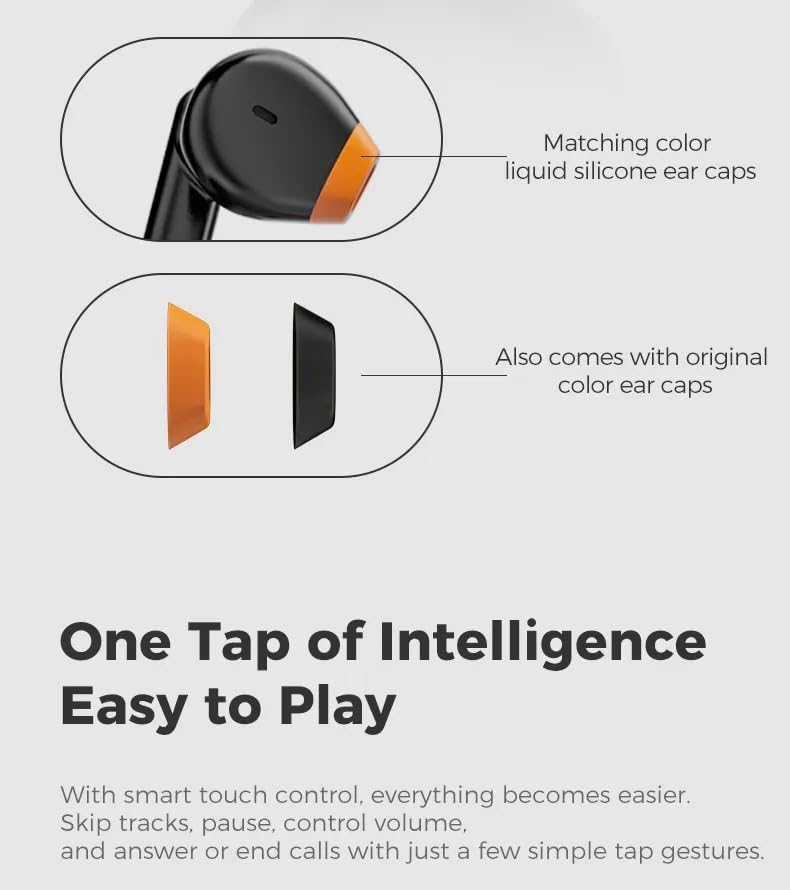
Image: A diagram illustrating the earbud design with matching color liquid silicone ear caps, and showing additional original color ear caps that come with the product.
4. אפערירן די כעדפאָונז
4.1 קלוגע ריר קאָנטראָלס
The Real-Fit F2 earbuds feature intuitive touch controls. Specific tap gestures allow you to manage playback, calls, and other functions:
- שפּיל / פּויזע: איין צאַפּן אויף יעדער עאַרבוד.
- ווייַטער שפּור: צאַפּ צוויי מאָל אויף די רעכטע אויערקנעפּל.
- פֿריִערדיקע שפּור: צאַפּ צוויי מאָל אויף די לינקע אויערקנעפּל.
- ענטפֿערן / סוף רופן: איין צאַפּן אויף יעדער עאַרבוד.
- אָפּוואַרפן רופן: דריקן און האַלטן יעדער עאַרבוד פֿאַר 2 סעקונדעס.
- אַקטאַווייט קול אַססיסטאַנט: טרייפאַך צאַפּן אויף יעדן אויערקנעפּעל.
- טוישן ANC/טראַנספּאַרענץ מאָדע: דריקן און האַלטן די רעכט עאַרבוד פֿאַר 2 סעקונדעס.
4.2 אַקטיוו ראַש קאַנסאַליישאַן (ANC)
The Real-Fit F2 headphones feature Active Noise Cancellation technology to reduce ambient noise. To activate or deactivate ANC, or switch to Transparency Mode (if available), use the touch control gesture mentioned above. ANC is most effective for low-frequency sounds.
4.3 רוף פאַרוואַלטונג
With the built-in microphone, you can easily manage calls:
- צו ענטפֿערן אַ ינקאַמינג רופן, איין צאַפּן אויף יעדער עאַרבוד.
- To end an active call, single tap either earbud.
- צו אפווארפן אן אנקומענדיקן רוף, דריקט און האלט איינע פון די אויערקנעפל פאר 2 סעקונדעס.

Image: Black Real-Fit F2 NC Headphones in their open charging case, positioned next to a smartphone screen showing an active call interface, highlighting the call management feature.
5. וישאַלט
5.1 רייניקונג
- רייניקט רעגולער די אויערקנעפּלעך, ספּעציעל די אויער שפּיץ און טשאַרדזשינג קאָנטאַקטן, מיט אַ ווייכן, טרוקענעם, לינט-פֿרייע שטאָף.
- ניצט נישט קיין שרײַבנדיקע רייניגער, אַלקאָהאָל, אדער כעמישע סאָלווענטן.
- זיכער מאַכן אַז קיין נעץ זאָל נישט אַרייַן אין קיין עפענונגען.
5.2 סטאָרידזש
- ווען נישט אין באַנוץ, שטענדיק האַלטן די אויערן-קנעפּלעך אין זייער טשאַרדזשינג קעסטל צו באַשיצן זיי און האַלטן זיי טשאַרדזשד.
- האַלט די טשאַרדזשינג קעסטל און די אויערקנעפּלעך אין אַ קיל, טרוקן אָרט, אַוועק פון עקסטרעמע טעמפּעראַטורן און דירעקט זונשייַן.
6. טראָובלעשאָאָטינג
If you encounter any issues with your Real-Fit F2 NC Headphones, please refer to the following common solutions:
- קיין קול:
- מאַכן זיכער אַז די עאַרבודז זענען באפוילן.
- קאָנטראָלירט צי די אויערקנעפּלעך זענען ריכטיק צוגעפּאַסט מיט אייער דעווייס.
- אַדזשאַסטירן די באַנד אויף ביידע דיין מיטל און די אויערקנעפּלעך.
- עאַרבודז ניט פּערינג:
- מאַכן זיכער אַז בלועטאָאָטה איז ענייבאַלד אויף דיין מיטל.
- Ensure the earbuds are in pairing mode (flashing LED).
- אויסלעשן און אן די בלועטוט פון אייער דעווייס.
- Try forgetting "Real-Fit F2" from your device's Bluetooth list and re-pairing.
- טשאַרדזשינג ישוז:
- באַשטעטיקן אַז דער טשאַרדזשינג קאַבל איז זיכער פארבונדן צו ביידע דעם קעסטל און די מאַכט מקור.
- זיכער מאַכן אַז די טשאַרדזשינג קאָנטאַקטן אויף די אויערקנעפּלעך און אינעווייניק פון די קעסטל זענען ריין און פריי פון שמוץ.
- פּרוּווט אַ אַנדערש וסב קאַבלע אָדער מאַכט אַדאַפּטער.
- ANC אַרבעט נישט עפֿעקטיוו:
- Ensure the earbuds are properly seated in your ears, forming a good seal.
- Confirm ANC is activated via touch controls.
7. ספּעסאַפאַקיישאַנז
| שטריך | באַשרייַבונג |
|---|---|
| מאָדעל נאָמען | REALFITF2 (F2) |
| קאַנעקטיוויטי טעכנאָלאָגיע | ווירעלעס (בלוטוט 5.3) |
| בלועטאָאָטה קייט | 10 מעטער |
| ראַש קאָנטראָל | אַקטיוו ראַש קאַנסאַליישאַן (ANC) |
| גאַנץ פּלייַטימע | ביז 25 שעה (מיט טשאַרדזשינג קעסטל) |
| מיקראָפאָן | געבויט-אין מיק |
| קאָנטראָל טיפּ | Touch Control, Call Control, Voice Control |
| אויער פּלייסמאַנט | אין אויער |
| מאַטעריאַל | פּלאַסטיק |
| אָפטקייַט ענטפער | 20 KHz |
| קאַמפּאַטאַבאַל דעוויסעס | בלועטאָאָטה-ענייבאַלד דעוויסעס |

Image: An infographic highlighting key specifications and features of the Real-Fit F2, including 13mm titanium-plated composite dome diaphragms, 25 hours total playback, Bluetooth 5.3, and surround stereo sound effects.
8. זיכערקייַט אינפֿאָרמאַציע
- שטעלט נישט אויס די אויערן-קנעפּלעך אדער טשאַרדזשינג קעסטל צו עקסטרעמע טעמפּעראַטורן, הומידיטי, אדער פליסיקייטן.
- Avoid dropping, disassembling, or modifying the product.
- האַלטן אויס פון דערגרייכן פון קינדער און פּעץ.
- פארלענגערט הערן ביי הויכע קולות קען שאָדן צו די הערן. שטעל די קול צו א זיכערן לעוועל.
- ניצט נישט די אויערן-קנעפּלעך אין סיטואַציעס וואו די אוממעגלעכקייט צו הערן אַמביאַנטע קלאַנגען קען זיין געפערלעך (למשל, דרייווינג, וועלאָסיפּעד, גיין אין פאַרקער).