
הקדמה
This manual provides detailed instructions for the safe and efficient operation of your QUANSHENG UV-K5(99) Ham Radio Handheld. Please read this manual thoroughly before using the device to ensure proper functionality and to understand all features and safety precautions.
וואָס איז אין די קעסטל
ביים אויספּאַקן, ביטע באַשטעטיקן אַז אַלע זאכן וואָס זענען ליסטעד אונטן זענען פאַראַן און אין גוטן צושטאַנד:
- Intercom Host (Radio Unit)
- לי-באַטערי
- אַנטענע
- גאַרטל קליפּ
- דעסקטאָפּ טשאַרדזשער
- באַניצער מאַנואַל
- Type-C Direct Charging Line
- Intercom Earphones

Figure 1: Package Contents of the UV-K5(99)
פּראָדוקט איבערview
Familiarize yourself with the various parts and controls of your UV-K5(99) radio:

Figure 2: UV-K5(99) Component Diagram
- אַנטענע: פֿאַר טראַנסמיטינג און ריסיווינג סיגנאַלן.
- Volume/Switch Knob: קאָנטראָלירט מאַכט אויף/אויס און אַודיאָ באַנד.
- Flashlights: Integrated LED for illumination.
- פאַרשטעלן: ווײַזט אינפֿאָרמאַציע וועגן פֿרעקווענץ, קאַנאַל און סטאַטוס.
- העאַדסעט צובינד: Port for connecting external audio accessories.
- PTT קנעפּל (פּוש-טו-רעדן): אַקטיוויזירט טראַנסמיסיע.
- A/B Switch Key: טוישט צווישן אויבערשטע און אונטערשטע אַרויסווייַז פרעקווענצן.
- Side Keys (SideKeys1, SideKeys2): פּראָגראַמירבאַרע פֿונקציע שליסלען.
- סקראָל אַראָפּ: Navigates menus and frequencies.
- Menu and Confirmation Key: גייט אריין אין מעניו און באשטעטיגט אויסוואלן.
- רעדנער: אַודיאָ רעזולטאַט.
סעטאַפּ
1. באַטאַרייע ייַנמאָנטירונג
- זייט זיכער אז די ראַדיאָ איז אויסגעלאָשן.
- גלייכט אויס די באַטעריע פּאַק מיט די גרוווז אויף דער צוריק פון די ראַדיאָ.
- רוקט די באַטאַרייע אַרויף ביז זי קליקט זיכער אין פּלאַץ.
- צו אַראָפּנעמען, דריק דעם אויסלאָז-קנעפּל (אויב פֿאַראַן) און שלעפּ די באַטאַרייע אַראָפּ.
2. אַנטענע אַטאַטשמענט
- שרויפט די אַנטענע אין זייגער ריכטונג אין דעם קאַנעקטאָר אויף דער שפּיץ פֿון ראַדיאָ ביז זי איז פֿינגערפֿעסט. נישט צו פֿעסט ציען.
3. גאַרטל קלעמערל ינסטאַלירונג
- Align the belt clip with the designated slot on the back of the radio.
- Secure the belt clip using the provided screws or by sliding it into place until it locks.
4. ערשטע אויפלאָדונג
Before first use, fully charge the battery. The radio supports two charging methods:
- דעסקטאָפּ טשאַרדזשער: לייגט דעם ראַדיאָ (מיט דער אינסטאַלירטער באַטעריע) אין דער דעסקטאַפּ טשאַרדזשינג וויגעלע. מאַכט זיכער אַז די טשאַרדזשינג קאָנטאַקטן זענען גלייך. די אינדיקאַטאָר ליכט וועט ווייַזן די טשאַרדזשינג סטאַטוס.
- USB-C דירעקט טשאַרדזשינג: Connect the provided USB-C cable to the USB-C port on the battery (or radio, if applicable) and to a compatible USB power source (e.g., power bank, car charger, computer USB port).

Figure 3: Dual Charging Methods
אַפּערייטינג ינסטראַקשאַנז
1. מאַכט אויף/אויס און באַנד קאָנטראָל
Rotate the Volume/Switch Knob clockwise to power on the radio. Continue rotating to increase volume. Rotate counter-clockwise to decrease volume and power off.
2. אָפטקייט און קאַנאַל סעלעקציע
- VFO מאָדע (פרעקווענץ מאָדע): Allows direct frequency input. Use the keypad to enter desired frequencies.
- קאַנאַל מאָדע: Accesses pre-programmed channels. Use the up/down keys or the rotary knob to select channels.
- A/B Switch Key: Press the A/B key to switch between the upper and lower frequency displays, allowing monitoring of two frequencies simultaneously.
3. Full Band Scan & Air Band Reception
The UV-K5(99) supports ultra-wide band reception from 20MHz to 1000MHz. It includes a dedicated AM Air Band mode (108-136MHz) for monitoring aviation communications. Use the scan function to search for active frequencies within the selected band.
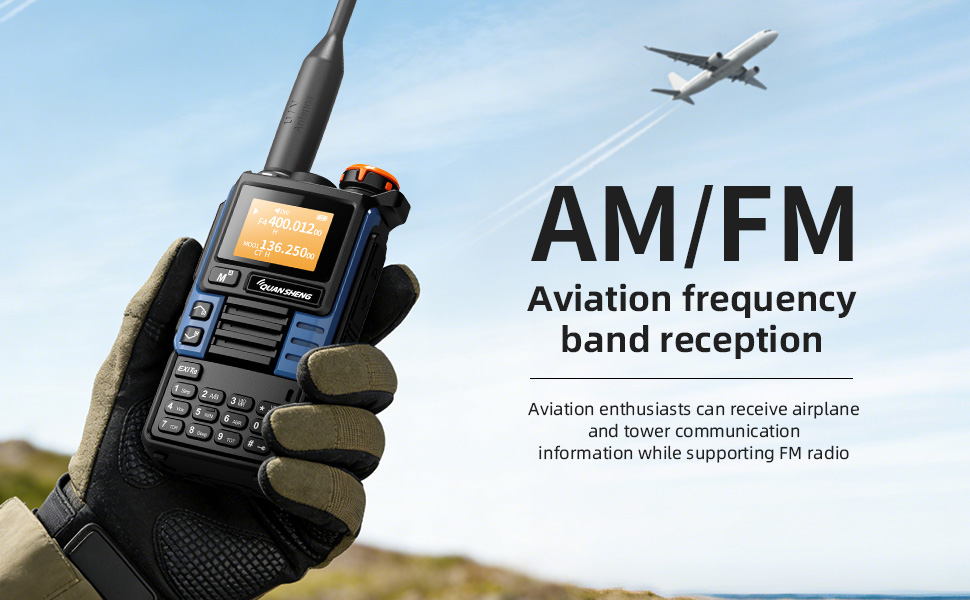
Figure 4: Air Band Reception
4. Wireless Frequency Copy (One-Key Frequency Match)
This feature allows instant detection and synchronization of frequency and CTCSS/DCS tones from other nearby two-way radios without computer programming. Activate this function (typically F+4) and point your radio towards the transmitting device.
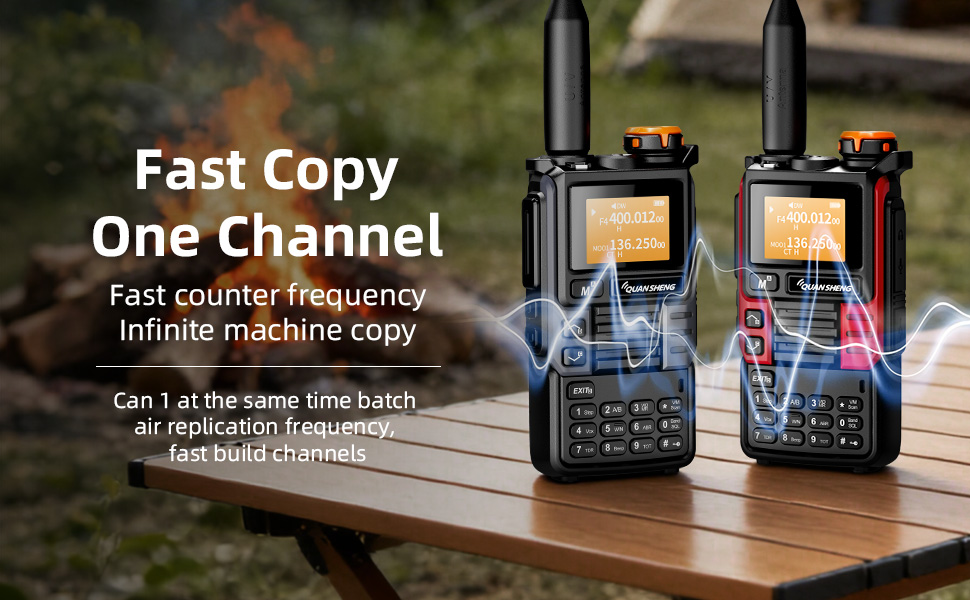
Figure 5: Wireless Frequency Copy in action
5. צווייפאַכיקע וואַך
The Dual Watch feature allows you to monitor two different frequencies simultaneously. If a signal is detected on either frequency, the radio will automatically switch to that frequency for reception.
6. VOX (שטימע-אפערירטע אויסטויש)
VOX enables hands-free operation. When activated, the radio will automatically transmit when it detects your voice, eliminating the need to press the PTT button.
7. DTMF Signaling
DTMF (Dual-Tone Multi-Frequency) signaling can be used for various functions, including repeater access and remote control applications. Refer to the specific DTMF codes for your intended use.
8. פלאַשליכט פונקציע
The built-in high-brightness LED flashlight can be activated for illumination. Refer to the user interface for specific key presses to toggle the flashlight on/off or activate SOS mode.

Figure 6: Strong Light Flashlight
זיכערקייַט פֿעיִקייטן
1. NOAA וועטער וואָרענונג
The UV-K5(99) can receive 10 NOAA weather channels with an auto-scan feature to alert you to severe weather conditions such as storms and tornadoes. This feature is crucial for emergency preparedness.
2. נויטפאַל שרעק
A remote emergency alarm function is integrated for critical situations, providing an audible alert to signal distress.
Performance & Compliance
The UV-K5(99) delivers 5 Watts of high power for clear long-distance communication on VHF (136-174MHz) and UHF (400-470MHz) bands. It supports repeater access for extended range.
Note: FCC ID: XBPUV-K5. Please adhere to local regulations. Transmitting on Amateur Radio frequencies requires a valid FCC license.

Figure 7: Compliance Certifications
וישאַלט
- רייניקונג: ניצן אַ ווייך, דamp א שטאָף צו רייניקן די ראַדיאָ'ס אויסערלעכער זייט. פֿאַרמייַדן שטרענגע כעמיקאַלן אָדער אַברייסיוו רייניגער.
- באַטערי זאָרגן: To prolong battery life, avoid overcharging or fully discharging the battery frequently. Store the radio and battery in a cool, dry place.
- סטאָרידזש: When not in use for extended periods, remove the battery and store the radio in a protective case.
טראָובלעשאָאָטינג
If you encounter issues with your UV-K5(99), please refer to the following common solutions:
- קיין מאַכט: Ensure the battery is correctly installed and fully charged. Check the power knob.
- קען נישט טראַנסמיטירן: Verify that you are on a valid frequency and have the necessary license. Check antenna connection.
- שלעכטע אויפנאמע: Ensure the antenna is securely attached. Check for obstructions or interference. Adjust squelch level.
- ווייַז ישוז: Try restarting the radio. If issues persist, consult the full user manual or contact customer support.
ספּעסאַפאַקיישאַנז
| פּונקט וואָג | 0.2 קילאָגראַמס (7 אונסעס) |
| פּראָדוקט דימענשאַנז | 1.48"D x 1.48"H (3.76 x 3.76 cm) |
| מאָדעל נומער | UV-K5(99) |
| באַטעריז | 1 ליטהיום יאָן באַטאַרייע פארלאנגט (אַרייַנגערעכנט) |
| ווייַז טיפּ | לקד |
| נומער פון טשאַנאַלז | 200 |
| ספּעציעלע שטריך | וועטער אַלערט |
| אָפטקייַט ראַנגע | 20-1000 מהז |
| טאַלקינג קייט מאַקסימום | 10 קילאָמעטער |
| וואַסער קעגנשטעל מדרגה | ניט וואַסער קעגנשטעליק |
וואָראַנטי & שטיצן
The product comes with a 2-year warranty. For technical support, troubleshooting assistance, or warranty claims, please contact QUANSHENG customer service through their official webפּלאַץ אָדער די זיצער ווו די פּראָדוקט איז פּערטשאַסט.