
1. פּראָדוקט איבערview
This manual provides instructions for the CHUNGHOP ASK-STI6220 Voice Remote Control. This remote is designed as a replacement for specific Verizon Stream TV Box models, offering intelligent voice control and responsive button functionality for an enhanced entertainment experience.
2. קאָמפּאַטאַביליטי אינפֿאָרמאַציע
The ASK-STI6220 Voice Remote Control is specifically designed to work ONLY with Verizon Stream TV Box voice remote control V2 ARRIS CCAM21LP1890T2, 2AGOFRC451A, RC451A, STI6220-D315, ASK-STI6220. It is NOT a universal remote for Verizon FiOS and is NOT compatible with Verizon Stream TV JS8V, Verizon FiOS TV 2019 - MG3-R32140B VRC4100 BLE Remote, or any Verizon remote with a "LAST" button. Please ensure your original remote's design and button layout match this model for proper functionality.
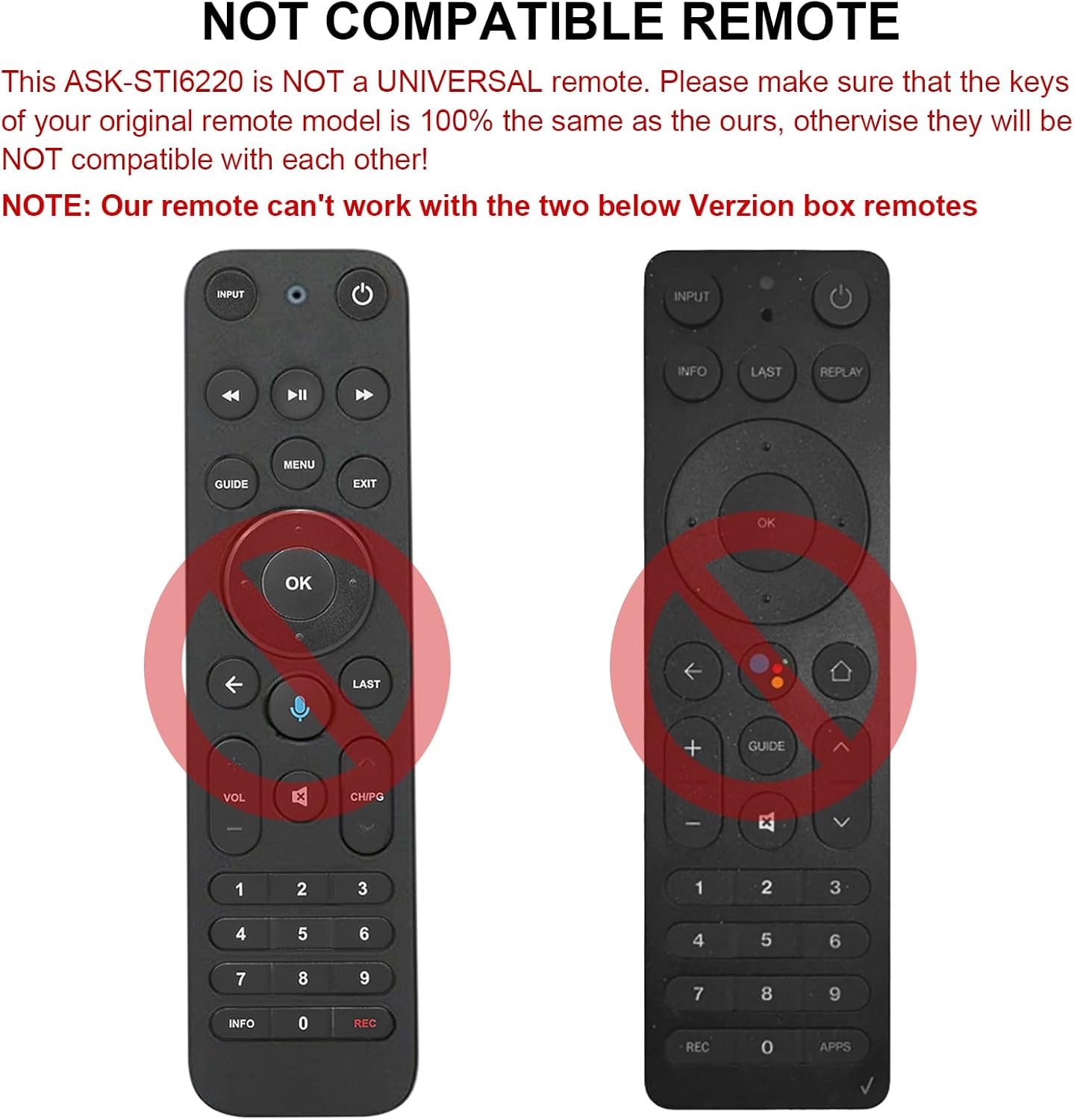
פיגורע 2.1: עקסamples of incompatible Verizon remotes. Ensure your original remote's buttons match the ASK-STI6220 model.

Figure 2.2: The ASK-STI6220 Voice Remote Control, compatible with Verizon Stream TV Box.
3. סעטאַפּ און ייַנמאָנטירונג
3.1 באַטאַרייע ייַנמאָנטירונג
די ווײַטקאָנטראָל דאַרף צוויי AAA באַטעריעס (נישט אַרייַנגערעכנט). צו אינסטאַלירן די באַטעריעס:
- אַראָפּנעמען די באַטאַרייע דעקן פון די צוריק פון די ווייַט קאָנטראָל.
- Insert two AAA batteries, ensuring correct polarity (+ and - ends match the markings inside the compartment).
- פאַרבייַטן די באַטאַרייע דעקן סיקיורלי.

פיגור 3.1: באַטעריע אָפּטייל פֿאַר צוויי AAA באַטעריעס.
Video 3.1: Demonstration of battery installation and initial setup for the ASK-STI6220 Voice Remote.
3.2 פּאָרינג אינסטרוקציעס
To use the voice remote, it must first be paired with your Verizon Stream TV Box. Follow one of the methods below:
- אופֿן 1: דריק די "צוריקקומען"און"אַפּפּס" buttons simultaneously to initiate pairing.
- אופֿן 2: Alternatively, press the "OK"און"היים" buttons simultaneously to initiate pairing.
וויכטיק באַמערקונג:
- A device can only be paired with one voice remote at a time. Before pairing this new remote, please disconnect your old remote control (e.g., by removing its batteries).
- If pairing fails on the first attempt, try turning your TV Box off and then back on. If you continue to experience issues, clear any existing remote settings on your TV Box before attempting to pair again.

Figure 3.2: Visual guide for pairing the remote control.
4. אַפּערייטינג ינסטרוקטיאָנס
4.1 General Button Functions
The ASK-STI6220 remote features a standard layout for easy navigation and control of your Verizon Stream TV Box:
- מאַכט קנעפּל: טוט אן אדער אויסלעשן די טעלעוויזיע באקס.
- אַרייַנשרייַב קנעפּל: Switches input sources on your TV.
- נאַוויגאַציע פּאַד (אַרויף/אַראָפּ/לינקס/רעכטס/גוט): געניצט פֿאַר מעניו נאַוויגאַציע און סעלעקציע.
- באַנד אַרויף / אַראָפּ: אַדזשאַסץ די באַנד.
- קאַנאַל אַרויף / אַראָפּ: ענדערונגען טשאַנאַלז.
- שפּילן/פּויזע, שנעל פאָרויס, צוריקשפּילן: מעדיע פּלייבאַק קאָנטראָלס.
- היים קנעפּל: קערט צוריק צום הויפּט היים עקראַן.
- גייד קנעפּל: גייט אריין אין פּראָגראַם גייד.
- נומערן בלאט (0-9): דירעקט קאַנאַל פּאָזיציע.
- אינפֿאָרמאַציע קנעפּל: ווײַזט פּראָגראַם אינפֿאָרמאַציע.
- APPs Button: Accesses applications.
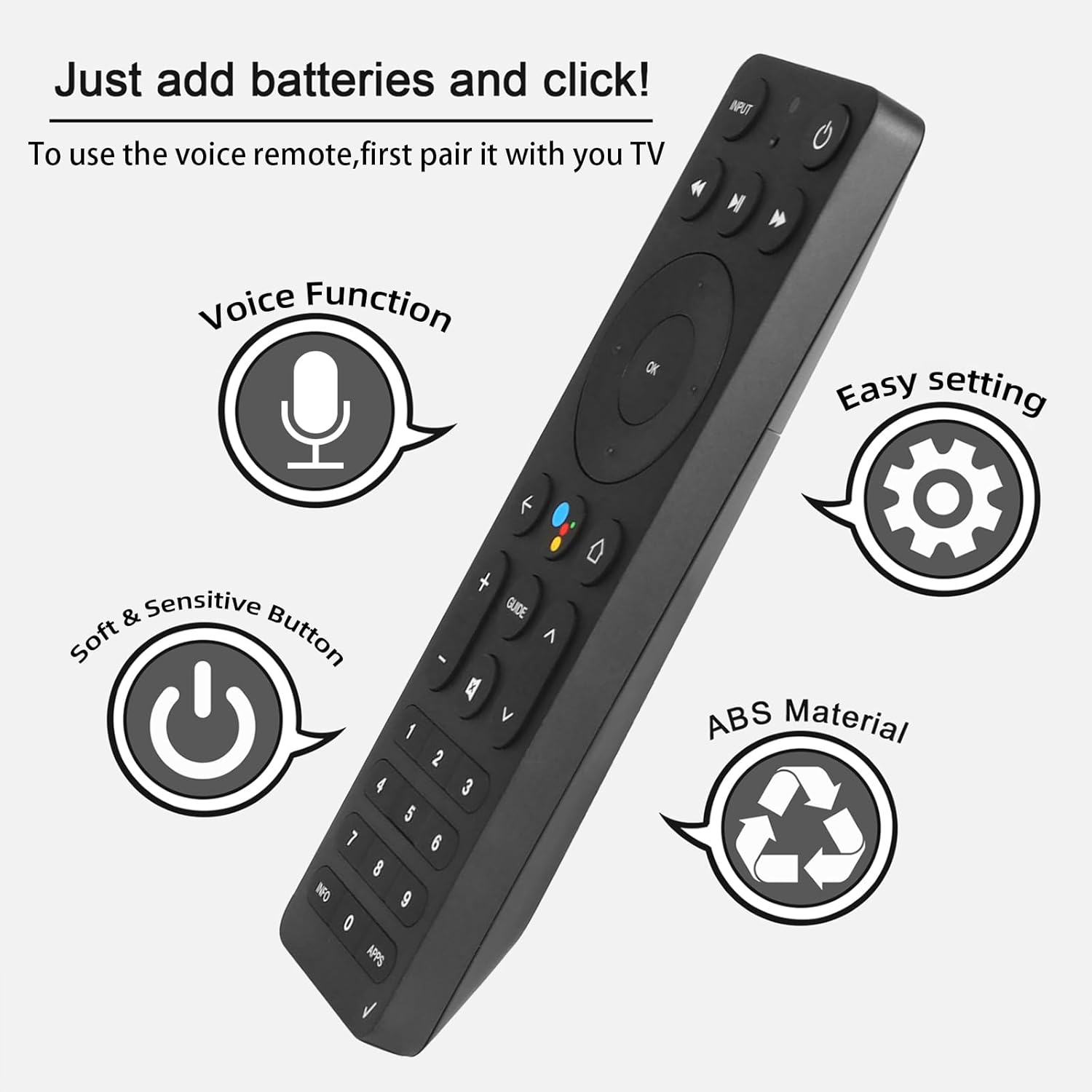
Figure 4.1: Key features and button layout of the remote control.
4.2 אינטעליגענטע שטימע קאנטראל
The remote features an intelligent voice function, allowing you to control your TV Box with voice commands. Press the dedicated voice button (often represented by a microphone icon) and speak clearly into the remote.
Exampלייענען פון קול קאַמאַנדז:
- "Launch channels"
- "Lower the volume"
- "Play action movie"
If the voice function does not work correctly, follow these steps:
- Go to the home page of your TV Box.
- Press the "Settings" button on the remote control.
- Select "Remote Controls and Accessories" and then "Remote Controls."
- Select to add a new remote control and follow the on-screen steps to complete the setup.

Figure 4.2: Using intelligent voice search and control.

Figure 4.3: The remote offers a 0.2-second fast response and a 33-foot transmitting distance for accurate control.
5. וישאַלט
כדי צו זיכער מאַכן די לאַנגלעבעניש און אָפּטימאַלע פאָרשטעלונג פון דיין ווייַט קאָנטראָל:
- Keep the remote clean by wiping it with a soft, dry cloth. Avoid using liquid cleaners or abrasive materials.
- Replace batteries promptly when the remote's responsiveness decreases. Always use fresh AAA batteries.
- פֿאַרמײַדט אויסשטעלן דעם ווײַטקאָנטראָל צו עקסטרעמע טעמפּעראַטורן, דירעקטע זונשײַן, אָדער פֿײַכטקייט.
- לאָזט נישט אַראָפּ דעם ווײַטקאָנטראָל און שטעלט עס נישט אויס צו שטאַרקע קלאַפּן.
6. טראָובלעשאָאָטינג
If you encounter issues with your ASK-STI6220 remote control, please refer to the following common solutions:
- ווייַט ניט ריספּאַנדינג:
- זיכער מאַכן אַז די באַטעריעס זענען ריכטיק אינסטאַלירט און נישט אויסגעשעפּט. אויב נייטיק, פאַרבייטן זיי מיט פרישע AAA באַטעריעס.
- Verify that the remote is properly paired with your Verizon Stream TV Box (refer to Section 3.2).
- זיכער מאַכן אַז עס זענען נישטאָ קיין שטערונגען צווישן דעם ווײַטקאָנטראָל און דער טעלעוויזיע קעסטל.
- פּאָרינג ישוז:
- Confirm that your original remote is disconnected (e.g., by removing its batteries) as only one Bluetooth remote can be paired at a time.
- If pairing fails, try turning the TV Box off and on again, then re-attempt the pairing process.
- Clear existing remote settings on your TV Box before trying to pair again.
- שטימע קאנטראל ארבעט נישט:
- Ensure the remote is successfully paired and the voice function is enabled on your TV Box.
- Follow the voice control setup steps outlined in Section 4.2.
- רעדט קלאָר און גלייך אין דעם מיקראָפאָן פון דער ווייַטקאָנטראָל.
- Remote not compatible with my device:
- This remote is specifically designed for Verizon Stream TV Box voice remote control V2 ARRIS CCAM21LP1890T2, 2AGOFRC451A, RC451A, STI6220-D315, ASK-STI6220. It is not a universal remote. Please verify your device's model number and compare your original remote's buttons with the ASK-STI6220.

Figure 6.1: Common questions and answers regarding the remote's functionality and compatibility.
7. ספּעסאַפאַקיישאַנז
| שטריך | דעטאַל |
|---|---|
| סאָרט | טשונגהאָפּ |
| מאָדעל נומער | ASK-STI6220 |
| קאַמפּאַטאַבאַל דעוויסעס | Verizon Stream TV Box (specific models as listed in Section 2) |
| מאַקס נומער פון שטיצט דעוויסעס | 1 |
| ספּעציעלע שטריך | Ergonomic, Voice Control |
| קאָליר | As Shown (typically black) |
| באַטעריז פארלאנגט | 2 אַאַאַ באַטעריז |
| פּונקט וואָג | 3.2 אונסעס |
| פּעקל דימענשאַנז | 8.19 X 3.54 X 0.94 אינטשעס |
8. וואָראַנטי און שטיצן
For any questions or concerns regarding your CHUNGHOP ASK-STI6220 Voice Remote Control, including pairing, setup, or functionality, please contact the seller directly. Refer to your purchase documentation for specific warranty details, as these may vary.
The manufacturer, CHUNGHOP, is committed to providing support for their products.