
1. וויכטיק סאַפעטי אינסטרוקציעס
ביטע ליינט און פארשטייט אלע זיכערהייט אינסטרוקציעס איידער איר ניצט דעם פראדוקט. האלט דעם מאנואל פאר שפעטערדיגע רעפערענץ.
- שטעלט נישט אויס דעם אַפּאַראַט צו רעגן, פייכטקייט, אדער עקסטרעמע טעמפּעראַטורן.
- פֿאַרמײַדט צו שטעלן דעם אַפּאַראַט לעבן היץ־קוואַלן ווי ראַדיאַטאָרן, היץ־רעגיסטערס, אויוון אָדער אַנדערע אַפּאַראַטן וואָס פּראָדוצירן היץ.
- נאָר נוצן אַטאַטשמאַנץ / אַקסעסעריז ספּעסיפיעד דורך דער פאַבריקאַנט.
- אָפּשטעקן דעם אַפּאַראַט בעשאַס בליץ סטאָרמז אָדער ווען אַניוזד פֿאַר לאַנג פּיריאַדז.
- קאָנטאַקט אַלע קוואַלאַפייד סערוויס פּערסאַנעל. סערוויסינג איז פארלאנגט אויב די אַפּאַראַט איז דאַמידזשד אין קיין וועג.
- זיכער מאַכן אַז עס איז דאָ געהעריקע ווענטילאַציע אַרום דעם אַפּאַראַט. בלאָקירט נישט קיין ווענטילאַציע עפענונגען.
- באַשיצן די מאַכט שנור פון גיין אויף אָדער פּינטשעד.
2. פּעקל אינהאַלט
באַשטעטיקט אַז אַלע זאכן וואָס זענען אויסגערעכנט אונטן זענען אַרייַנגערעכנט אין אייער פּעקל:
- 1x syitren PARON II Record Player
- 1x באַניצער מאַנואַל
- 1x שטויב קאָווער
- 1x 12V AC Power Adapter

3. פּראָדוקט איבערview
Familiarize yourself with the main components of your syitren PARON II Record Player.


4. סעטאַפּ
- ופשליסן די אַפּאַראַט: פֿאָרזיכטיק אַרויסנעמען דעם פּלאַטן שפּילער און אַלע אַקסעסאָריעס פֿון דער פּאַקאַדזשינג.
- Place the Dust Cover: Position the dust cover onto the hinges at the back of the unit.
- פאַרבינדן מאַכט: Plug the 12V AC power adapter into the DC IN port on the back of the record player, then plug the adapter into a wall outlet.
- אַדזשאַסטירן קעגן-געוויכט: The tonearm features an adjustable counterweight. Carefully balance the tonearm so it floats horizontally. Then, rotate the counterweight to the recommended tracking force (refer to cartridge specifications, typically around 2.5g for the AT3600L). This ensures optimal sound quality and prevents record damage.
- אַנטי-סקייטינג אַדזשאַסטמאַנט: The anti-skating system helps prevent the stylus from skipping. Adjust this setting according to the instructions provided with the cartridge or by testing with a blank record.

5. אַפּערייטינג ינסטרוקטיאָנס
5.1 שפּילן אַ וויניל פּלאַטע
- מאַכט אויף: Turn the power knob to switch on the unit.
- אויסקלייַבן גיכקייַט: Choose the appropriate speed (33 or 45 RPM) for your vinyl record using the speed selector switch.
- אָרט רעקאָרד: Carefully place your vinyl record on the platter. If playing a 45 RPM single, use the included adapter.
- הייבן טאָנאַרם: ניצן די טאָנעאַרם הייבן הייבער צו כאַפּן די טאָנעאַרם.
- פּאָזיציע סטיילוס: Gently move the tonearm over the desired starting groove of the record.
- נידעריקער טאָנאַרם: Slowly lower the tonearm using the lift lever. The stylus will make contact with the record and playback will begin.
- סטרויערן באַנד: Use the volume knob to set the desired listening level.
The record player features an auto-stop function that will stop the platter approximately three minutes after the record ends. The tonearm will not auto-return.

5.2 בלועטוט קאָנעקטיוויטי
The syitren PARON II Record Player can receive audio wirelessly from Bluetooth-enabled devices.
- געבן בלועטאָאָטה: Switch the function selector to Bluetooth mode. The indicator light will flash, indicating it's in pairing mode.
- פּאָר דיווייס: On your smartphone, tablet, or other Bluetooth device, enable Bluetooth and search for available devices. Select "syitren PARON II" (or similar name) from the list.
- באַשטעטיקונג: Once paired, the indicator light on the record player will stop flashing and remain solid. You can now stream audio from your device to the record player's built-in speakers.
5.3 עקסטערנע אַודיאָ קאַנעקשאַנז
The unit supports both Aux-in and RCA output for versatile audio connections.
- אַוקס-אין: Connect an external audio source (e.g., MP3 player, CD player) to the AUX IN port using a 3.5mm audio cable. Select AUX mode on the record player to play audio from the connected device.
- RCA רעזולטאַט: Connect the RCA output jacks on the back of the record player to an external amplifier or powered speakers using RCA cables. This allows you to use the record player as a source for a larger audio system.
6. וישאַלט
6.1 רייניקן דעם סטיילוס
A clean stylus ensures optimal sound quality and extends the life of your records. Use a soft brush designed for stylus cleaning, brushing gently from back to front.
6.2 רייניקונג די אַפּאַראַט
Wipe the unit with a soft, dry cloth. For stubborn marks, a slightly damp מען קען ניצן אַ שטאָף, און דערנאָך אַ טרוקענעם שטאָף. פֿאַרמייַדן אַברייסיוו רייניגער אָדער סאָלווענטן.
6.3 Dust Cover Care
The dust cover protects your turntable. Clean it with a soft, lint-free cloth. Avoid harsh chemicals that may scratch or cloud the plastic.
7. טראָובלעשאָאָטינג
אויב איר טרעפט פּראָבלעמען, זעט די פאלגענדע געוויינטלעכע פּראָבלעמען און לייזונגען:
| פּראָבלעם | מעגלעך לייזונג |
|---|---|
| קיין מאַכט | זיכער מאַכן אַז דער מאַכט אַדאַפּטער איז זיכער פארבונדן צו דער אַפּאַראַט און אַ אַרבעטנדיקער מאַכט ווענטיל. |
| קיין געזונט פון ספּיקערז | Check volume level. Ensure correct input mode (Phono, Aux, Bluetooth) is selected. |
| איבערשפּרינגען אָדער פֿאַרדרייען קלאַנג | Clean the record and stylus. Re-adjust the tonearm counterweight and anti-skating. Ensure the record player is on a stable, level surface. |
| בלועטאָאָטה איז נישט פּערינג | Ensure the record player is in Bluetooth pairing mode. Disable and re-enable Bluetooth on your device. Move closer to the record player. |
אויב פראבלעמען בלייבן, ביטע קאנטאקטירט קאסטומער סופארט פאר הילף.
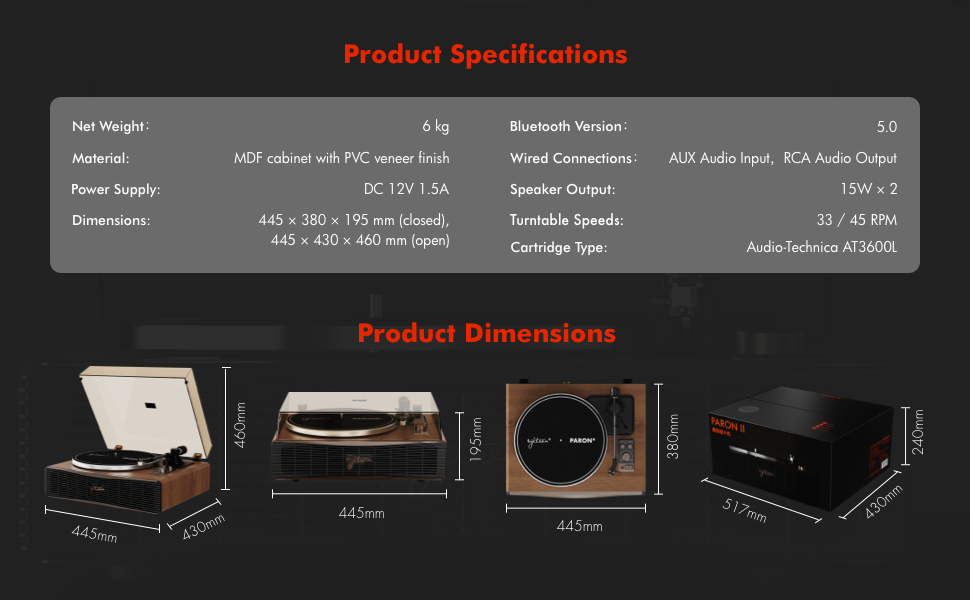
8. ספּעסאַפאַקיישאַנז
| שטריך | דעטאַל |
|---|---|
| מאָדעל נאָמען | PARON II |
| נומער מאָדעל נומער | SN13 |
| פּראָדוקט דימענשאַנז | 17.4 x 14.96 x 7.48 inches (445 x 380 x 195 mm closed) |
| פּונקט וואָג | 16 פונט (6 קג) |
| מאַטעריאַל | MDF cabinet with PVC veneer finish (Wood, Metal, Plastic) |
| טערנטייבאַל ספּידז | 33 1/3, 45 רפּם |
| פּאַטראָן טיפּ | Audio-Technica AT3600L (Magnet-type) |
| בלועטאָאָטה ווערסיע | 5.0 |
| ווייערד קאַנעקשאַנז | AUX Audio Input, RCA Audio Output |
| רעדנער רעזולטאַט | 15W x 2 (Built-in 2.5" woofer and 2" tweeter) |
| מאַכט צושטעלן | דק 12וו 1.5אַ |
| ספּעציעלע פֿעיִקייטן | Adjustable Counterweight, Built-In Speaker, Built-In Bluetooth Receiver, RCA Output, Suspension Shock Absorption System, S5 Motor System |
9. וואָראַנטי און שטיצן
The syitren PARON II Record Player is designed for reliable performance. For warranty information or technical support, please refer to the contact details provided with your purchase documentation or visit the official syitren webפּלאַץ.
ביטע באַהאַלטן אייער קויפן-באַווייַז פֿאַר יעדע וואָראַנטי-פאָדערונג.


