
1. הקדמה
This manual provides detailed instructions for the installation, operation, and maintenance of your UNITOPSCI Double Din Apple CarPlay & Android Auto Car Stereo. Please read this manual thoroughly before using the product to ensure proper functionality and safety.
2. וואָס איז אין דער קעסטל
- 1 x Car Stereo
- 1 x באַקקופּ אַפּאַראַט
- 1 x Remote Control (Battery Not included)
- 1 x Steering Wheel Control (Battery Not included)
- 1 x מאַכט קאַבלע
- 1 x רעדנער קאַבלע
- 1 x באַניצער מאַנואַל
- 1 x מיקראָפאָן
3. שליסל פֿעיִקייטן
- Compatible with Apple CarPlay & Android Auto via USB cable connection.
- 7-inch HD Capacitive Touch Screen for clear visuals and smooth operation.
- Built-in Bluetooth 5.1 for hands-free calling and music streaming.
- FM ראַדיאָ מיט 18 פאָרגעשטעלטע סטאַנציעס.
- Mirror Link function for screen mirroring from smartphones (Android/iOS).
- Includes Backup Camera for safer parking.
- Supports Steering Wheel Control for convenient operation.
- EQ Sound settings (Classic, Pop, Rock, Flat, DSP).
- Multiple playback options: USB, AUX, TF Card input.
- 7 colorful backlight display options.
4. סעטאַפּ און ייַנמאָנטירונג
Proper installation is crucial for optimal performance. It is recommended to have this unit installed by a professional if you are unfamiliar with car audio wiring.
4.1 אַלגעמיינע דראָט דיאַגראַמע
Refer to the following diagram for the general wiring connections of the car stereo. Ensure all connections are secure and correctly matched to your vehicle's wiring harness.

פיגור 1: אַלגעמיינע דראָט דיאַגראַמע
4.2 Backup Camera Wiring
The included backup camera requires specific wiring for proper functionality. Connect the red power cable of the camera to the positive back battery supply and the black cable to the negative battery supply. The yellow video input port of the camera connects to the CAM IN port on the rear of the car radio. Locate the wire labeled "BACK" on the car radio's harness and connect it to the positive power supply (typically the reverse light trigger wire). This ensures the display automatically switches to the reversing image when the car is in reverse gear.

Figure 2: Backup Camera Wiring Diagram
5. אַפּערייטינג ינסטרוקטיאָנס
5.1 עפּל קאַרפּליי און אַנדרויד אויטאָ
Connect your smartphone to the car stereo via a USB cable. The unit will automatically detect and launch Apple CarPlay or Android Auto, allowing you to access navigation, music, calls, and messages directly from the stereo's screen. Voice control functions are supported for hands-free operation.

פיגור 3: קאַרפּליי און אַנדרויד אויטאָ צובינד
5.2 בלועטאָאָטה 5.1
Enable Bluetooth on your smartphone and search for available devices. Select the car stereo from the list to pair. Once connected, you can make and receive hands-free calls and stream audio directly to the stereo. The built-in microphone ensures clear call quality.

Figure 4: Bluetooth Hands-free Calls
5.3 עפעם ראַדיאָ
Access the FM radio function to listen to your favorite stations. The unit supports a radio range of FM 87.5-108.0MHZ and allows you to save up to 18 preset stations for quick access to news, sports, and music.

Figure 5: Stable FM Radio Operation
5.4 שפּיגל לינק
Utilize the Mirror Link function by connecting your smartphone via USB. This feature allows you to mirror your phone's screen content, including videos and navigation maps, directly onto the car stereo's display.

פיגור 6: שפּיגל לינק פונקציאָנאַליטעט
5.5 EQ קלאַנג סעטטינגס
Adjust the audio output to your preference using the built-in EQ sound settings. Choose from predefined modes like Classic, Pop, Rock, Flat, or customize your sound with DSP settings.

Figure 7: Digital Sound Effect Adjustment
5.6 סטירינג ראָד קאָנטראָל
Connect the steering wheel control wires to enable convenient control of the stereo directly from your steering wheel. This allows you to easily switch songs, adjust volume, and manage phone calls without taking your hands off the wheel.

פיגור 8: שטיר-ראד קאנטראל סעטאַפּ
5.7 USB/AUX/TF Card Playback
The unit supports multiple input sources for audio and video playback. Insert a USB drive, TF card, or connect an external device via the AUX input to enjoy your media files.
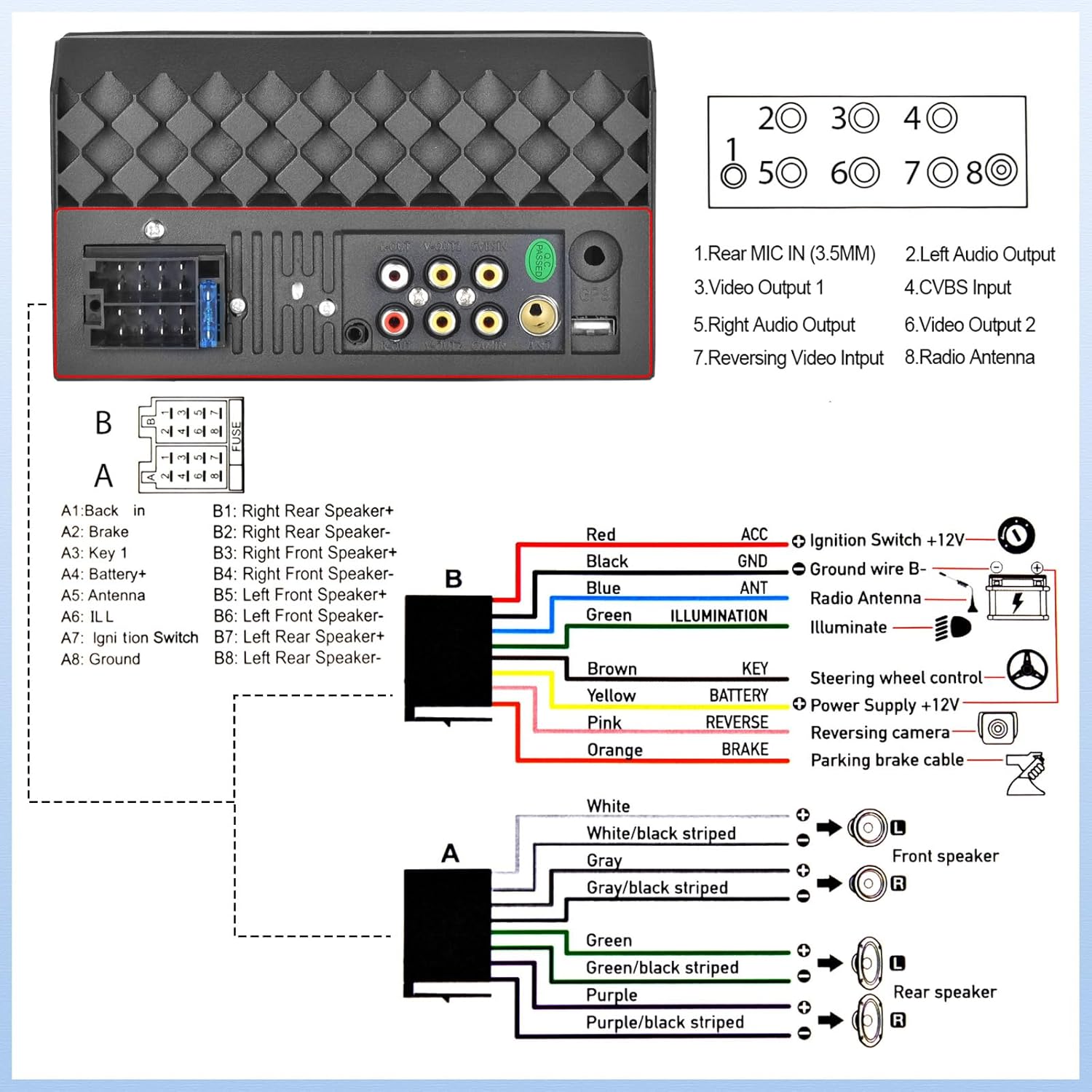
Figure 9: USB/AUX/TF Card Input
6. וישאַלט
כדי צו זיכער מאַכן די לאַנגלעבעדיקייט און אָפּטימאַלע פאָרשטעלונג פון דיין מאַשין סטערעאָ, נאָכפאָלגן די וישאַלט גיידליינז:
- האַלט דעם עקראַן ריין מיט אַ ווייכן, לינט-פֿרייע שטאָף. פֿאַרמייַדט אַברייסיוו רייניגער.
- פאַרזיכערן געהעריק ווענאַליישאַן אַרום די אַפּאַראַט צו פאַרמייַדן אָוווערכיטינג.
- פֿאַרמײַדן אויסצושטעלן דעם אַפּאַראַט צו עקסטרעמע טעמפּעראַטורן אָדער דירעקטער זון פֿאַר פֿאַרלענגערטע פּעריאָדן.
- Regularly check wiring connections for looseness or corrosion.
7. טראָובלעשאָאָטינג
אויב איר טרעפט פּראָבלעמען מיט אייער אויטאָ סטערעאָ, זעט די פאלגענדע געוויינטלעכע פּראָבלעמען און לייזונגען:
- קיין מאַכט: Check all power connections, including the ACC (ignition switch) and B+ (battery) wires. Ensure the fuse is not blown.
- קיין קול: Verify speaker connections are secure and correctly polarized. Check the volume level and EQ settings.
- בלועטאָאָטה קאַנעקטיוויטי ישוז: זיכער מאַכן אַז בלועטוט איז אַקטיווירט אויף ביידע די סטערעאָ און דיין טעלעפאָן. פּרוּווט צו אָפּפּערן און ווידער פּערן די דעוויסעס.
- באַקאַפּ קאַמעראַ ווייַזט נישט: If the camera is powered on but the head unit does not switch to the reversing image, check the trigger wire for the backup camera connection. Ensure it is correctly connected to a positive power supply that activates when reverse gear is engaged.
- ריר סקרין ניט ריספּאַנדאַבאַל: Try resetting the unit (refer to the main unit for a small reset button, if available, or disconnect power briefly).
8. ספּעסאַפאַקיישאַנז
| שטריך | באַשרייַבונג |
|---|---|
| פּראָדוקט דימענשאַנז | 2.48 X 7 X 4 אינטשעס |
| פּונקט וואָג | 1.1 פונט |
| נומער מאָדעל נומער | L2 |
| קאַנעקטיוויטי טעכנאָלאָגיע | בלועטאָאָטה, אַגזיליערי, וסב |
| קאָנטראָללער טיפּ | אַנדרויד |
| ספּעציעלע פֿעיִקייטן | Touchscreen, Backup Camera Input, Android Auto, Built-In Bluetooth, Apple CarPlay |
| קאַמפּאַטאַבאַל דעוויסעס | סמאַרטפאָנע |
| קאַנעקטער טיפּ | וסב 2.0 |
| אַודיאָ רעזולטאַט מאָדע | מאָנאָ |
| אַרומרינגלען סאָונד קאַנאַל קאַנפיגיעריישאַן | 4.0 |
| ווידעא קאָדירונג | ה.264, ה.265 |
| פאַבריקאַנט | UNITOPSCI |
| לאַנד פון אָריגין | כינע |
9. וואָראַנטי און שטיצן
UNITOPSCI is committed to providing high-quality products and satisfactory services. Your product comes with the following support:
- Replacement Available within 24 Months
- 60-days No Worry to Return
- Lifetime After-Sales Consult and Technical Support
- שנעל ענטפער אין 16 שעה
For any inquiries or technical assistance, please contact us at: UNITOPSCI@126.com