
הקדמה
The Strich BT-FP2 is a wireless page turner pedal designed to enhance your musical performance or presentation by providing hands-free control over digital content. This device allows musicians, presenters, and other users to effortlessly navigate through sheet music, lyrics, chords, or presentation slides on their mobile phones, tablets, or computers via Bluetooth connectivity. By eliminating the need to use your hands for page turning, you can maintain focus on your instrument or presentation, ensuring a smooth and uninterrupted experience.
סעטאַפּ
פּעקל אינהאַלט
איידער איר הייבט אן, ביטע זיכער מאכן אז אלע זאכן זענען פאראן אין פעקל:
- Strich BT-FP2 Wireless Page Turner Pedal
- טשאַרדזשינג קאַבלע
טשאַרדזשינג די מיטל
The BT-FP2 pedal features a built-in rechargeable Lithium-ion battery. For optimal performance, fully charge the device before its first use.
- Connect the provided charging cable to the charging port on the pedal.
- Connect the other end of the charging cable to a standard USB power adapter (not included) or a computer's USB port.
- די טשאַרדזשינג אינדיקאַטאָר ליכט וועט זיך אָנצינדן. אַמאָל גאָר אָנגעלאָדן, קען די ליכט טוישן קאָליר אָדער זיך אויסלעשן, לויטן מאָדעל.
- א פולע אָפּצאָל גיט ביז 20 שעה פון קעסיידערדיק נוצן.
פּערינג מיט דיין מיטל
The Strich BT-FP2 uses Bluetooth for wireless connectivity with your mobile phone, tablet, or computer. It is compatible with both Apple iOS and Android platforms.
- Ensure the BT-FP2 pedal is charged and powered on. The power switch is typically located on the central unit.
- On your mobile device or computer, navigate to the Bluetooth settings.
- געבן בלועטאָאָטה און זוכן פֿאַר בנימצא דעוויסעס.
- Select "BT-FP2" from the list of discovered devices to initiate the pairing process.
- Once paired, the device's Bluetooth indicator light will confirm a successful connection. The operating range is up to 10 meters (33 feet).

פיגורע 1: פראָנט view of the Strich BT-FP2 pedal, showing the two foot pedals and the central control panel with various buttons and indicator lights. This view is useful for identifying the power switch and pairing buttons.
אַפּערייטינג ינסטראַקשאַנז
יקערדיק פאַנגקשאַנז
The BT-FP2 pedal features two foot pedals, allowing for intuitive control of your digital content.
- לינקס פּעדאַל: Typically used for moving backward (e.g., previous page, previous slide).
- רעכט פּעדאַל: Typically used for moving forward (e.g., next page, next slide).
- מאָדע קנעפּלעך: The central control panel includes buttons to switch between different operating modes, which may emulate various keyboard commands (e.g., page up/down, left/right arrow keys). Refer to your application's settings for optimal configuration.
אַפּפּליקאַטיאָן קאָמפּאַטיביליטי
The pedal is compatible with a wide range of applications that support external keyboard or Bluetooth input for navigation. Supported software includes, but is not limited to, GarageBand and CAKEWALK. For other applications, check their settings for options to assign keyboard shortcuts to page turning or navigation functions.

פיגורע 2: The Strich BT-FP2 pedal shown in a usage scenario, connected to a device via a red cable (likely for charging or wired connection, though primarily wireless). This image illustrates the pedal's compact design and how it might appear during use.

פיגורע 3: אַ נאָענט-אַרויף view of a foot pressing one of the pedals on the Strich BT-FP2. This demonstrates the hands-free operation and the ergonomic design for foot control, highlighting its practical application during a performance.
וישאַלט
Proper care and maintenance will extend the life of your Strich BT-FP2 pedal.
- רייניקונג: Use a soft, dry cloth to clean the surface of the pedal. Avoid using abrasive cleaners or solvents, as they may damage the finish.
- סטאָרידזש: האַלט דעם פּעדאַל אין אַ קיל, טרוקן אָרט אַוועק פון דירעקט זונשייַן און עקסטרעמע טעמפּעראַטורן.
- באַטערי זאָרגן: To maintain battery health, avoid fully discharging the battery frequently. If storing for an extended period, charge the battery to approximately 50% every few months.
- וואַסער ויסשטעלן: This device is not waterproof. Avoid exposure to liquids to prevent damage.
טראָובלעשאָאָטינג
If you encounter issues with your Strich BT-FP2 pedal, refer to the following common problems and solutions:
- די מיטל איז נישט פּאַוערינג:
- Ensure the battery is charged. Connect the charging cable and allow it to charge for at least 30 minutes.
- באַשטעטיקן אַז דער מאַכט סוויטש איז אין דער 'ON' פּאָזיציע.
- נישט מעגלעך צו פארבינדן דורך בלוטוט:
- Make sure the pedal is powered on and within the 10-meter range of your device.
- Turn off and on Bluetooth on your mobile device or computer.
- פארגעסט דעם דעווייס פון אייערע בלועטוט סעטינגס און פרובירט נאכאמאל צו פארבינדן.
- Ensure no other devices are actively connected to the pedal.
- Pedal not responding in application:
- Check if the pedal is successfully paired with your device.
- Verify the application settings to ensure it supports external input or keyboard shortcuts for navigation.
- Try switching the operating mode on the pedal using the central buttons to see if a different mode is compatible with your application.
- Restart the application and/or your mobile device.
- קורץ באַטאַרייע לעבן:
- פאַרזיכערן די מיטל איז גאָר באפוילן איידער נוצן.
- Battery life can vary based on usage and environmental conditions.
- If the issue persists, the battery may need replacement (contact support).
ספּעסאַפאַקיישאַנז
Detailed technical specifications for the Strich BT-FP2 Wireless Page Turner Pedal:
| שטריך | דעטאַל |
|---|---|
| מאָדעל נומער | BT-FP2 |
| קאַנעקטיוויטי טעכנאָלאָגיע | בלועטאָאָטה |
| קאַמפּאַטאַבאַל דעוויסעס | פּיסי, לאַפּטאָפּ, סמאַרטפאָון, טאַבלעט |
| שטיצט ווייכווארג | GarageBand, CAKEWALK (and others supporting keyboard input) |
| נומער פון שליסלען/פּעדאַלן | 2 |
| באַטערי טיפּ | 1 ליטיום-יאָן (אַרייַנגערעכנט) |
| באַטערי לעבן | אַרויף צו 20 שעה |
| ווירעלעסס ראַנגע | אַרויף צו 10 מעטער |
| פּונקט וואָג | 420 ג |
| פּעקל דימענשאַנז | 21.3 X 19.2 X 4.2 סענטימעטער |
| ספּעציעלע שטריך | Compact, Portable |
| פאַבריקאַנט | Strich |
| לאַנד פון אָריגין | כינע |
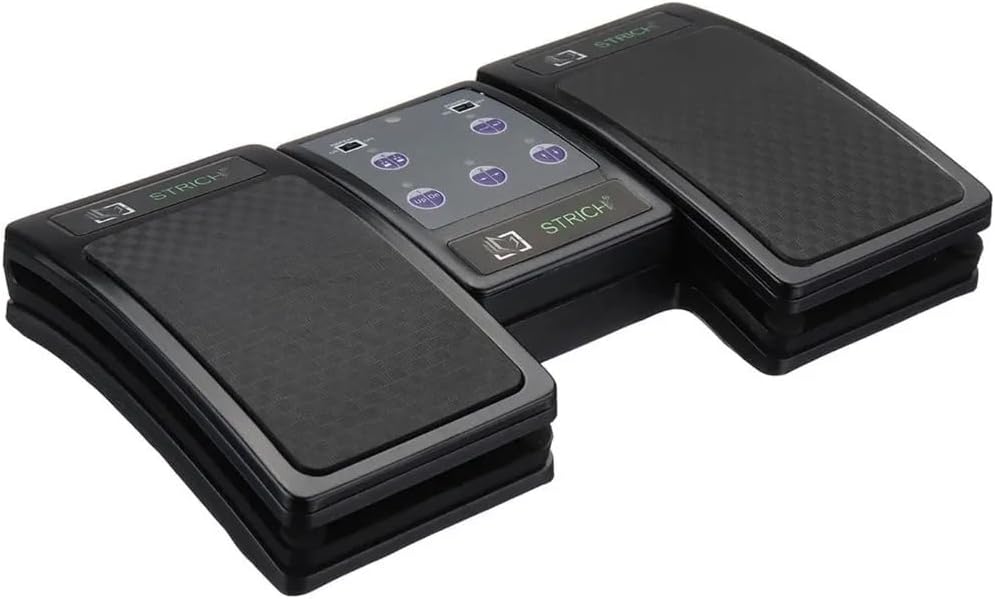
פיגורע 4: An angled top-down view of the Strich BT-FP2 pedal, showcasing its overall design and footprint. This image provides a comprehensive look at the product's physical characteristics.
וואָראַנטי און שטיצן
For warranty information or technical support, please refer to the documentation provided with your purchase or contact the retailer/manufacturer directly. Keep your proof of purchase for any warranty claims.