
1. הקדמה
The Black Shark Lucifer T7 TWS Gaming Earbuds (Model: BS-T7) are designed to provide an immersive audio experience for both gaming and music. Featuring advanced Bluetooth 5.3 technology, these earbuds offer lightning-fast transmission speeds and low latency, ensuring a responsive and stable connection. With 10mm drivers for powerful bass, Environmental Noise Cancellation (ENC) for clear calls, and smart touch controls, the Lucifer T7 earbuds are built for performance and convenience. They also boast IPX5 water resistance and dynamic lighting effects, enhancing your overall user experience.

Figure 1: Black Shark Lucifer T7 TWS Gaming Earbuds in their open charging case.
2. וואָס איז אין דער קעסטל
ביטע קאָנטראָלירט די אינהאַלט פון דער פּאַקעט ווען איר נעמט עס אויס, כּדי צו זיכער מאַכן אַז אַלע זאַכן זענען דאָרט:
- Black Shark Lucifer T7 TWS Gaming Earbuds (Left and Right)
- ווירעלעסס טשאַרדזשינג קאַסע
- באַניצער מאַנואַל (דעם דאָקומענט)
- אויער קישן (פאַרשידענע גרייסן)
- Charging Cable (USB-C) - (Assumed, not explicitly listed but standard for TWS earbuds)

Figure 2: Black Shark Lucifer T7 TWS Gaming Earbuds and their charging case.
3. סעטאַפּ
3.1 אויפלאָדן די אויערקנעפּלעך און קעסטל
פארן ערשטן באַנוץ, לאָדן די אויערקנעפּלעך און די טשאַרדזשינג קעסטל גאָר אויף.
- לייגט די אויערקנעפּלעך אין דעם טשאַרדזשינג קעסטל. מאַכט זיכער אַז זיי זענען ריכטיק אַרײַנגעזעצט אין זייערע ריספּעקטיווע סלאָץ.
- פאַרבינדן די טשאַרדזשינג פאַל צו אַ מאַכט מקור מיט די צוגעשטעלט וסב-C קאַבלע.
- The LED indicators on the case will illuminate to show charging status. A full charge is indicated when all LEDs are solid.
די אויערקנעפּלעך פאָרשלאָגן ביז 23 שעה פון גאַנץ שפּיל צייט מיט די טשאַרדזשינג קעסטל.
3.2 פּערינג מיט אַ מיטל
די אויערקנעפּלעך נוצן בלועטוט 5.3 פֿאַר אַ סטאַביל און עפֿעקטיוו פֿאַרבינדונג.
- עפֿנט דעם טשאַרדזשינג קעסטל. די אויערקנעפּלעך וועלן אויטאָמאַטיש אַרײַן אין פּערינג מאָדע, וואָס ווערט אָנגעוויזן דורך בלינקנדיקע LED ליכטלעך אויף די אויערקנעפּלעך.
- אויף אייער דעווייס (סמאַרטפאָן, טאַבלעט, לאַפּטאָפּ, אאז"וו), גייט צו די בלועטוט סעטטינגס.
- זוכן פֿאַר available devices and select "Black Shark Lucifer T7" from the list.
- Once connected, the earbud LEDs will stop flashing.
- אויב די פּאָרינג פיילז, פאַרמאַכט דעם קעסטל, וואַרט אַ פּאָר סעקונדעס, און איבערחזר די טריט.
3.3 צופּאַסן די אויערקנעפּלעך
For optimal sound quality and comfort, choose the ear cushions that best fit your ears. Gently insert the earbuds into your ear canal and twist slightly to secure them.
4. אַפּערייטינג ינסטרוקטיאָנס
4.1 מאַכט אויף / אַוועק
- מאַכט אויף: עפֿענען די טשאַרדזשינג פאַל, און די עאַרבודז וועט אויטאָמאַטיש מאַכט אויף.
- מאַכט אַוועק: לייגט די אויערקנעפּלעך צוריק אין די טשאַרדזשינג קעסטל און מאַכט צו דעם דעקל. זיי וועלן זיך אויטאָמאַטיש אויסלעשן און אָנהייבן טשאַרדזשינג.
4.2 קלוגע ריר קאָנטראָלס
The Black Shark Lucifer T7 earbuds feature intuitive touch controls on each earbud. The specific functions are as follows:
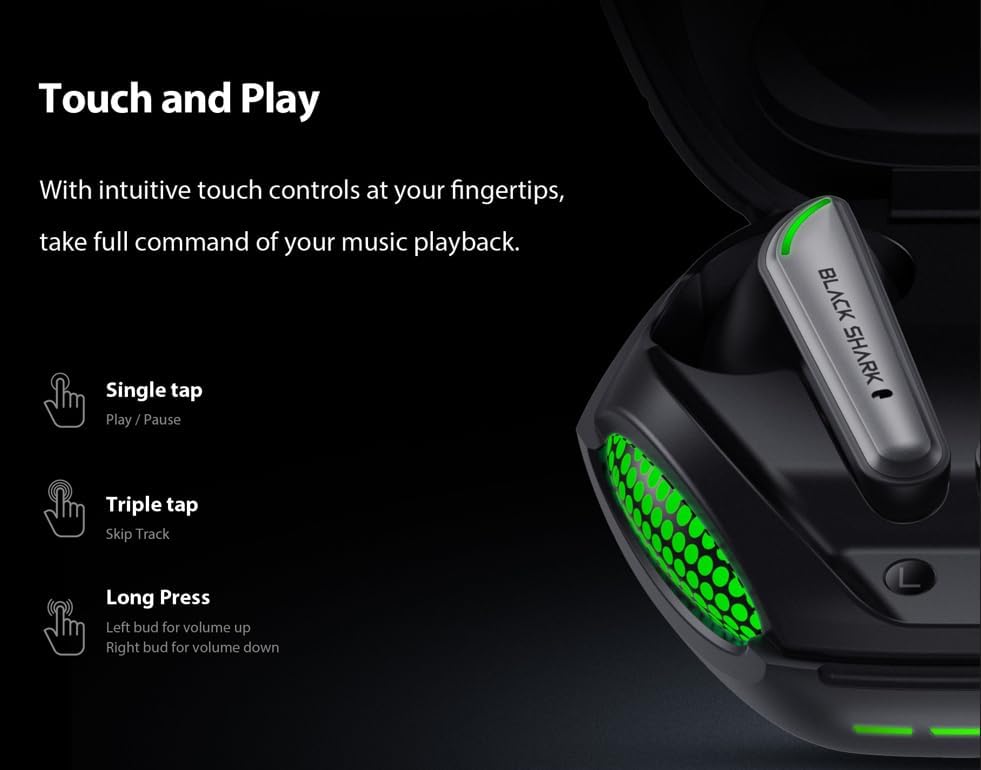
Figure 3: Smart Touch Controls Overview.
- איין טאַפּ: שפּיל / פּויזע מוזיק.
- דרייַיק טאַפּ: האָפּקען צו דער ווייַטער שפּור.
- לאַנג דריקן (לינקע אויערקנעפּל): באַנד אַרויף.
- לאַנג דריקן (רעכטע אויערקנעפּל): באַנד אַראָפּ.
- ענטפֿערן / סאָף רופט: איין צאַפּן אויף יעדער עאַרבוד.
- רידזשעקטינג רופט: לאַנג דריקן אויף יעדן אויערקנעפּעל.
- אַקטאַווייטינג קול אַססיסטאַנט: טאָפּל צאַפּן אויף יעדער עאַרבוד.
4.3 Game and Music Dual Mode
The earbuds support a dual mode for optimized audio performance in both gaming and music listening. Switch between modes by performing a specific touch gesture (e.g., quadruple tap or specific long press combination). Refer to the quick start guide included in your package for the exact gesture to toggle between game mode (low latency) and music mode (high-fidelity audio).
4.4 סביבה ראַש קאַנסאַליישאַן (ENC) פֿאַר רופן
The built-in ENC technology helps reduce background noise during calls, ensuring your voice is clear and distinct to the person on the other end. This feature is automatically active during phone calls.

Figure 4: Environmental Noise Cancellation for clear communication.
5. וישאַלט
5.1 רייניקונג
- רייניקט רעגולער די אויערקנעפּלעך, ספּעציעל די אויער שפּיץ און טשאַרדזשינג קאָנטאַקטן, מיט אַ ווייכן, טרוקענעם, לינט-פֿרייע שטאָף.
- ניצט נישט קיין שרײַבנדיקע רייניגער, אַלקאָהאָל, אדער כעמישע סאָלווענטן.
- זיכער מאַכן אַז קיין נעץ זאָל נישט אַרייַן אין קיין עפענונגען.
5.2 וואַסער קעגנשטעל (IPX5)
The Black Shark Lucifer T7 earbuds are rated IPX5 water resistant, meaning they can withstand low-pressure water jets from any direction. This makes them suitable for workouts and light rain. However, they are not designed for swimming or submersion in water. Do not charge the earbuds if they are wet.
5.3 סטאָרידזש
ווען נישט אין באַנוץ, לייגט די אויערן-קנעפּלעך אין זייער טשאַרדזשינג קעסטל צו באַשיצן זיי און האַלטן זיי טשאַרדזשד. לייגט די קעסטל אין אַ קיל, טרוקן אָרט אַוועק פון עקסטרעמע טעמפּעראַטורן.
6. טראָובלעשאָאָטינג
6.1 אויערקנעפּלעך נישט פּערינג
- מאַכן זיכער אַז ביידע עאַרבודז זענען באפוילן.
- Place both earbuds back into the charging case, close the lid, and then open it again to re-enter pairing mode.
- אויסלעשן און אן די בלועטוט פון אייער דעווייס.
- Forget "Black Shark Lucifer T7" from your device's Bluetooth list and try pairing again.
- Ensure the earbuds are within the 10-meter wireless range of your device.
6.2 קיין קלאַנג אָדער נידעריקע באַנד
- Check the volume level on both your device and the earbuds (using long press controls).
- זיכער מאַכן אַז די אויערקנעפּלעך זענען ריכטיק פֿאַרבונדן צו דיין מיטל.
- רייניקט יעדן שמוץ פון די אויערקנעפל רעדנערס און אויער עצות.
- פרובירט צו שפּילן אַודיאָ פֿון אַן אַנדער אַפּליקאַציע אָדער מיטל.
6.3 טשאַרדזשינג ישוז
- באַשטעטיקן אַז דער טשאַרדזשינג קאַבל איז זיכער פארבונדן צו ביידע דעם קעסטל און די מאַכט מקור.
- פרובירט אן אנדערן USB-C קאבל און פאוער אדאפטער.
- זיכער מאַכן אַז די טשאַרדזשינג קאָנטאַקטן אויף די אויערקנעפּלעך און אינעווייניק פון די קעסטל זענען ריין און פריי פון שטערונגען.
- If the earbuds are wet, dry them completely before attempting to charge.
6.4 ריר קאָנטראָלס רעאַגירן נישט
- זייט זיכער אז אייערע פינגער זענען ריין און טרוקן ווען איר ניצט די ריר קאנטראלס.
- Try restarting the earbuds by placing them in the case and closing the lid for a few seconds.
7. ספּעסאַפאַקיישאַנז
| מאָדעל נאָמען | Black Shark Lucifer T7 |
| מאָדעל נומער | בס-ט 7 |
| קאַנעקטיוויטי | בלועטאָאָטה 5.3 |
| ווירעלעסס ראַנגע | אַרויף צו 10 מעטער (33 פֿיס) |
| אַודיאָ דריווערס | 10 מם דינאַמיש דריווערס |
| אַודיאָ לייטאַנס | 65 מיליסעקאַנדז |
| ראַש קאָנטראָל | Environmental Noise Cancellation (ENC) for calls |
| וואַסער קעגנשטעל | IPX5 |
| Playtime (Total with Case) | אַרויף צו 23 שעה |
| קאָנטראָל מעטאָד | ריר |
| דימענסיעס (קאַסע) | 3.5 X 3.5 X 1.54 אינטשעס (בעערעך) |
| וואָג | 4.16 אונסעס (אומגעפער) |
| מאַטעריאַל | פּלאַסטיק |
| קאַמפּאַטאַבאַל דעוויסעס | Cellphones, Gaming Consoles, Laptops, Tablets, iPhone |

Figure 5: Key features of the Black Shark Lucifer T7.
8. פּראָדוקט איבערview ווידעא
קוקט דעם אפיציעלן ווידעא פאר א וויזועלע איבערבליקview of the Black Shark Lucifer T7 Gaming Earbuds, highlighting their design and key functionalities.
ווידעא 1: אפיציעל איבערview of the Black Shark Lucifer T7 Gaming Earbuds.
9. וואָראַנטי און שטיצן
For detailed warranty information and customer support, please refer to the official Black Shark webזייטל אדער קאנטאקט זייער קאסטומער סערוויס גלייך. האלט אייער קויף קוויטל פאר גאראנטיע טענות.
פאַבריקאַנט: שווארצע שאַרק
בראַנד קראָם: Black Shark Store on Amazon