
1. פּראָדוקט איבערview
This document provides essential instructions for the installation, operation, and maintenance of your new wangpeng cooling fan. This fan is designed to replace the original cooling fan in compatible MECHREVO F1 and GPU series laptops, ensuring optimal thermal performance.
- High-quality replacement cooling fan.
- Designed for specific laptop models to ensure proper fit and function.
- Aids in maintaining optimal laptop operating temperatures.
2. קאַמפּאַטאַבילאַטי
This cooling fan is specifically compatible with the following laptop models and fan part numbers:
- MECHREVO F1 Series Laptops
- GPU Cooling Fan THER7PH4TX-1411
- GPU Cooling Fan PH4TUX1
- GPU Cooling Fan EG50050S1-1C180-S9A Series Laptops
Important: Please verify your laptop's model and the existing fan's part number against the compatibility list before proceeding with installation.
3. זיכערקייַט אינפֿאָרמאַציע
Always observe the following safety precautions when handling and installing electronic components:
- דיסקאַנעקט מאַכט: Before beginning any installation, ensure your laptop is completely powered off and disconnected from the AC adapter. Remove the battery if possible.
- סטאַטיק עלעקטרע: טראָגט אַן אַנטי-סטאַטישן האַנטגעלענק-רימען אָדער רירט אָפט אָן אַן געערדטן מעטאַלנעם אָביעקט צו אָפּלאָדן סטאַטישע עלעקטריע, וואָס קען שעדיקן סענסיטיווע עלעקטראָנישע קאָמפּאָנענטן.
- מכשירים: Use appropriate tools for laptop disassembly (e.g., small Phillips head screwdrivers).
- שעפּן מיט זאָרג: Avoid touching the fan blades or electrical connectors directly.
- פאַכמאַן ינסטאַלירונג: אויב איר זענט נישט זיכער וועגן קיין שריט, זוכט הילף פון אַ קוואַליפֿיצירטן טעכניקער.
4. פּעקל אינהאַלט
דער פּעקל זאָל אַנטהאַלטן די פאלגענדע זאַך:
- 1 x wangpeng Cooling Fan (Model: FAOT23101914572860)
5. ינסטאַללאַטיאָן גייד
Follow these general steps to replace your laptop's cooling fan. Specific steps may vary slightly depending on your laptop model. Refer to your laptop's service manual for detailed instructions if available.
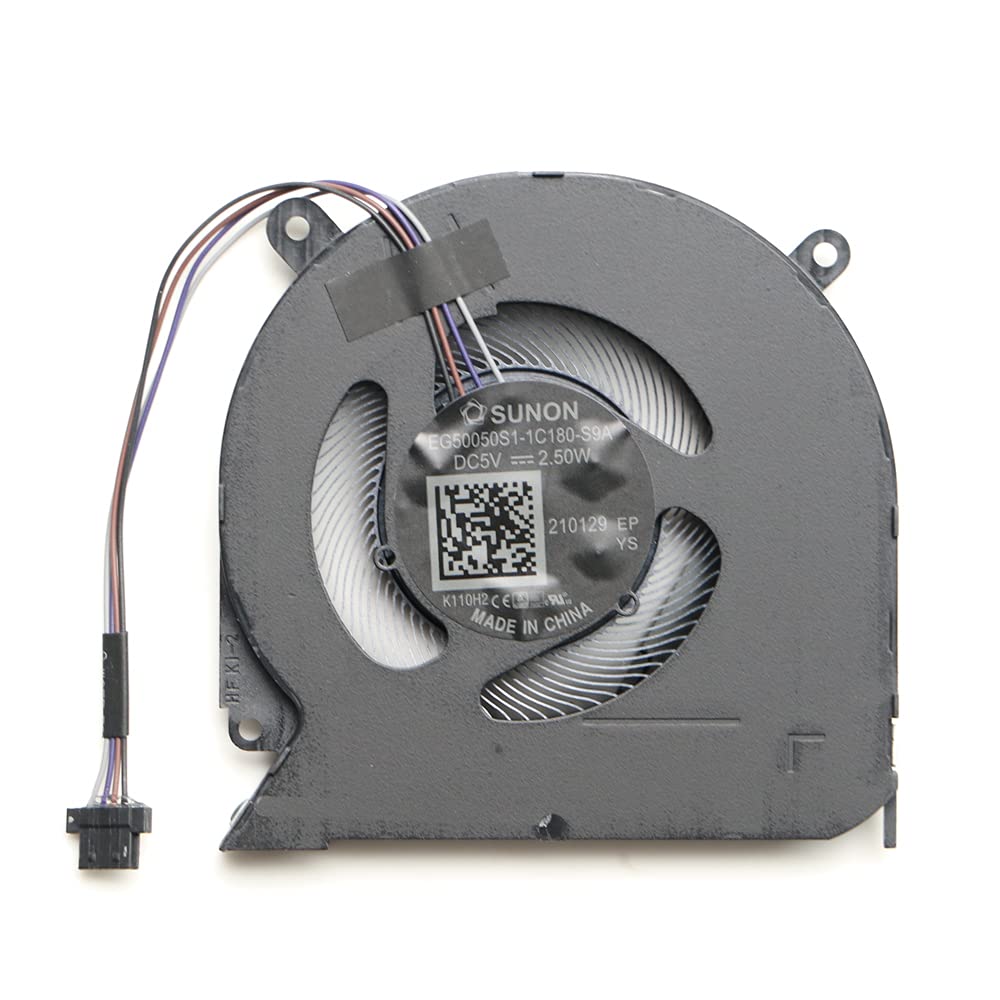
Image 5.1: The wangpeng cooling fan, showing its compact design and connector. This fan is a direct replacement for compatible MECHREVO F1 and GPU laptop models, designed to restore efficient cooling.
- צוגרייטן דעם לאַפּטאָפּ: Power off your laptop completely, disconnect the AC adapter, and remove the battery.
- Access the Fan: Carefully open the laptop's bottom cover. This usually involves unscrewing several small screws. Some models may require removing the keyboard or other components to access the fan.
- Disconnect Old Fan: Locate the existing cooling fan. Gently disconnect its power cable from the motherboard.
- אַראָפּנעמען אַלטן ווענטילאַטאָר: Unscrew the screws holding the old fan in place. Carefully lift and remove the old fan. Note the routing of any cables.
- ריינע געגנט: Use compressed air or a soft brush to clean any dust from the heatsink and surrounding areas. If thermal paste is present on the CPU/GPU heatsink, clean it and apply new thermal paste if necessary (not included).
- Install New Fan: Place the new wangpeng cooling fan into position, aligning it with the screw holes. Secure it with the screws removed earlier.
- Connect New Fan: Carefully connect the new fan's power cable to the corresponding connector on the motherboard. Ensure it is seated firmly.
- צוריקשטעלן דעם לאַפּטאָפּ: Carefully reassemble the laptop, ensuring all cables are properly routed and all screws are tightened.
- טעסט פאַנגקשאַנאַליטי: Reconnect the battery and AC adapter. Power on the laptop and verify that the new fan spins correctly and quietly. Monitor temperatures to ensure proper cooling.
6. אַפּערייטינג ינסטרוקטיאָנס
Once installed, the cooling fan operates automatically, controlled by your laptop's system to regulate internal temperatures. No manual operation is required.
- The fan will activate and adjust its speed based on the thermal load of the CPU and GPU.
- Ensure that the laptop's vents are not obstructed to allow for proper airflow.
7. וישאַלט
Regular maintenance helps prolong the life of your cooling fan and maintain optimal laptop performance:
- באַזייַטיקונג פון שטויב: Periodically use compressed air to clear dust from the laptop's air vents and, if comfortable, from the fan blades themselves (after opening the laptop).
- ויסמיידן אַבסטראַקשאַנז: Do not place your laptop on soft surfaces (like beds or couches) that can block airflow to the vents.
- פאַכמאַן רייניקונג: Consider professional cleaning every 1-2 years, especially if you notice increased fan noise or higher operating temperatures.
8. טראָובלעשאָאָטינג
| פּראָבלעם | מעגלעך סיבה | לייזונג |
|---|---|---|
| Fan not spinning after installation. | Fan cable not properly connected. Incorrect fan model. Fan is faulty. | Ensure the fan cable is securely connected to the motherboard. באַשטעטיקן די קאָמפּאַטאַבילאַטי מיט דיין לאַפּטאַפּ מאָדעל. Contact support if the fan is confirmed faulty. |
| Laptop overheating. | Poor thermal paste application. Obstructed vents. Fan not spinning at adequate speed. | Reapply thermal paste to CPU/GPU if necessary. Ensure vents are clear of dust and obstructions. Check fan operation; if it's not spinning, refer to the above solution. |
| Unusual noise from the fan. | שטויב אָנקלייַבונג. פען בליידז שלאָגן אַ שטערונג. Faulty fan bearing. | Clean the fan and surrounding area. Recheck installation to ensure no cables or components are interfering with the fan blades. If noise persists, the fan may be faulty; contact support. |
9. ספּעסאַפאַקיישאַנז
| סאָרט | wangpeng |
| מאָדעל נומער | FAOT23101914572860 |
| קאַמפּאַטאַבאַל דעוויסעס | Laptop (MECHREVO F1 & GPU Cooling Fan THER7PH4TX-1411 PH4TUX1 EG50050S1-1C180-S9A Series) |
| נומער פון זאכן | 1 |
| פאַבריקאַנט | wangpeng |
| ASIN | B0CLRW9V7Q |
| GTIN/UPC | 615431825841 |
10. וואָראַנטי אינפֿאָרמאַציע
This wangpeng cooling fan comes with a 3-חודש וואָראַנטי from the date of purchase. This warranty covers manufacturing defects. It does not cover damage caused by improper installation, misuse, accidents, or unauthorized modifications.
ביטע האַלטן דיין דערווייַז פון קויפן פֿאַר וואָראַנטי קליימז.
11. שטיצן
For technical assistance, warranty claims, or further inquiries, please contact your retailer or the manufacturer, wangpeng. Provide your product model number (FAOT23101914572860) and proof of purchase when seeking support.
For more information, you may visit the official wangpeng webזייטל אדער קאנטאקט זייערע קאסטומער סערוויס קאנאלן.