
הקדמה
Thank you for choosing the R-MUSIC KARADUO Complete Karaoke Pack. This manual provides detailed instructions for the safe and efficient use of your new karaoke system, which includes a portable RGB speaker and two wireless microphones. Please read this manual thoroughly before operation and retain it for future reference.
פּעקל אינהאַלט
זיכער מאַכן אַז אַלע זאכן זענען פאַראַן און אין גוטן צושטאַנד ביים אויספּאַקן:
- 1 x R-MUSIC KARADUO Portable RGB Speaker
- 2 רענטגענ ווירעלעסס מיקראָפאָנעס
- 1 רענטגענ וסב- C טשאַרדזשינג קאַבלע
- 1 x באַניצער מאַנואַל (דאָס דאָקומענט)

Image: The R-MUSIC KARADUO portable RGB speaker and two wireless microphones, as included in the package.
פּראָדוקט איבערview
רעדנער קאָמפּאָנענטן און קאָנטראָלס

בילד: אויבן view of the R-MUSIC KARADUO speaker, showing the control buttons.
- LED Animation Button: Press to cycle through 5 different LED light animations.
- באַנד + / נעקסטע ליד קנעפּל: Short press to increase volume. Long press to skip to the next song.
- ON / OFF / Pause / Play Button: Long press to power the speaker on or off. Short press to play or pause music.
- באַנד - / פריערדיקע ליד קנעפּל: Short press to decrease volume. Long press to go to the previous song.
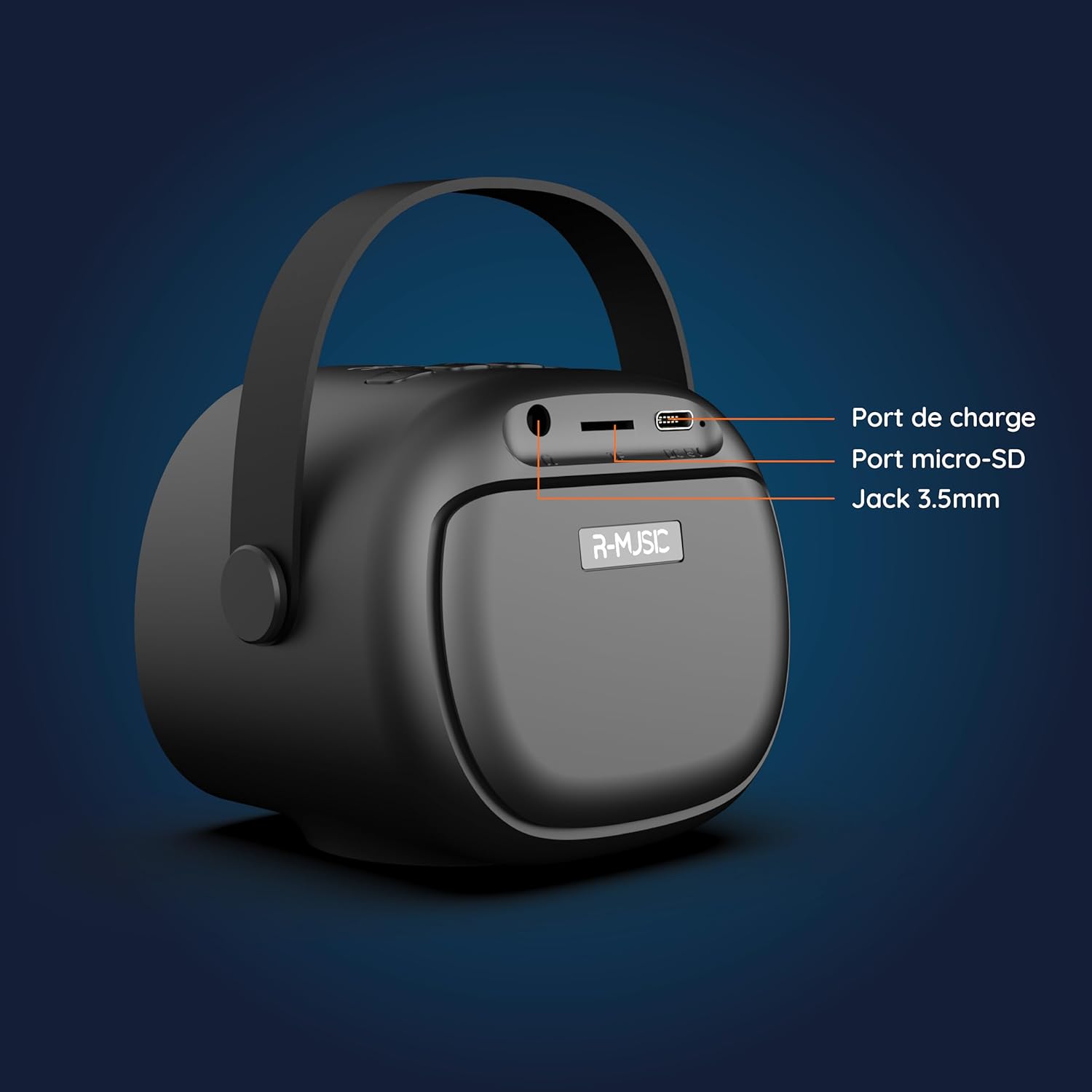
בילד: צוריק view of the R-MUSIC KARADUO speaker, highlighting the charging port, Micro-SD card slot, and 3.5mm Jack port.
- טשאַרדזשינג פּאָרט (וסב-C): Connect the provided USB-C cable for charging.
- Micro-SD Card Slot: Insert a Micro-SD card for direct music playback.
- 3.5 מ״מ AUX פּאָרט: Connect external audio devices using a 3.5mm audio cable (not included).
מיקראָפאָן קאָנטראָלס

Image: Close-up of the R-MUSIC wireless microphones, illustrating the power, volume, and mode buttons.
- מאַכט קנעפּל: Long press to power the microphone on or off.
- באנד + קנעפּל: פאַרגרעסערן די מיקראָפאָן באַנד.
- באַנד - קנעפּל: פאַרמינערן די מיקראָפאָן באַנד.
- מאָדע קנעפּל (M): Short press to cycle through 5 voice deformation effects and 3 karaoke modes.
סעטאַפּ
1. Charging the Speaker and Microphones
Before first use, fully charge the speaker and both microphones.
- רעדנער: Connect the provided USB-C charging cable to the speaker's charging port and a compatible USB power adapter (not included). The charging indicator will show the charging status.
- מיקראָפאָן: Each microphone has its own charging port (usually Micro-USB, check the microphone itself). Connect them to a USB power source using appropriate cables (not included, or check if included with microphones).
A full charge provides approximately 14 hours of speaker playback without LED lights, or 7 hours with LED lights activated.
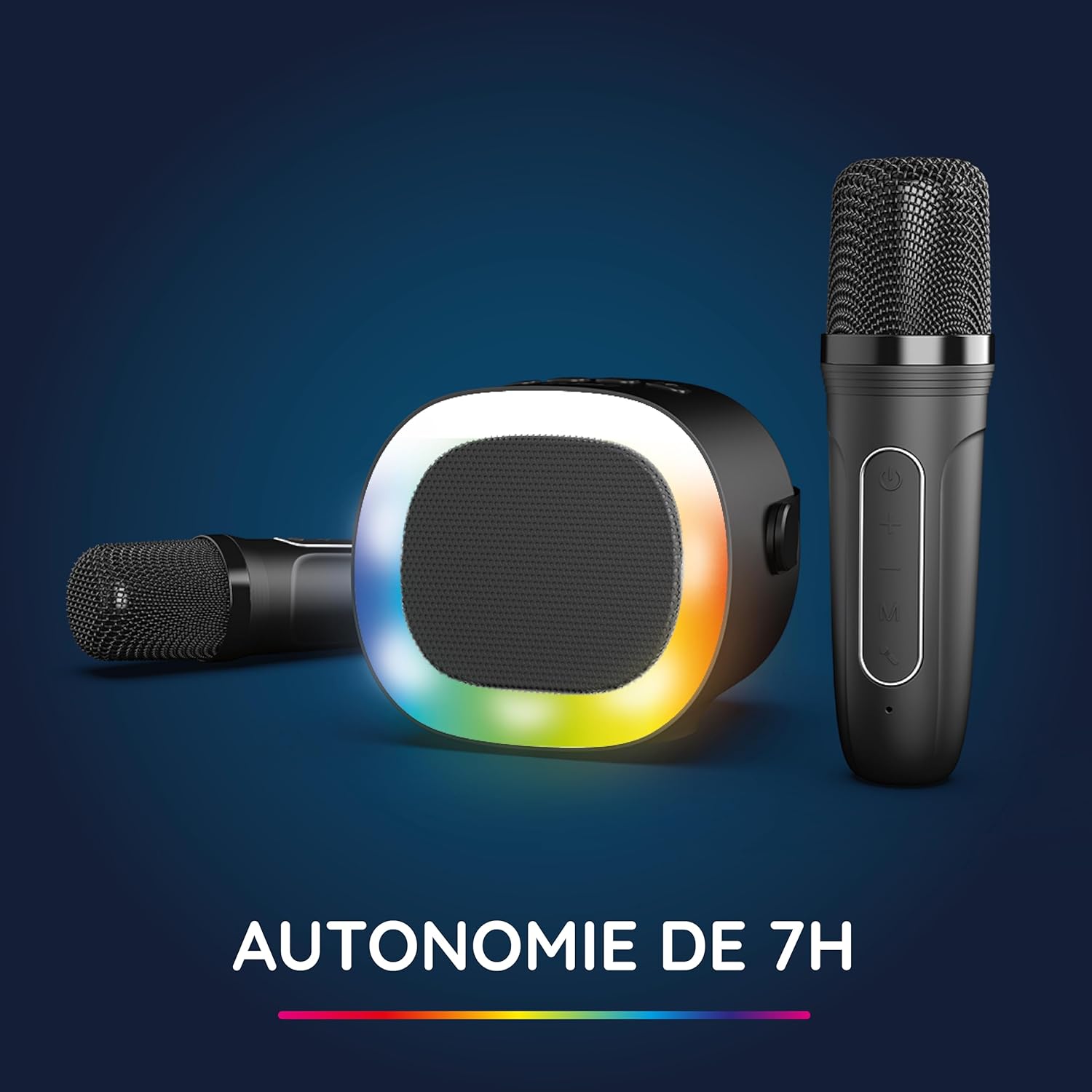
Image: The R-MUSIC speaker and microphones, illustrating the battery life with LED lights active.
2. אײַנצושאַלטן און צוזאַמענשטעלן מיקראָפאָנען
- אײַנשאַלטן רעדנער: Long press the ON/OFF button on the speaker until it powers on.
- אײַנשאַלטן מיקראָפאָנען: Long press the Power button on each microphone until they power on.
- The microphones should automatically pair with the speaker. If not, ensure they are within close proximity and try powering them off and on again.
אַפּערייטינג ינסטראַקשאַנז
1. פֿאַרבינדן זיך צו אַודיאָ קוועלער
The KARADUO speaker offers multiple connectivity options:
- בלועטאָאָטה 5.0:
- פאַרזיכערן אַז די רעדנער איז פּאַוערד אויף.
- Activate Bluetooth on your smartphone, tablet, PC, or other compatible device.
- זוכן פֿאַר "KARADUO" in your device's Bluetooth settings and select it to pair. A confirmation sound will indicate a successful connection.
- The Bluetooth 5.0 technology ensures optimal sound quality and a stable connection up to 10 meters.
- AUX אַרייַנשרייַב:
- Connect a 3.5mm audio cable (not included) from your audio device's headphone jack to the speaker's 3.5mm AUX port.
- דער רעדנער וועט זיך אויטאָמאַטיש איבערקערן צו AUX מאָדע.
- Micro-SD Card Playback:
- Insert a Micro-SD card containing MP3 audio files into the Micro-SD card slot on the back of the speaker.
- The speaker will automatically detect the card and begin playing music.
2. Speaker Operation
- שפּיל / פּויזע: Short press the ON/OFF/Pause/Play button.
- באַנד אַדזשאַסטמאַנט: Short press the Volume + or Volume - buttons.
- ווייַטער / פרייַערדיק שפּור: Long press the Volume + (next) or Volume - (previous) buttons.
- LED ליכט מאָדעס: Press the LED Animation button to cycle through 5 different LED light animations.

Image: The R-MUSIC speaker showcasing its dynamic LED light animations.
3. Microphone Operation
- מיקראָפאָן באַנד: Use the Volume + and Volume - buttons on the microphone to adjust your vocal volume.
- Voice Deformation Effects: Short press the 'M' (Mode) button on the microphone to cycle through 5 different voice deformation effects.
- קאַראַאָקע מאָדעס: Continue pressing the 'M' button to cycle through 3 distinct karaoke modes.
וישאַלט
To ensure the longevity and optimal performance of your R-MUSIC KARADUO system, follow these maintenance guidelines:
- רייניקונג: Use a soft, dry cloth to clean the speaker and microphones. Do not use abrasive cleaners, solvents, or harsh chemicals.
- סטאָרידזש: האַלט דאָס אַפּאַראַט אין אַ קיל, טרוקן אָרט אַוועק פון דירעקט זונשייַן און עקסטרעמע טעמפּעראַטורן ווען עס איז נישט אין באַנוץ.
- וואַסער ויסשטעלן: This product is not waterproof. Avoid exposure to water or excessive moisture.
- טשאַרדזשינג: Only use the provided charging cable and a compatible USB power adapter. Do not overcharge the device.
טראָובלעשאָאָטינג
If you encounter issues with your KARADUO system, please refer to the following common problems and solutions:
| פּראָבלעם | מעגלעך סיבה | לייזונג |
|---|---|---|
| קיין מאַכט | נידעריגע באַטעריע אָדער די דעוויס איז אויסגעלאָשן. | Charge the speaker/microphones. Long press the power button to turn on. |
| קיין געזונט פון רעדנער | Volume too low, incorrect input mode, or device not connected. | Increase speaker volume. Ensure correct input (Bluetooth, AUX, Micro-SD). Reconnect Bluetooth or check AUX cable. |
| מיקראָפאָנען אַרבעטן נישט | Microphones off, low battery, or not paired. | Ensure microphones are charged and powered on. They should automatically pair with the speaker. If not, power cycle them. |
| בלועטאָאָטה דיסקאַנעקשאַן | Device out of range, interference, or low battery. | Move the connected device closer to the speaker (within 10m). Ensure no major obstacles. Recharge the speaker. |
If the problem persists after trying these solutions, please contact R-MUSIC customer support.
ספּעסאַפאַקיישאַנז
| שטריך | דעטאַל |
|---|---|
| סאָרט | ר-מוזיק |
| מאָדעל נומער | RM484437 |
| קאָליר | שוואַרץ |
| קאַנעקטיוויטי טעכנאָלאָגיע | בלועטאָאָטה 5.0 |
| קשר פּאָרץ | 3.5mm Jack, USB Type-C (charging), Micro-SD Card Slot |
| ספּעציעלע פֿעיִקייטן | 2 Wireless Microphones, Universal Connectivity, 5 Voice Deformation Effects, LED Lights |
| קאַמפּאַטאַבאַל דעוויסעס | PC, Smartphone, Tablet, TV (via AUX) |
| מאַכט מקור | באַטאַרייע פּאַוערד |
| Speaker Battery Life | Up to 14 hours (without LED), 7 hours (with LED) |
| בלועטאָאָטה קייט | אַרויף צו 10 מעטער |

Image: Technical dimensions of the R-MUSIC KARADUO speaker, showing its height, width, and depth.
וואָראַנטי און שטיצן
Information regarding specific warranty terms and conditions for the R-MUSIC KARADUO Complete Karaoke Pack is not available in this document. Please refer to the product packaging or the retailer's webפּלאַץ פֿאַר וואָראַנטי דעטאַילס.
For technical support or further assistance, please contact R-MUSIC customer service through their official webפּלאַץ אָדער די קאָנטאַקט אינפֿאָרמאַציע צוגעשטעלט מיט דיין קויפן.