
1. וויכטיק סאַפעטי אינפֿאָרמאַציע
Please read all instructions carefully before using the EVTSCAN Projection Clock. Keep this manual for future reference.
- שטעלט נישט אויס דעם אפאראט צו עקסטרעמע טעמפעראטורן, דירעקטע זונשייַן, אדער הויכע הומידיטי.
- Avoid dropping or subjecting the clock to strong impacts.
- פּרוּווט נישט צו צענעמען אָדער פאַרריכטן דעם אַפּאַראַט אַליין. קאָנטאַקט קוואַליפֿיצירטע סערוויס פּערסאָנעל.
- Use only the specified power adapter (DC 5.0V, 1.2A) or appropriate batteries (2xAAA, not included).
- האַלטן אויס פון דערגרייכן פון קינדער.
2. פּראָדוקט איבערview
The EVTSCAN Projection Clock is a versatile digital alarm clock featuring a 3-inch backlit LCD screen that displays time, date, day of the week, temperature, and humidity. It includes a projection function to display time and temperature on a wall or ceiling, dual alarms with snooze, and a USB port for charging mobile phones.
שליסל פֿעיִקייטן:
- 12/24-hour time format display.
- Date and day of the week display (7 languages for week).
- Temperature detection (-9℃ to +50℃) and humidity detection (20% to 95%).
- Projection function with 180-degree rotation for time and temperature.
- Dual alarm clocks with slowly increasinג באַנד.
- 5-minute snooze function.
- USB charging port for mobile devices.
- Adjustable backlight with 4 levels (high, medium, low, off).

פיגורע 2.1: פראָנט view of the EVTSCAN Projection Clock, showing the LCD display and projection lens.
3. פּעקל אינהאַלט
ביים אויספּאַקן, ביטע זיכער מאַכן אַז אַלע זאכן וואָס זענען ליסטעד אונטן זענען פאַראַן און אין גוטן צושטאַנד:
- 1 x EVTSCAN Projection Clock
- קסנומקס רענטגענ וסב קאַבלע
- 1 x ענגליש באַניצער מאַנואַל
Note: 2xAAA batteries are required for battery power and are not included in the package.
4. סעטאַפּ
4.1 מאַכט די מיטל
The EVTSCAN Projection Clock can be powered by either AAA batteries or via the included USB cable.
4.1.1 באַטאַרייע ייַנמאָנטירונג
- געפינט דעם דעקל פונעם באַטעריע־אָפּטייל אויף דער הינטערשטער זייגער.
- Slide open the cover.
- אַרײַנשטעלן צוויי (2) AAA באַטעריעס, און זיכער מאַכן אַז די פּאָלאַריטעט (+/-) איז ריכטיק.
- פאַרמאַכן די באַטאַרייע אָפּטייל דעקן סיקיורלי.
Note: When powered by batteries, the backlight will only light up for 8 seconds when activated to conserve power. The projection lamp will also light up for 8 seconds.
4.1.2 USB Power Connection
- Connect the small end of the provided USB cable to the DC 5.0V 1.2A input port on the back of the clock.
- Connect the larger end of the USB cable to a compatible USB power adapter (not included) or a powered USB port.
Note: When powered by USB, the backlight and projection lamp can remain continuously on, with adjustable brightness for the backlight.
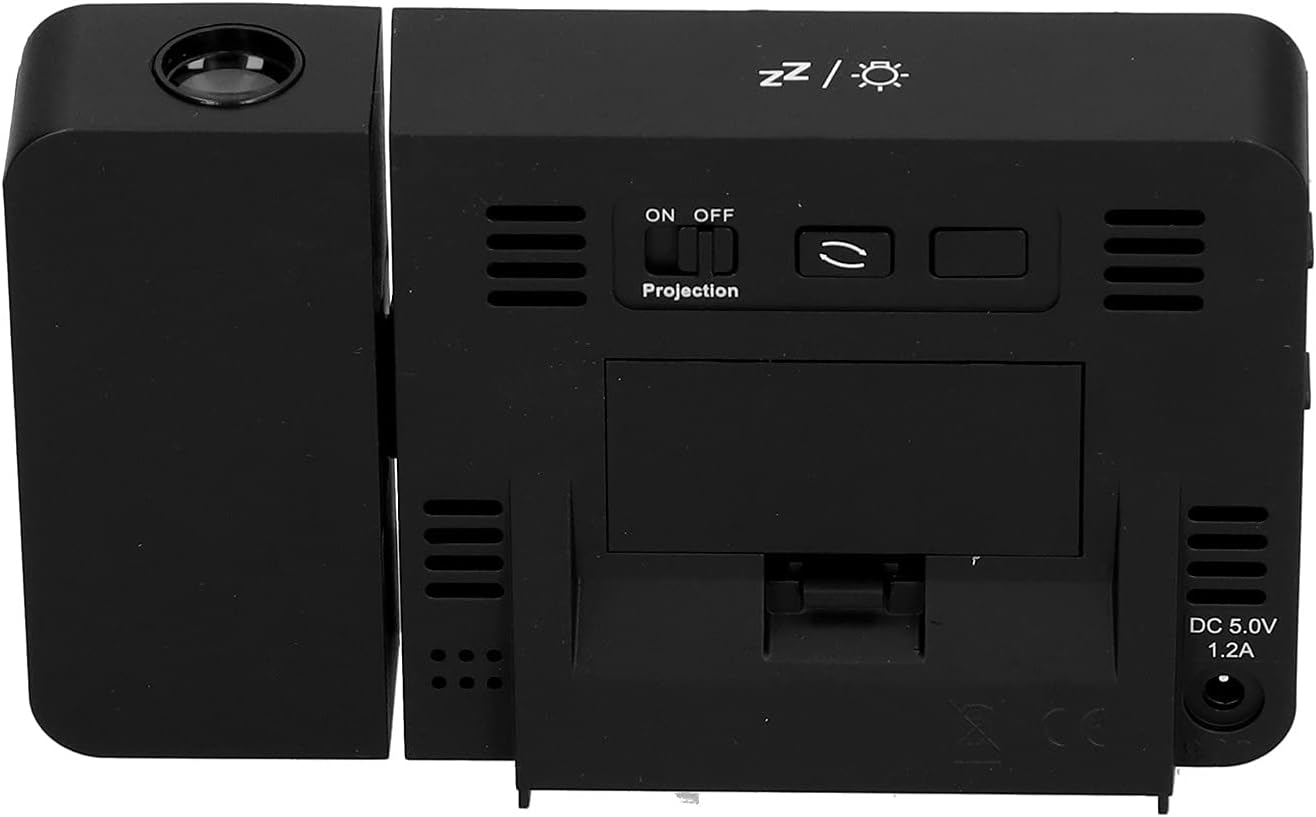
פיגורע 4.1: דערציען view of the clock, indicating the battery compartment and DC 5.0V 1.2A power input.
5. אַפּערייטינג ינסטרוקטיאָנס
5.1 קנעפּל פאַנגקשאַנז
Familiarize yourself with the control buttons located on the front and sides of the clock:
- צייט: גייט אריין אין צייט-אײַנשטעלונג מאָדע.
- אַלאַרם: גייט אריין אין אַלאַרם סעטטינג מאָדע.
- +: Increases values, switches 12/24HR format, adjusts backlight.
- -: Decreases values, switches temperature units (℃/℉).
- Projection ON/OFF Switch: Activates or deactivates the projection. (Located on the back/side)
- Alarm 1 ON/OFF Switch: Activates or deactivates Alarm 1. (Located on the side)
- Alarm 2 ON/OFF Switch: Activates or deactivates Alarm 2. (Located on the side)
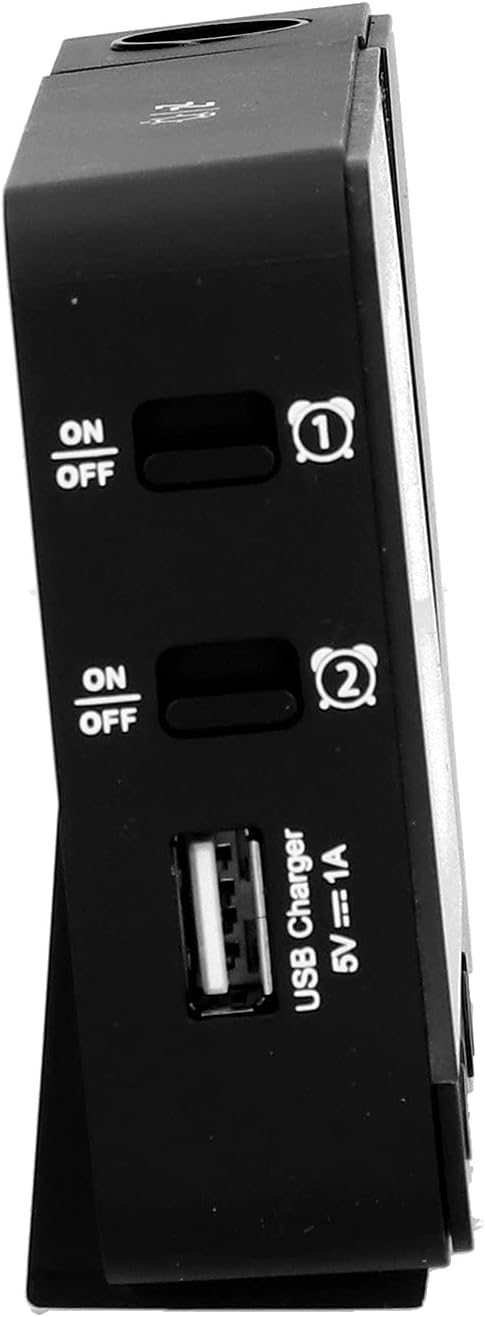
פיגורע 5.1: זייַט view showing Alarm 1 and Alarm 2 ON/OFF switches, and the USB charging port.
5.2 באַשטעטיקן צייט און דאַטע
- דריקן און האַלטן די צייט button to enter time setting mode. The hour display will flash.
- ניצן די + or - קנעפּלעך צו סטרויערן די שעה.
- דרוק צייט again to confirm the hour and move to minute setting. Adjust with + or -.
- פאָרזעצן דרינגלעך צייט to cycle through setting year, month, and day. Adjust each with + or -.
- נאכדעם וואס איר שטעלט איין דעם טאג, דריקט צייט נאך איין לעצט מאל צו פארלאזן סעטטינג מאָדוס.
- צו בייטן צווישן 12-שעה און 24-שעה פֿאָרמאַט, דריק די + button during normal time display.
- To switch between Celsius (℃) and Fahrenheit (℉) for temperature, press the - button during normal time display.
5.3 שטעלן אַלאַרמס
די זייגער פֿאַרמאָגט צוויי אומאָפּהענגיקע אַלאַרמס (אַלאַרם 1 און אַלאַרם 2).
- דריקן און האַלטן די שרעק button to enter Alarm 1 setting mode. The Alarm 1 hour display will flash.
- ניצן די + or - קנעפּלעך צו סטרויערן די שרעק שעה.
- דרוק שרעק again to confirm the hour and move to Alarm 1 minute setting. Adjust with + or -.
- דרוק שרעק again to move to Alarm 2 hour setting, and repeat the process for Alarm 2.
- After setting Alarm 2 minutes, press שרעק נאך איין לעצט מאל צו פארלאזן סעטטינג מאָדוס.
- To activate or deactivate an alarm, use the corresponding שרעק 1 ON/OFF or שרעק 2 ON/OFF switch on the side of the clock. An alarm icon will appear on the display when active.
5.3.1 סנוז פונקציע
When an alarm sounds, press any button (except the alarm ON/OFF switch) to activate the 5-minute snooze function. The alarm will sound again after 5 minutes. To turn off the alarm completely, slide the corresponding alarm ON/OFF switch to OFF.
5.4 פּראָיעקציע פֿונקציע
The clock can project the time and temperature onto a wall or ceiling.
- געפינען די פּרויעקציע אויף / אַוועק switch on the back of the clock. Slide it to ON to activate the projection.
- Adjust the angle of the projection arm (the part with the lens) to direct the projection as desired. The arm can rotate nearly 180 degrees.
- The projection will display the current time and temperature in a soft red color.

פיגורע 5.2: זייַט view showing the projection arm extended and ready for use.

פיגורע 5.3: The clock projecting time and temperature onto a wall in a bedroom setting.
5.5 באַקלייט אַדזשאַסטמאַנט
When the clock is powered by USB, the backlight can be adjusted to four levels: high, medium, low, or off. Repeatedly press the + button during normal time display to cycle through the brightness levels.
When powered by batteries, the backlight will illuminate for 8 seconds when any button is pressed, then turn off to conserve power.
5.6 וסב טשאַרדזשינג פּאָרט
The clock features a USB charging port (5V=1A) on its side. You can use this port to charge your mobile phone or other small electronic devices while the clock is connected to USB power.
Note: The USB charging port only functions when the clock is powered via the USB cable. It does not work when the clock is running on battery power.
6. וישאַלט
6.1 רייניקונג
- ווישט די זייגער'ס ייבערפלאַך מיט אַ ווייכן, טרוקענעם שטאָף.
- Do not use abrasive cleaners, solvents, or chemical sprays, as these may damage the finish or electronic components.
- Keep the projection lens clean for clear projection. Use a soft, lint-free cloth.
6.2 באַטערי פאַרבייַט
When the display becomes dim or the clock functions erratically while on battery power, it's time to replace the AAA batteries. Refer to Section 4.1.1 for battery installation instructions. Always replace both batteries at the same time with new ones.
7. טראָובלעשאָאָטינג
| פּראָבלעם | מעגלעך סיבה | לייזונג |
|---|---|---|
| די זייגער אויסשטעלונג איז ליידיק אדער טונקל. | No power, low batteries, or USB cable not connected. | Check battery installation and replace if necessary. Ensure USB cable is securely connected to a power source. |
| Projection is unclear or not visible. | Projection switch is OFF, lens is dirty, or projection distance is too far/close. | Ensure Projection switch is ON. Clean the projection lens. Adjust the clock's distance from the projection surface. |
| דער אַלאַרם קלינגט נישט. | דער אַלאַרם איז נישט געשטעלט אָדער איז דעאַקטיוויזירט. | Verify alarm time is set correctly. Ensure the corresponding Alarm ON/OFF switch is in the ON position. |
| די USB טשאַרדזשינג פּאָרט אַרבעט נישט. | Clock is running on battery power, or USB cable is not connected to a power source. | Ensure the clock is powered via the USB cable and connected to a functional power adapter. |
| אומרעכטע צייט/דאטום. | Time/date not set correctly. | Refer to Section 5.2 to reset the time and date. |
8. ספּעסאַפאַקיישאַנז
| מאָדעל: | B0CLGDFCGX |
| סאָרט: | EVTSCAN |
| מאַטעריאַל: | אַקרילאָניטרילע בוטאַדיענע סטירענע (אַבס) |
| פּראָדוקט דימענשאַנז: | אומגעפער 13.5 x 8 x 2.5 ס״מ (5.3 x 3.1 x 1.0 אינטשעס) |
| וואָג: | בעערעך. 242 ג (8.5 אַז) |
| ווייַז טיפּ: | דיגיטאַלע LCD מיט באַקלייט |
| מאַכט מקור: | 2xAAA batteries (not included) or DC 5.0V 1.2A via USB cable |
| וסב טשאַרדזשינג רעזולטאַט: | 5V=1A |
| טעמפּעראַטור דעטעקשאַן קייט: | -9℃ to +50℃ (1℃ resolution) |
| הומידיטי דעטעקשאַן קייט: | 20% ביז 95% (1% רעזאָלוציע) |
| Temperature/Humidity Calibration Time: | 30 סעקונדעס |
| באַקלייט לעוועלס: | 4 levels (High, Medium, Low, Off) when USB powered; 8s illumination when battery powered. |
| פּרויעקציע לamp: | Always on when USB powered; 8s illumination when battery powered. |

פיגורע 8.1: Product dimensions: 5.3 inches wide by 3.1 inches high.
9. וואָראַנטי און שטיצן
EVTSCAN products are manufactured to high quality standards. For specific warranty information, please refer to the warranty card included with your purchase or contact your retailer.
If you encounter any issues or have questions regarding your EVTSCAN Projection Clock, please contact the seller or EVTSCAN customer support for assistance. Please have your model number (B0CLGDFCGX) ready when contacting support.
פֿאַר ווייטערדיקע הילף, קענט איר באַזוכן די EVTSCAN Store on Amazon.