
1. הקדמה
This manual provides detailed instructions for the installation, operation, maintenance, and troubleshooting of the Fydun ZL-7901A Incubator Controller. This device is designed for precise and automatic control of temperature and humidity in various incubation environments, ensuring optimal conditions for successful hatching.
2. פּראָדוקט איבערview
The Fydun ZL-7901A is a high-precision digital incubator controller capable of managing both temperature and humidity. It features a clear display and intuitive controls for easy programming and monitoring.
שליסל פֿעיִקייטן:
- פּינטלעך קאָנטראָל: High-accuracy temperature and humidity regulation for stable incubator environments.
- Strong Anti-interference: Designed for reliable operation in various conditions.
- High Stability and Accuracy: Ensures consistent performance for critical incubation processes.
- ברייט אַפּלאַקיישאַן: Suitable for a variety of eggs including chicken, duck, goose, pigeon, quail, parrot, and peacock.
- אָטאַמאַטיק אָפּעראַציע: Fully automatic control reduces manual intervention.
קאַמפּאָונאַנץ:

פיגורע 2.1: פראָנט view of the Fydun ZL-7901A Incubator Controller, showing the display and control buttons.

פיגורע 2.2: The ZL-7901A controller packaged with its temperature and humidity sensors and connecting cables.

פיגורע 2.3: The ZL-7901A controller shown in an incubator environment, demonstrating its application for egg incubation.
3. זיכערקייַט אינפֿאָרמאַציע
- לייענען אַלע ינסטראַקשאַנז קערפאַלי איידער ייַנמאָנטירונג און אָפּעראַציע.
- פאַרזיכערן די מאַכט צושטעלן וואָלtage matches the controller's requirements (100V-240V).
- All wiring should be performed by a qualified professional to prevent electrical hazards.
- שטעלט נישט אויס דעם קאָנטראָללער צו וואַסער אָדער צו פיל פייכטקייט.
- האַלטן די מיטל אַוועק פון ברענעוודיק מאַטעריאַלס.
- אָפּשטעקן די מאַכט איידער איר דורכפירן קיין וישאַלט אָדער וויירינג ענדערונגען.
- דער מיטל איז נישט אַ צאַצקע. האַלטן אויס פון דערגרייכן פון קינדער.
4. סעטאַפּ און ייַנמאָנטירונג
4.1 מאַונטינג די קאָנטראָללער
The ZL-7901A controller is designed for panel mounting. Ensure a secure and stable location within your incubator setup.

פיגורע 4.1: זייַט view illustrating the mounting bracket for panel installation.
4.2 וויירינג קאַנעקשאַנז
Carefully connect the power supply, sensors, and output devices (heater, humidifier, fan, egg turner) to the appropriate terminals on the back of the controller. Refer to the wiring diagram provided with your product for specific connections. Ensure all connections are tight and secure.

פיגורע 4.2: דערציען view of the controller, showing the terminal blocks for electrical connections.
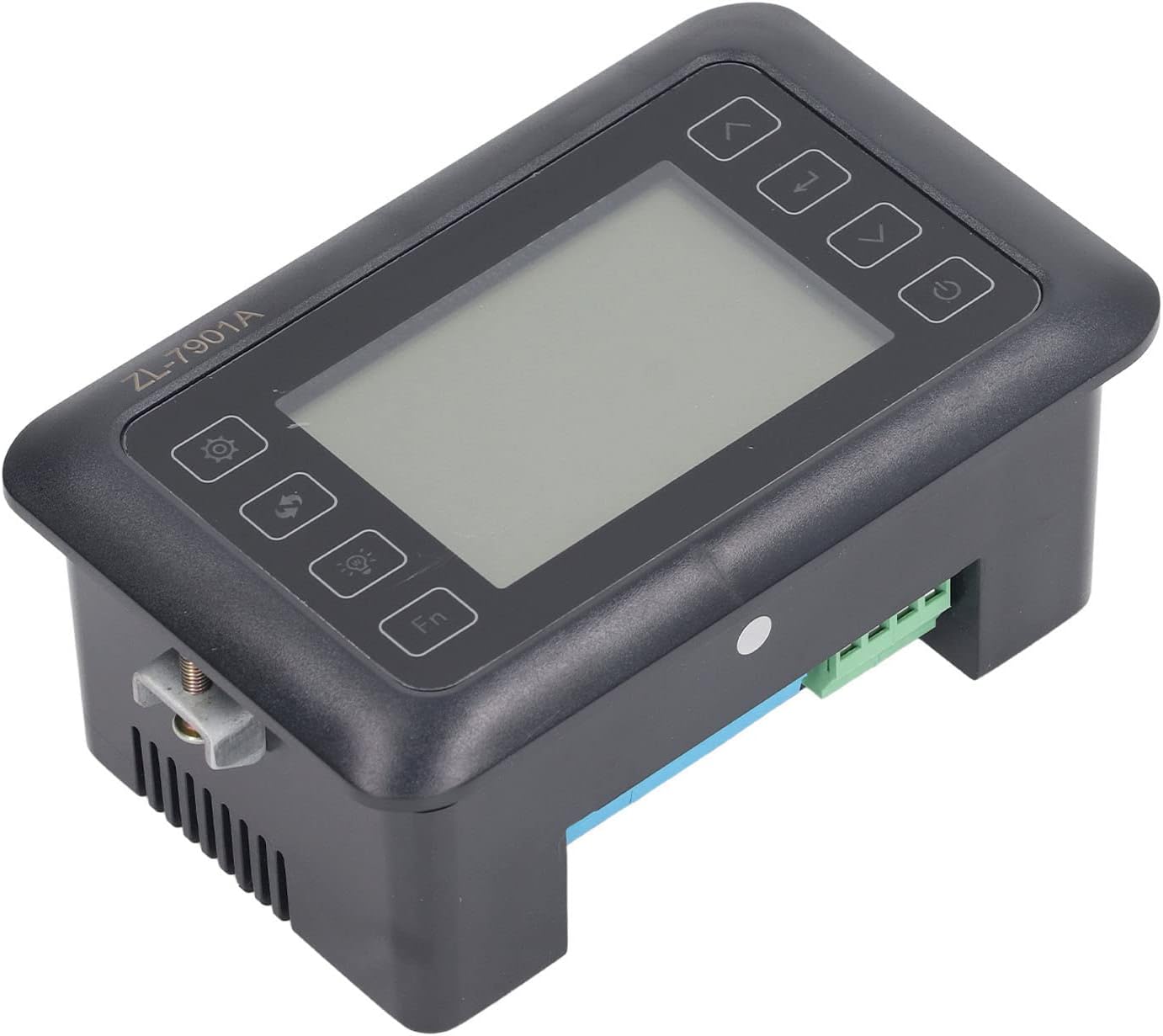
פיגורע 4.3: אַנגגאַלד view highlighting the various connection points on the controller's side.
After all connections are made, double-check them for correctness before applying power.
5. אַפּערייטינג ינסטרוקטיאָנס
5.1 מאַכט אויף / אַוועק
דרוק די מאַכט קנעפּל to turn the controller on or off. The display will illuminate upon power-on. The power button is located on the right side of the controller's front panel.
5.2 ווייַז איבערview
The main display shows the current temperature and humidity readings. Additional indicators may show the status of heating, humidifying, and turning functions.
5.3 באַשטעטיקן פּאַראַמעטערס
- דרוק די סעטטינגס קנעפּל (gear icon) to enter the parameter setting mode. This button is on the left side of the controller's front panel.
- ניצן די Up (ארויף פײַל) און אַראָפּ (down arrow) buttons to navigate through different parameters (e.g., target temperature, target humidity, egg turning interval). These buttons are on the right side of the controller's front panel.
- דרוק די אַרייַן קנעפּל (return arrow icon) to select a parameter for editing. This button is on the right side of the controller's front panel.
- ניצן די Up און אַראָפּ קנעפּלעך צו סטרויערן די ווערט.
- דרוק די אַרייַן קנעפּל ווידער צו באַשטעטיקן די נייַ ווערט.
- Repeat for all desired parameters.
- פֿאַרלאָזט דעם סעטטינג מאָדע דורך דריקן די סעטטינגס קנעפּל again or waiting for a timeout.
באַמערקונג: Consult the full product manual (if provided separately) for a complete list of parameters and their functions.
5.4 פונקציאָנירן קנעפּלעך
- ליכט קנעפּל (light bulb icon): Controls the internal light of the incubator (if connected). This button is on the left side of the controller's front panel.
- Fn קנעפּל: Activates special functions or enters advanced settings. Refer to the detailed manual for specific Fn button operations. This button is on the left side of the controller's front panel.
6. וישאַלט
6.1 רייניקונג
- Ensure the controller is powered off and disconnected from the power source before cleaning.
- Wipe the exterior of the controller with a soft, dry cloth.
- ניצט נישט קיין שרײַבנדיקע רייניגער, סאָלווענטן, און טוט נישט אײַנטונקען דעם אַפּאַראַט אין וואַסער.
- Keep the sensor probes clean and free from debris to ensure accurate readings.
6.2 סענסאָר זאָרג
Handle the temperature and humidity sensors with care. Avoid bending or damaging the cables. If readings appear inaccurate, gently clean the sensor tips. Do not attempt to disassemble the sensors.
7. טראָובלעשאָאָטינג
| פּראָבלעם | מעגלעך סיבה | לייזונג |
|---|---|---|
| קאָנטראָללער טוט נישט מאַכט אויף. | קיין שטראָם צושטעל; פרייַ פֿאַרבינדונג; דעפעקטיווער שטראָם קאַבל. | Check power outlet; ensure all connections are secure; test power cable. |
| נישט פּינקטלעכע טעמפּעראַטור/פֿײַכטקייט מעסטונגען. | Sensor dirty or damaged; sensor not properly placed; calibration needed. | Clean sensor; reposition sensor away from direct airflow/heat; refer to advanced settings for calibration (if available). |
| Heater/Humidifier not activating. | Output device not connected; setpoint not reached; faulty output device. | Verify wiring connections; check setpoint values; test heater/humidifier independently. |
| ווייַז ווייזט טעות קאָד. | Sensor fault; internal error. | Note the error code and consult the full product manual or contact support. |
8. ספּעסאַפאַקיישאַנז
| שטריך | דעטאַל |
|---|---|
| מאָדעל | זל-7901אַ |
| סאָרט | Fydun |
| אַרייַנשרייַב וואָלtage | 100V-240V AC |
| קאָנטראָל טיפּ | Fully Automatic Digital Temperature and Humidity Control |
| אַקיעראַסי | High precision for both temperature and humidity |
| אַפּפּליקאַטיאָן | Incubators for various poultry and bird eggs |
| מאַונטינג | טאַפליע בארג |
9. וואָראַנטי און שטיצן
Fydun is committed to providing quality products and excellent customer service. If you encounter any issues or have questions regarding your ZL-7901A Incubator Controller, please contact our customer service team.
For support, please refer to the contact information provided with your purchase or visit the official Fydun store on Amazon: Fydun Amazon Store.
Our professional customer service team is ready to assist you promptly.