
הקדמה
Thank you for choosing the Contixo F21 Pro Drone. This manual provides essential information for the safe operation, setup, and maintenance of your drone. Please read this manual thoroughly before operating the device to ensure proper usage and to prevent damage.
1. סעטאַפּ
1.1 וואָס איז אין דער קעסטל
באַשטעטיקן אַז אַלע קאָמפּאָנענטן זענען פאַראַן אין דער פּאַקעט:
- Contixo F21 Pro Drone
- Remote Control (with 4.3" integrated screen)
- 2 x 3.7V 1200mAh באַטעריעס
- 8 x Propeller Replacements
- 4 רענטגענ פּראָפּעלער גואַרדס
- וסב טשאַרדזשינג קאַבלע
- 16 גיגאבייט סד קאָרט
- שרויפנ - ציער
- לאַנדינג פּאַד
- קעריינג קאַסע
- ינסטראַקשאַנז מאַנואַל
- שנעל גייד

1.2 באַטעריע טשאַרדזשינג און ינסטאַלירונג
The drone is powered by two 3.7V 1200mAh Lithium-Ion batteries. Ensure both batteries are fully charged before first use.
- Connect the USB charging cable to the battery and a suitable USB power adapter (not included).
- The charging indicator on the battery will show its status (refer to the Quick Guide for specific light patterns).
- אַמאָל גאָר אָנגעלאָדן, אָפּשטעקן די באַטאַרייע.
- שטעקט אריין די אויפגעלאדענע באַטעריע אין דעם דראָון'ס באַטעריע אָפּטייל ביז עס קליקט זיכער אין פּלאַץ.

1.3 פּראָפּעלער ינסטאַלירונג
The drone comes with pre-installed propellers. If replacement is needed:
- Identify the correct propeller for each motor (marked A or B).
- Use the provided screwdriver to remove the screw holding the old propeller.
- Place the new propeller onto the motor shaft, aligning it correctly.
- Secure the propeller with a screw. Ensure all propellers are firmly attached before flight.
1.4 רימאָוט קאָנטראָל סעטאַפּ
The remote control features an integrated 4.3-inch screen for live video feed and flight data.
- זיכער מאַכן אַז די ווײַטקאָנטראָל איז אויפֿגעלאָדן.
- מאַכט אויף די ווייַט קאָנטראָל.
- מאַכט אויף די דראָון.
- The remote control and drone should automatically pair. If not, refer to the Quick Guide for pairing instructions.

1.5 דראָון צוגרייטונג
The F21 Pro drone features a foldable design for portability.
- פֿאָרזיכטיק עפֿנט אויס די דראָון־אַרעמס ביז זיי פֿאַרשליסן זיך אין פּאָזיציע.
- Attach the propeller guards if flying indoors or in crowded areas for added protection.

2. אַפּערייטינג ינסטרוקטיאָנס
2.1 גרונטלעכע פלי קאָנטראָלן
Familiarize yourself with the remote control sticks and buttons for basic flight maneuvers:
- אָפּפֿלי/לאַנדינג: Use the dedicated one-key take-off/landing button or manually control with the throttle stick.
- הייך האַלטן: The drone maintains a stable altitude automatically, allowing for easier control.
- ריכטונג קאָנטראָל: Use the directional stick to move the drone forward, backward, left, and right.
- ראָוטיישאַן: Use the rotation control to turn the drone left or right.
2.2 ינטעליגענט פלי מאָדעס
The F21 Pro drone includes several intelligent flight features to enhance your experience:
- ויסמיידן מכשול: Equipped with 270° environmental perception, the drone can sense obstacles and automatically stop to prevent collisions. This feature is primarily for indoor use.

- אָפּטיש פלאָו פּאַזישאַנינג: This system helps the drone hover steadily, improving stability, especially for beginners.
- הייך האַלטן: Maintains a consistent altitude, simplifying flight control.

- דזשעסטשור סעלפי: Activate camera functions with simple hand gestures.
- Follow Object/Palm Follow: The drone can track and follow a designated object or your palm.
- גראַוויטי קאָנטראָל: Control the drone's movement by tilting your remote.
- 360° פליפּס און ראָללס: Execute aerial acrobatics with a dedicated button.


2.3 אַפּאַראַט אָפּעראַציע
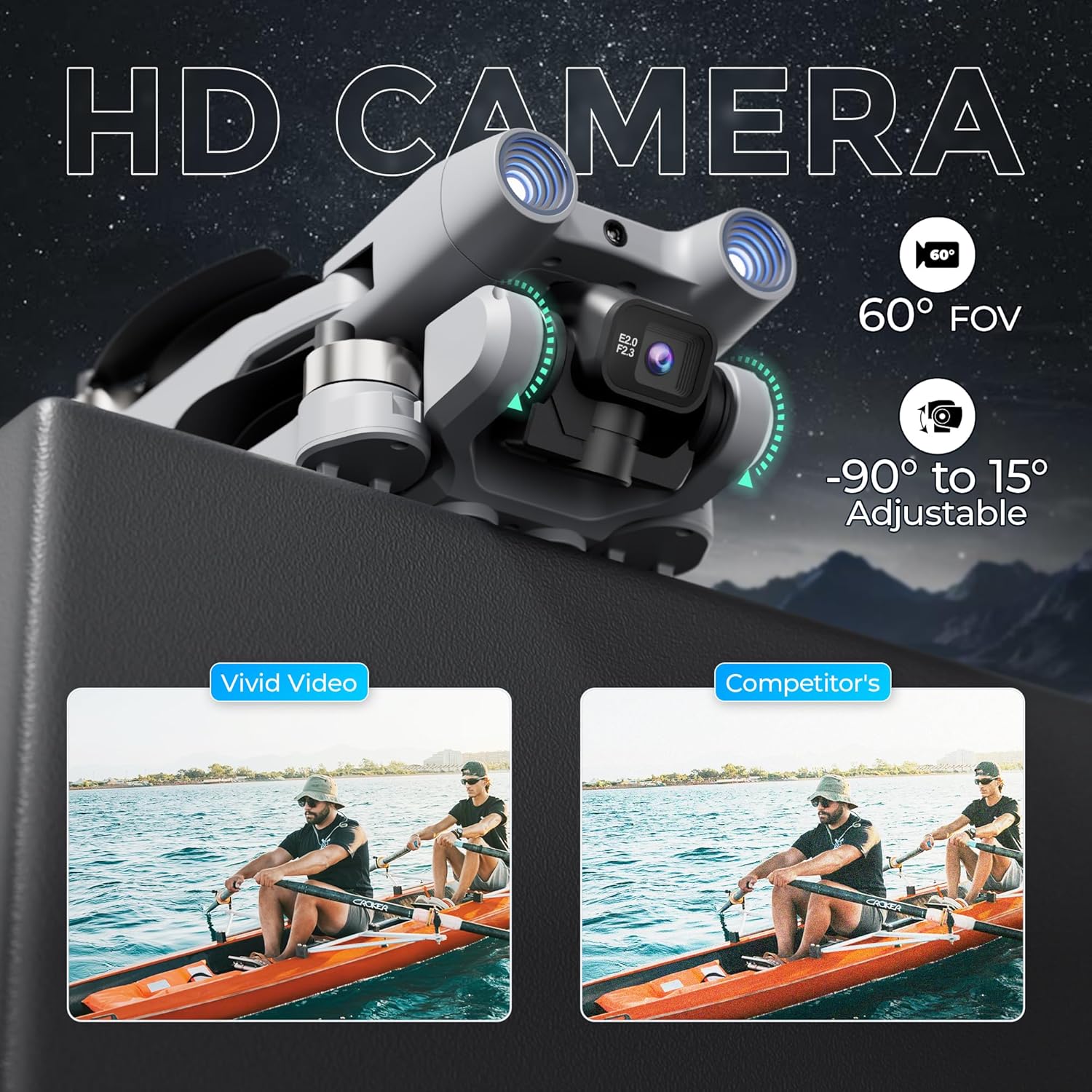
The F21 Pro features a dual camera system with adjustable angles.
- The main camera offers a 60° Field of View (FOV) and can be adjusted from -90° to 15°.
- Video capture resolution is 480p, with an output resolution of 1920x1080 pixels.
- Images are captured in JPEG format, and videos in MP4.
- Use the controls on the remote to adjust the camera angle and initiate recording or photo capture.
2.4 Flight Performance
- פלי צייט: Each battery provides approximately 15 minutes of flight, totaling up to 30 minutes with both included batteries.
- פלי-ראַנג: The drone has a maximum flight range of up to 300 feet and video transmission up to 240 feet.
- ברושלעס מאָטאָרן: Equipped with efficient and quiet 1503 brushless motors for stable flight.
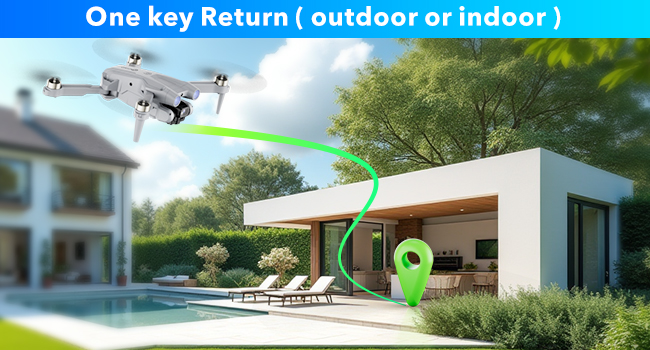
- איין שליסל צוריקקומען: The drone features a one-key return function for easy recall.
2.5 אָפּעראַציע ווידעא
Watch this video for a visual guide on operating your Contixo F21 Pro Drone.
3. וישאַלט
3.1 פּראָפּעלער פאַרבייַט
Inspect propellers regularly for damage. Replace any bent, cracked, or chipped propellers immediately using the provided replacements and screwdriver. Ensure correct propeller type (A or B) is installed on the corresponding motor.
3.2 באַטערי קער
- ניצט שטענדיק דעם אריגינעלן טשאַרדזשינג קאַבל.
- דו זאלסט נישט אָוווערטשאַרדזש אָדער איבער-אָפּזאָגן באַטעריז.
- סטאָר באַטעריז אין אַ קיל, טרוקן אָרט אַוועק פון דירעקט זונשייַן און עקסטרעם טעמפּעראַטורעס.
- If not used for an extended period, charge batteries to approximately 50% capacity.
3.3 רייניקונג
Use a soft, dry cloth to clean the drone and remote control. Avoid using liquids or solvents that could damage electronic components.
4. טראָובלעשאָאָטינג
If you encounter issues with your Contixo F21 Pro Drone, refer to the following common problems and solutions:
| פּראָבלעם | מעגלעך סיבה | לייזונג |
|---|---|---|
| דראָון טוט זיך נישט אָן | באַטעריע נישט אויפגעלאָדן אָדער נישט ריכטיק אינסטאַלירט | זיכער מאַכן אַז די באַטאַרייע איז גאָר אויפגעלאָדן און ריכטיק אַרײַנגעשטעלט. |
| Drone is unstable or veers during flight | Propellers damaged; Drone not calibrated; Environmental interference | Check and replace damaged propellers. Perform drone calibration as per Quick Guide. Fly in calm conditions away from strong winds or magnetic interference. |
| קורץ פלי צייט | Battery not fully charged; Old or damaged battery | זיכער מאַכן אַז די באַטעריעס זענען גאָר אויפגעלאָדן. באַטראַכטן צו פאַרבייַטן אַלטע באַטעריעס אויב די פאָרשטעלונג ווערט באַדייטנד ערגער. |
| Loss of control or unresponsive remote | Drone out of range; Signal interference; Low remote battery | Keep drone within specified range. Avoid areas with strong Wi-Fi or radio signals. Ensure remote control battery is charged. |
| Camera not recording or taking photos | SD card full or not inserted; Camera malfunction | Check if the 16GB SD card is correctly inserted and has free space. Format the SD card if necessary. |
5. ספּעסאַפאַקיישאַנז
| שטריך | דעטאַל |
|---|---|
| סאָרט | Contixo |
| מאָדעל נאָמען | F21 Pro |
| ספּעציעלע פֿעיִקייטן | 360 Degree Flip, Foldable, Integrated GPS, Obstacle Avoidance, Portable |
| עלטער קייט (דיסקריפּשאַן) | דערוואַקסן |
| קאָליר | גרוי |
| ווידעא קאַפּטורע רעסאָלוטיאָן | 480 פּ |
| קאַנעקטיוויטי טעכנאָלאָגיע | ווי-פי |
| אַרייַנגערעכנט קאַמפּאָונאַנץ | Drone, Remote Control, 2 Batteries, 8 Propellers, USB Cable, Landing Pad, 16GB SD Card, Screwdriver, Carrying Case |
| בקיעס מדרגה | אָנהייבער |
| פּונקט וואָג | 5.8 אונסעס (אומגעפער 164 ג) |
| באַטאַרייע קאַפּאַציטעט | 1200 מיליamp Hours (per battery) |
| ווידעא קאַפּטורע פֿאָרמאַט | mp4 |
| ווייַט קאָנטראָל טעכנאָלאָגיע | 2.4 גהז |
| קאָנטראָל טיפּ | ווייַט קאָנטראָל |
| מאַקסימום קייט | 350 Feet (Flight), 240 Feet (Video Transmission) |
| ווירעלעסס קאָמוניקאַציע טעכנאָלאָגיע | ווי-פי |
| באַטאַרייע צעל זאַץ | ליטהיום יאָן |
| שטיצט בילד פֿאָרמאַטירונג | JPEG |
| ווידעא אָוטפּוט רעסאָלוטיאָן | 1920x1080 פּיקסעלס |
| אָפּטיש סענסאָר טעכנאָלאָגיע | אָפּטישער פלוס, CMOS |
| מאַטעריאַל | פּלאַסטיק |
| נומער דימענשאַנז ל x וו x ה | 5.28"ל x 5.28"ברייט x 1.02"ה (צוזאמענגעלייגט) |
6. וואָראַנטי אינפֿאָרמאַציע
Contixo products are covered by a limited warranty against manufacturing defects. For specific warranty terms and conditions, please refer to the warranty card included in your product packaging or visit the official Contixo webזייטל. האַלט דיין קויפן באַווייַז פֿאַר וואָראַנטי קליימז.
7. קונה שטיצן
For technical assistance, troubleshooting, or any questions regarding your Contixo F21 Pro Drone, please contact Contixo customer support. Contact details can be found on the official Contixo website or in the Quick Guide provided with your product.