
1. הקדמה
Thank you for choosing the MAIRDI M890DBTC Wireless Headset. This manual provides detailed instructions for setting up, operating, and maintaining your headset to ensure optimal performance and longevity. Please read this manual thoroughly before use.

א דעטאַלירטע פראָנט view of the MAIRDI M890DBTC Wireless Headset, showcasing its over-ear design, adjustable headband, and microphone boom.
2. פּעקל אינהאַלט
באַשטעטיקן אַז אַלע זאכן זענען פאַראַן אין דיין פּעקל:
- MAIRDI M890DBTC Bluetooth Headset x1
- וסב טשאַרדזשינג קאַבלע קס 1
- באַניצער מאַנואַל x1
3. פּראָדוקט איבערview
3.1 כעדסעט קאָמפּאָנענטן
- אַדזשאַסטאַבאַל העאַדבאַנד
- Padded Earmuffs
- Rotatable Microphone Boom (330-degree)
- מאַכט קנעפּל
- באנד אַרויף/אַראָפּ בוטטאָנס
- מולטי-פונקציע קנעפּל (MFB)
- שטום קנעפּל
- געפירט ינדיקאַטאָר ליכט
- Charging Port (Mini USB)
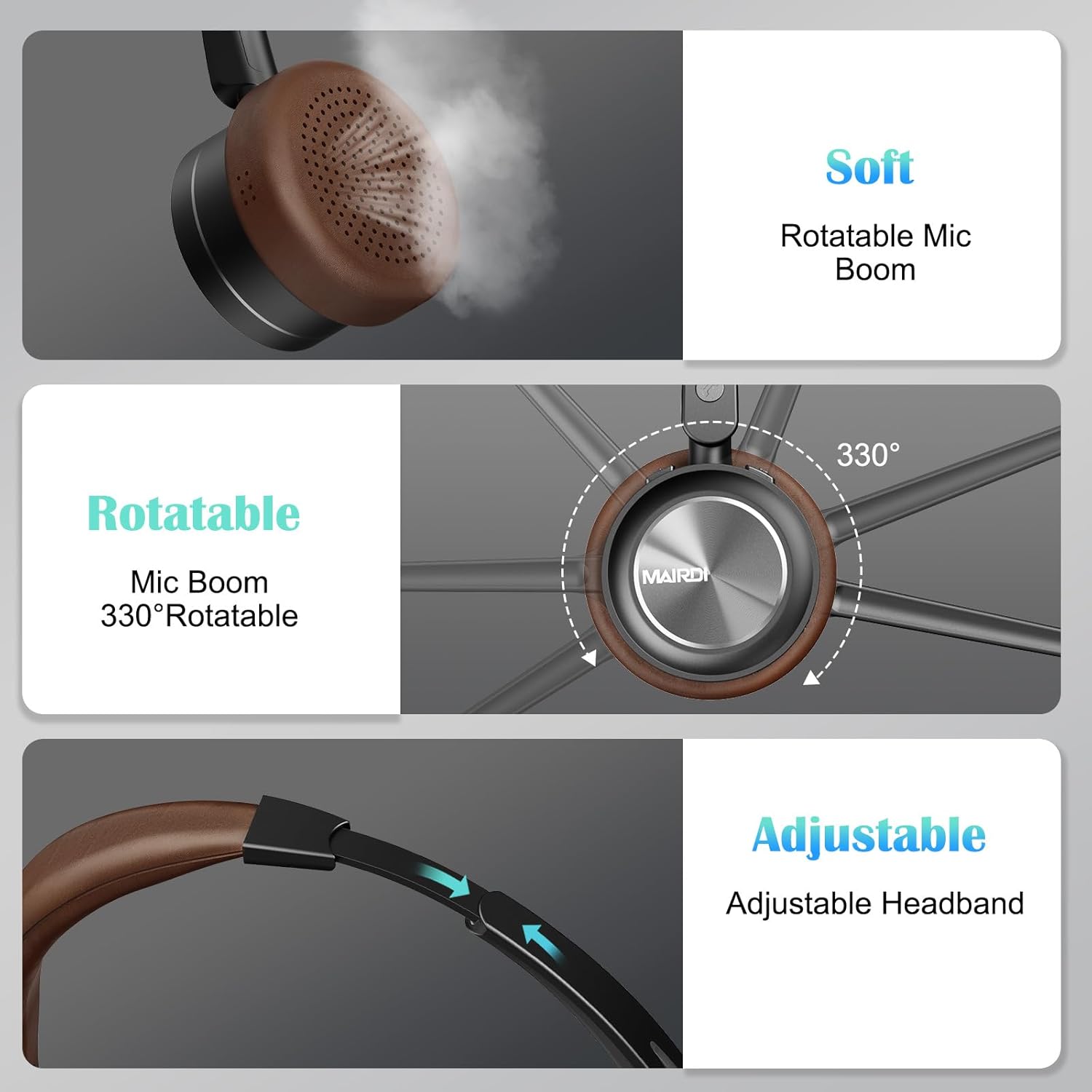
A visual breakdown of the MAIRDI M890DBTC headset's comfort features, including soft earpads, a 330-degree rotatable microphone boom, and an adjustable stainless steel headband.
4. סעטאַפּ און טשאַרדזשינג
4.1 ערשט אָפּצאָל
Before first use, fully charge the headset. Connect the provided USB charging cable to the headset's Mini USB port and a power source (e.g., computer USB port or USB wall adapter). The LED indicator will show charging status and turn off or change color when fully charged (approximately 2 hours).
4.2 מאַכט אויף / אַוועק
- מאַכט אויף: Press and hold the Power Button for 3 seconds until the LED indicator flashes blue.
- מאַכט אַוועק: Press and hold the Power Button for 3 seconds until the LED indicator flashes red and then turns off.
5. אַפּערייטינג ינסטרוקטיאָנס
5.1 בלועטאָאָטה פּערינג
- פאַרזיכערן די כעדסעט איז Powered אַוועק.
- Press and hold the Power Button for approximately 5-7 seconds until the LED indicator flashes red and blue alternately. This indicates pairing mode.
- On your device (smartphone, PC, laptop), enable Bluetooth and search for available devices.
- Select "MAIRDI M890DBTC" from the list of found devices.
- נאָך די פֿאַרבינדונג, די געפֿירט גראדן סלאָולי בלאַס.
5.2 מולטיפונקט קאָנעקטיוויטי
The MAIRDI M890DBTC supports connecting to two Bluetooth devices simultaneously.
- Pair the headset with the first device (e.g., smartphone) as described in Section 5.1.
- Disable Bluetooth on the first device. The headset will re-enter pairing mode.
- Pair the headset with the second device (e.g., laptop).
- Re-enable Bluetooth on the first device. The headset should automatically connect to both devices.

The MAIRDI M890DBTC headset connected simultaneously to a smartphone and a laptop, illustrating its multipoint pairing capability for stable connection with two devices.
5.3 רוף פאַרוואַלטונג
- ענטפֿערן / סוף רופן: דריק איין מאל דעם מולטי-פונקציע קנעפל (MFB).
- אָפּוואַרפן רופן: דריקן און האַלטן די MFB פֿאַר 2 סעקונדעס.
- ריאַל די לעצטע נומער: טאָפּל דריקן די MFB.
- שטום / ונמוט מיקראָפאָן: Press the Mute Button once during a call. The LED indicator on the microphone will illuminate when muted.

An image depicting a person wearing the MAIRDI M890DBTC headset, highlighting the noise-canceling microphone feature and the mute button functionality. Visual representation of sound waves before and after noise cancellation is included.
5.4 באַנד קאָנטראָל
- באַנד אַרויף: דריק דעם באַנד אַרויף (+) קנעפּל.
- באַנד אַראָפּ: דריק דעם באַנד אַראָפּ (-) קנעפּל.
6. וישאַלט
- רייניקט דעם כעדסעט רעגולער מיט אַ ווייכן, טרוקענעם שטאָף.
- Avoid exposing the headset to extreme temperatures, humidity, or corrosive substances.
- סטאָר די כעדסעט אין אַ קיל, טרוקן אָרט ווען ניט אין נוצן.
- פּרוּווט נישט צו צענעמען אָדער פאַרריכטן דעם כעדסעט אַליין, ווײַל דאָס וועט בטל מאַכן די וואָראַנטי.
7. טראָובלעשאָאָטינג
7.1 Headset Does Not Power On
- Ensure the headset is fully charged. Connect it to a power source and allow it to charge for at least 30 minutes before attempting to power on again.
7.2 קען נישט פארבינדן מיטן אפאראט
- Ensure the headset is in pairing mode (LED flashing red and blue alternately).
- Make sure Bluetooth is enabled on your device and it is within 10 meters (33 feet) of the headset.
- פּרוּווט ריסטאַרטן ביידע דעם כעדסעט און דיין דעווייס.
- Clear the Bluetooth pairing list on your device and attempt to pair again.
7.3 קיין אַודיאָ אָדער שלעכטע אַודיאָ קוואַליטעט
- קאָנטראָלירט די וואָלומען לעוועלס אויף ביידע די כעדסעט און אייער פֿאַרבונדענע מיטל.
- Ensure the headset is properly connected to your device. Re-pair if necessary.
- ריקט זיך נענטער צו אייער דעווייס כדי צו פארמיידן שטערונגען אדער ראנגע פראבלעמען.
- If using with a PC, ensure the MAIRDI M890DBTC is selected as the default audio input/output device in your sound settings.
7.4 מיקראָפאָן אַרבעט נישט
- Ensure the microphone is not muted (check the LED indicator on the microphone boom).
- Verify that the microphone boom is positioned correctly towards your mouth.
- Check your device's audio settings to ensure the headset microphone is selected as the input device.
8. ספּעסאַפאַקיישאַנז
| מאָדעל | M890DBTC |
| קאַנעקטיוויטי טעכנאָלאָגיע | ווירעלעס (בלוטוט 5.1) |
| בלועטאָאָטה קייט | אַרויף צו 20 מעטער (60 פֿיס) |
| באַטעריע לעבן (רעד צייט) | אַרויף צו 30 שעה |
| באַטעריע לעבן (סטאַנדביי צייט) | אַרויף צו 200 שעה |
| טשאַרדזשינג צייט | בעערעך 2 שעה |
| מיקראָפאָן | Advanced Noise-Canceling |
| רעדנער דרייווער גרייס | 40 מם |
| אָפטקייַט ראַנגע | 20 הערץ - 20,000 הערץ |
| וואָג | 0.21 קילאָגראַמס (7.4 אונסעס) |
| מאַטעריאַל | Leather, Plastic, Stainless Steel |

The MAIRDI M890DBTC headset positioned over a circuit board, illustrating its advanced Bluetooth 5.1 technology and 40mm speaker drivers for high-definition audio.
9. וואָראַנטי און שטיצן
MAIRDI products are designed for reliability and performance. For warranty information or technical support, please refer to the contact details provided on the MAIRDI official webוועבזייטל אדער אייערע קויפן דאקומענטן. האַלט אייער קויפן באווייז פאר גאַראַנטיע קליימז.
פֿאַר ווייטערדיקע הילף, ביטע באַזוכט די MAIRDI Store on Amazon.