
הקדמה
א דאנק פארן קויפןasing the Funistree Cell Phone Stand with Wireless Bluetooth Speaker. This device combines a versatile phone stand with a high-quality Bluetooth speaker and a white noise machine, designed to enhance your audio and viewing experience. Please read this manual carefully before use to ensure proper operation and to maximize the product's lifespan.
פּראָדוקט איבערview
The Funistree H77 is a multi-functional device featuring a detachable phone stand and a wireless Bluetooth speaker. Its innovative design allows for independent use of the speaker and the stand, or combined for an integrated entertainment solution.
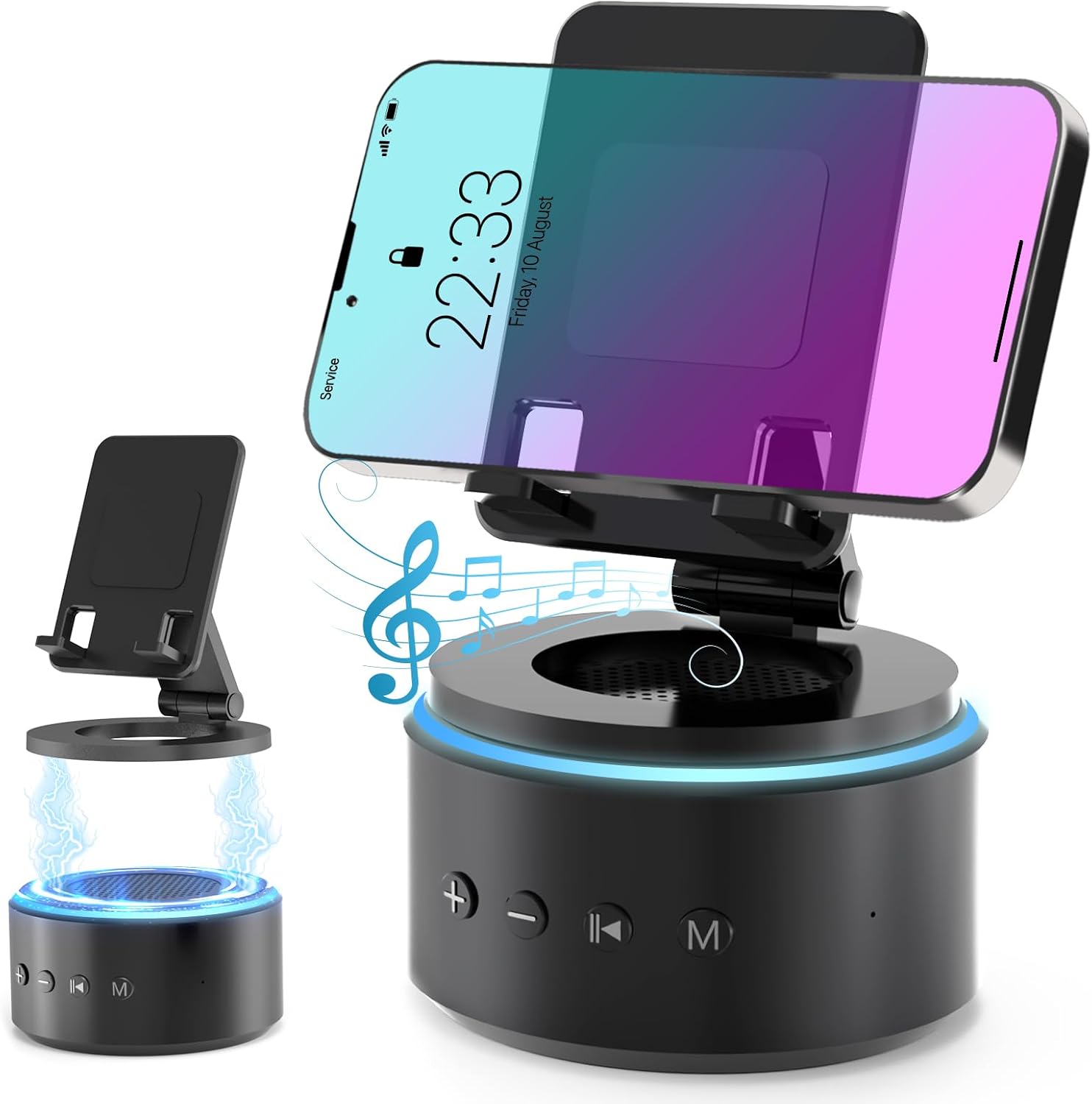
Image: The Funistree H77 device, illustrating its 2-in-1 design with the phone stand attached to the speaker base and also shown detached.
שליסל פֿעיִקייטן:
- 2-in-1 Detachable Design: The phone stand magnetically connects to the Bluetooth speaker, allowing for combined or separate use.
- Adjustable & Portable Stand: אָפפערס עטלעכע viewing angles and includes a hanging design for easy portability.
- HD סטערעאָ געזונט: Equipped with a dual stereo system for enhanced bass, clear highs, and balanced midrange.
- ווייסע ראַש מאַשין: Features 10 soothing white noise sounds with an auto-off timer (15, 30, or 60 minutes).
- סטאַביל באַזע: Anti-slip silicone pads ensure device stability.
- לאנג באַטאַרייע לעבן: Optimized 1800 mAh battery for extended use.
פּעקל אינהאַלט
ביטע טשעק די פּאַקעט פֿאַר די פאלגענדע זאכן:
- Funistree Cell Phone Stand with Wireless Bluetooth Speaker (Model H77)
- וסב טשאַרדזשינג קאַבלע
- באַניצער מאַנואַל
Note: Contents may vary slightly. If any items are missing or damaged, please contact customer support.
סעטאַפּ
טשאַרדזשינג די מיטל:
- Locate the charging port on the speaker base.
- Connect the provided USB charging cable to the speaker.
- שטעקט אריין דעם אנדערן עק פונעם USB קאבל אין א קאמפאטיבלן USB פאוער אדאפטער (נישט אריינגערעכנט) אדער א קאמפיוטער USB פארט.
- די טשאַרדזשינג אינדיקאַטאָר ליכט וועט זיך אָנצינדן. אַמאָל גאָר אָנגעלאָדן, קען די ליכט טוישן קאָליר אָדער זיך אויסלעשן.
Initial charge time is approximately 2-3 hours.
Assembling the Phone Stand and Speaker:
The phone stand and speaker connect magnetically.
- Align the magnetic base of the phone stand with the top surface of the speaker.
- The magnets will snap the two components together securely.
- To detach, simply pull the phone stand upwards from the speaker base.

בילד: נאָענט-אַרויף view demonstrating the magnetic connection between the phone stand and the speaker base.
אַפּערייטינג ינסטראַקשאַנז
מאַכט אויף / אַוועק:
- To power on, press and hold the Power button (usually marked with a power symbol) on the speaker base for a few seconds until you hear an audible prompt or see an indicator light.
- צו אויסלאָשן, דריק און האַלט ווידער דעם פּאַוער קנעפּל פֿאַר אַ פּאָר סעקונדעס.
Bluetooth Pairing:
- Ensure the speaker is powered on and in pairing mode (indicated by a flashing LED light, usually blue). If not, briefly press the Bluetooth button (if available) or power cycle the device.
- אויף אייער מאָביל מיטל (סמאַרטפאָן, טאַבלעט, אאז"וו), גייט צו די בלועטוט סעטטינגס.
- זוכן פֿאַר available devices. The speaker will appear as "H77" or "Funistree H77".
- Select the speaker from the list to pair. Once paired, you will hear a confirmation sound, and the LED light will become solid.
- איר קענט איצט שפּילן אַודיאָ פֿון אייער דעווייס דורך דעם רעדנער.

Image: The Funistree H77 in use, with a smartphone mounted on the stand, playing music, and a laptop nearby, illustrating its versatile functionality.
White Noise Function:
The speaker includes 10 built-in white noise sounds to aid relaxation or concentration.
- Press the 'M' (Mode) button to cycle through the white noise sounds.
- To set a timer for the white noise, press the Timer button (if available) or refer to the specific button layout on your device. The available timer settings are 15, 30, or 60 minutes. The device will automatically turn off after the selected duration.

Image: Visual representation of the 10 white noise options (Ocean, Wind, Rain, Bird, Heartbeat, Campfire, Thunderstorm, Brook, Fan, Piano) and timer settings, with a person sleeping, indicating the relaxation benefits.
אַדזשאַסטינג באַנד און פּלייבאַק:
- באַנד אַרויף: דריק דעם '+' קנעפל.
- באַנד אַראָפּ: דריק דעם '-' קנעפּל.
- שפּיל / פּויזע: Press the Play/Pause button (usually marked with a triangle/two vertical bars).
- ווייַטער שפּור: Press the '>>|' button.
- פֿריִערדיקע שפּור: Press the '|<<' button.
ניצן די טעלעפאָן שטיין:
The phone stand is adjustable to provide optimal viewינג אַנגלעס.
- Place your smartphone or tablet securely on the stand's cradle.
- Adjust the angle of the stand by gently pushing or pulling the articulated arm to your desired viewינג שטעלע.
- The stand features anti-slip silicone pads to prevent your device from sliding.

בילד: דעטאַלירט view highlighting the adjustable angle mechanism and the anti-slip silicone pads on the phone stand and base for secure device placement.
פּאָרטאַביליטי:
The speaker can be carried easily using its integrated hanging design.

Image: A woman outdoors, holding the Funistree speaker by its hanging rope, demonstrating its portability for outdoor activities.
וישאַלט
- רייניקונג: Use a soft, dry cloth to wipe the surface of the device. Do not use abrasive cleaners, alcohol, or chemical solvents, as these may damage the finish.
- סטאָרידזש: ווען נישט אין באַנוץ פֿאַר לענגערע פּעריאָדן, זאָל מען דאָס אַפּאַראַט אויפֿהיטן אין אַ קיל, טרוקן אָרט, אַוועק פֿון דירעקטער זון און עקסטרעמע טעמפּעראַטורן.
- באַטערי זאָרגן: כדי צו פארלענגערן די לעבן פון די באַטעריע, זאָלט איר נישט אָפט אויסלאָדן די באַטעריע. לאָדט דאָס אַפּאַראַט רעגולער אויף, אפילו אויב עס איז נישט אין אַקטיוון באַנוץ.
- ויסמיידן וואַסער: This device is not waterproof. Keep it away from water, moisture, and excessive humidity.
- שעפּן מיט זאָרג: ויסמיידן דראַפּינג אָדער אונטערטעניק די מיטל צו שטאַרק ימפּאַקץ.
טראָובלעשאָאָטינג
| פּראָבלעם | מעגלעך סיבה | לייזונג |
|---|---|---|
| די מיטל טוט נישט מאַכט אויף. | נידעריק באַטאַרייע. | טשאַרדזש די מיטל גאָר. |
| קען נישט פארבינדן דורך בלוטוט. | Speaker not in pairing mode; Bluetooth disabled on source device; device too far. | Ensure speaker is in pairing mode. Enable Bluetooth on your device. Move devices closer (within 10 meters). Forget previous pairings and try again. |
| קיין קלאַנג אָדער נידעריקע וואָלומען. | Volume too low on speaker or source device; device not properly paired. | Increase volume on both speaker and source device. Re-pair the device. |
| White noise function not working. | אומרעכטע מאָדע אויסגעקליבן. | Press the 'M' (Mode) button to cycle to the white noise function. |
| Phone stand is unstable. | Device not placed correctly; surface is uneven. | Ensure phone is centered on the cradle. Place the stand on a flat, stable surface. |
If the problem persists, please contact Funistree customer support.
ספּעסאַפאַקיישאַנז
| מאָדעל נומער | H77 |
| פּראָדוקט דימענשאַנז | 4.53 X 4.13 X 4.37 אינטשעס |
| פּונקט וואָג | 15.8 אונסעס |
| באַטערי טיפּ | 1 ליטהיום יאָן באַטאַרייע (אַרייַנגערעכנט) |
| באַטאַרייע קאַפּאַציטעט | 1800 מאַה |
| קאַנעקטיוויטי | בלועטאָאָטה |
| ווייסע ראַש סאָונדס | 10 types (Ocean, Wind, Rain, Bird, Heartbeat, Campfire, Thunderstorm, Brook, Fan, Piano) |
| טיימער סעטטינגס | 15, 30, 60 מינוט |
| קאַמפּאַטאַבאַל דעוויסעס | Smartphones, Tablets (iPhone, Galaxy, LG, iPad, Samsung Tab, Sony, etc.) |
זיכערקייַט אינפֿאָרמאַציע
- Do not disassemble, repair, or modify the device. This may cause damage, electric shock, or fire.
- Keep the device away from heat sources, direct sunlight, and high temperatures.
- דו זאלסט נישט ויסשטעלן די מיטל צו וואַסער אָדער אנדערע ליקווידס.
- Do not use the device in environments with strong electromagnetic interference.
- האַלטן אויס פון דערגרייכן פון קינדער און פּעץ.
- Dispose of the device and its battery responsibly according to local regulations. Do not dispose of with household waste.
וואָראַנטי און שטיצן
Funistree products are designed and manufactured to the highest quality standards. For warranty information and customer support, please refer to the warranty card included with your purchase or visit the official Funistree website. If you encounter any issues or have questions regarding your product, please contact our customer service team.
פֿאַר ווייַטער הילף, ביטע באַזוכן: Funistree Official Store on Amazon