
1. הקדמה
This manual provides detailed instructions for the proper use, setup, and maintenance of your Yealink W59R Ruggedized DECT Handset. Please read this manual thoroughly before operating the device to ensure optimal performance and safety. The Yealink W59R is designed for environments requiring a durable and reliable communication solution.
2. פּראָדוקט איבערview
The Yealink W59R is a professional ruggedized DECT handset built to withstand challenging environments. It features an IP67 rating for dust, splash, and water resistance, along with integrated Bluetooth and a vibration alarm. This handset is fully compatible with the Yealink W80 Multi-Cell System, enabling seamless roaming and call handover.
שליסל פֿעיִקייטן:
- IP67 רייטאַד: Shock, dust, and water resistant for reliable operation in harsh conditions.
- ימפּרוווד געווער: Tough rubberized surface protects against drops, slips, and scratches.
- Seamless Mobility: Compatible with Yealink W80 Multi-Cell System for extensive coverage.
- בלועטאָאָטה קאַנעקטיוויטי: Allows use with Bluetooth headsets for hands-free communication.
- ווייבריישאַן אַלאַרם: Ensures calls are not missed in noisy environments.
- Optimal HD Audio: Features FNR (Flexible Noise Reduction), full duplex, and Opus codec for clear sound.
- Comprehensive Alarm Functions: Includes push-button, no-movement, man-down, and running alarms for occupational safety.
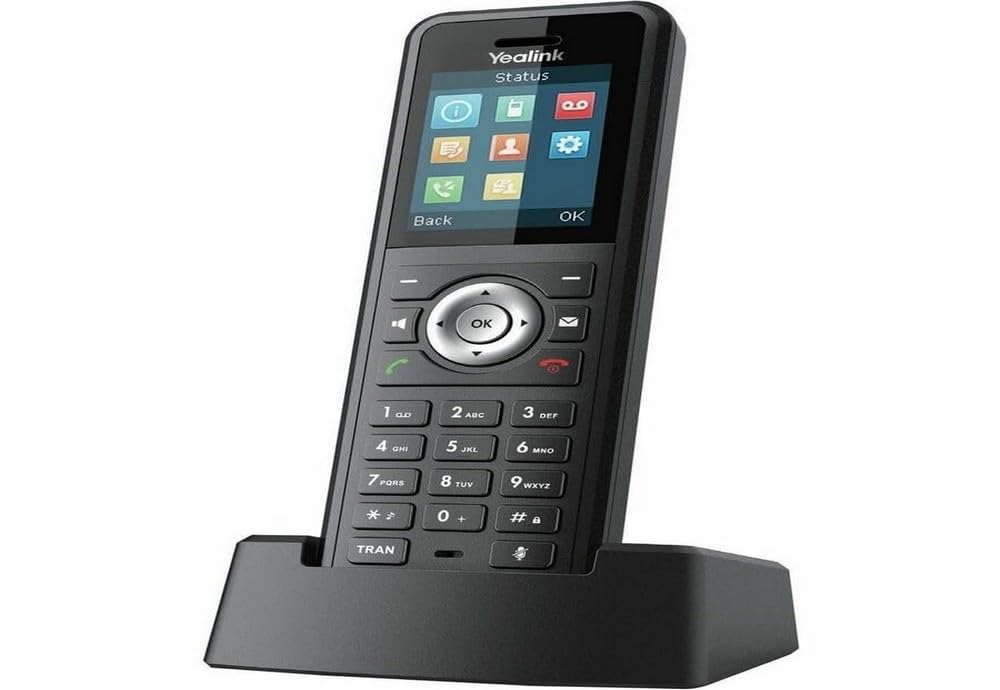
Figure 2.1: Yealink W59R Ruggedized DECT Handset. This image displays the front view of the handset, highlighting its robust design.
3. סעטאַפּ
3.1. פּעקל אינהאַלט
איידער איר גייט ווייטער, זיכערט זיך אז אלע זאכן זענען פאראן אין פעקל:
- Yealink W59R גראָב DECT כאַנדסעט
- טשאַרדזשינג וויגעלע
- קריקאָנלאָדלעך באַטערי
- מאַכט אַדאַפּטער
- דעקאָראַטיווע קאָווער
- שנעל אָנהייב גייד
3.2. באַטאַרייע ייַנמאָנטירונג
- געפינט דעם דעקל פונעם באַטעריע־אָפּטייל אויף דער הינטערשטער זייט פונעם הענדסעט.
- קערפאַלי אַראָפּנעמען די דעקן.
- אַרײַנשטעלן די ריטשאַרדזשאַבאַל באַטאַרייע, און זיכער מאַכן אַז די קאָנטאַקטן זענען ריכטיק אויסגעשטעלט.
- Replace the battery compartment cover and secure it firmly to maintain the IP67 rating.
3.3. טשאַרדזשינג די כאַנדסעט
- פאַרבינדן די מאַכט אַדאַפּטער צו די טשאַרדזשינג וויגעלע.
- צאַפּן די מאַכט אַדאַפּטער אין אַ וואַנט ווענטיל.
- Place the handset into the charging cradle. The charging indicator on the handset will illuminate.
- לאָזט דעם האַנדסעט זיך אויפלאָדן פֿאַר מינדעסטנס 4 שעה איידער דעם ערשטן באַנוץ.
3.4. רעגיסטרירן דעם האַנדסעט
The W59R handset must be registered to a Yealink DECT base station (e.g., W80 Multi-Cell System) to function. Refer to your DECT base station's manual for specific registration procedures. Generally, this involves:
- Put the DECT base station into registration mode.
- On the W59R handset, navigate to the registration menu (typically Menu > Settings > Registration > Register Handset).
- Select the desired base and enter the system PIN (default is 0000).
- דער הענדסעט וועט ווייַזן אַ באַשטעטיקונג אָנזאָג נאָך געראָטן רעגיסטראַציע.
4. אַפּערייטינג ינסטרוקטיאָנס
4.1. גרונטלעכע רוף פונקציעס
- מאַכן אַ רוף: Enter the phone number and press the רופן שליסל.
- ענטפֿערן אַ רוף: דרוק די רופן key when the handset rings.
- ענדיקן אַ רוף: דרוק די סוף רופן שליסל.
- אַדזשאַסטינג באַנד: Use the navigation keys during a call to adjust the earpiece volume.
4.2. ניצן בלועטאָאָטה
The W59R supports Bluetooth for connecting wireless headsets. To pair a Bluetooth device:
- Enable Bluetooth on your headset and set it to pairing mode.
- On the W59R, navigate to Menu > Settings > Bluetooth.
- אַקטיווירן בלוטוט On און אויסקלייַבן Paired Devices > Add Device.
- Select your headset from the list of available devices and enter the PIN if prompted (usually 0000 or 1234).
4.3. שרעק פאַנגקשאַנז
The W59R includes several alarm features designed to enhance user safety in hazardous environments. These alarms can be configured by an administrator.
- Push-Button Alarm: Activates an emergency alert when a dedicated button is pressed.
- No-Movement Alarm: Triggers an alert if the handset detects no movement for a configurable period.
- Man-Down Alarm: Activates if the handset detects a sudden change in orientation, indicating a fall.
- Running Alarm: Can be configured to alert if the user is running or moving rapidly beyond a set threshold.

Figure 4.1: Detail of the Yealink W59R handset, showing a button that can be configured for alarm functions.
5. וישאַלט
5.1. רייניקונג
To maintain the handset's IP67 rating and overall performance:
- Wipe the handset with a soft, damp שטאָף.
- דו זאלסט נישט נוצן האַרב קעמיקאַלז, רייניקונג סאָלוואַנץ אָדער שטאַרק דיטערדזשאַנץ.
- Ensure all port covers are securely closed after cleaning to maintain water and dust resistance.
5.2. באַטערי קער
- ויסמיידן יקספּאָוזינג די באַטאַרייע צו עקסטרעם טעמפּעראַטורעס.
- Charge the battery regularly to prolong its lifespan.
- If the handset will not be used for an extended period, fully charge the battery before storage.
6. טראָובלעשאָאָטינג
This section addresses common issues you may encounter with your W59R handset.
| פּראָבלעם | מעגלעך סיבה | לייזונג |
|---|---|---|
| Handset does not power on. | די באַטעריע איז נישט אינסטאַלירט אָדער אויסגעלאָדן. | Ensure battery is correctly installed and fully charged. |
| Cannot register handset to base. | Base station not in registration mode; incorrect PIN. | Verify base station is in registration mode. Check the PIN. Ensure handset is within range. |
| קיין דייאַל טאָן אָדער קען נישט מאַכן רופן. | Handset not registered; network issue. | Confirm handset is registered. Check network connection of the base station. |
| נעבעך אַודיאָ קוואַליטעט. | Interference; handset out of range. | Move closer to the base station. Avoid sources of interference (e.g., microwaves, Wi-Fi routers). |
If the problem persists after attempting these solutions, please contact Yealink technical support.
7. ספּעסאַפאַקיישאַנז
| שטריך | דעטאַל |
|---|---|
| סאָרט | יעלינק |
| מאָדעל נומער | W59R |
| קאָליר | שוואַרץ |
| טיפּ פון טעלעפאָן | קאָרדלעסס |
| מאַכט מקור | באַטאַרייע פּאַוערד |
| נומער דימענשאַנז (L X W X H) | 7.6 X 4.4 X 3.7 אינטשעס |
| פּונקט וואָג | 14.4 אונסעס |
| קאַמפּאַטאַבאַל דעוויסעס | Yealink W80 Multi-Cell System, Bluetooth devices |
| DECT טעכנאָלאָגיע | CAT-iq2.0 (not compatible with third-party DECT devices) |
| IP שאַץ | IP67 (Shock, dust, and water resistant) |
| רעקאָרדינג קאַפּאַציטעט | 30 Minutes (Answering System Type: Digital) |
| UPC | 841885104410 |
8. וואָראַנטי און שטיצן
וואָראַנטי אינפֿאָרמאַציע: The product specifications indicate that warranty information is not available. Please refer to your purchase documentation or contact your vendor for specific warranty details.
טעכניש שטיצן: For technical assistance, troubleshooting beyond this manual, or inquiries regarding your Yealink W59R, please contact Yealink customer support or visit the official Yealink webפּלאַץ פֿאַר שטיצן רעסורסן.