
LS VISION LS-MS2
LS VISION 4K 180-Degree Ultra-Wide Angle 4G Solar-Powered Outdoor Security Camera
Model: LS-MS2
בראַנד: LS VISION
1. הקדמה
This user manual provides detailed instructions for the installation, operation, and maintenance of your LS VISION 4K 180-Degree Ultra-Wide Angle 4G Solar-Powered Outdoor Security Camera. Please read this manual thoroughly before using the product to ensure proper functionality and safety.
2. פּראָדוקט איבערview
2.1 שליסל פֿעיִקייטן
- 4K/8MP Resolution for clear video capture.
- 180-Degree Ultra-Wide Angle Dual Lens for comprehensive coverage without distortion.
- Integrated 4G Module for connectivity without Wi-Fi, ideal for remote locations.
- Solar-Powered with 6W solar panel and built-in 18000 mAh batteries for continuous operation. Supports integrated and separate solar panel installation.
- Two-Way Audio for real-time communication.
- Cloud Storage and local TF card storage (up to 128GB, TF card not included).
- ווייַט Viewing and Playback via Niview app (Android/iOS).
- PIR + Human Detection with automatic human tracking, wake-up video recording, and push notifications.
- Multiple Recording Modes: 24-hour continuous recording, 24-hour + trigger recording, and three trigger recording modes.
- Dual Light Source Design: Full-color night vision up to 20 meters and infrared night vision up to 40 meters.
- IP66 Waterproof Rating for outdoor durability.
2.2 פּראָדוקט דיאַגראַמע
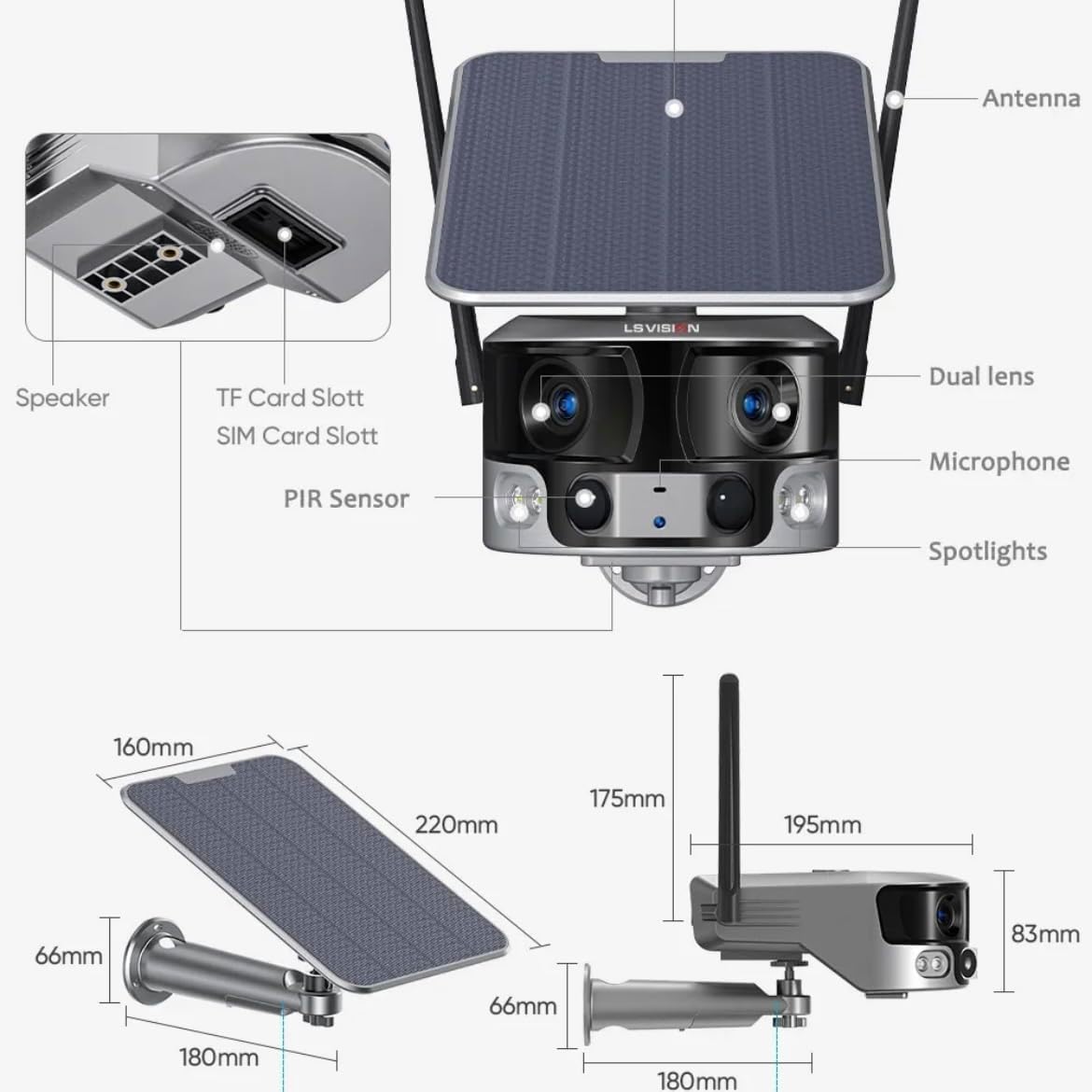
Figure 2.1: Product components and dimensions. Key parts include the solar panel, antennas, dual lens, microphone, spotlights, PIR sensor, speaker, TF card slot, and SIM card slot.
3. פּעקל אינהאַלט
ביטע קאָנטראָלירט דעם אינהאַלט פֿון דער פּאַקעט בײַם עפֿענען, כּדי צו זיכער מאַכן אַז אַלע זאַכן זענען פֿאַראַן און נישט געשעדיגט:
- 1 x LS VISION 4K 180-Degree Ultra-Wide Angle 4G Solar-Powered Outdoor Security Camera
- 1 x Solar Panel (6W)
- 1 x גאַנג פון מאַונטינג בראַקאַץ
- 1 רענטגענ 4 ג אַנטענע
- 1 x Set of Screws and Wall Plugs
- 1 x 2-meter Extension Cable for Solar Panel
4. סעטאַפּ גייד
4.1 ערשט טשאַרדזשינג
Although the camera is solar-powered, it is recommended to fully charge the built-in batteries before the first use. Connect the camera to a 5V/2A USB power adapter (not included) using a standard USB cable for initial charging. The charging indicator will show the status.
4.2 סים קאַרטל און TF קאַרטל אינסטאַלאַציע
Locate the SIM card slot and TF card slot on the camera (refer to Figure 2.1). Ensure the camera is powered off before inserting or removing cards.
- Open the protective cover of the card slots.
- Insert a standard 4G SIM card into the SIM card slot with the gold contacts facing down. Ensure it clicks into place.
- Insert a TF (microSD) card (up to 128GB, not included) into the TF card slot with the gold contacts facing down. Ensure it clicks into place.
- Close the protective cover firmly to maintain the IP66 waterproof rating.
4.3 מאָונטינג די אַפּאַראַט
The camera is designed for wall mounting and outdoor use. Consider the following for optimal placement:
- קלייַבן אַ אָרט מיט ampדירעקטע זונשייַן פֿאַר די זונ - פּאַנעל.
- מאַכן זיכער אַז די אַפּאַראַט האט אַ קלאָר view פון די געגנט איר ווילן צו מאָניטאָר.
- Mount the camera at a height that provides good coverage and deters tampערינג.

Figure 4.1: The LS VISION camera shown with its solar panel and mounting bracket, ready for outdoor installation.

Figure 4.2: The camera operates on a 4G network, eliminating the need for a Wi-Fi router, making it suitable for locations without existing Wi-Fi infrastructure.
The solar panel can be installed integrated with the camera or separately using the 2-meter extension cable for optimal sun exposure.
4.4 אַפּ אינסטאַלאַציע און פֿאַרבינדונג
To access and control your camera, download the Niview אַפּ פֿון דיין סמאַרטפֿאָן'ס אַפּ סטאָר (פֿאַראַן פֿאַר אַנדרויד און יאָס).
- זוכן פֿאַר "Niview" in the App Store or Google Play Store and install it.
- רעגיסטרירט אַ נייעם חשבון אָדער לאָגט זיך איין אויב איר האָט שוין איינעם.
- פֿאָלגט די אינסטרוקציעס אין דער אַפּ צו לייגן צו אייער קאַמעראַ. דאָס באַדייט טיפּיש סקענען אַ QR קאָד אויף דער קאַמעראַ אָדער מאַנועל אַרייַנגעבן איר ID.
- אַמאָל קאָננעקטעד, איר קענען view לעבן פאָאָtage, access recordings, and configure settings.
5. אַפּערייטינג ינסטרוקטיאָנס
5.1 לעבן View & פּלייבאַק
Access the Niview app on your smartphone or tablet to view live video streams from your camera anytime, anywhere. The app also allows you to review רעקאָרדעד פוtage.

Figure 5.1: The Niview app interface demonstrating real-time monitoring and timeline playback, ensuring no moment is missed.
5.2 באַוועגונג דעטעקציע און וואָרענונגען
The camera features advanced PIR and human detection capabilities. When motion or a human figure is detected, the camera will:
- Automatically begin recording a wake-up video.
- Send instant push notifications to your connected smartphone.
- Initiate automatic human tracking to follow the detected subject.

Figure 5.2: The camera's human tracking feature automatically follows detected individuals, ensuring continuous monitoring of their movement.
5.3 נאַכט זעאונג
The camera is equipped with a dual light source design for enhanced night vision:
- פול-קאָליר נאַכט זעאונג: Provides clear, colored images up to 20 meters in low-light conditions when spotlights are activated.
- אינפֿראַרויט (IR) נאַכט זעאונג: Offers black and white vision up to 40 meters using infrared LEDs.
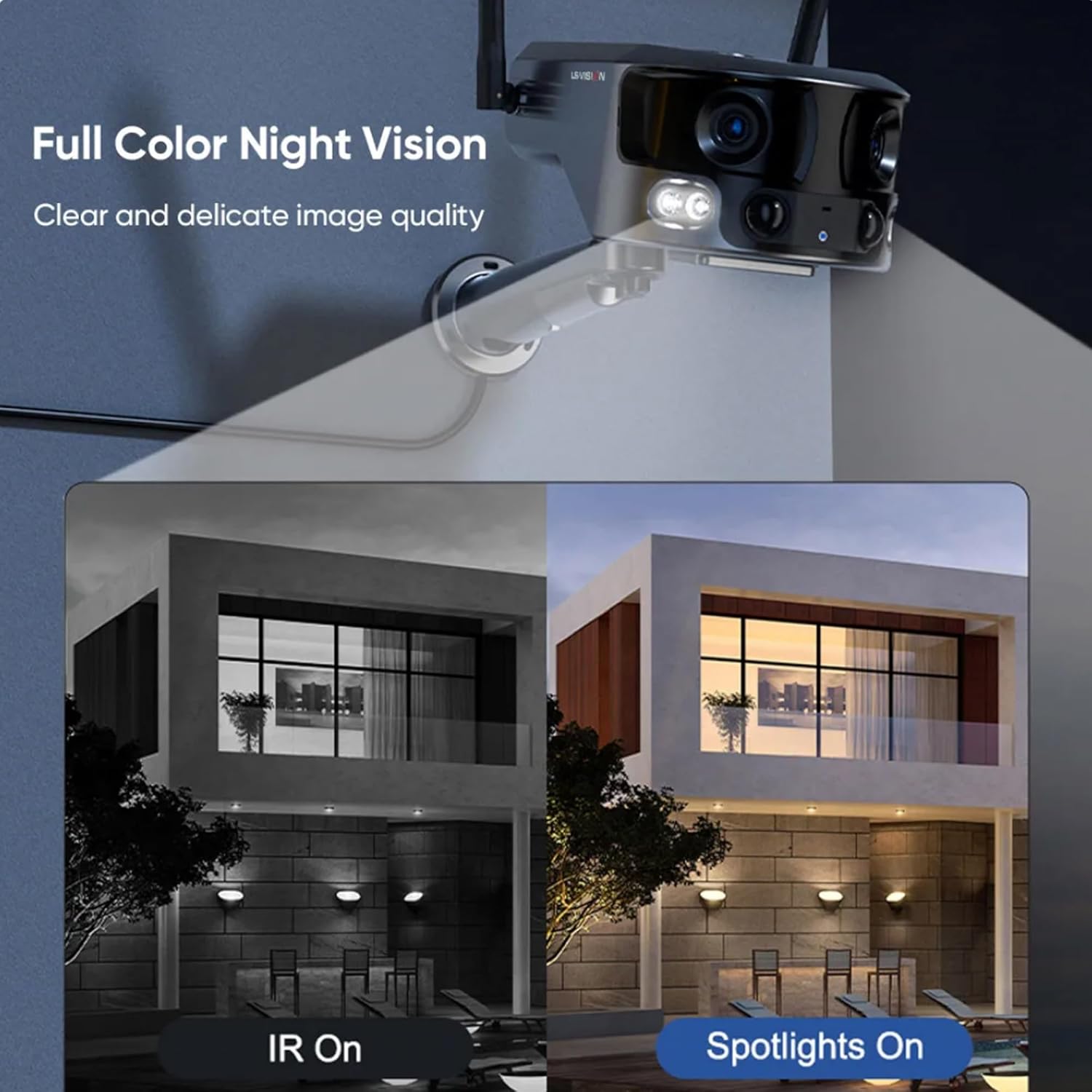
Figure 5.3: Comparison illustrating the difference between standard IR night vision and full-color night vision when the camera's spotlights are active.
5.4 צוויי-וועג אַודיאָ
Utilize the built-in microphone and speaker for two-way audio communication through the Niview app. This allows you to listen in on the camera's surroundings and speak through the camera.
5.5 רעקאָרדינג מאָדעס
The camera supports various recording modes to suit your needs:
- 24-Hour Continuous Recording: Records continuously throughout the day.
- Trigger Recording: Records only when motion or human detection is triggered. This mode has three sub-options for customization.
6. וישאַלט
Regular maintenance ensures optimal performance and longevity of your camera:
- רייניקונג: ווישט פּעריִאָדיש די קאַמעראַ לינז און זונ פּאַנעל מיט אַ ווייכן, דamp שטאָף צו באַזייַטיקן שטויב און שמוץ. ניצט נישט קיין שאַרפע כעמיקאַלן.
- באַטערי זאָרגן: Ensure the solar panel is exposed to sufficient sunlight to keep the built-in batteries charged. In prolonged periods of low sunlight, consider manually charging the camera.
- Firmware דערהייַנטיקונגען: Check the Niview app regularly for firmware updates. Keeping the firmware updated ensures the latest features and security patches.
- ענוויראָנמענטאַל שוץ: While IP66 rated, avoid exposing the camera to extreme weather conditions beyond its specified operating range if possible.

Figure 6.1: The camera's IP66 industrial-grade waterproof design ensures reliable operation even in adverse outdoor weather conditions like rain.
7. טראָובלעשאָאָטינג
אויב איר טרעפט פּראָבלעמען מיט אייער קאַמעראַ, זעט די פאלגענדע געוויינטלעכע פּראָבלעמען און לייזונגען:
| פּראָבלעם | מעגלעך סיבה | לייזונג |
|---|---|---|
| אַפּאַראַט אָפפלינע | קיין 4G סיגנאַל; נידעריגע באַטאַרייע; סים קאַרטל פּראָבלעם. | Check 4G signal strength; Recharge battery; Reinsert SIM card or try a different one. |
| נעבעך בילד קוואַליטעט | Dirty lens; Insufficient light; Network bandwidth. | Clean the lens; Ensure adequate lighting or enable night vision; Check 4G network speed. |
| באַוועגונג דיטעקשאַן איז נישט ארבעטן | Detection sensitivity too low; Incorrect settings; Obstructions. | Adjust sensitivity in app; Verify detection zone settings; Clear any obstructions. |
| די באַטאַרייע איז נישט טשאַרדזשינג | Insufficient sunlight; Dirty solar panel; Faulty connection. | Relocate solar panel to direct sunlight; Clean solar panel; Check cable connections. |
אויב די פראבלעם בלייבט, ביטע קאנטאקטירט קאסטומער סופארט.
8. ספּעסאַפאַקיישאַנז
| שטריך | באַשרייַבונג |
|---|---|
| מאָדעל נאָמען | LS-MS2 |
| ווידעא קאַפּטורע רעסאָלוטיאָן | 4K |
| Viewינג אַנגלע | 180 Degrees (Ultra-Wide) |
| קאַנעקטיוויטי טעכנאָלאָגיע | 4G Cellular Network (also supports Wi-Fi) |
| מאַכט מקור | Solar Powered (6W Solar Panel) |
| באַטאַרייע קאַפּאַציטעט | 18000 מאַה (געבויט-אין) |
| Night Vision Range (Color) | אַרויף צו 20 מעטער |
| Night Vision Range (IR) | אַרויף צו 40 מעטער |
| סטאָרידזש | Cloud Storage, TF Card (Max 128GB, not included) |
| וואָטערפּרוף רייטינג | IP66 |
| מאַטעריאַל | Acrylonitrile Butadiene Styrene (ABS) and Metal |
| ייַנמאָנטירונג טיפּ | וואנט בארג |
| קאַמפּאַטאַבאַל דעוויסעס | Tablet, Smartphone (Android/iOS) |
| פּראָדוקט דימענשאַנז | 18 X 18 X 15 סענטימעטער |
| פּונקט וואָג | 1.25 קילאָגראַמס |
9. וואָראַנטי אינפֿאָרמאַציע
This product comes with a standard manufacturer's warranty. For specific warranty terms, duration, and claim procedures, please refer to the warranty card included in your product packaging or contact the retailer/manufacturer directly. Keep your purchase receipt as proof of purchase.
10. קונה שטיצן
For technical assistance, product inquiries, or troubleshooting beyond this manual, please contact LS VISION customer support. Contact details can typically be found on the product packaging, the manufacturer's official webוועבזייטל, אדער דורך אייער קויפן-פונקט.
Ask a question about this manual
Ask about setup, troubleshooting, compatibility, parts, safety, or missing instructions. Manuals+ will review the question and use this page’s manual context to help answer it.