
1. הקדמה
This manual provides detailed instructions for the operation and maintenance of the LAUNCH CRP129E Plus OBD2 Scanner. Please read this manual thoroughly before using the device to ensure proper and safe operation. The CRP129E Plus is a comprehensive diagnostic tool designed for automotive professionals and enthusiasts, offering full system diagnostics and various service reset functions.
2. פּראָדוקט איבערview
2.1. מיטל קאַמפּאָונאַנץ
The LAUNCH CRP129E Plus features a user-friendly interface with a 5-inch touchscreen and physical buttons for navigation.

בילד 2.1: The LAUNCH CRP129E Plus OBD2 Scanner and its protective carrying case.
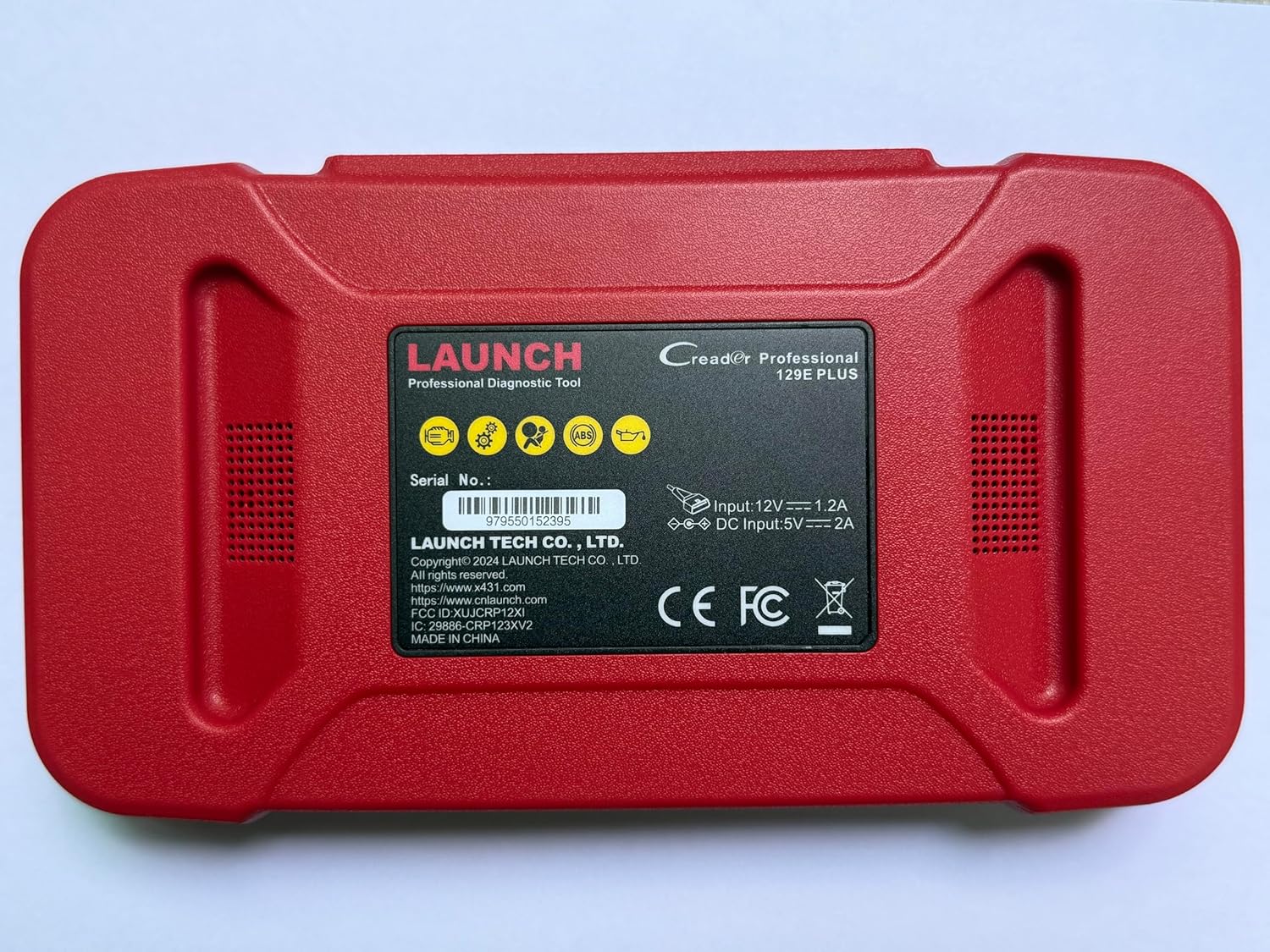
בילד 2.2: דערציען view of the CRP129E Plus, displaying input voltage, current specifications, and serial number (e.g., 979550152395).
2.2. פּעקל אינהאַלט
Upon unboxing, verify that all items listed below are present:
- CRP129E PLUS OBD2 Scanner (x1)
- OBDII Cable (x1)
- 5V DC Charging Cable (x1)
- באַניצער מאַנואַל (x1)
- שנעל אָנהייב גייד (קס 1)
- טראָג־זאַק (x1)

בילד 2.3: Visual representation of the CRP129E Plus package contents.
3. אויפשטעלן און ערשטע באנוץ
3.1. טשאַרדזשינג די מיטל
Before first use, ensure the device is fully charged using the provided 5V DC charging cable. Connect the cable to the device and a suitable power source.
3.2. פּאָווערינג אויף / אויסגעלאשן
- מאַכט אויף: דריק און האלט דעם מאַכט קנעפּל ביז דער עקראַן באַלויכטנט זיך.
- מאַכט אַוועק: Press and hold the power button, then select "Power Off" from the options.
3.3. פֿאַרבינדן זיך צום פֿאָרמיטל
Locate the vehicle's OBDII port, typically under the dashboard on the driver's side. Connect the provided OBDII cable from the CRP129E Plus to the vehicle's OBDII port. Ensure the vehicle's ignition is in the ON position (engine off or running, depending on the diagnostic task).
3.4. Wi-Fi Connection and Updates
The CRP129E Plus supports one-click Wi-Fi updates. Connect the device to a stable Wi-Fi network to download the latest software and vehicle data. Regular updates ensure compatibility with new vehicle models and improved diagnostic functions.
- From the main menu, tap "Settings".
- Select "WLAN" and connect to an available network.
- Return to the main menu and tap "Upgrade".
- Select the desired software updates and tap "Update".

בילד 3.1: The device interface showing options for updates, DTC lookup, live data stream, and battery test.
4. אַפּערייטינג ינסטרוקטיאָנס
4.1. אַוטאָ ווין סקאַן
The device can automatically identify vehicle information. After connecting to the vehicle, select "Diagnose" and the device will attempt an Auto VIN scan to quickly identify the vehicle's make, model, and year.

בילד 4.1: Visual representation of the Auto VIN scan process and systems covered by diagnosis.
4.2. פולע סיסטעם דיאַגנאָסטיק
The CRP129E Plus can access and diagnose all available vehicle systems. This includes, but is not limited to, Engine, ABS, SRS, SAS, TCM, TPMS, Body, Chassis, Powertrain, Fuel System, and Lighting System.
- פֿון די הויפּט מעניו, אויסקלײַבן "דיאַגנאָזירן".
- Choose "Health Report" or select specific systems for diagnosis.
- The device will scan for Diagnostic Trouble Codes (DTCs) and display results.
- You can read fault codes, clear fault codes, and view live data streams.

בילד 4.2: איבערview of the comprehensive system diagnostic capabilities.
4.3. OBD2 פונקציעס
The device supports all 10 modes of OBDII testing for emissions-related issues.
- לייענען/אויסמעקן DTCs: צוריקקריגן און אויסמעקן דיאַגנאָסטיק פּראָבלעם קאָודז.
- לעבעדיקע דאַטן סטרים: View real-time data from the vehicle's sensors.
- I/M גרייטקייט: קאָנטראָלירט דעם סטאַטוס פון עמיסיע-פֿאַרבונדענע מאָניטאָרס.
- פרירן פריים דאַטן: View a snapshot of vehicle conditions when a fault code was set.
- O2 סענסאָר טעסט: באַקומען די רעזולטאַטן פון די O2 סענסאָר מאָניטאָר.
- אויף-באָרד מאָניטאָר טעסט: Retrieve results for emission-related powertrain components.
- EVAP סיסטעם טעסט: Initiate a test of the evaporative emission system.
- פאָרמיטל אינפֿאָרמאַציע: צוריקקריגן דעם פאָרמיטל אידענטיפיקאציע נומער (VIN), קאַליבראַציע ID, און קאַליבראַציע וועריפיקאַציע נומער (CVN).
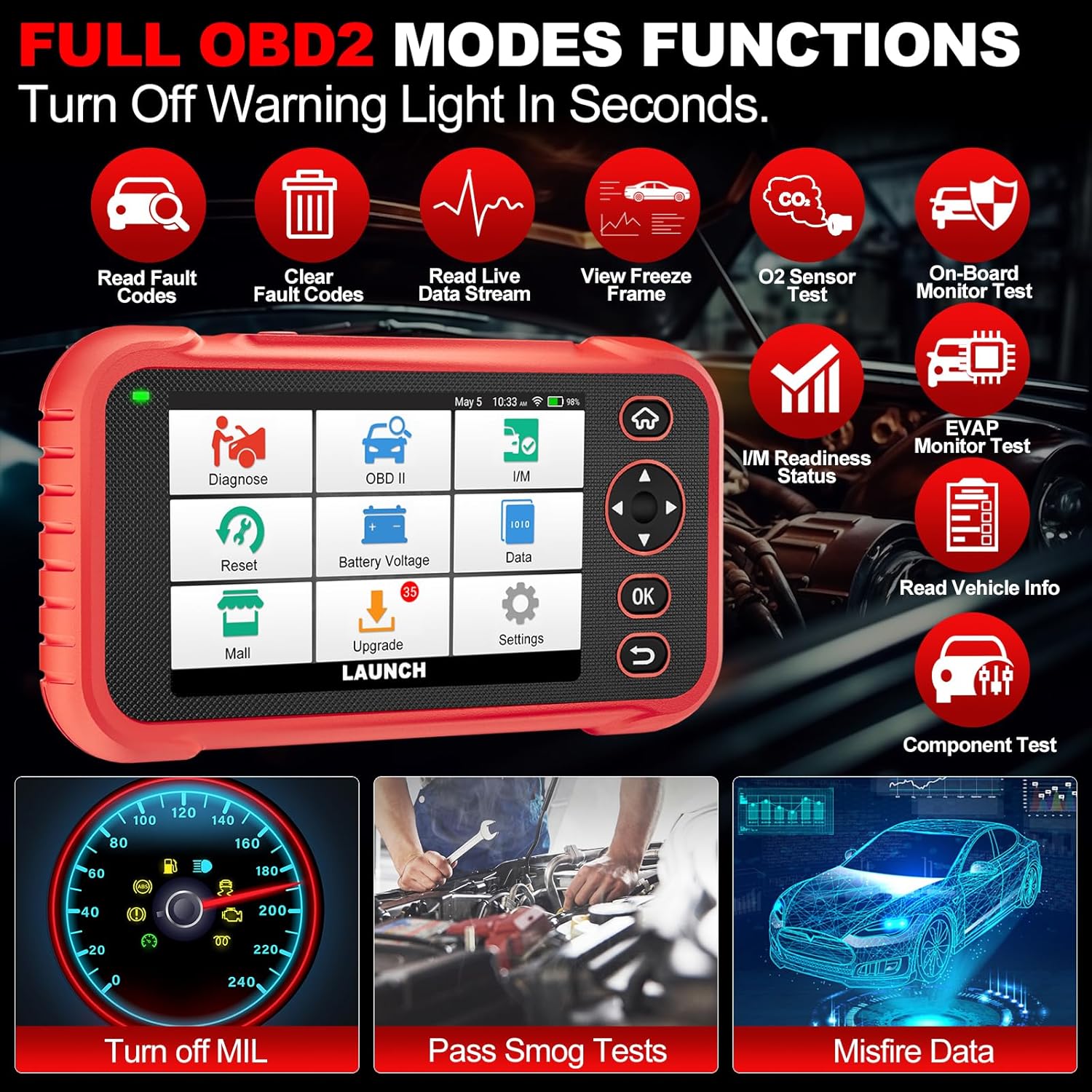
בילד 4.3: Main menu options for OBD2 functions.
4.4. Service Reset Functions
The CRP129E Plus offers 12+ essential service reset functions for common maintenance tasks.
- אָיל באַשטעטיק: ריסעט די אויל לעבן סיסטעם נאך אן אויל וועקסל.
- טראָטל אַדאַפּטיישאַן: איניציאליזירט די טראטל אַקטואַטאָרס צו די פעליקייַט צושטאַנד.
- אדבלו ריסעט: Resets the urea after the diesel exhaust fluid (AdBlue) is replaced or refilled.
- העדלamp ריכטן: Calibrates the adaptive front lighting system.
- TPMS באַשטעטיק: ריסעטז די טייער דרוק מאָניטאָרינג סיסטעם סענסאָרן.
- SAS איבערשטעלן: קאליברירט דעם סטירינג ווינקל סענסאָר.
- Battery Matching (BMS Reset): רעגיסטרירט נייע באַטעריע פאַרבייַט.
- A/F צוריקשטעלן: אַדזשאַסטירט לופט/ברענשטאָף פאַרהעלטעניש פּאַראַמעטערס.
- D-P-F Regeneration: רייניקט פּאַרטיקולאַט מאַטעריע פֿון די DPF פֿילטער.
- אינדזשעקטאָר קאָדירונג: קאָדירט נייע אינדזשעקטאָר נומערן צום ECU.
- EPB צוריקשטעלן: ריסעט די עלעקטראָנישע פּאַרקינג ברעיק פּאַדס נאָך ריפּלייסמאַנט.
- ABS בלוטונג: פירט אויס בלידינג פון די ברעיק סיסטעם.

בילד 4.4: איבערview of available service reset functions.
4.5. Live Data Graphing and Recording
The device can display live data streams in merged quadrant graphs, allowing for comprehensive analysis of up to four parameters simultaneously. Data can also be recorded and played back for further review.

בילד 4.5: Example of 4-in-1 live data graphing and diagnostic report generation.
4.6. באַטערי וואָלtagE טעסט
Monitor the vehicle's battery voltage in real-time to assess its status and identify potential issues.

בילד 4.6: באַטערי וואָלtage test interface and other diagnostic support features.
5. וישאַלט
- רייניקונג: ניצט אַ ווייכע, טרוקענע שטאָף צו רייניקן דעם אַפּאַראַט. פֿאַרמייַדט אַברייסיוו רייניגער אָדער סאָלווענטן.
- סטאָרידזש: האַלט דאָס אַפּאַראַט אין זײַן טראָג־קעסטל אין אַ קילן, טרוקענעם אָרט ווען עס איז נישט אין באַנוץ.
- ווייכווארג דערהייַנטיקונגען: Regularly check for and install software updates via Wi-Fi to ensure optimal performance and vehicle compatibility.
- באַטערי זאָרגן: Avoid fully discharging the battery frequently. Charge the device regularly, even if not in active use, to maintain battery health.
6. טראָובלעשאָאָטינג
| פּראָבלעם | מעגלעך סיבה | לייזונג |
|---|---|---|
| די מיטל טוט נישט מאַכט אויף. | Low battery; faulty power button. | Charge the device for at least 30 minutes. If issue persists, contact support. |
| קאָמוניקאַציע טעות מיטן אויטאָ. | Loose OBDII connection; vehicle ignition off; incompatible vehicle protocol. | Ensure cable is securely connected. Turn ignition to ON. Verify vehicle compatibility. |
| Unable to update software. | No Wi-Fi connection; unstable internet; insufficient storage. | Check Wi-Fi connection. Ensure stable internet. Free up storage if necessary. |
| דער עקראַן רעאַגירט נישט. | ווייכווארג פראבלעם; פיזישער שאדן. | ריסטאַרט דעם מיטל. אויב די פּראָבלעם בלייבט, קאָנטאַקטירט שטיצע. |
7. ספּעסאַפאַקיישאַנז
- מאָדעל: CRP129E PLUS
- אַפּערייטינג סיסטעם: אַנדרויד 7.0
- ווייַז: 5-אינטש טאָוטשסקרעען
- זכּרון: 16 גיגאבייט
- באַטערי: 6100 מאַה
- קאַנעקטיוויטי: ווי-פי
- דימענסיעס: 7.09 X 6.3 X 2.36 אינטשעס
- נומער וואָג: 2.27 פונט
- שטיצט פּראָטאָקאָלס: OBDII/EOBD
- פאָרמיטל קאַווערידזש: Over 85 brands (1996-2025)
- UPC: 884508007774

בילד 7.1: Summary of key hardware and software specifications.

בילד 7.2: Extensive vehicle brand coverage and multi-language support.
8. וואָראַנטי און שטיצן
The LAUNCH CRP129E Plus comes with a manufacturer's warranty. Please refer to the official LAUNCH webוועבזייטל אדער אייער קויפן דאקומענטאציע פאר ספעציפישע גאראנטיע טערמינען און באדינגונגען.
- וואָראַנטי: 5 Years (as per product information)
- Return/Replace Policy: 90 Days (as per product information)
- טעכניש שטיצן: 24/7 technical support is available. For assistance, please contact LAUNCH customer service.
- אָנליין באַמערקונגען: The device supports online feedback for quick resolution of diagnostic issues.
For further assistance or to provide feedback, please visit the official LAUNCH support channels.