1. פּראָדוקט איבערview
The ANENG M469A Network Cable Tester is a new type of digital signal finder designed for efficient and accurate network cable testing. It features strong anti-interference capabilities against electrical or magnetic fields and other external environmental factors. This instrument provides fast and precise line checking, capable of accurately locating break points in network lines whether under load or not. It is an essential tool for installation, maintenance, and technical personnel working with communication lines, weak current systems, computer networks, and metal wire lines.
שליסל פֿעיִקייטן:
- Multi-Functional Testing: Includes open circuit and short circuit testing, wire finding, cable tracing, DC level testing (DC 3~10V), network line finding, and network cable proofreading functions.
- נידעריק וואָלtage אָנזאָג: Alerts the user when the battery voltage drops below 6V by flashing the "SCAN" and "line sequence" LEDs on the transmitter, indicating battery replacement is needed.
- ירפאָון פֿונקציע: Allows for clear signal detection in noisy environments, minimizing external interference.
- פּרויעקטאָר פֿונקציע: Integrated light for convenient operation in dark conditions.
- אַדזשאַסטאַבאַל באַנד: The receiver features a volume adjustment knob to control sensitivity and sound output for optimal user experience.
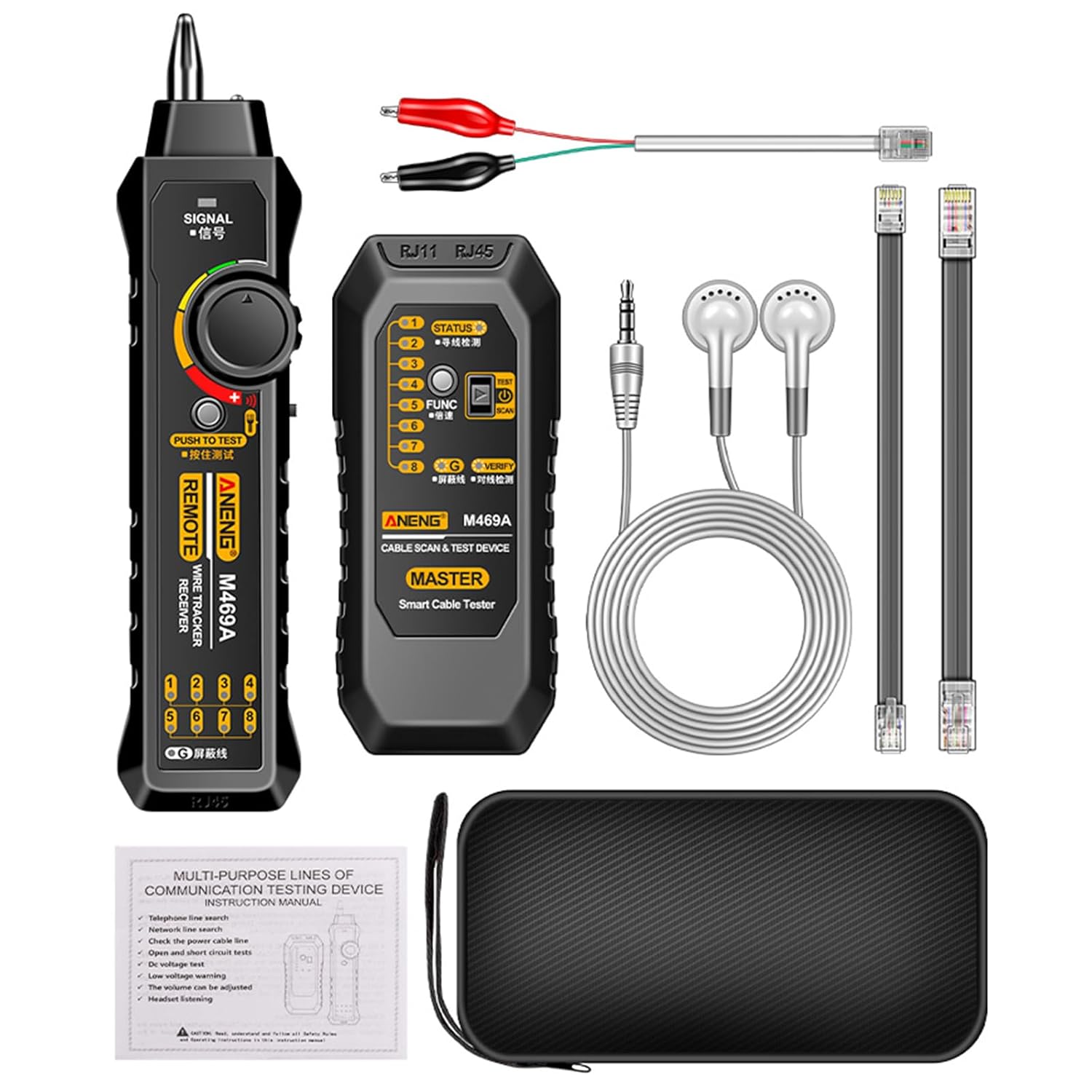
Figure 1: Complete ANENG M469A Network Cable Tester Kit.
2. פּעקל אינהאַלט
ווען איר עפנט דעם פעקל, ביטע זיכער מאכן אז אלע פאלגנדע זאכן זענען אריינגערעכנט:
- 1 x טראַנסמיטער אַפּאַראַט
- 1 קס ופנעמער אַפּאַראַט
- 1 x RJ11 Alligator Clip Cable
- 1 x RJ11 Test Cable
- 1 x RJ45 Test Cable
- 1 x סטאָרידזש באַג
- 1 רענטגענ כעדסעט
- 1 x באַניצער מאַנואַל (ענגליש)
3. ספּעסאַפאַקיישאַנז
| פּאַראַמעטער | ווערט |
|---|---|
| פּראָדוקט נאָמען | Network Line Finder |
| פּראָדוקט מאָדעל | M469A |
| מאַכט מקור | 6F22 9V battery (not included) |
| מאַטעריאַל | ABS |
| אינטערפֿייס סוף | RJ11, RJ45 |
| טראַנסמיטער גרייס | 127 רענטגענ 56.5 רענטגענ 30 מם (5 רענטגענ 2.22 רענטגענ 1.18 אינטשעס) |
| טראַנסמיטער וואָג | 62 ג (2.19 אַז) |
| ופנעמער גרייס | 198 רענטגענ 46 רענטגענ 31.5 מם (7.79 רענטגענ 1.81 רענטגענ 1.24 אינטשעס) |
| ופנעמער ווייט | 77 ג (2.72 אַז) |
| קאָליר אָפּציעס | Black / Red (Optional) |
4. סעטאַפּ
4.1 באַטאַרייע ייַנמאָנטירונג
The ANENG M469A requires a 6F22 9V battery (not included) for operation. Follow these steps to install the battery:
- Locate the battery compartment on the back of both the Transmitter and Receiver units.
- Open the battery compartment cover by sliding or unscrewing it.
- Insert a new 6F22 9V battery, ensuring the polarity (+/-) matches the indicators inside the compartment.
- פאַרמאַכן די באַטאַרייע אָפּטייל דעקן סיקיורלי.
- Repeat for both units.
באַמערקונג: Always use a fresh 9V battery for optimal performance. If the low voltage prompt activates, replace the battery promptly.
4.2 קאַנעקטינג קאַבלעס
Depending on the test you wish to perform, connect the appropriate cable to the Transmitter unit:
- For RJ45 Network Cables: Insert one end of the RJ45 test cable into the RJ45 port on the Transmitter. Connect the other end to the network cable or device you wish to test.
- For RJ11 Telephone Cables: Insert one end of the RJ11 test cable into the RJ11 port on the Transmitter. Connect the other end to the telephone cable or device.
- For Alligator Clip Connections: Use the RJ11 Alligator Clip cable for direct connection to bare wires or terminals for tracing and continuity tests.
5. אַפּערייטינג ינסטרוקטיאָנס
5.1 Cable Tracing and Wire Finding
This function allows you to locate a specific cable within a bundle or trace its path.
- Connect the cable to be traced to the appropriate port (RJ45, RJ11, or alligator clips) on the Transmitter unit.
- Turn the function selection switch on the Transmitter to the "SCAN" or line finding position.
- צינדט אן דעם ריסיווער איינהייט.
- Adjust the volume knob on the Receiver to a comfortable level.
- Move the Receiver's probe along the suspected cable path. The Receiver will emit an audible tone when it detects the signal from the Transmitter, indicating the location of the cable. The tone will be strongest when directly over the cable.
- For noisy environments, plug the provided headset into the Receiver's audio jack.
5.2 Network Cable Proofreading (Line Sequence Test)
This function checks the wiring sequence of RJ45 network cables for open circuits, short circuits, and cross-overs.
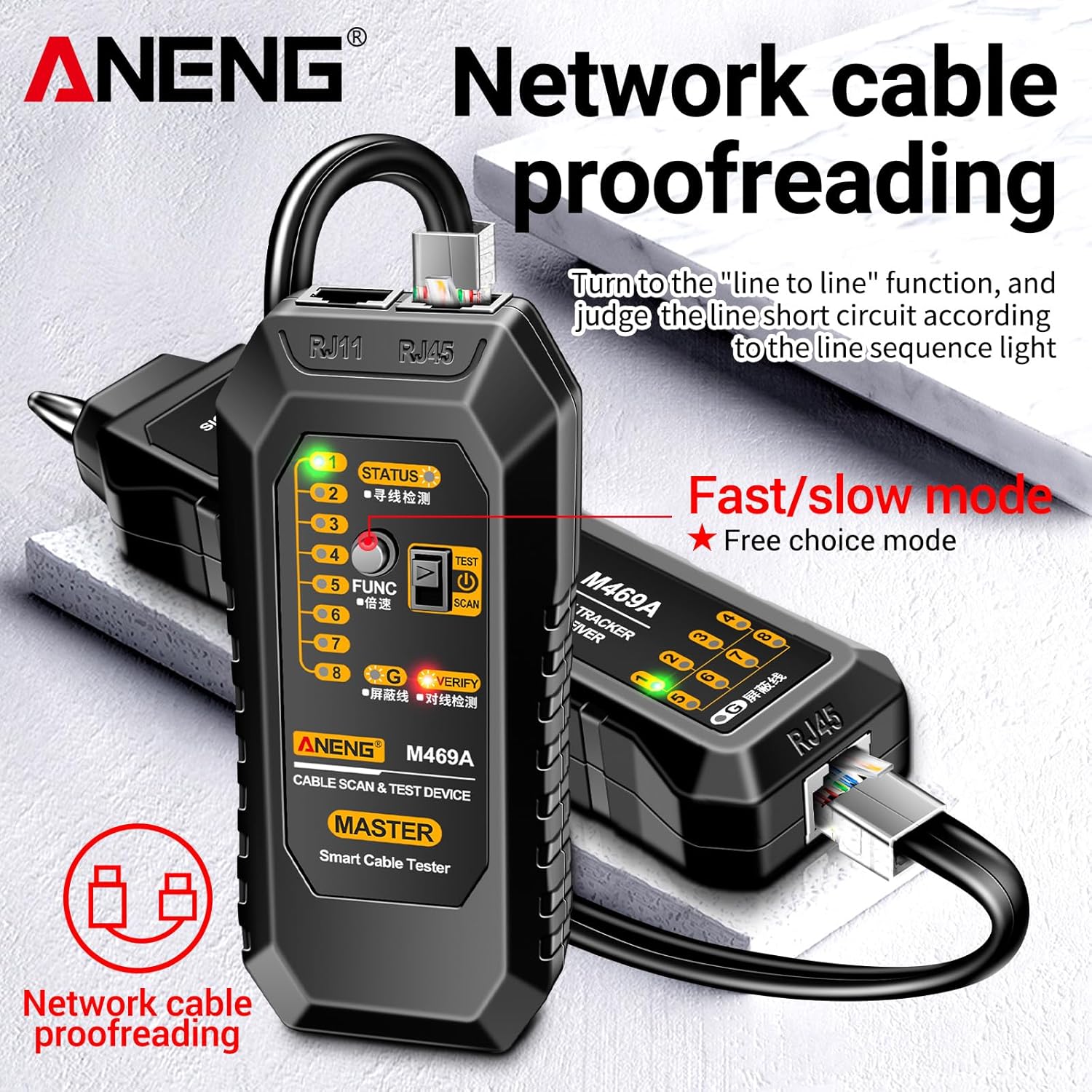
Figure 2: Network Cable Proofreading in progress.
- Connect one end of the RJ45 network cable to the RJ45 port on the Transmitter unit.
- Connect the other end of the same RJ45 network cable to the RJ45 port on the Receiver unit.
- Turn the function selection switch on the Transmitter to the "line sequence" or "VERIFY" position.
- Observe the LED indicators on both the Transmitter and Receiver. The LEDs (1-8 and G for shield) will light up in sequence, indicating the continuity and correct wiring of each wire pair.
- Any deviation in the sequence or unlit LEDs indicates a wiring fault (e.g., open circuit, short circuit, or cross-over).
- The "Fast/slow mode" allows you to adjust the speed of the LED sequence for easier observation.
5.3 DC Level Testing (DC 3~10V)
This function allows for basic voltage detection on DC lines within the specified range.
- Connect the alligator clips to the DC line you wish to test.
- Observe the indicator on the Transmitter unit. If a DC voltage between 3V and 10V is detected, the corresponding indicator will light up.
5.4 Spotlight Function
The Receiver unit is equipped with a spotlight for use in dimly lit environments.
- Locate the light switch on the Receiver unit.
- Toggle the switch to turn the spotlight on or off as needed.
5.5 נידעריק וואָלtage פּינטלעך
To ensure accurate readings, the device provides a low voltagE ווארענונג.
- When the function selection switch of the Transmitter is set to the "SCAN" (line finding) position, if the battery voltage drops below 6V, both the "SCAN" LED and the "line sequence" LEDs on the Transmitter will flash simultaneously.
- This indicates that the battery needs to be replaced to maintain optimal performance and accuracy.
6. וישאַלט
Proper maintenance will extend the lifespan of your ANENG M469A Network Cable Tester.
- רייניקונג: ווישט די איינהייטן מיט א ווייכן, טרוקענעם טוך. ניצט נישט קיין שרײַבנדיקע רייניגער אדער סאָלווענטן.
- סטאָרידזש: Store the device in the provided storage bag in a cool, dry place away from direct sunlight and extreme temperatures.
- באַטערי פאַרבייַט: אויב דער אַפּאַראַט וועט נישט געניצט ווערן פֿאַר אַ לענגערע צייט, נעמט אַרויס די באַטעריעס צו פֿאַרמייַדן ליקאַדזש און שאָדן.
- האַנדלינג: פֿאַרמײַדט צו לאָזן די אַפּאַראַטן פֿאַלן אָדער זיי אויסשטעלן צו שטאַרקע קלאַפּן.
7. טראָובלעשאָאָטינג
If you encounter issues with your ANENG M469A, refer to the following table for common problems and solutions:
| פּראָבלעם | מעגלעך סיבה | לייזונג |
|---|---|---|
| די מיטל טוט נישט מאַכט אויף. | די באַטעריע איז טויט אָדער נישט ריכטיק אינסטאַלירט. | קאָנטראָלירט די פּאָלאַריטעט פון די באַטעריע. פאַרבייטן מיט אַ נייע 9V באַטעריע. |
| No signal detected during cable tracing. | Transmitter not powered on; cable not properly connected; signal too weak; excessive interference. | Ensure Transmitter is on and in "SCAN" mode. Reconnect cables securely. Adjust Receiver volume/sensitivity. Use headset in noisy environments. |
| Network cable proofreading LEDs are incorrect or not lighting up. | Cable fault (open, short, cross-over); cable not fully inserted; Transmitter/Receiver not in "line sequence" mode. | Inspect the cable for damage. Ensure RJ45 connectors are fully seated. Verify both units are in the correct test mode. |
| נידעריק וואָלtage Prompt (LEDs flashing). | באַטערי וואָלtage איז נידעריק. | Replace the 9V battery in the Transmitter unit. |
8. וואָראַנטי און שטיצן
This product is covered by a standard manufacturer's warranty against defects in materials and workmanship. Please refer to your purchase documentation for specific warranty terms and duration. For technical support, troubleshooting assistance, or warranty claims, please contact your retailer or the manufacturer's customer service department.
האַלט אייער קויף קוויטל ווי אַ באַווייַז פון קויפן פֿאַר גאַראַנטיע צוועקן.

