
1. הקדמה און איבערview
The Bmax Mini PC B1 Pro is a compact and efficient desktop computer designed for various tasks, including office work, multimedia consumption, and web browsing. Its small form factor allows for flexible placement in any environment, while its robust specifications ensure smooth performance for everyday computing needs.

Image: The Bmax Mini PC B1 Pro, showcasing its compact size as it is held in a hand.
2. וואָס איז אין דער קעסטל
Upon opening your Bmax Mini PC B1 Pro package, please ensure all the following items are present:
- 1 x Bmax Mini PC B1 Pro (8GB+128GB)
- 1 x HDMI קאַבלע
- 1 רענטגענ יו. עס. מאַכט אַדאַפּטער
- 1 x באַניצער מאַנואַל (דאָס דאָקומענט)
- 1 x וועסאַ מאָונט מיט שרויפן

Image: All components included in the Bmax Mini PC B1 Pro package, laid out next to the product box.
3. פּראָדוקט פֿעיִקייטן
3.1. פּראַסעסער און פאָרשטעלונג
The Bmax Mini PC B1 Pro is equipped with the Intel Gemini Lake N4000 processor, offering a base frequency of 1.1 GHz and a burst frequency of up to 2.6 GHz. This processor, combined with 8GB of LPDDR4 RAM, provides efficient performance for daily computing tasks, ensuring smooth operation for web בראַוזינג, דאָקומענט עדיטינג און מולטימעדיאַ פּלייבאַק.

Image: Detailed specifications of the Intel Gemini Lake N4000 processor, highlighting its 2 cores, 2 threads, 14nm process, 4MB cache, 6W power consumption, and 2.6 GHz burst frequency.
3.2. זכּרון און סטאָרידזש
The device comes with 128GB of eMMC storage for quick boot times and application loading. For expanded storage needs, the Mini PC supports adding an M.2_2280 SATA SSD (up to 1TB, not included). This allows users to significantly increase storage capacity for files, אַפּלאַקיישאַנז און מידיאַ.

בילד: אן עקס-שטראַל view of the Bmax Mini PC B1 Pro, illustrating the internal layout and the M.2_2280 SATA SSD expansion slot.
3.3. קאָנעקטיוויטי און פּאָרטן
The B1 Pro offers comprehensive connectivity options:
- וסב פּאָרץ: 2 רענטגענ וסב 3.0, 2 רענטגענ וסב 2.0
- ווידעא אַוטפּוץ: 1 x HDMI, 1 x VGA (supports 4K dual screen display)
- נעץ: LAN 1000Mbps Ethernet port, 2.4G/5G Dual Band Wi-Fi (802.11ac)
- ווירעלעסס: Bluetooth 4.2 for connecting peripherals like mice, keyboards, and speakers.
- אַודיאָ: 3.5 מם כעדסעט דזשאַק
- אנדערע: Micro SD Card Slot, Power In, Power Button, Clear CMOS

Image: A visual guide to the various ports on the Bmax Mini PC B1 Pro, including USB, HDMI, VGA, Ethernet, and audio jacks, indicating their compatibility with different devices.
3.4. Compact Design and Mounting
With dimensions of only 4.7 x 4.7 x 0.9 inches and a weight of approximately 8.5 ounces, the B1 Pro is exceptionally portable and space-saving. It includes a VESA bracket, allowing it to be easily mounted behind a monitor or on a wall, creating a clutter-free workspace.

Image: The Bmax Mini PC B1 Pro shown next to a smartphone, illustrating its small physical dimensions and light weight.
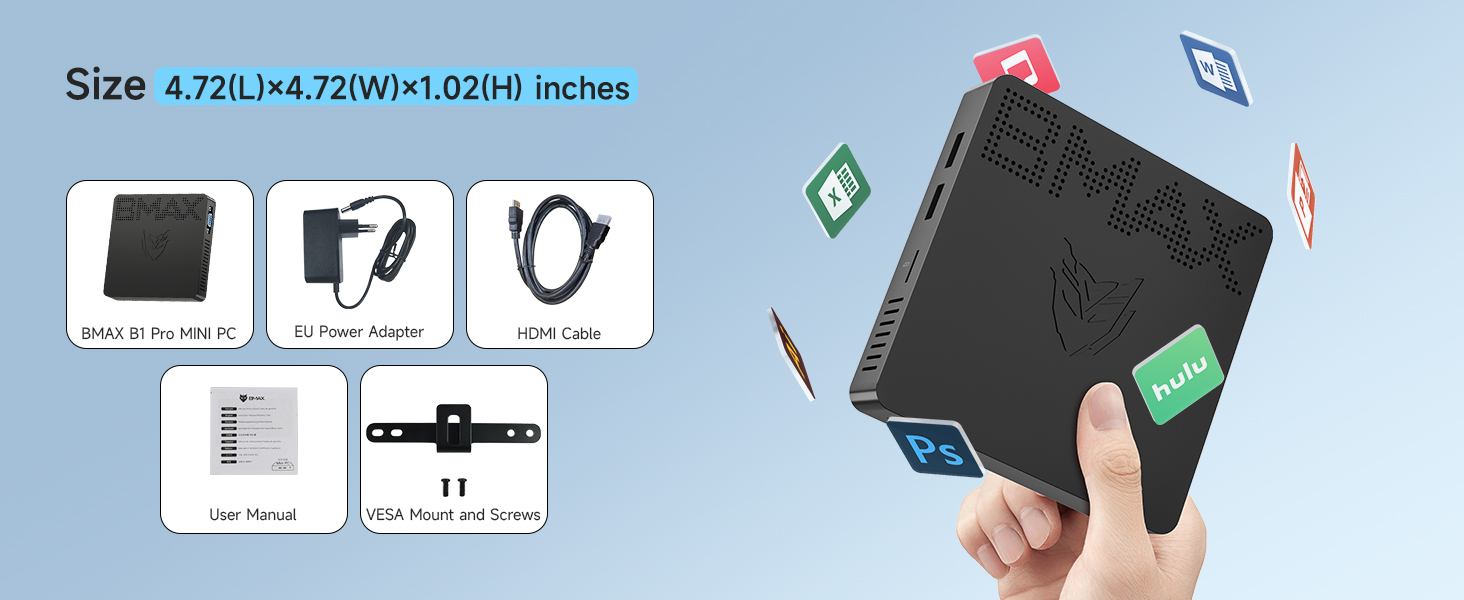
Image: Demonstrations of the Bmax Mini PC B1 Pro's versatile placement options: resting on a desk, attached to a VESA mount, and mounted on a wall.
4. סעטאַפּ גייד
4.1. ערשט סעטאַפּ
For the first boot of your Bmax Mini PC B1 Pro, it is recommended to נישט connect to Ethernet or Wi-Fi. This can help expedite the initial Windows setup process. Once the initial setup is complete, you can connect to your network.
4.2. קאַנעקטינג פּעריפעראַלס
- פֿאַרבינדט אייער קלאַוויאַטור און מויז צו די פֿאַראַן USB פּאָרץ.
- Connect your monitor(s) using either the HDMI or VGA port.
- Plug in the US Power Adapter to the Mini PC and then to a power outlet.
- דרוק די מאַכט קנעפּל צו קער אויף די מיטל.
4.3. ווייַז סעטאַפּ
The B1 Pro supports dual 4K display output via its HDMI and VGA ports, allowing for an extended workspace or mirrored displays.

Image: The Bmax Mini PC B1 Pro demonstrating its capability to connect to and display content on two monitors simultaneously.
Video: An official product video from Bmax Direct showcasing the B1 Pro Mini PC, its features, and connectivity options.
5. אַפּערייטינג ינסטרוקטיאָנס
5.1. מאַכט אויף / אויסגעלאשן
To power on the Mini PC, press the power button located on the device. To power off, use the standard shutdown procedure within the operating system (Start Menu > Power > Shut down) or press and hold the power button for a few seconds.
5.2. אָפּערייטינג סיסטעם
The Bmax Mini PC B1 Pro comes with Windows 11 Pro pre-installed. It also supports other operating systems such as Linux (Ubuntu).

Image: The Bmax Mini PC B1 Pro connected to a monitor, displaying the Windows 11 Pro desktop, indicating its pre-installed operating system and compatibility with Linux/Ubuntu.
5.3. ווייַט אַקסעס
The Mini PC supports Wake On LAN, RTC Wake, and Auto Power On, allowing for convenient remote access and management. These features can be configured in the BIOS settings.
6. סטאָרידזש יקספּאַנשאַן
The Bmax Mini PC B1 Pro offers an M.2_2280 SATA SSD expansion slot, allowing users to upgrade storage up to 1TB. This is ideal for users requiring more space for applications, large files, or a secondary operating system. The expansion slot is easily accessible for user-friendly upgrades.
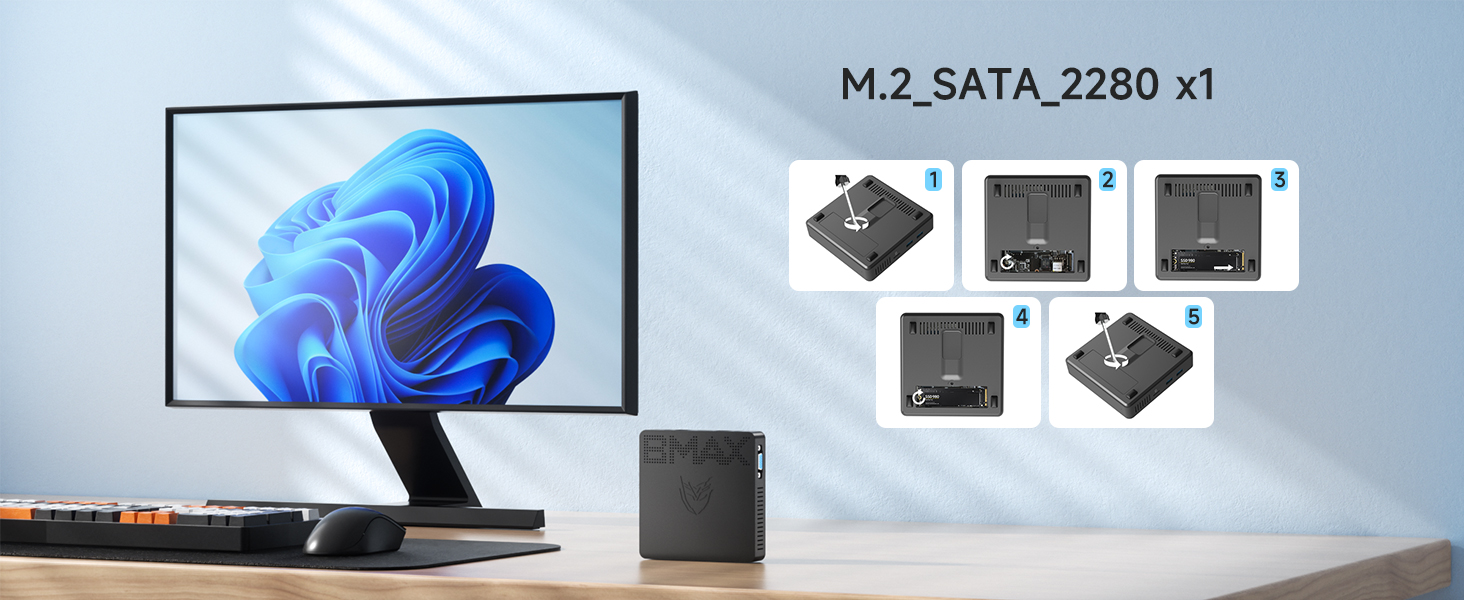
Image: A visual step-by-step guide demonstrating how to open the Bmax Mini PC B1 Pro and install an M.2 SATA SSD for storage expansion.
7. וישאַלט
7.1. היץ דיסיפּאַטיאָן
The B1 Pro features a silent heatsink design that efficiently cools the CPU processor, ensuring stable performance and a quiet working environment. Regular cleaning of dust from the vents can help maintain optimal heat dissipation.
Image: An internal diagram of the Bmax Mini PC B1 Pro highlighting its efficient heat dissipation system, which contributes to a silent operation.
7.2. אַלגעמיינע קער
To ensure the longevity of your Mini PC, keep it in a clean, dry environment away from direct sunlight and extreme temperatures. Avoid spilling liquids on the device and use a soft, dry cloth for cleaning the exterior.
8. טראָובלעשאָאָטינג
If you encounter any issues with your Bmax Mini PC B1 Pro, please refer to the following general troubleshooting steps:
- קיין מאַכט: זיכער מאַכן אַז דער מאַכט אַדאַפּטער איז זיכער פארבונדן צו ביידע דעם מיטל און אַ אַרבעטנדיקן מאַכט ווענטיל.
- קיין ווייַז: Verify that the HDMI/VGA cable is properly connected to both the Mini PC and the monitor. Try a different cable or monitor if possible.
- סיסטעם פארלאנגזאמונג: Check for excessive background processes, update drivers, or consider expanding storage with an M.2 SSD if your current storage is nearly full.
- נעץ קאָנעקטיוויטי פּראָבלעמען: Ensure Wi-Fi is enabled or the Ethernet cable is properly connected. Restart your router/modem.
For persistent issues, please contact Bmax customer support.
9. ספּעסאַפאַקיישאַנז
| שטריך | באַשרייַבונג |
|---|---|
| סאָרט | Bmax |
| סעריע | B1 Pro |
| פּראַסעסער | Intel Celeron N4000 (Up to 2.6 GHz) |
| באַראַן | 8 גיגאבייט LPDDR4 |
| שווער דרייוו | 128 גיגאבייט eMMC |
| סטאָרידזש יקספּאַנשאַן | M.2_2280 SATA SSD (up to 1TB, not included) |
| גראַפיקס קאָופּראַסעסער | Intel UHD Graphics 600 |
| מאַקסימום סקרין האַכלאָטע | 3840 X 2160 בילדצעלן (4K) |
| ווירעלעסס טיפּ | Bluetooth 4.2, 802.11ac (2.4G/5G Dual Band WiFi) |
| עטהערנעט | 1000 מבפּס לאַן |
| אָפּערייטינג סיסטעם | Windows 11 Pro (pre-installed), supports Linux/Ubuntu |
| פּונקט וואָג | 7.8 אונסעס |
| פּעקל דימענשאַנז | 11.06 X 6.18 X 2.91 אינטשעס |
| קאָליר | שוואַרץ |
10. וואָראַנטי און שטיצן
Bmax provides a 12-month warranty for the Mini PC B1 Pro, ensuring satisfaction and product reliability. Additionally, lifetime technical support is available to assist with any queries or issues you may encounter. For support, please contact Bmax customer service via email.