
Scheppach ROBOCUT-L500
Scheppach RoboCut L500 Robotic Lawnmower User Manual
Model: ROBOCUT-L500
הקדמה
This user manual provides essential information for the safe and efficient operation, setup, and maintenance of your Scheppach RoboCut L500 Robotic Lawnmower. Please read this manual thoroughly before operating the device and keep it for future reference.

Figure 1: Scheppach RoboCut L500 Robotic Lawnmower with its charging station, boundary wire, and spare blades.
זיכערקייַט אינסטרוקציעס
שטענדיק אָבסערווירן די פאלגענדע זיכערהייט מיטלען צו פאַרמייַדן שאָדן און שעדיקן צו די מיטל:
- לייענען אַלע ינסטראַקשאַנז קערפאַלי איידער נוצן.
- האַלטן קינדער און פּעץ אַוועק פון די אַרבעט געגנט.
- Do not operate the mower in wet conditions or during rain. The integrated rain sensor will prevent operation in such conditions.
- Ensure the boundary wire is correctly installed to define the mowing area.
- Regularly inspect the blades for wear and damage. Replace as necessary.
- Use the manual stop function (red button) immediately in case of emergency.
- נאָר נוצן אָריגינעל ספּער טיילן און אַקסעסעריז.
סעטאַפּ און ינסטאַלירונג
1. אויספּאַקן און קאָמפּאָנענטן
Carefully unpack all components and check for completeness. The package should include:
- Scheppach RoboCut L500 Robotic Lawnmower
- Charging Station with power supply
- Boundary Wire (approx. 100m)
- Fixing Pegs (approx. 130x)
- Spare Blades (6x)
- באַניצער מאַנואַל

Figure 2: The robotic lawnmower shown with its installation kit (100m boundary wire, 130 pegs) and accessories (6 spare blades).
2. פּלאַצירונג פון די טשאַרדזשינג סטאַנציע
Select a suitable location for the charging station. It should be on a flat surface, close to a power outlet, and in an area that allows the robot easy access to and from the station. Ensure there is enough clear space around the station.
3. אינסטאַלאַציע פון גרענעץ דראָט
The boundary wire defines the mowing area. Lay the wire around the perimeter of your lawn, securing it with the provided pegs. Ensure the wire is taut and buried or securely fastened to the ground to prevent tripping hazards and damage to the wire. Leave sufficient distance from obstacles like walls, fences, and ponds. The RoboCut L500 is designed for areas up to 400 m² and can handle gradients up to 35%.
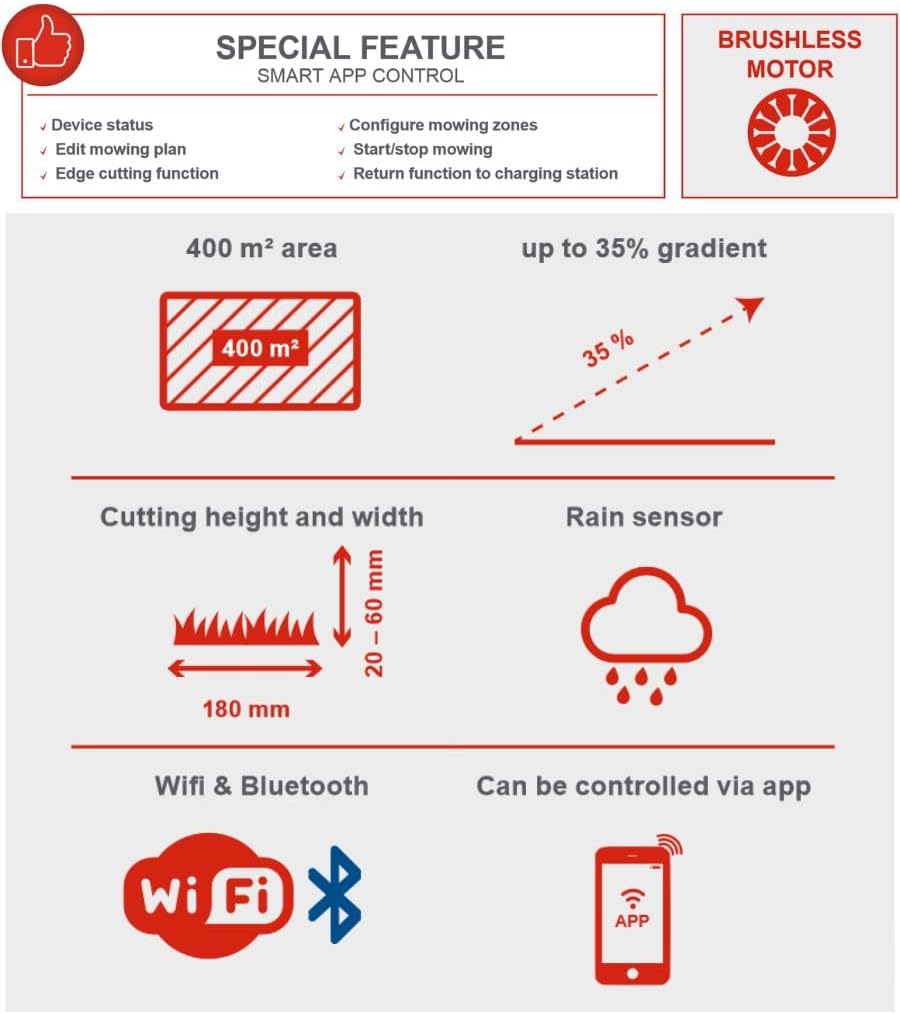
Figure 3: Key operational specifications including a maximum mowing area of 400 m², ability to climb gradients up to 35%, cutting height range of 20-60 mm, cutting width of 180 mm, integrated rain sensor, and connectivity via WiFi and Bluetooth for app control.
4. ערשטע אויפלאָדונג
Place the robotic lawnmower into the charging station. Ensure the charging contacts align. The indicator light on the charging station will confirm proper connection. Allow the mower to fully charge before its first operation.
אַפּערייטינג ינסטראַקשאַנז
1. פּאַוערינג אויף און אויסגעלאשן
To power on, press the main power button. To power off, press and hold the main power button or use the red STOP button for immediate halt.

פיגורע 4: נאָענט-אַרויף view highlighting the manual stop function, the rain sensor, the three integrated cutting blades, the charging station, and the floating cutting head mechanism that adapts to uneven surfaces.
2. Setting Cutting Height
The cutting height can be adjusted steplessly from 20 mm to 60 mm using the rotary knob on top of the mower. Turn the knob to your desired height setting.

Figure 5: A hand demonstrating the adjustment of the cutting height knob, which allows for stepless adjustment between 20 and 60 mm.
3. Smart App Control (WLAN & Bluetooth)
The RoboCut L500 can be controlled via a dedicated smartphone app using WLAN or Bluetooth connectivity. The app allows you to:
- Monitor device status
- Edit mowing plans and schedules
- Configure mowing zones
- Activate edge cutting function
- Start/stop mowing manually
- Send the mower back to the charging station
Figure 6: The infographic details the smart app control features, including monitoring device status, editing mowing plans, configuring zones, edge cutting, and remote start/stop/return to charging station.
4. שניידן אפעראציע
Once configured, the mower will operate automatically within the defined boundary. It features a brushless motor for efficient operation and a floating cutting head that reliably compensates for uneven surfaces, ensuring a consistent cut. The mower operates quietly at approximately 55 dB.

Figure 7: The Scheppach RoboCut L500 in action, demonstrating its automatic mowing capability on a well-maintained lawn.

Figure 8: This image highlights features such as extremely quiet operation (55 dB), simple installation, definable mowing zones and edge cutting function, an edge sensor, and large wheels for maximum grip. It also reiterates the included accessories: 3 in-built blades, 100m installation wire, and 130 pegs.
וישאַלט
1. רייניקונג
Regularly clean the mower's chassis, wheels, and cutting deck. Use a soft brush or cloth. Do not use high-pressure cleaners or excessive water directly on the electronic components.
2. בלייד פאַרבייַט
The RoboCut L500 uses 3 in-built blades. For optimal cutting performance, inspect the blades regularly and replace them when they become dull or damaged. Always wear protective gloves when handling blades. Use only original Scheppach replacement blades.
3. ווינטער סטאָרידזש
Before winter, thoroughly clean the mower and charging station. Store the device in a dry, frost-free location. Ensure the battery is fully charged before storage and recharge it periodically during long storage periods to maintain battery health.
טראָובלעשאָאָטינג
| פּראָבלעם | מעגלעך סיבה | לייזונג |
|---|---|---|
| מאָוער טוט נישט אָנהייבן. | Battery low; Power button not pressed; Safety features engaged. | Charge battery; Press power button firmly; Check for obstacles or lifted mower. |
| דער שניידער בלייבט אין דער טשאַרדזשינג סטאַנציע. | No schedule set; Rain sensor activated; Boundary wire issue. | Set mowing schedule via app; Wait for rain to stop; Check boundary wire connection. |
| אומגלייכע שניידן. | Dull blades; Incorrect cutting height setting. | Replace blades; Adjust cutting height. |
| Mower gets stuck. | Obstacles in mowing area; Steep slope. | Remove obstacles; Ensure area is within 35% gradient limit. |
טעכניש ספּעסאַפאַקיישאַנז
| שטריך | באַשרייַבונג |
|---|---|
| מאָדעל נומער | ROBOCUT-L500 |
| טייל נומער | 59130019944 |
| סאָרט | שעפּפּאַטש |
| Mowing Area Capacity | אַרויף צו 400 מ² |
| קאַטינג ברייט | 18 סענטימעטער |
| קאַטינג הייך אַדזשאַסטמאַנט | 20 - 60 mm (stepless) |
| מאַקס. גראַדיענט | 35% |
| ראַש מדרגה | בעערעך. 55 dB |
| קאַנעקטיוויטי | WLAN, Bluetooth (App Control) |
| מאַכט מקור | באַטערי-פּאַוערד |
| מאָטאָר טיפּ | ברושלעסס |
| מאַטעריאַל | פּלאַסטיק |
| פּונקט וואָג | 13.94 קג |
| Included Boundary Wire | 100 עם |
| Included Fixing Pegs | 130 פּקס |
| Included Blades | 6 pcs (spare) |
וואָראַנטי און שטיצן
Scheppach products are manufactured with high quality standards. For warranty information and customer support, please refer to the warranty card included with your product or visit the official Scheppach webזייטל. האַלט דיין קויפן באַווייַז פֿאַר וואָראַנטי קליימז.
For technical assistance or spare parts, please contact Scheppach customer service.
Ask a question about this manual
Ask about setup, troubleshooting, compatibility, parts, safety, or missing instructions. Manuals+ will review the question and use this page’s manual context to help answer it.