הקדמה
This manual provides instructions for the use and maintenance of your new replacement remote control. This remote is designed to function as a substitute for the original remote control of Chiq GCBLTV6EA-C4 L32H7N Smart LED TVs. Please note that as a replacement, some advanced or specific functions of your original remote may not be fully replicated.
סעטאַפּ
ייַנמאָנטירונג פון באַטאַרייע
די ווײַטקאָנטראָל דאַרף צוויי AAA באַטעריעס (נישט אַרייַנגערעכנט). פֿאָלגט די סטעפּס צו זיי אינסטאַלירן:
- געפֿינען די דעקן פון די באַטאַרייע אָפּטייל אויף די צוריק פון די ווייַט קאָנטראָל.
- דריק אַראָפּ אויף דעם טאַב און שלעפּ דעם דעקל אַראָפּ צו עפֿענען דעם אָפּטייל.
- אַרײַנשטעלן צוויי AAA באַטעריעס, און זיכער מאַכן אַז די פּאָזיטיוו (+) און נעגאַטיוו (-) טערמינאַלן זענען ריכטיק אויסגעשטעלט מיט די מאַרקירונגען אינעווייניק אין דעם אָפּטייל.
- שטופּט צוריק דעם דעקל פון דעם באַטעריע־אָפּטייל ביז עס קליקט זיכער.
Once batteries are installed, the remote control is ready for use. No pairing or programming is typically required for this replacement remote.
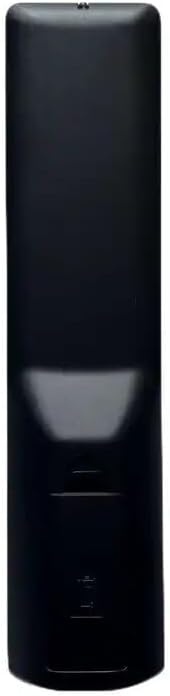
בילד: צוריק view of the remote control, illustrating the location of the battery compartment. The compartment is a rectangular indentation on the lower half of the remote's back, designed to hold two AAA batteries.
אַפּערייטינג ינסטראַקשאַנז
This section outlines the general functions of the buttons on your replacement remote control. Button layouts may vary slightly depending on the specific model received (black or white version).

בילד: פראָנט view of the replacement remote control. It is black with various grey and colored buttons, including a power button, number pad, navigation arrows, volume and channel controls, and dedicated buttons for Netflix and YouTube.
- מאַכט קנעפּל (●): טורנס די טעלעוויזיע אויף אָדער אַוועק.
- נומערן בלאט (0-9): גלייך אריינגעבן קאַנאַל נומערן.
- באַנד אַרויף / אַראָפּ (+/-): אַדזשאַסץ די אַודיאָ באַנד.
- קאַנאַל אַרויף/אַראָפּ (P+/P-): ענדערונגען די טעלעוויזיע קאַנאַל.
- שטום (שטום): מיוטעס אָדער אַנמיוט די טעלעוויזיע אַודיאָ.
- נאַוויגאַציע פײַלן (אַרויף, אַראָפּ, לינקס, רעכטס): נאַוויגירט דורך מעניוז און אָפּציעס.
- OK קנעפּל: באַשטעטיקט אויסוואַלן אין מעניוז.
- צוריק / צוריקקומען: קערט צו די פריערדיקע פאַרשטעלן אָדער מעניו.
- מקור/איינגאנג: טוישט די אינפוט מקור (HDMI, AV, אאז"וו).
- Netflix קנעפּל: דירעקטער צוטריט צו דער נעטפליקס אַפּליקאַציע.
- יוטוב קנעפל: דירעקטער צוטריט צו דער יוטוב אַפּליקאַציע.
- מעניו / היים: Opens the TV's main menu or smart TV home screen.
For specific functions not listed, refer to your television's original user manual, as this remote is designed to mimic common functions.
וישאַלט
רייניקונג פון די ווייַטקאָנטראָל
צו רייניקן די ווײַטקאָנטראָל, ניצט אַ ווייכע, טרוקענע שטאָף. פֿאַר שווערע שמוץ, אַ ביסל ווייכער מאַכןampווישט דעם שטאָף מיט וואַסער אָדער אַ מילדן, נישט-שרייַבנדיקן רייניגער. ניצט נישט שטרענגע כעמיקאַלן און טונקט נישט די ווייַטקאָנטראָל אין וואַסער.
באַטערי פאַרבייַט
Replace batteries when the remote's responsiveness decreases or it stops functioning. Always replace both batteries at the same time with new AAA batteries. Do not mix old and new batteries, or different types of batteries.
טראָובלעשאָאָטינג
| פּראָבלעם | מעגלעך סיבה | לייזונג |
|---|---|---|
| ווייַט ניט ארבעטן. | טויטע אדער נישט ריכטיק אינסטאלירטע באַטעריעס. א פארשטאפונג צווישן דער ווײַטקאָנטראָל און טעלעוויזיע. | Check battery polarity and replace batteries. Ensure clear line of sight to TV's IR receiver. |
| Some functions not working. | This is a replacement remote; some specific functions may not be supported. | Confirm if the function is standard. If not, it may be a limitation of the replacement remote. |
| ווײַטקאָנטראָל רעאַגירט נישט. | Low batteries. Remote sensor blocked. | Replace batteries. Clean the remote's IR emitter and TV's IR receiver. |
ספּעסאַפאַקיישאַנז
- סאָרט: גענעריק
- מאָדעל: Replacement Remote Control (ASIN: B0CKWGC1KD)
- קאַמפּאַטאַבאַל דעוויסעס: Television, Stereo System, Set Top Box, DVD/Blu-ray Player, Home Theater
- מאַקסימום נומער פון שטיצט דעוויסעס: 5
- ספּעציעלע שטריך: ערגאָנאָמיק
- קאָליר: Black/White (sent randomly)
- מאַטעריאַל: אַבס פּלאַסטיק
וואָראַנטי און שטיצן
Specific warranty information for this generic replacement remote control is not provided in the product details. For any issues or support inquiries, please contact the seller directly through the platform where the purchase was made. It is recommended to provide your original remote part number or unit model to the seller for better assistance.