
Bmax B8 Pro
Bmax B8 Pro Mini PC User Manual
מאָדעל: B8 Pro
1. פּראָדוקט איבערview
The Bmax B8 Pro Mini PC is a compact desktop computer designed for various applications, from office work and web browsing to streaming video and home entertainment. It features an Intel 12th Generation i7-1255U Processor, providing efficient performance for demanding tasks. The system is equipped with 24GB LPDDR5 RAM and a 1TB NVMe SSD, ensuring fast boot times, rapid application loading, and smooth multitasking.

Figure 1.1: The Bmax B8 Pro Mini PC, showcasinג זײַן קאָמפּאַקטן דיזײַן.
2. וואָס איז אין דער קעסטל
ביים עפענען דעם פעקל, זיכער מאכן אז אלע קאמפאנענטן זענען דא:
- 1 x B8 Pro MINI PC
- 1 x מאַכט אַדאַפּטער
- 1 x באַניצער גייד
- 1 רענטגענ הדמי קאַבלע
- 1 x Metal Bracket (for VESA mounting)

Figure 2.1: All items included in the Bmax B8 Pro Mini PC package.
3. סעטאַפּ גייד
3.1 קאַנעקטינג פּעריפעראַלס
Before powering on your Mini PC, connect your essential peripherals:
- ווייַז: Connect your monitor, TV, or projector using the HDMI port or Type-C port. The device supports 4K/60Hz resolution and triple-display configurations.
- קלאַוויאַטור און מויז: שטעקט אריין אייער USB קלאַוויאַטור און מויז אין די פאַראַן USB 2.0 אָדער USB 3.0 פּאָרץ.
- אַודיאָ: Connect headphones or speakers to the 3.5mm headset jack on the front panel.
- נעץ: For wired internet access, connect an Ethernet cable to the Gigabit Ethernet port.
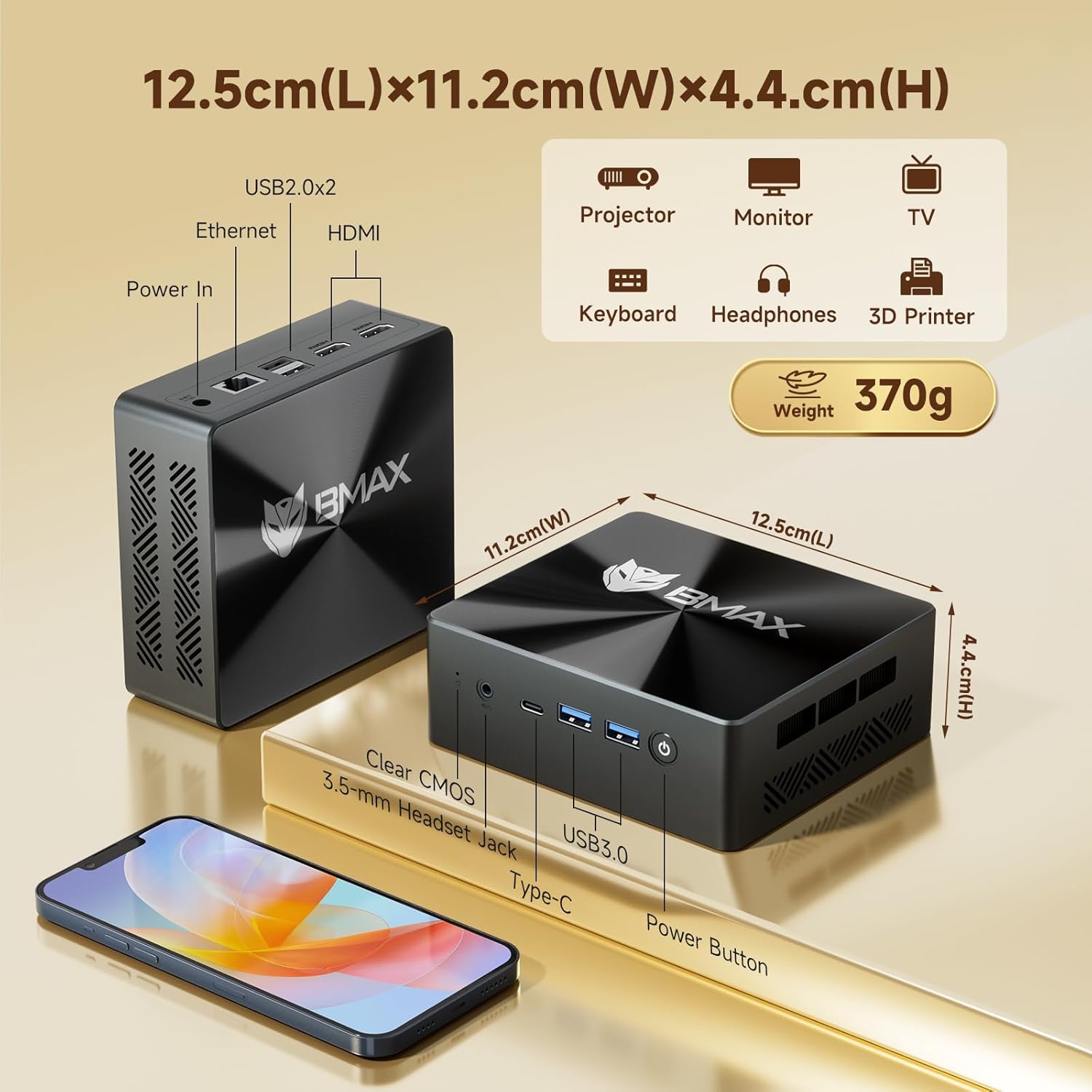
פיגור 3.1: פאָרנט און הינטן views of the Bmax B8 Pro Mini PC, highlighting port locations and dimensions.
3.2 מאַכט אויף
אַמאָל אַלע פּעריפערישע דעוויסעס זענען פארבונדן:
- פֿאַרבינדט דעם מאַכט אַדאַפּטער צום DC-אין פּאָרט אויף דעם מיני פּיסי.
- צאַפּן די מאַכט אַדאַפּטער אין אַ וואַנט ווענטיל.
- Press the power button located on the front panel of the Mini PC. The power indicator light will illuminate.
- The system will boot up, and you will see the operating system (likely Windows 11 Pro) on your connected display. Follow any on-screen instructions for initial setup.
4. אַפּערייטינג ינסטרוקטיאָנס
4.1 אַפּערייטינג סיסטעם
The Bmax B8 Pro Mini PC typically comes pre-installed with Windows 11 Pro, providing a modern and secure user interface. Ensure your operating system is updated regularly for optimal performance and security.
4.2 פאָרשטעלונג פֿעיִקייטן
The Mini PC is powered by an Intel 12th Generation i7-1255U Processor, featuring 10 cores and 12 threads with a max clock speed of 4.7 GHz. This processor delivers strong performance for various workloads, from everyday computing to more intensive applications.

Figure 4.1: Details of the Intel Core i7-1255U Processor, highlighting its core count, threads, and clock speed.
It includes 24GB of LPDDR5 RAM operating at 5200MHz and a 1TB NVMe SSD (M.2_NVMe 2280 x1). This high-speed memory and storage combination ensures quick data access and responsiveness, suitable for demanding software like Photoshop, Dreamweaver, Premiere, AI, and XD.

Figure 4.2: Illustration of the dual-channel high-speed 24GB LPDDR5 RAM and 1TB NVMe SSD configuration.
4.3 קאַנעקטיוויטי
The B8 Pro Mini PC offers robust connectivity options:
- Wi-Fi 6: Supports faster wireless transmission speeds and improved network efficiency compared to older Wi-Fi standards.
- בלועטאָאָטה 5.2: Provides lower latency and more stable connections for wireless peripherals.
- Gigabit עטהערנעט: For reliable high-speed wired network connections.
- וסב פּאָרץ: Includes multiple USB 2.0 and USB 3.0 ports for connecting various devices.
- HDMI & Type-C: For video output to displays.
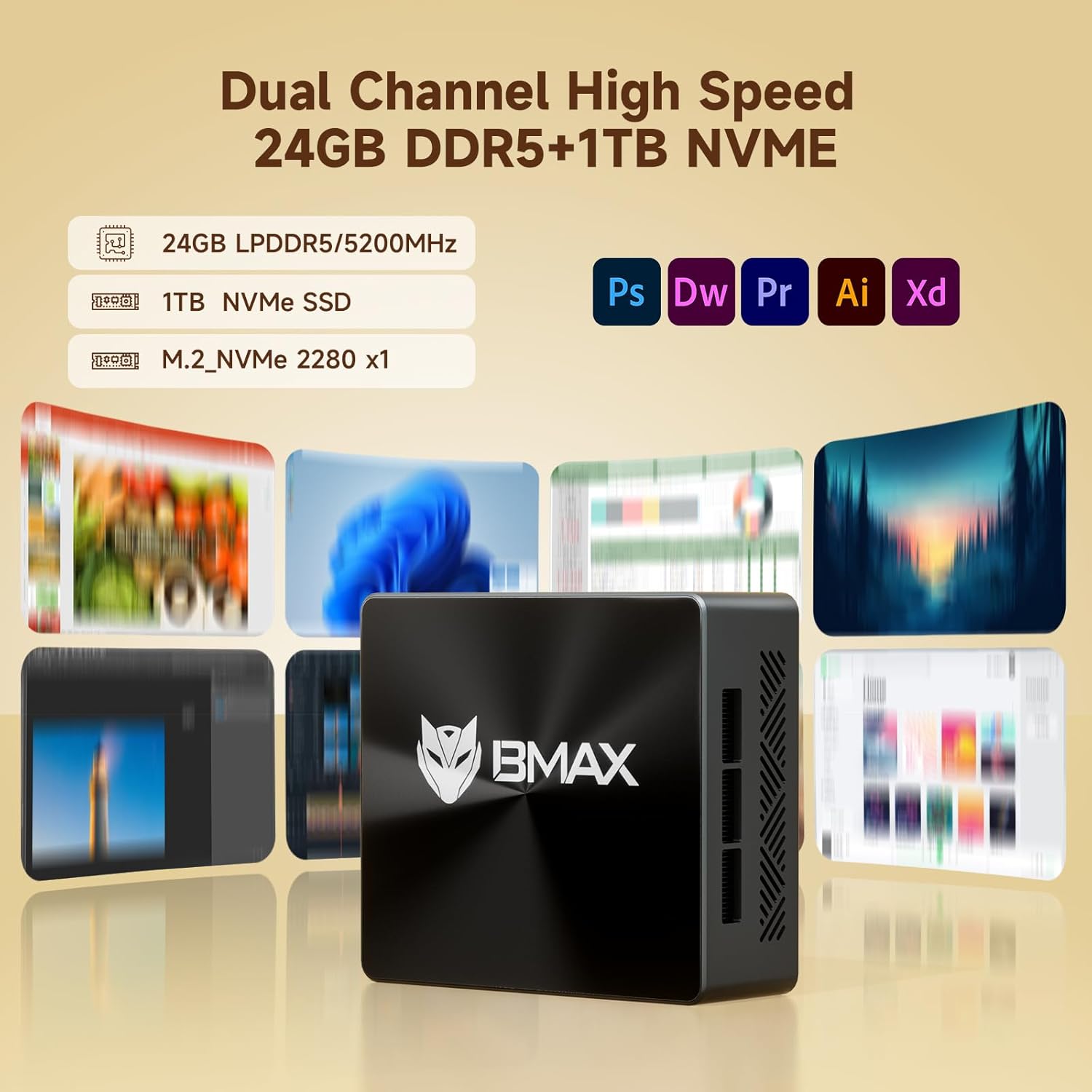
Figure 4.3: Visual representation of the Mini PC's support for WiFi 6 and Bluetooth 5.2, indicating faster transmission speeds.
5. וישאַלט
5.1 קאָאָלינג סיסטעם
The B8 Pro Mini PC incorporates a smart fan and two copper heat pipes to ensure efficient heat dissipation and stable operation, even under load. Ensure proper airflow around the device by keeping vents clear.

Figure 5.1: Diagram illustrating the smart fan and dual copper heat pipe cooling solution within the Mini PC.
5.2 רייניקונג
To maintain optimal performance and longevity, regularly clean the exterior of the Mini PC with a soft, dry cloth. Use compressed air to gently clear dust from the ventilation openings. Do not use liquid cleaners directly on the device.
6. טראָובלעשאָאָטינג
If you encounter issues with your Bmax B8 Pro Mini PC, refer to the following common troubleshooting steps:
- קיין מאַכט:
זיכער מאַכן אַז דער מאַכט אַדאַפּטער איז זיכער פארבונדן צו ביידע די מיני פּיסי און אַ אַרבעטנדיק מאַכט אַוטלעט. פּרוּווט אַן אַנדער אַוטלעט אויב נייטיק. - קיין ווייַז:
Verify that the HDMI or Type-C cable is firmly connected to both the Mini PC and the monitor. Ensure the monitor is powered on and set to the correct input source. - פּאַמעלעך פאָרשטעלונג:
Check for background applications consuming excessive resources. Ensure the operating system and drivers are up to date. Consider running a disk cleanup or defragmentation if using an HDD (though this model uses SSD). - נעץ קאָנעקטיוויטי פּראָבלעמען:
For Wi-Fi, ensure the Wi-Fi adapter is enabled and you are connected to the correct network. For wired Ethernet, check the cable connection and router status. - סיסטעם רעאַגירט נישט:
If the system becomes unresponsive, press and hold the power button for 5-10 seconds to force a shutdown. Wait a few moments, then power it back on. If issues persist, locate the 'Clear CMOS' button (often a small pinhole) and follow instructions in the user guide for a CMOS reset.
7. טעכניש ספּעסאַפאַקיישאַנז
| שטריך | באַשרייַבונג |
|---|---|
| מאָדעל נאָמען | B8 Pro |
| פּראַסעסער | Intel 12th Gen Core i7-1255U (4.7 GHz max) |
| באַראַן | 24 גיגאבייט LPDDR5 |
| סטאָרידזש | 1TB NVMe SSD |
| גראַפיקס קאַרד | ינטעגראַטעד |
| מאַקסימום סקרין האַכלאָטע | 3840 X 2160 (4K) |
| אָפּערייטינג סיסטעם | OS (typically Windows 11 Pro) |
| וסב 2.0 פּאָרץ | 2 |
| וסב 3.0 פּאָרץ | 2 |
| קאַנעקטיוויטי | WiFi 6, Bluetooth 5.2, Gigabit Ethernet |
| פּונקט וואָג | 1.87 פונט |
| דימענסיעס (L X W X H) | 10.51 X 6.14 X 2.91 אינטשעס |
8. וואָראַנטי און שטיצן
8.1 פּראָדוקט וואָראַנטי
The Bmax B8 Pro Mini PC comes with a standard manufacturer's warranty. Please refer to the warranty card included in your package or visit the official Bmax webזייטל פֿאַר דעטאַלירטע וואָראַנטי טערמינען און באַדינגונגען. האַלט דיין באַווייַז פון קויפן פֿאַר וואָראַנטי קליימז.
8.2 קונה שטיצן
For technical assistance, troubleshooting, or warranty inquiries, please contact Bmax customer support through their official channels. You can often find contact information on the manufacturer's website or in the included user guide.
Visit the official Bmax Store on Amazon for more information and products: Bmax Store
Ask a question about this manual
Ask about setup, troubleshooting, compatibility, parts, safety, or missing instructions. Manuals+ will review the question and use this page’s manual context to help answer it.