
הקדמה
This manual provides detailed instructions for the SHIDU X1 Portable Bluetooth Speaker with Wireless Microphone. Please read this manual thoroughly before using the product to ensure proper operation and to maximize your user experience. This device is designed to deliver high-quality audio with versatile connectivity and entertainment features.
פּעקל אינהאַלט
ביים אויספּאַקן, ביטע באַשטעטיקן אַז אַלע זאכן וואָס זענען ליסטעד אונטן זענען פאַראַן און אין גוטן צושטאַנד:
- 1 x SHIDU X1 Portable Bluetooth Speaker
- 1 x Wireless UHF Microphone
- 1 x Type-C Charging Plug
- 1 רענטגענ AUX קאַבלע
- 1 x Live Stream Cable
- 1 x באַניצער מאַנואַל
פּראָדוקט איבערview
ספּיקער קאָנטראָלס
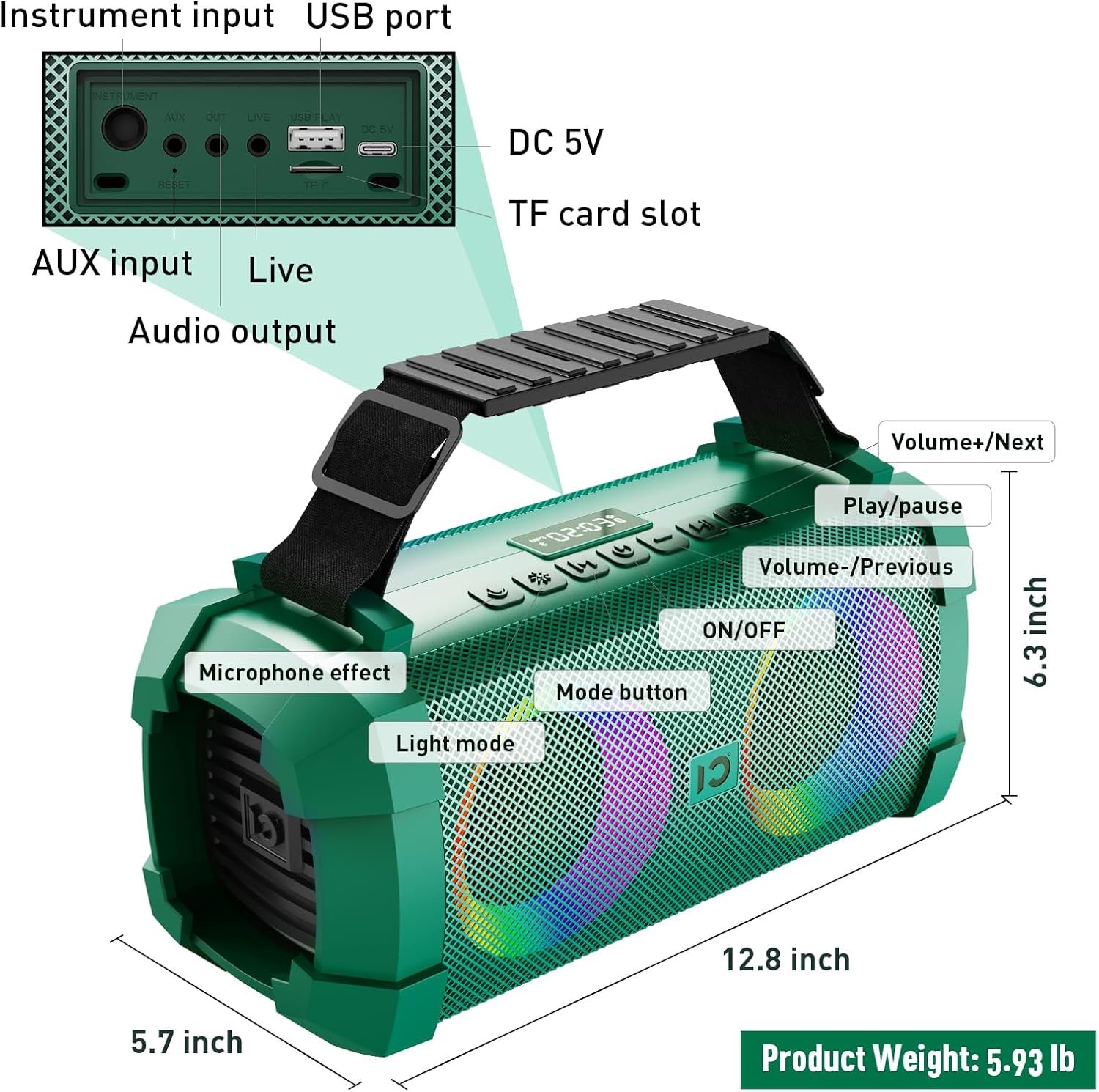
Image: SHIDU X1 Portable Bluetooth Speaker Control Panel Diagram
The speaker features a top-mounted control panel for easy access to various functions:
- ON/OFF קנעפּל: Long press to power the speaker on or off.
- מאָדע קנעפּל: Short press to cycle through input modes (Bluetooth, AUX, TF Card, U-Disk).
- ליכט מאָדע קנעפּל: Short press to switch between 5 dynamic LED light modes. Long press to turn the lights off.
- Microphone Effect Button: Short press to cycle through 3 sound effects (Popular, Professional, Original) for the microphone.
- באַנד - / פריערדיקע ליד קנעפּל: קורץ דריקן פֿאַר פֿריִערדיקן ליד. לאַנג דריקן צו פֿאַרמינערן די קול.
- שפּיל / פּויזע קנעפּל: קורץ דריקן צו שפּילן אָדער פּויזירן אַודיאָ.
- באַנד + / נעקסטע ליד קנעפּל: קורץ דריקן פֿאַר דער ווייַטער ליד. לאַנג דריקן צו פאַרגרעסערן די באַנד.
Wireless Microphone Controls
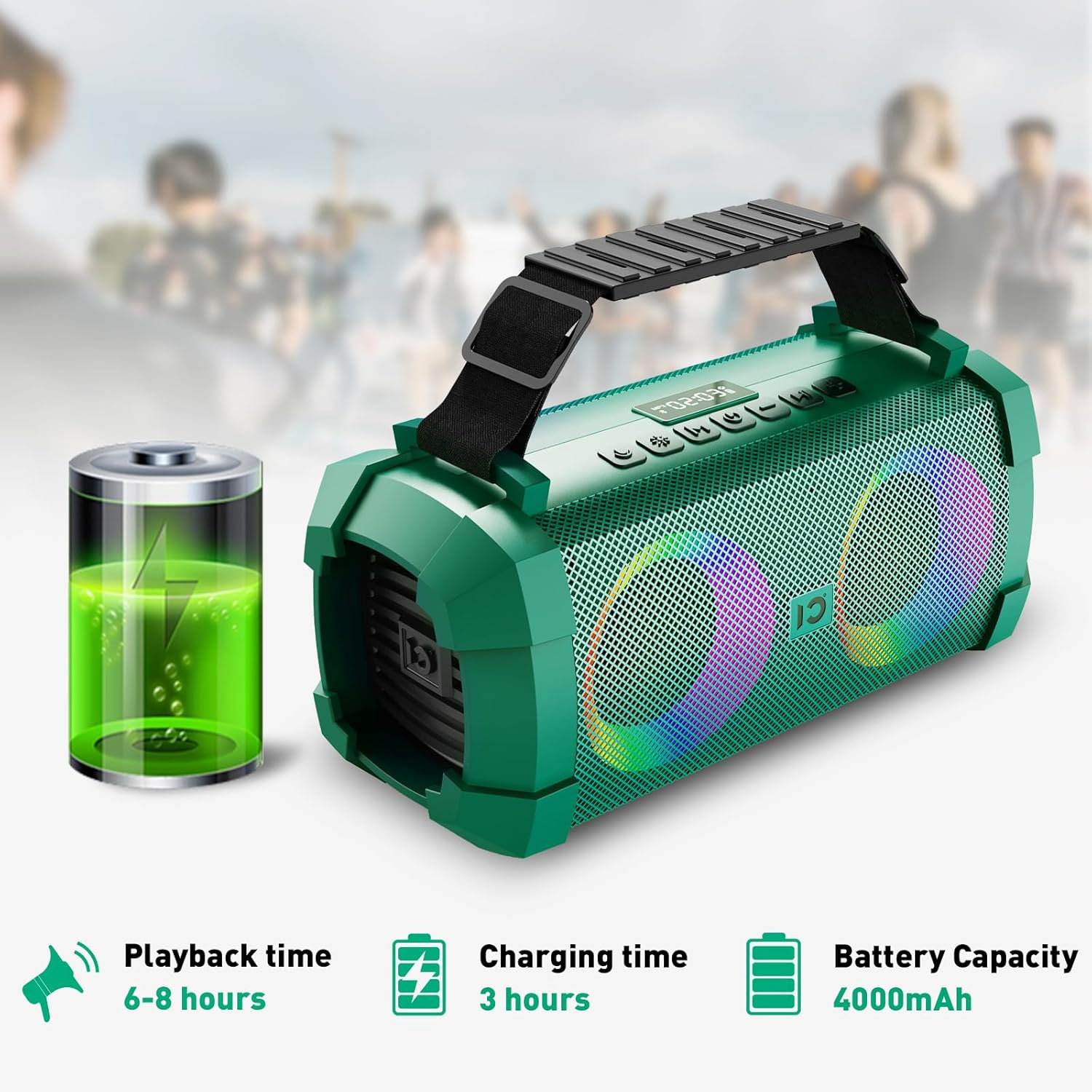
Image: SHIDU X1 Wireless Microphone Controls
The wireless microphone includes the following controls:
- מאַכט קנעפּל: לאַנג דריקן צו אַקטיווירן אָדער אויסלעשן דעם מיקראָפאָן.
- Frequency + Button: Short press to increase the microphone's frequency.
- Frequency - Button: Short press to decrease the microphone's frequency.
- באנד + קנעפּל: Long press to increase microphone volume.
- באַנד - קנעפּל: Long press to decrease microphone volume.
- געפֿירט סקרין: Displays current frequency and battery level.
סעטאַפּ
טשאַרדזשינג די רעדנער
Before first use, fully charge the speaker. Connect the provided Type-C charging plug to the DC 5V port on the speaker and plug it into a power source. The charging indicator will show the charging status. A full charge takes approximately 3 hours.

Image: SHIDU X1 Portable Bluetooth Speaker battery life details: 6-8 hours playback, 3 hours charging, 4000mAh capacity.
מאַכט אויף / אַוועק
לאנג דריקן די ON/OFF button on the speaker's control panel to power it on or off.
בלועטאָאָטה פּערינג
- Ensure the speaker is powered on and in Bluetooth mode (indicated by a flashing Bluetooth icon or voice prompt). If not, short press the מאָדע קנעפּל צו באַשטימען צו בלועטאָאָטה מאָדע.
- אַקטיווירן בלועטוט אויף אייער מאָביל מיטל (סמאַרטפאָן, טאַבלעט, אאז"וו).
- זוכן פֿאַר available Bluetooth devices and select "SHIDU X1" from the list.
- Once connected, the speaker will indicate successful pairing, and the Bluetooth icon will stop flashing.
מיקראָפאָן פּערינג
The UHF wireless microphone is factory-paired with the speaker. Simply power on both the speaker and the microphone, and they should connect automatically. If pairing is lost, refer to the troubleshooting section.
אַפּערייטינג ינסטראַקשאַנז
באַשטימען אַרייַנשרייַב מאָדעס
קורץ דריקן די מאָדע button on the speaker to cycle through available input sources: Bluetooth, AUX, TF Card, and U-Disk (USB flash drive).
Adjusting Volume and Tracks
- באַנד קאָנטראָל: לאנג דריקן די באנד + button to increase volume, and long press the באַנד - קנעפּל צו פאַרמינערן די באַנד.
- שפּור נאַוויגאַציע: קורץ דריקן די ווייַטער שפּור button to skip to the next song, and short press the פֿריִערדיקע שפּירט button to go to the beginning of the current song or the previous song.
- שפּיל / פּויזע: קורץ דריקן די שפּיל / פּויזע קנעפּל צו פּויזע אָדער נעמענ זיכ ווידער פּלייבאַק.
Using Sound Effects
The speaker offers three distinct sound effects for the wireless microphone:

Image: SHIDU X1 Portable Bluetooth Speaker demonstrating Original, Popular, and Professional sound modes.
- אריגינעלער מאָדע: Standard vocal output.
- Popular Mode: Enhances vocals for a more vibrant sound.
- פאַכמאַן מאָדע: Provides a refined vocal output suitable for performances.
קורץ דריקן די מיקראָפאָן ווירקונג button on the speaker to cycle through these effects.
Controlling LED Lights
The speaker features 5 dynamic LED light modes to enhance the atmosphere.

Image: SHIDU X1 Portable Bluetooth Speaker showcasing 5 types of lighting modes.
קורץ דריקן די ליכט מאָדע button to cycle through the different lighting patterns. Long press the ליכט מאָדע קנעפּל צו אויסלעשן די LED לייץ.
Live Streaming Function
The SHIDU X1 includes a professional live streaming interface. Connect your device using the provided Live Stream Cable to enable karaoke live streaming functionality.

Image: SHIDU X1 Portable Bluetooth Speaker with professional live broadcast interface for karaoke.
פּראָדוקט פֿעיִקייטן איבערview
The SHIDU X1 is designed for versatile use, offering powerful sound and engaging features for various occasions.

Image: SHIDU X1 Portable Bluetooth Speaker with 60W output, Monstrous Bass, 3 Sound Effects, 5 Party Lights, Bluetooth 5.0, TF Card, 6.5mm Instrument Port, Live Streaming, UHF Wireless Mic, USB Flash Drive.
Experience deep bass and clear highs with 60W high-power stereo sound, suitable for both indoor and outdoor environments.

Image: SHIDU X1 Portable Bluetooth Speaker illustrating high-quality three-dimensional sound and overweight bass.
The speaker is ideal for various scenarios, including family karaoke, parties, band performances, and outdoor camping.

Image: SHIDU X1 Portable Bluetooth Speaker suitable for multiple scenarios: family karaoke, party interaction, band performance, outdoor camping.
אפיציעלע פּראָדוקט ווידעאָ
Video: Official SHIDU X1 Wireless Bluetooth Speaker with Wireless Microphone 60W Portable Karaoke Machine overview. This video demonstrates the product's features and functionality.
ספּעסאַפאַקיישאַנז
| סאָרט | SHIDU |
| מאָדעל נומער | X1 |
| רעזולטאַט וואָסtage | 60 וואטס (שפּיץ) / 40 וואטס (RMS) |
| קאַנעקטיוויטי טעכנאָלאָגיע | בלועטוט 5.0, AUX, USB, TF קאַרטל |
| נומער דימענשאַנז (L X W X H) | 12.8 X 5.7 X 6.3 אינטשעס |
| פּונקט וואָג | 5.6 פונט |
| באַטאַרייע קאַפּאַציטעט | 4000 מאַה |
| פּלייַבאַקק צייט | 6-8 hours (at medium volume) |
| טשאַרדזשינג צייט | 3 שעה |
| געבויט-אין מידיאַ | מיקראָפאָן |
טראָובלעשאָאָטינג
If you encounter any issues with your SHIDU X1 speaker, please refer to the following common solutions:
- קיין מאַכט: Ensure the speaker is fully charged. Connect the charging cable and allow it to charge for at least 30 minutes before attempting to power on again.
- קיין קול: Check the volume levels on both the speaker and your connected device. Ensure the correct input mode is selected. If using Bluetooth, verify successful pairing.
- בלועטאָאָטה פּערינג ישוז: Turn off Bluetooth on your device and the speaker, then restart both. Clear the speaker from your device's Bluetooth history and attempt to pair again. Ensure no other devices are actively connected to the speaker.
- מיקראָפאָן איז נישט ארבעטן: Ensure the microphone is powered on and fully charged. Check the microphone's frequency settings and adjust if necessary. Re-pair the microphone if connection is lost (usually automatic).
- פאַרקרימט סאָונד: רעדוצירט דעם קול אויף ביידע דעם רעדנער און דעם פארבונדענעם אפאראט. זיכערט זיך אז די אודיא מקור איז פון גוטער קוואַליטעט.
וישאַלט
To ensure the longevity and optimal performance of your SHIDU X1 speaker, follow these maintenance guidelines:
- רייניקונג: ניצט אַ ווייכע, טרוקענע שטאָף צו רייניקן די אויסערלעכע זייט פון דעם רעדנער. ניצט נישט קיין שרײַבנדיקע רייניגערס אדער סאָלווענטן.
- סטאָרידזש: האַלט דעם רעדנער אין אַ קיל, טרוקן אָרט אַוועק פון דירעקט זונשייַן און עקסטרעמע טעמפּעראַטורן.
- באַטערי זאָרגן: For optimal battery life, avoid fully discharging the battery frequently. Charge the speaker regularly, even if not in use, to maintain battery health.
- וואַסער קעגנשטעל: כאָטש עס איז דיזיינד פֿאַר דרויסנדיק נוצן, זאָל מען נישט אונטערטונקען דעם רעדנער אין וואַסער אָדער אים אויסשטעלן צו שווערן רעגן.
וואָראַנטי און שטיצן
The SHIDU X1 Portable Bluetooth Speaker comes with a standard manufacturer's warranty. Please refer to the warranty card included in your package for specific terms and conditions.
For technical support, troubleshooting assistance, or warranty claims, please contact SHIDU customer service through the retailer where you purchased the product or visit the official SHIDU webפּלאַץ פֿאַר קאָנטאַקט אינפֿאָרמאַציע.