
1. הקדמה
Welcome to the user manual for your new SGIN E10P 10-inch Kids Tablet. This guide provides essential information on setting up, operating, maintaining, and troubleshooting your device. Please read this manual thoroughly to ensure proper use and to maximize your tablet's features.
וואָס איז אין די קעסטל
ביים אויספּאַקן, ביטע באַשטעטיקן אַז אַלע די זאכן וואָס זענען אויסגערעכנט אונטן זענען פאַראַן:
- SGIN E10P Kids Tablet (with protective case)
- באַניצער מאַנואַל
- וסב טיפּע- C קאַבלע
- מאַכט אַדאַפּטער (טשאַרדזשער)
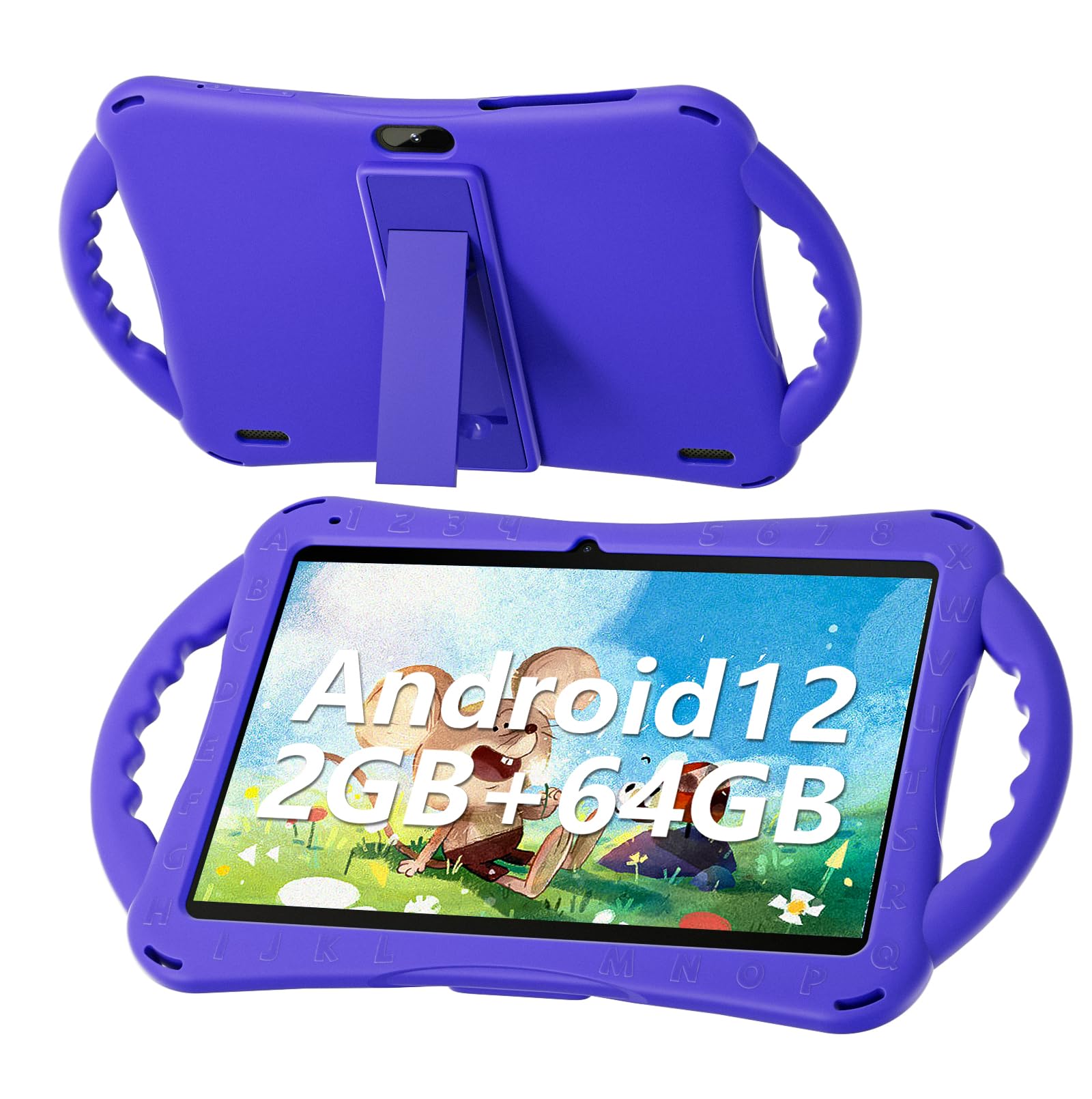
Figure 1: SGIN E10P Kids Tablet with its protective case.
2. פּראָדוקט איבערview
Familiarize yourself with the physical components of your SGIN E10P Kids Tablet.

Figure 2: Labeled diagram of the SGIN E10P Kids Tablet components.
- פראָנט אַפּאַראַט: פֿאַר ווידעאָ קאָלס און סעלפֿיז.
- דערציען אַפּאַראַט: פֿאַר נעמען בילדער און ווידעאָס.
- רעדנער: אַודיאָ רעזולטאַט.
- טיפּ-C פּאָרט: פֿאַר טשאַרדזשינג און דאַטן אַריבערפירן.
- טף קאַרד שפּעלטל: For expanding storage with a microSD card.
- כעדפאָון דזשאַק: פֿאַר פֿאַרבינדן דראָטיקע קאָפּהערער.
- פאַרגרעסערן באַנד: Button to raise the audio level.
- רעדוצירן באַנד: Button to lower the audio level.
- Bracket (Kickstand): אינטעגרירטער שטאַנד פֿאַר הענט-פֿרײַ viewing.
- Armrest (Handle): Ergonomic handles on the protective case for easy gripping.
3. סעטאַפּ
3.1 אויפלאָדן די טאַבלעט
Before first use, fully charge the tablet. Connect the USB Type-C cable to the tablet's Type-C port and the other end to the power adapter. Plug the power adapter into a wall outlet. The battery indicator on the screen will show charging status. A full charge typically takes several hours.
3.2 פּאַוערינג אויף / אַוועק
- צו מאַכט אויף: Press and hold the Power button (usually located on the side or top edge) until the SGIN logo appears on the screen.
- צו מאַכט אַוועק: דריק און האלט דעם פּאַוער קנעפּל ביז אַ מעניו דערשיינט. סעלעקטיר "אויסלאָשן" פֿון די אָפּציעס.
- צו ריסטאַרט: דריק און האלט דעם פּאַוער קנעפּל ביז אַ מעניו דערשיינט. סעלעקטיר "ריסטאַרט" פֿון די אָפּציעס.
3.3 ערשט סעטאַפּ
The first time you power on the tablet, you will be guided through an initial setup process:
- שפּראַך סעלעקציע: קלייַבן דיין בילכער שפּראַך.
- Wi-Fi קאַנעקשאַן: אויסקלייבן אייער Wi-Fi נעץ און אַרייַן די פּאַראָל צו פאַרבינדן זיך צום אינטערנעט.
- גוגל אקאונט: Sign in with an existing Google account or create a new one. This is necessary for downloading apps from the Google Play Store.
- טאָג און צייט: שטעלט איין דעם ריכטיקן דאטום און צייט, אדער לאזט דעם נעץ עס אויטאמאטיש שטעלן.
- פּאַרענטאַל קאָנטראָלס: Configure Google Kids Space or other parental control features to manage content and screen time for children.
4. אפערירן די טאַבלעט
4.1 יקערדיק נאַוויגאַציע
The SGIN E10P tablet uses a touch-sensitive screen for navigation:
- צאַפּן: רירט דעם עקראַן איין מאָל צו עפֿענען אַן אַפּ, אויסקלײַבן אַן אייטעם, אָדער דריקן אַ קנעפּל.
- ריר און האלט: דריק און האלט אן אייטעם צו צוקומען צו נאָך אָפּציעס אדער עס צו באַוועגן.
- לאַקכענען: שלעפּט אייער פינגער אַריבער דעם עקראַן צו סקראָלן דורך בלעטער אָדער רשימות.
- קניפּ-צו-זומען: לייגט צוויי פינגער אויפן עקראַן און ריקט זיי באַזונדער צו פארגרעסערן, אדער צוזאַמען צו פארגרעסערן.
4.2 Wi-Fi קאָנעקטיוויטי
To connect or manage Wi-Fi networks:
- גיין צו סעטטינגס > נעץ און אינטערנעט > ווי-פי.
- טוישן Wi-Fi On.
- אויסקלייבן אייער געוואונטשענע נעץ פון דער ליסטע און אַרייַן די פּאַראָל אויב געבעטן.

Figure 3: The tablet supports both 2.4GHz and 5GHz Wi-Fi for stable connections.
4.3 Applications and Content
The tablet runs on Android 12 and comes with access to the Google Play Store, allowing you to download a wide range of applications. It is pre-configured for children's use, supporting apps like YouTube Kids, educational games, and other child-friendly content.

Figure 4: The Android 12 interface with various pre-installed and downloadable kids' apps.
4.4 פּערענטאַל קאָנטראָלס
Utilize the built-in parental control features to manage your child's tablet experience. This includes setting screen time limits, filtering content, and approving app downloads. Access these settings through the Google Family Link app or directly in the tablet's settings under "Digital Wellbeing & parental controls."
5. וישאַלט
5.1 רייניקונג
- פאַרשטעלן: ניצט אַ ווייכע, לינט-פֿרייע שטאָף ספּעציעל דיזיינד פֿאַר עלעקטראָניק. פֿאַר שווערע פֿלעקן, אַ ביסל ווייכערampen the cloth with water or a screen cleaner solution (do not spray directly onto the screen).
- פאַל: The silicone protective case can be wiped with a damp cloth and mild soap if necessary. Ensure it is completely dry before reattaching it to the tablet.
- פּאָרץ: Keep all ports (USB-C, headphone jack, TF card slot) free of dust and debris. Use a soft brush or compressed air if needed.
5.2 באַטערי קער
The tablet is equipped with a 5000mAh battery, providing extended usage time.

Figure 5: The tablet features a 5000mAh battery for prolonged use.
- פֿאַרמײַדט עקסטרעמע טעמפּעראַטורן, ווײַל זיי קענען פֿאַרערגערן די לעבן פֿון דער באַטעריע.
- Use only the provided charger and cable to prevent damage.
- כּדי צו האַלטן די באַטאַרייע אויף אַן אָפּטימאַלן לענג, זאָלט איר נישט אָפט אויסליידיקן די באַטאַרייע אינגאַנצן אָדער האַלטן זי אויף 100% אָפּצאָל פֿאַר לענגערע צייטן.
5.3 סטאָרידזש
Store the tablet in a cool, dry place away from direct sunlight and moisture when not in use.
6. טראָובלעשאָאָטינג
This section addresses common issues you might encounter with your SGIN E10P tablet.
6.1 טאַבלעט טוט זיך נישט אָן
- Ensure the tablet is sufficiently charged. Connect it to the charger for at least 30 minutes before attempting to power it on again.
- דריק און האלט דעם פּאַוער קנעפּל פֿאַר 10-15 סעקונדעס צו דורכפירן אַ געצוואונגענע ריסטאַרט.
6.2 Wi-Fi פֿאַרבינדונג פּראָבלעמען
- קוק צי Wi-Fi איז ענייבאַלד אין די טאַבלעט'ס סעטטינגס.
- Verify that your Wi-Fi router is working correctly and other devices can connect.
- Forget the network in the tablet's Wi-Fi settings and reconnect.
- Restart both the tablet and your Wi-Fi router.
6.3 אַפּפּס קראַכן אָדער פרירן
- נאָענט און ריאָופּאַן די אַפּ.
- אויסמעקן די אַפּ'ס קאַש און דאַטן אין סעטטינגס > אַפּפּס > [אַפּ נאָמען] > סטאָרידזש און קאַש.
- Ensure the app is updated to its latest version via the Google Play Store.
- ריסטאַרט די טאַבלעט.
6.4 לאַנגזאַמע פאָרשטעלונג
- נאָענט ומנייטיק הינטערגרונט אַפּלאַקיישאַנז.
- ויסמעקן קאַשט דאַטן פון אַפּפּס און די סיסטעם.
- Ensure there is sufficient storage space available. Delete unused apps or files.
- Consider performing a factory reset as a last resort (באַמערקונג: This will erase all data on the tablet. Back up important fileס ערשטער).
7. ספּעסאַפאַקיישאַנז
Key technical specifications for the SGIN E10P Kids Tablet:
| שטריך | באַשרייַבונג |
|---|---|
| סאָרט | SGIN |
| מאָדעל נומער | E10P |
| פאַרשטעלן גרייס | 10 אינטשעס |
| פאַרשטעלן האַכלאָטע | 1280 X 800 |
| פּראַסעסער | 1.5 GHz Allwinner Quad-core A133 |
| באַראַן | 2 גיגאבייט |
| סטאָרידזש (ראַם) | 64 גיגאבייט |
| יקספּאַנדאַבאַל סטאָרידזש | TF Card Slot (for additional expansion) |
| אָפּערייטינג סיסטעם | אַנדרויד 12 |
| דערציען Webקאַם האַכלאָטע | 5 מפּ |
| פראָנט אַפּאַראַט | 2 מפּ |
| באַטאַרייע קאַפּאַציטעט | 5000 מאַה |
| קאַנעקטיוויטי | 2.4G/5G WiFi, בלועטוט 4.2 |
| דימענשאַנז (LxWxH) | 10.1 X 6 X 0.4 אינטשעס |
| פּונקט וואָג | 2.27 פונט |
8. וואָראַנטי און שטיצן
SGIN provides a 1-year maintenance period from the date of purchase for this product. If you encounter any issues or require assistance, please contact SGIN customer support.
For further support, please refer to the contact information provided with your purchase documentation or visit the official SGIN webפּלאַץ.