1. הקדמה
This manual provides essential instructions for the setup, operation, and maintenance of your new Generic Replacement IR Remote Control. This remote is designed to be compatible with various Minix Neo Android 4K HD TV Box models, including T5, X39, U9-H, X6, Z64, X88, U1, U220-XJ, U22-XJ, and Z64-A. Please read this manual thoroughly before use to ensure proper functionality and to maximize your user experience.
2. פּראָדוקט איבערview
The Generic Replacement IR Remote Control is a direct infrared replacement for your original Minix Neo TV Box remote. It features an ergonomic design and provides basic, essential functions for navigating your TV box interface.

בילד 1: פראָנט view of the Generic Replacement IR Remote Control. This image displays the remote's layout, including the power button, directional pad with 'OK' button, volume controls, back button, home button, menu button, and settings button.
3. סעטאַפּ
3.1 באַטאַרייע ייַנמאָנטירונג
די ווײַטקאָנטראָל דאַרף צוויי (2) AAA באַטעריעס פֿאַר אָפּעראַציע. באַטעריעס זענען נישט אַרייַנגערעכנט מיטן ווײַטקאָנטראָל און מוזן ווערן געקויפֿט באַזונדער.
- געפֿינען די דעקן פון די באַטאַרייע אָפּטייל אויף די צוריק פון די ווייַט קאָנטראָל.
- דריק אַראָפּ אויף דער טאַב און שלעפּ דעם דעקל אַראָפּ צו עס אַראָפּנעמען.
- אַרײַנשטעלן צוויי (2) AAA באַטעריעס, און זיכער מאַכן אַז די פּאָזיטיוו (+) און נעגאַטיוו (-) טערמינאַלן זענען ריכטיק אויסגעשטעלט מיט די מאַרקירונגען אינעווייניק אין דעם אָפּטייל.
- שטופּט צוריק דעם דעקל פון דעם באַטעריע־אָפּטייל ביז עס קליקט זיכער.
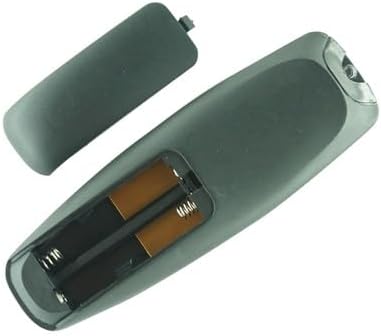
בילד 2: צוריק view of the remote control with the battery compartment cover removed, clearly showing the two slots for AAA batteries and their polarity markings.
4. אַפּערייטינג ינסטרוקטיאָנס
4.1 גרונטלעכע קנעפּל פונקציעס
This remote control provides essential functions for navigating your Minix Neo TV Box. Point the remote directly at your TV box for optimal performance.
- מאַכט קנעפּל (⏻): Turns the TV box on or off.
- ריכטונג-פאד (ארויף, אראפ, לינקס, רעכטס): Navigates through menus and selections.
- OK קנעפּל: Confirms selections or opens items.
- צוריק קנעפּל (↩): קערט צו די פריערדיקע פאַרשטעלן אָדער מעניו.
- היים קנעפּל (⌂): Returns to the main home screen of the TV box.
- מעניו קנעפּל (☰): Accesses context-sensitive menus or options.
- סעטינגס קנעפּל (⚙): Opens the system settings menu.
- Volume Buttons (+ / -): אַדזשאַסץ די באַנד מדרגה.
4.2 קאַמפּאַטאַבילאַטי
This remote is an infrared (IR) replacement unit designed for the following Minix Neo TV Box models:
- Minix Neo T5
- Minix Neo X39
- Minix Neo U9-H (X8-H Plus)
- Minix Neo X6
- Minix Neo Z64
- Minix Neo X88
- Minix Neo U1
- Minix Neo U220-XJ
- Minix Neo U22-XJ
- Minix Neo Z64-A
Please ensure your TV box model is listed above for guaranteed compatibility. While this remote is a replacement, it may not offer all advanced functions present on your original remote control.
5. וישאַלט
כדי צו זיכער מאַכן די לאַנגלעבעניש און ריכטיקע פונקציאָנירן פון אייער ווייַט קאָנטראָל, פאָלגט די וישאַלט גיידליינז:
- רייניקונג: Use a soft, dry cloth to clean the remote control. Do not use liquid cleaners, aerosols, or harsh chemicals, as these can damage the surface or internal components.
- באַטערי זאָרגן: If the remote control will not be used for an extended period (e.g., one month or more), remove the batteries to prevent leakage and potential damage to the remote.
- סטאָרידזש: האַלט די ווײַטקאָנטראָל אין אַ קיל, טרוקן אָרט ווײַט פֿון דירעקטער זון, עקסטרעמע טעמפּעראַטורן און הויכער פֿײַכטקייט.
- ויסמיידן טראפנס: באַשיצט די ווייַטקאָנטראָל פון פיזישע קלאַפּן, ווײַל פאַלן קענען שעדיקן די אינערלעכע קרייזן.
6. טראָובלעשאָאָטינג
If you encounter issues with your remote control, please try the following troubleshooting steps:
- ווייַט ניט ריספּאַנדינג:
- קאָנטראָלירט צי די באַטעריעס זענען ריכטיק אַרײַנגעשטעלט מיט דער ריכטיקער פּאָלאַריטעט.
- טוישט די באַטעריעס מיט נייע AAA באַטעריעס.
- Ensure there is a clear line of sight between the remote control and the IR receiver on your Minix Neo TV Box. Obstructions can block the signal.
- Move closer to the TV box to rule out range issues.
- עטלעכע פונקציעס ארבעטן נישט:
- As a replacement remote, it may not support all advanced or specific functions of your original remote. This remote is designed for basic navigation and control.
- Verify that your TV box model is listed in the compatibility section (Section 4.2).
- ינטערמיטאַנט אָפּעראַציע:
- דאָס קען אָנווייַזן אויף אַ נידעריקע באַטאַרייע. טוישט די באַטאַרייעס.
- זיכערט זיך אז קיין שטארקע ליכט קוועלער (ווי דירעקטע זונשייַן אדער העלע פלורעסצענט ליכט) זאלן נישט אריינמישן זיך מיטן IR סיגנאַל.
7. ספּעסאַפאַקיישאַנז
| פּראָדוקט טיפּ | IR Replacement Remote Control |
| סאָרט | גענעריק |
| מאַכט מקור | 2 X AAA באַטעריז (ניט אַרייַנגערעכנט) |
| קאָליר | שוואַרץ |
| ספּעציעלע פֿעיִקייטן | Ergonomic design, basic functions only |
| קאַמפּאַטאַבאַל דעוויסעס | Minix Neo T5, X39, U9-H, X6, Z64, X88, U1, U220-XJ, U22-XJ, Z64-A Android 4K HD TV Boxes |
8. וויכטיק נאָטעס
- This remote control is an infrared (IR) replacement and may not offer all functions or features of your original equipment manufacturer (OEM) remote.
- Ensure the model number of your Minix Neo TV Box matches one of the compatible models listed in this manual.
- No programming is required for this remote; it operates directly with compatible Minix Neo TV Boxes once batteries are installed.
9. שטיצן
If you have any questions or encounter issues that cannot be resolved using the troubleshooting steps provided, please contact the seller or retailer from whom you purchased this product. Provide your purchase details and a clear description of the problem for assistance.


