
KETOTEK KT3300 FR
KETOTEK Digital Hygrostat Plug User Manual
Model: KT3300 FR
בראַנד: קעטאָטעק
1. הקדמה
The KETOTEK KT3300 FR Digital Hygrostat Plug is a versatile and easy-to-use humidity controller designed for various applications requiring precise humidity management. This plug-and-play device allows you to control humidifiers or dehumidifiers to maintain desired humidity levels in environments such as terrariums, incubators, greenhouses, and more.

Figure 1: KETOTEK KT3300 FR Digital Hygrostat Plug with its external humidity probe.
2. פּראָדוקט פֿעיִקייטן
- פּלוג און שפּיל פּלאַן: Simple and safe to use, just plug it in.
- Wide Humidity Control Range: 20%RH to 95%RH.
- אָטאַמאַטיק מאָדע סוויטשינג: Automatically switches between humidification and dehumidification based on settings.
- עטלעכע אַפּערייטינג מאָדעס: Includes M1 (Humidity Control), M2 (Humidity Control with Countdown OFF), and M3 (Humidity Control with Countdown ON).
- Countdown Timer Function: Set a countdown from 0 to 99 hours and 59 minutes to activate or deactivate humidity control.
- הומידיטי קאליבראציע: Allows for fine-tuning of humidity readings for accuracy.
- דאַטאַ רעטענטיאָן: All settings are saved automatically even when the device is powered off.
- טעות קאָד ווייַז: Provides visual error indicators for probe issues or out-of-range humidity.

Figure 2: Key features of the KETOTEK KT3300 FR.
3. פּראָדוקט קאָמפּאָנענטן און אַרויסווייַזונג איבערview
The KETOTEK KT3300 FR consists of the main control unit with an integrated display and control buttons, and an external humidity probe connected via a cable.

Figure 3: Labeled diagram of the KETOTEK KT3300 FR display and buttons.
ווייַז עלעמענטן:
- געמאסטן הומידיטי: Displays the current humidity detected by the probe.
- Start Humidity: The humidity level at which the connected device will turn ON.
- Stop Humidity: The humidity level at which the connected device will turn OFF.
- רעזולטאַט ינדיקאַטאָר: A small light or icon indicating if the output socket is active.
- אָפּעראַציע מאָדע: Indicates the current operating mode (e.g., M1 HC, M2 HC+CD OFF).
קאָנטראָל קנעפּלעך:
- M (מאָדע) קנעפּל: Used to cycle through different operating modes and save settings.
- + (Increase) Button: Used to increase numerical values during setting.
- OK קנעפּל: Used to confirm selections and enter setting modes.
- - (Decrease) Button: Used to decrease numerical values during setting.
- Return/Reset Button: Used to return to the main display or reset settings to default.
4. טעכניש ספּעסאַפאַקיישאַנז
| באַשרייַבונג | ווערט |
|---|---|
| מאָדעל נומער | KT3300 FR |
| מאַכט צושטעלן | 100 ~ 250 וו אַק 50/60 הז |
| רעזולטאַט | Max 16A/230V |
| הומידיטי קאָנטראָל ראַנגע | 20%רה ~ 95%רה |
| Countdown Time Range | 0~99 Hours 59 Minutes |
| פּראָדוקט גרייס (אומגעפער) | 11.8 ס״מ (הייך) x 5.9 ס״מ (ברייט) x 3.2 ס״מ (טיפקייט) |
| פּראָבע קאַבל לענג | 300 ס״מ (3 מעטער) |
| וואָג | 240 גראַמז |
| לאַנד פון אָריגין | כינע |

Figure 4: Product dimensions and probe cable length.
5. סעטאַפּ
- ופשליסן די מיטל: Carefully remove the hygrostat plug and the humidity probe from its packaging.
- פאַרבינדן די פּראָבע: Ensure the humidity probe is securely plugged into the designated port on the top of the hygrostat unit.
- Position the Probe: Place the humidity probe in the environment where you wish to monitor and control humidity. Ensure it is not directly exposed to water unless specifically designed for such conditions (refer to safety information).
- Plug in the Hygrostat: Insert the KETOTEK KT3300 FR into a standard 220V AC power outlet. The display should light up.
- Connect Your Appliance: Plug your humidifier or dehumidifier into the socket on the front of the KETOTEK KT3300 FR.
6. אַפּערייטינג מאָדעס
The KETOTEK KT3300 FR offers three distinct operating modes to suit various humidity control needs:

פיגורע 5: איבערview of the three selectable operating modes.
6.1. M1 HC (Humidity Control Mode)
This is the primary humidity control mode. You set a 'Start Humidity' and a 'Stop Humidity'. The device will automatically turn on the connected appliance when the measured humidity reaches the 'Start Humidity' and turn it off when it reaches the 'Stop Humidity'. It intelligently switches between humidification and dehumidification based on your set values.

Figure 6: M1 HC Mode Display.
6.2. M2 HC+CD OFF (Humidity Control with Countdown OFF)
In this mode, the device performs humidity control (like M1) but also includes a countdown timer. Once the countdown timer expires, the humidity control function will be deactivated, and the connected appliance will turn off.

Figure 7: M2 HC+CD OFF Mode Display.
6.3. M3 HC+CD ON (Humidity Control with Countdown ON)
Similar to M2, this mode combines humidity control with a countdown timer. However, in M3 mode, the humidity control function will only activate once the countdown timer expires. Before the timer runs out, the connected appliance will remain off.

Figure 8: M3 HC+CD ON Mode Display.
7. Basic Operation: Setting Humidity (M1 Mode Exampל)
Follow these steps to set the desired humidity levels in M1 HC mode:

Figure 9: Easy Configuration Steps.
- Enter M1 HC Mode: Press the "M" button repeatedly until the display shows "M1 HC".
- Set Start Humidity: Press the "OK" button. The 'Start Humidity' value will begin to flash. Use the "+" or "-" buttons to adjust the value to your desired starting humidity.
- Set Stop Humidity: Press the "OK" button again. The 'Stop Humidity' value will begin to flash. Use the "+" or "-" buttons to adjust the value to your desired stopping humidity.
- היט סעטטינגס: Press the "M" button to save your settings and exit the configuration mode. The device will return to the main display.
Understanding Humidification and Dehumidification:
- If 'Start Humidity' < 'Stop Humidity': The KT3300 FR operates in humidification mode. It will turn on the connected appliance when humidity drops below 'Start Humidity' and turn it off when it reaches 'Stop Humidity'.
- If 'Start Humidity' > 'Stop Humidity': The KT3300 FR operates in דעהומידיפיקאַטיאָן מאָדע. It will turn on the connected appliance when humidity rises above 'Start Humidity' and turn it off when it drops to 'Stop Humidity'.
8. אַוואַנסירטע סעטטינגס
8.1. הומידיטי קאַלאַבריישאַן
If you find that the measured humidity is inaccurate compared to a known standard, you can calibrate the device. Refer to the full instruction manual (if provided separately) for detailed steps on how to access and adjust the calibration setting. This typically involves holding a specific button combination to enter calibration mode and then using the +/- buttons to offset the reading.
8.2. פאַבריק באַשטעטיק
To restore all settings to their default factory values, locate the reset function. This is often done by pressing and holding a specific button (e.g., the return/reset button) for several seconds while the device is powered on. Confirm the reset if prompted.
8.3. דאַטאַ סאַווינג
The KT3300 FR automatically saves all your settings. In case of a power outage, your configured humidity levels and mode selections will be retained when power is restored.
9. אַפּפּליקאַטיאָנס
The KETOTEK KT3300 FR Digital Hygrostat Plug is suitable for a wide range of applications where precise humidity control is essential:
- טערראריומס: Maintaining optimal humidity for reptiles, amphibians, and exotic plants.
- Incubators: Ensuring stable humidity levels for hatching eggs.
- גרינכאַוסיז: Controlling humidity for plant growth and preventing mold.
- Grow Tents: Ideal for indoor plant cultivation.
- Mushroom Cultivation: Providing specific humidity conditions for mushroom growth.
- Storage Areas: Protecting sensitive items from excessive humidity or dryness (e.g., basements, warehouses, wine cellars).
- היים נוצן: General humidity control in living spaces.
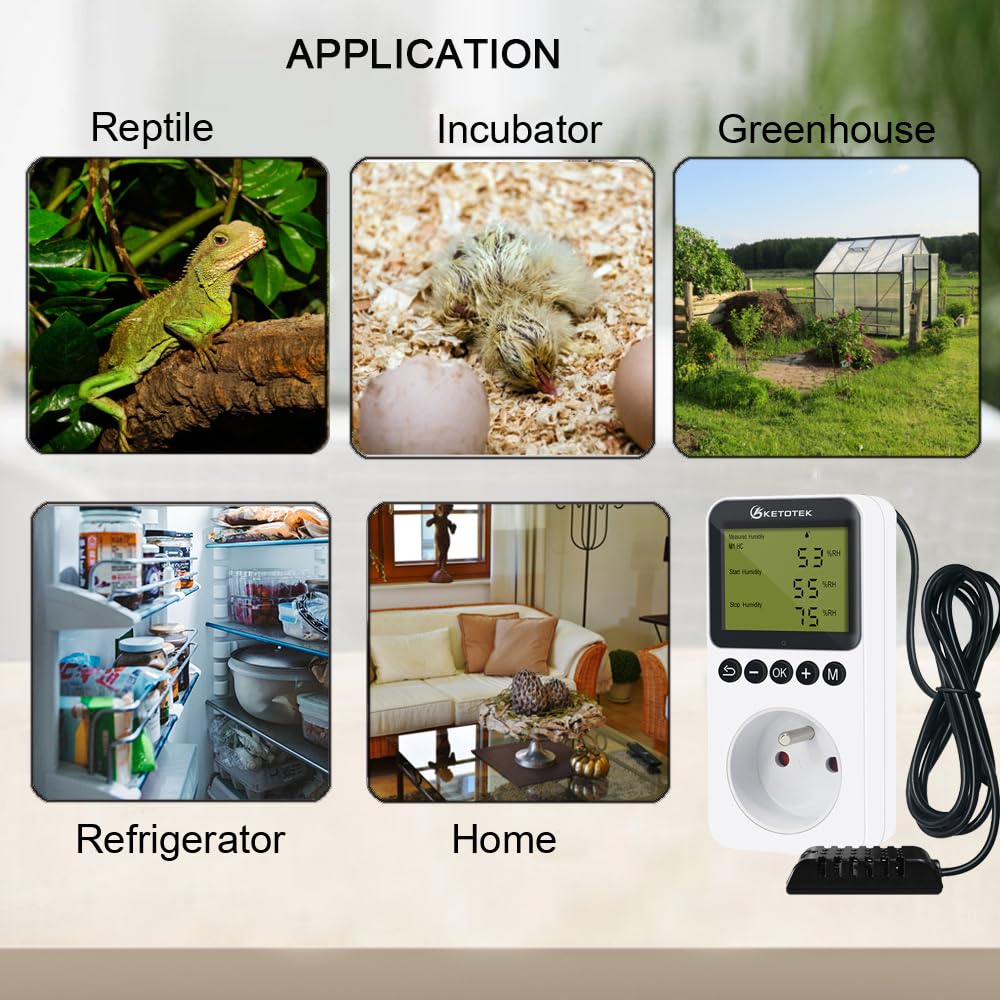
Figure 10: Common applications of the hygrostat plug.

Figure 11: Diverse applications for humidity control.
10. טראָובלעשאָאָטינג
10.1. טעות קאָודז
- H1 Error: If the display shows "H1" flashing, it indicates that the humidity probe is either disconnected or the measured humidity is below 20%RH. Check the probe connection and ensure it is placed in an environment with at least 20%RH.
- H2 Error: If the display shows "H2" flashing, it indicates a short circuit in the humidity probe or the measured humidity is above 95%RH. Check the probe for damage or ensure it is not in an excessively humid environment.
10.2. אַלגעמיינע פּראָבלעמען
- מיטל נישט פּאַוערינג אויף: Ensure the hygrostat is securely plugged into a live power outlet. Check the power outlet with another appliance.
- Appliance Not Turning On/Off: Verify that the 'Start Humidity' and 'Stop Humidity' settings are correctly configured for your desired humidification or dehumidification mode. Ensure the connected appliance is functional and properly plugged into the hygrostat.
- ומפּינקטלעך הומידיטי רידינגז: Consider performing a humidity calibration if you have a reliable reference hygrometer. Ensure the probe is clean and free from obstructions.
11. זיכערקייַט אינפֿאָרמאַציע
- Always ensure the device is unplugged before cleaning or performing any maintenance.
- Do not immerse the main hygrostat unit in water or any other liquid.
- The humidity probe is designed for environmental humidity measurement. While robust, avoid direct contact with standing water or prolonged submersion unless explicitly stated by the manufacturer, as this may damage the sensor.
- Do not exceed the maximum output load of 16A/230V.
- האַלטן די מיטל אויס פון דערגרייכן פון קינדער און פּעץ.
- פרובירט נישט צו צענעמען אדער פאררעכטן דעם אפאראט אליין. ווענדט זיך צו קוואַליפֿיצירטע פּערסאָנעל פֿאַר סערוויס.
12. וואָראַנטי און שטיצן
Specific warranty details are not available in the provided product information. For warranty claims, technical support, or further inquiries, please contact KETOTEK customer service directly through their official website or the retailer from whom you purchased the product. Please have your model number (KT3300 FR) and purchase information ready when contacting support.