
Yinker YK-SW041C
Yinker 4K HDMI Multiviewer 4x1 User Manual
Model: YK-SW041C
הקדמה
The Yinker 4K HDMI Multiviewer 4x1 is a high-performance device designed to connect up to four HDMI input sources and display them on a single HDMI output screen, such as a monitor, projector, or TV. This multiviewer supports various display modes including Single, Quad, Picture-in-Picture (PBP), and Dual modes, offering flexibility for different viewing requirements. It is ideal for applications in security monitoring, gaming setups, conference rooms, and other professional or home entertainment environments.
זיכערקייַט אינפֿאָרמאַציע
- זיכער מאַכן אַז די דעווייס איז געשטעלט אויף אַ סטאַביל, פלאַך ייבערפלאַך צו פאַרמייַדן אַקסאַדענטאַל פאלן.
- שטעלט נישט אויס דעם אפאראט צו וואסער, פייכטקייט, אדער עקסטרעמע טעמפעראטורן.
- Use only the provided power adapter. Using an incorrect adapter may damage the device and void the warranty.
- ויסמיידן בלאַקינג ווענטאַליישאַן אָופּאַנינגז צו פאַרמייַדן אָוווערכיטינג.
- פרובירט נישט צו עפענען אדער פאררעכטן דעם אפאראט אליין. לאָזט איבער אלע סערוויסעס צו קוואַליפֿיצירטע פּערסאָנעל.
- האַלטן די מיטל אַוועק פון שטאַרק מאַגנעטיק פעלדער.
- Unplug the power adapter during lightning storms or when unused for long periods.
פּעקל אינהאַלט

Image: Contents of the Yinker 4K HDMI Multiviewer 4x1 package. This image displays the main multiviewer unit, an IR remote control, a power adapter, and a user manual, all neatly arranged on a white surface.
Please check the package contents upon opening. If any items are missing or damaged, contact Yinker customer support.
- 1x Yinker 4K HDMI Multiviewer 4x1 Unit
- 1x מאַכט אַדאַפּטער (DC 12V)
- 1 קס יר רימאָוט קאָנטראָל
- 1x באַניצער מאַנואַל
פּראָדוקט איבערview

בילד: א פולשטענדיקע view of the Yinker 4K HDMI Multiviewer 4x1 unit, showcasing its front panel with control buttons and IR receiver, and its rear panel with HDMI input/output ports and power input. The accompanying remote control is also visible.
פראָנט פּאַנעל:
- IR: ינפרערעד ופנעמער פֿאַר ווייַט קאָנטראָל.
- CH1-CH4 Buttons: Select individual HDMI input channels.
- מאָדע קנעפּל: Cycle through different display modes (Single, Quad, PBP, Dual).
ריר פּאַנעל:
- DC 12V: מאַכט אַרייַנשרייַב פּאָרט.
- HDMI 1-4: HDMI input ports for connecting source devices.
- HDMI אויס: HDMI output port for connecting to a display.
סעטאַפּ
Follow these steps to set up your Yinker 4K HDMI Multiviewער:
- פֿאַרבינדן HDMI אַרייַנגאַנג קוואלן: Connect up to four HDMI source devices (e.g., gaming consoles, PCs, set-top boxes, security cameras) to the HDMI 1, HDMI 2, HDMI 3, and HDMI 4 input ports on the multiviewer using high-quality HDMI cables.
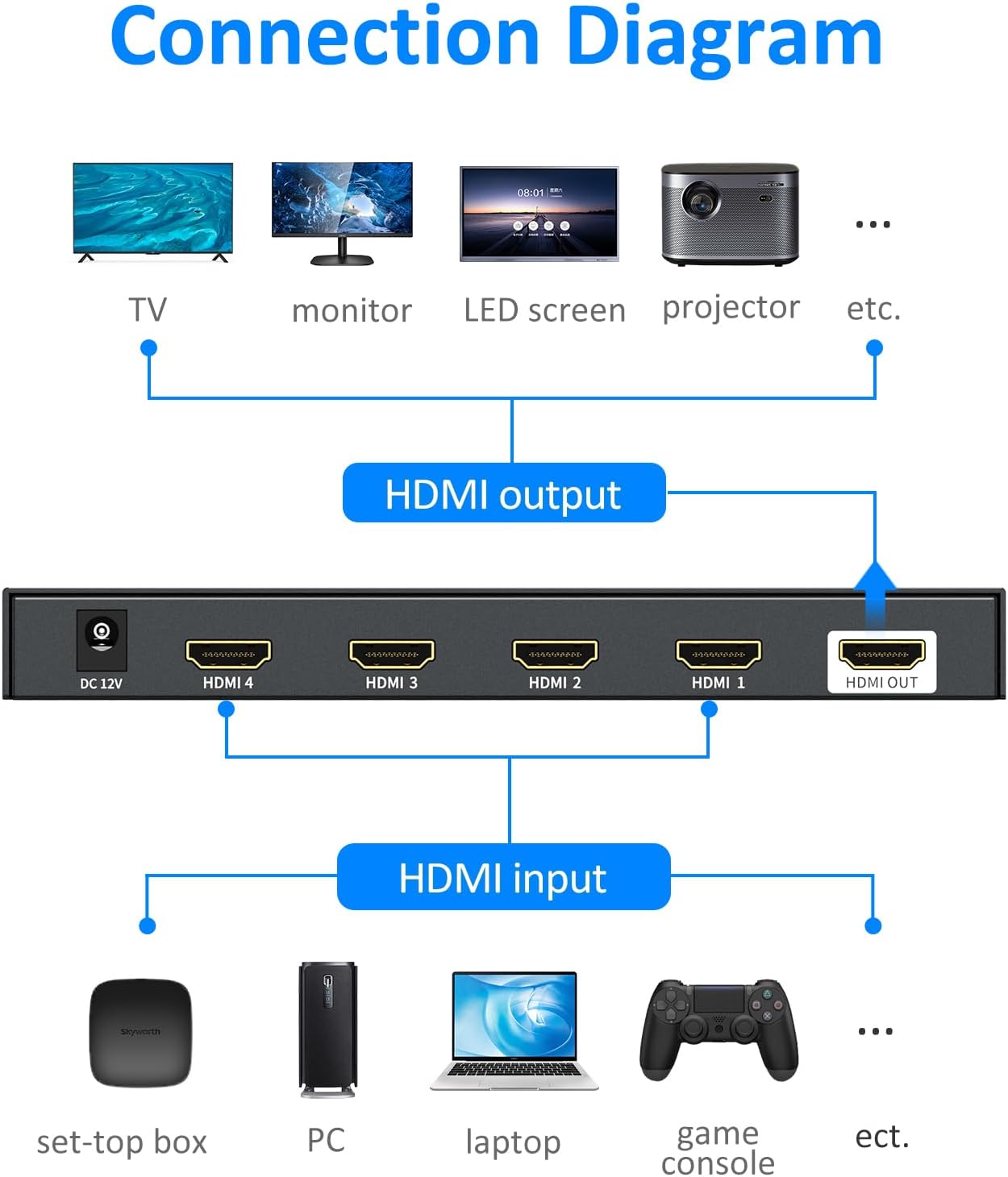
Image: A clear connection diagram illustrating how to connect various HDMI input devices (set-top box, PC, laptop, game console) to the HDMI input ports of the multiviewer, and how the HDMI output connects to a display (TV, monitor, LED screen, projector).
- Connect HDMI Output Display: Connect the HDMI OUT port of the multiviewer to the HDMI input of your display (TV, monitor, projector) using an HDMI cable.
- פאַרבינדן מאַכט אַדאַפּטער: Plug the provided DC 12V power adapter into the DC 12V port on the multiviewer, then plug the adapter into a power outlet. The power indicator light on the multiviewer will illuminate.
- מאַכט אויף דיווייסאַז: Power on all connected HDMI source devices and your display.
- אויסקלייבן איינגאבע אויף דיספּליי: Set your display's input source to the HDMI port connected to the multiviewער.
די מולטיviewer is plug-and-play and does not require any software installation.
אַפּערייטינג ינסטראַקשאַנז
Switching Methods:
The Yinker 4K HDMI Multiviewer offers two convenient methods for switching between inputs and display modes:
- טאַפליע קנעפּל: Use the CH1-CH4 buttons on the front panel to directly select an input, or the MODE button to cycle through display modes.
- IR רימאָוט קאָנטראָל: Use the included IR remote control for full functionality, including direct input selection and mode switching. Ensure the remote is pointed towards the IR receiver on the front panel.
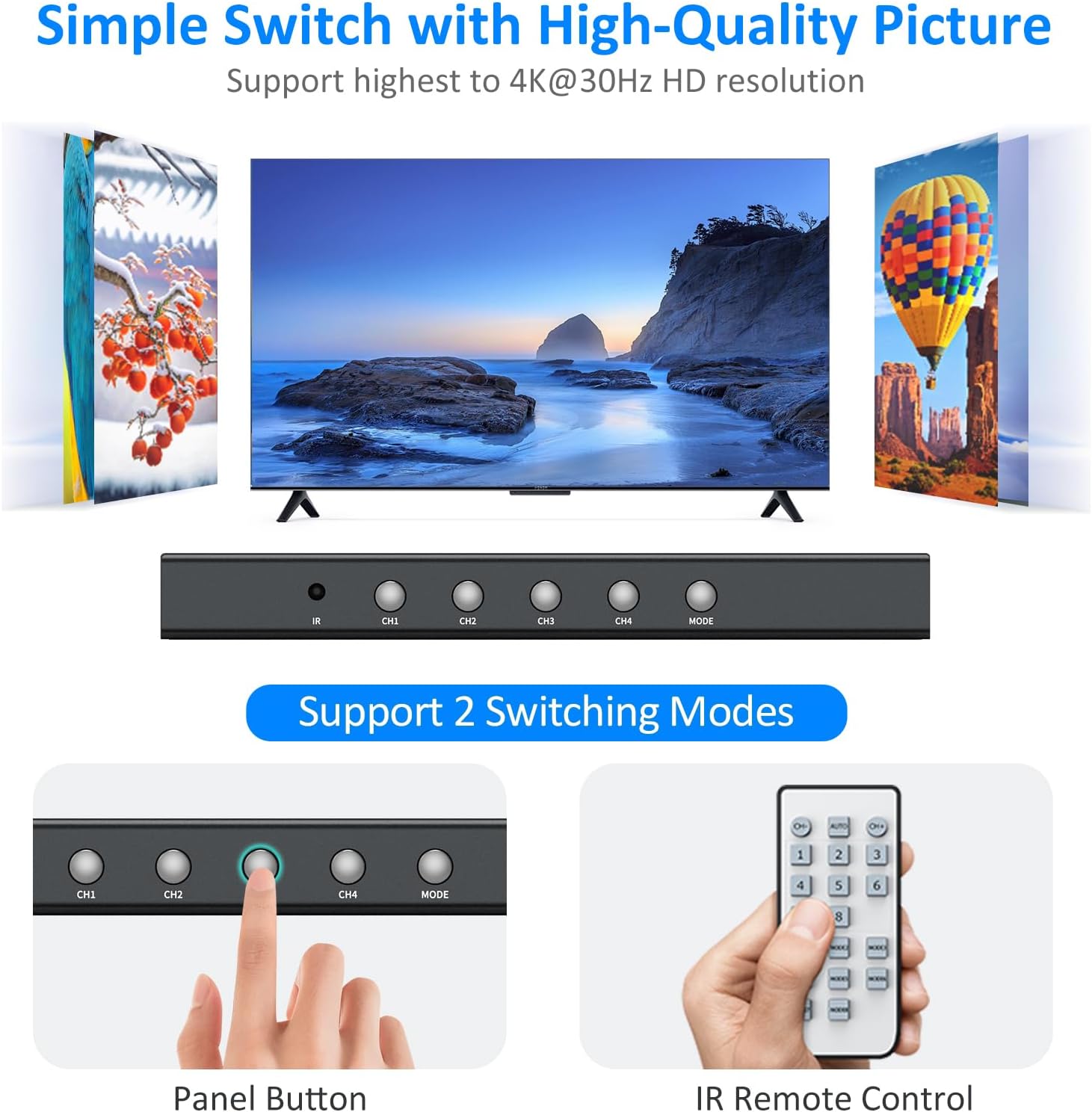
Image: This image highlights the two primary switching methods for the multiviewer: the physical buttons on the device's front panel (CH1, CH2, CH3, CH4, MODE) and the included IR remote control, demonstrating ease of use.
ווייַז מאָדעס:
די מולטיviewer supports four distinct display modes to suit various needs:
- איין מאָדע: Displays one selected HDMI input source in full screen. Use the CH1-CH4 buttons or corresponding remote buttons to select the desired input.
- קוואַד מאָדע: Displays all four HDMI input sources simultaneously on the screen, each occupying a quarter of the display area.
- צוויי מאָדע: Displays two selected HDMI input sources side-by-side.
- PBP Mode (Picture-by-Picture): Displays one main HDMI input source in a larger window, with three other input sources displayed in smaller windows.

Image: This visual guide illustrates the four distinct display modes available on the Yinker 4K HDMI Multiviewer 4x1: Single Screen Mode (full display of one source), Quad Screen Mode (four sources equally divided), Dual Screen Mode (two sources side-by-side), and PBP Mode (one large source with three smaller ones).
דרוק די מאָדע button on the front panel or the remote to cycle through these display modes. Audio output will typically follow the main or selected input in multi-view modes. Refer to the remote control diagram in the user manual for specific button functions.
סימלאַס סוויטשינג:
די מולטיviewer features seamless switching between inputs, minimizing black screen delays when transitioning from one source to another in single mode. This ensures a smooth viewינג דערפאַרונג.

Image: A visual comparison demonstrating the "Effective Seamless Switch" feature of the multiviewer, showing an instant transition between two video sources (represented by a beach scene and parrots) without the typical 2-3 second lag often seen in standard switches.
טראָובלעשאָאָטינג
| פּראָבלעם | מעגלעך סיבה | לייזונג |
|---|---|---|
| קיין בילד אויף די אַרויסשטעלונג. |
|
|
| Flickering or unstable picture. |
|
|
| ווייַט קאָנטראָל נישט ארבעטן. |
|
|
| אַודיאָ פּראָבלעמען (קיין קלאַנג, פֿאַרדרייטער קלאַנג). |
|
|
ספּעסאַפאַקיישאַנז
| שטריך | דעטאַל |
|---|---|
| מאָדעל נומער | YK-SW041C |
| קאַנעקטער טיפּ | HDMI |
| HDMI ווערסיע | HDMI 1.4 |
| HDMI אַרייַנשרייַב האַכלאָטע | אַרויף צו 4K@30Hz |
| HDMI רעזולטאַט האַכלאָטע | Up to 4K@30Hz (compatible with 1080P@60Hz, 720P, 1080i, 1024x768, 1360x768) |
| HDCP קאָמפּליאַנסע | HDCP 1.4 |
| באַשטימען מאָדעס | Panel Button & IR Remote |
| ווייַז מאָדעס | Single Mode, Quad Mode, PBP Mode, Dual Mode |
| קאַמפּאַטאַבאַל סיסטעמען | Mac, Win11, Win7, Windows, Linux, Unix, Fedora, Raspbian, Ubuntu, etc. |
| קאַמפּאַטאַבאַל דעוויסעס | Nintendo, Xbox, PS series, Blu-Ray Player, Roku, Chromecast, Web Camera, PC, Laptop, Gaming Console, Monitor, Television |
| פּראָדוקט דימענשאַנז | 3.14 X 6.88 X 0.78 אינטשעס |
| פּונקט וואָג | 1.47 פונט |
| מאַכט צושטעלן | דק 12 וו מאַכט אַדאַפּטער |
| ווייַט באַטערי | 1 CR2032 באַטאַרייע פארלאנגט |

Image: This image illustrates the broad compatibility of the Yinker 4K HDMI Multiviewer 4x1 with various operating systems, including Windows (7, 10, XP, Vista), Mac, Linux, Unix, Fedora, and others, highlighting its versatility.
וישאַלט
- רייניקונג: Use a soft, dry cloth to clean the surface of the device. Do not use liquid or aerosol cleaners.
- סטאָרידזש: ווען נישט אין באַנוץ פֿאַר לענגערע פּעריאָדן, זאָל מען דאָס אַפּאַראַט אויפֿהיטן אין אַ קיל, טרוקן אָרט, אַוועק פֿון דירעקטער זון און עקסטרעמע טעמפּעראַטורן.
- קאַבלע פאַרוואַלטונג: Ensure HDMI cables are not excessively bent or strained, which can lead to signal degradation or cable damage.
וואָראַנטי און שטיצן
Yinker products are designed for reliability and performance. For warranty information and technical support, please refer to the official Yinker website or contact Yinker customer service directly.
קאָנטאַקט אינפֿאָרמאַציע:
- Webפּלאַץ: Visit the Yinker Store on Amazon
- בליצפּאָסט: Refer to the contact section on the official Yinker website or the included user manual for specific email support.
Please have your model number (YK-SW041C) and purchase details ready when contacting support.