
1. הקדמה
The Lazmin112 YT800 Electric Pan-Tilt Rotation Head is a versatile accessory designed for photographers, videographers, and content creators. It offers precise control over camera movement, enabling smooth 360-degree horizontal rotation and 50-degree vertical tilt. With its wireless remote control and robust design, it is suitable for various applications including vlogging, live streaming, outdoor photography, and more.
This manual provides detailed instructions on how to set up, operate, and maintain your YT800 Pan-Tilt Head to ensure optimal performance and longevity.
2. זיכערקייַט אינפֿאָרמאַציע
- שטעלט נישט אויס דעם אפאראט צו וואסער אדער איבעריגע הומידיטי.
- ויסמיידן דראַפּינג אָדער אונטערטעניק די מיטל צו שטאַרק ימפּאַקץ.
- פּרוּווט נישט צו צענעמען אָדער פאַרריכטן דעם אַפּאַראַט אַליין. ווענדט זיך צו קוואַליפֿיצירטע סערוויס פּערסאָנעל.
- האַלטן אויס פון דערגרייכן פון קינדער.
- Ensure the device is placed on a stable surface or tripod before mounting equipment.
- דו זאלסט נישט יקסיד די מאַקסימום מאַסע קאַפּאַציטעט פון 1 קג.
3. פּעקל אינהאַלט
ביטע קאָנטראָלירט די אינהאַלט פון דער פּאַקעט ווען איר נעמט עס אויס. אויב עס פעלט עפּעס אָדער עס זענען צעבראָכן, קאָנטאַקטירט קונה סערוויס.
- YT800 Electric Pan-Tilt Rotation Head
- 2.4 GHz Wireless Remote Controller
- וסב טיפּע- C טשאַרדזשינג קאַבלע
- טעלעפאָנירן קלamp
- AAA Batteries (for remote controller)

Figure 3.1: Included components in the YT800 package. This image displays the main pan-tilt head unit, a wireless remote control, a USB-C charging cable, a smartphone clamp, and two AAA batteries.
4. פּראָדוקט איבערview
4.1. Main Unit Components

Figure 4.1: Labeled diagram of the YT800 Pan-Tilt Head. Key components include the main body, camera mount, battery compartment, base (territory), display screen, control buttons (keys), DC charging port, and power switch.
- הויפּט גוף: The primary structure housing the motors and electronics.
- אַפּאַראַט בארג: The platform with a 1/4-inch screw for attaching cameras or phone clamps.
- באַטערי אָפּטייל: Houses the internal rechargeable battery.
- ווייַז פאַרשטעלן: Shows operational information (e.g., speed, battery level).
- Control Buttons (Keys): M (Mode), -, +, A, B buttons for direct control.
- DC Port (5V2A): USB טיפּ-C פּאָרט פֿאַר טשאַרדזשינג.
- מאַכט קנעפּל (אויס/אײַן): צו קער די מיטל אויף אָדער אַוועק.
- Territory (Base): The stable base of the pan-tilt head.
4.2. רימאָוט קאָנטראָל איבערview

Figure 4.2: Labeled diagram of the YT800 remote control. It features a display for horizontal velocity, vertical velocity, channel, and battery level. Control buttons include directional arrows (up, down, left, right), OK, Menu, S (Speed), A, and B.
- ווייַז: Shows current settings like horizontal/vertical velocity, channel, and battery level.
- ריכטונג קנעפּלעך (אַרויף/אַראָפּ/לינקס/רעכטס): Control the pan and tilt movement.
- OK קנעפּל: באַשטעטיקן סאַלעקשאַנז.
- מעניו קנעפּל: Access settings.
- S (Speed) Button: Adjust rotation speed (7 levels).
- א/ב קנעפּלעך: Set and activate A-B point cruise.
5. סעטאַפּ
5.1. טשאַרדזשינג די מיטל
The YT800 Pan-Tilt Head is equipped with a built-in 2000mAh rechargeable battery. Before first use, fully charge the device.
- Locate the Type-C charging port (5V2A) on the side of the main unit.
- Connect the provided USB Type-C cable to the port and the other end to a 5V/2A USB power adapter (not included).
- The display screen will indicate charging status. A full charge provides long-lasting endurance. The device supports charging while in use.
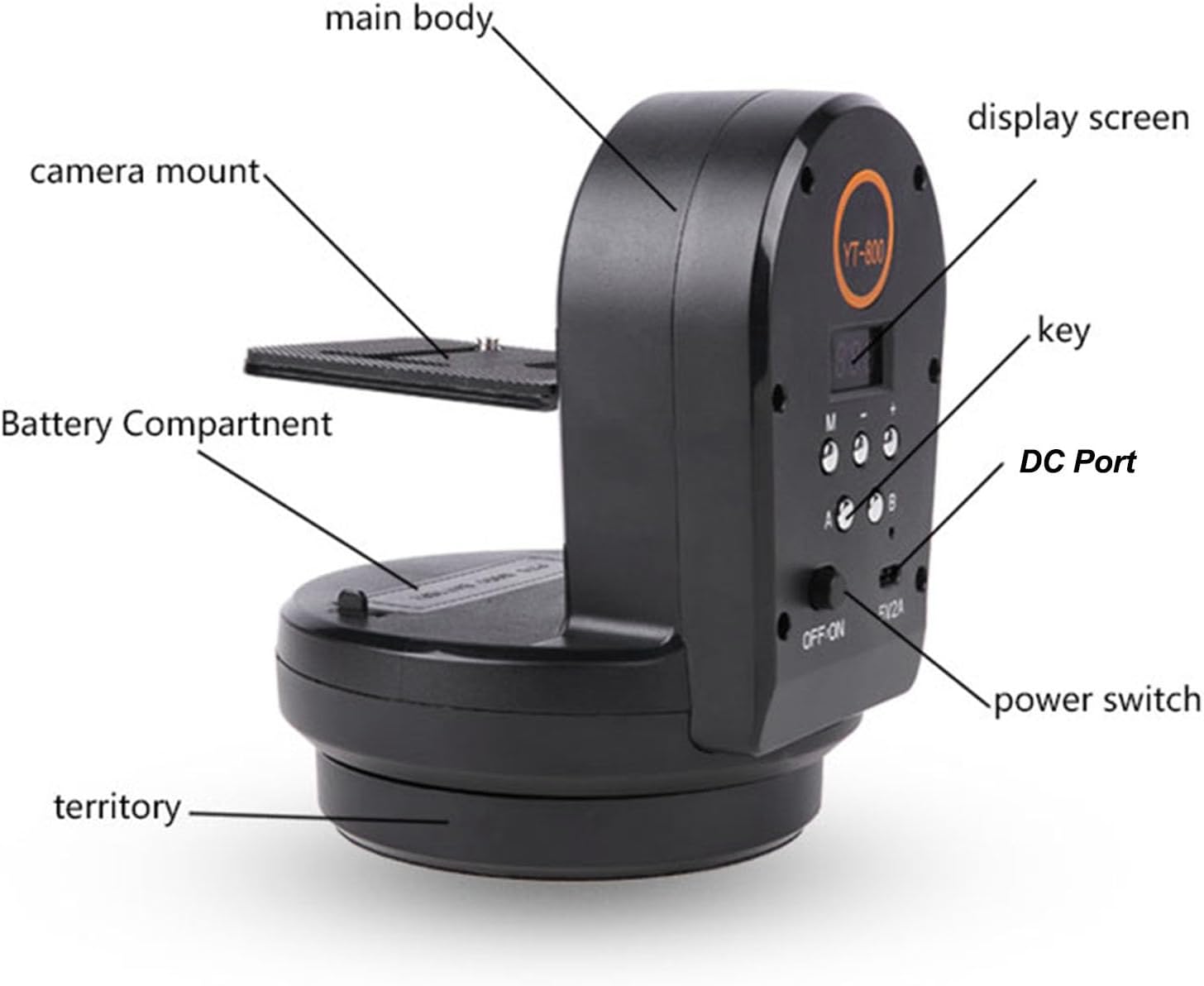
Figure 5.1: USB-C fast charging port for convenient power input.
5.2. ינסטאָלינג רימאָוט קאָנטראָל באַטעריז
אַרײַנשטעלן די צוויי AAA באַטעריעס אין דער ווײַטקאָנטראָל, און זיכער מאַכן אַז די פּאָלאַריטעט איז ריכטיק.
5.3. מאָנטירן אויף אַ דרייפוס
The YT800 features a 1/4-inch screw hole at its base for easy installation on most tripods or stands.
- Locate the 1/4-inch screw hole on the bottom of the YT800 base.
- Align it with the screw on your tripod's quick release plate or head.
- Securely fasten the YT800 to the tripod by rotating it clockwise until tight.
Figure 5.2: The anti-slip outsole and 1/4-inch screw hole for stable tripod mounting.
5.4. Attaching Camera or Phone
The YT800's camera mount has a 1/4-inch screw compatible with various devices.
- For cameras (mirrorless, DSLR, action cameras): Screw the camera directly onto the 1/4-inch screw on the YT800's camera mount. Ensure it is securely tightened.
- For smartphones: Attach the provided phone clamp to the 1/4-inch screw on the YT800's camera mount. The clamp can hold devices with a width of 5.5 to 8 cm. Insert your smartphone into the clamp, ensuring it is held firmly. The clamp supports both horizontal and vertical shooting orientations.

Figure 5.3: YT800 with a camera mounted, ready for remote-controlled movement.
6. אַפּערייטינג ינסטרוקטיאָנס
6.1. מאַכט אויף / אויסגעלאשן
רוק די OFF/ON switch on the main unit to the ON position to power on the device. Slide it to OFF צו מאַכט אַוועק.
6.2. Basic Movement Control (Remote)
Use the directional buttons on the 2.4 GHz wireless remote control to adjust the pan (left/right) and tilt (up/down) angles.
- לינקס/רעכטס פײַלן: Control horizontal rotation (pan).
- אַרויף / אַראָפּ אַראָוז: Control vertical tilt.
6.3. Adjusting Rotation Speed
The YT800 supports 7 levels of adjustable speed for both horizontal and vertical movement.
- דרוק די S (Speed) button on the remote control.
- Use the Up/Down arrows to cycle through the 7 speed levels.
- דרוק OK צו באַשטעטיקן דיין סעלעקציע.

Figure 6.1: Illustrates the 360-degree infinite horizontal rotation and 50-degree vertical tilt capabilities.
6.4. A-B Point Cruise Function
The A-B point cruise function allows you to set two specific points (A and B) and have the pan-tilt head automatically move between them.
- Manually position the camera to your desired starting point (Point A) using the remote control.
- דרוק די A button on the remote control to set Point A.
- Manually position the camera to your desired ending point (Point B).
- דרוק די B button on the remote control to set Point B.
- To start the cruise, press the אַוטאָ button (or similar function, refer to remote diagram). The head will now move smoothly between Point A and Point B.

Figure 6.2: Illustrates the A-B point cruise function for panoramic shooting, live streaming, and vlogging.
7. וישאַלט
- רייניקונג: ניצט אַ ווייכע, טרוקענע שטאָף צו רייניקן די אויסערלעכע זייט פון דעם אַפּאַראַט. ניצט נישט קיין פליסיקע רייניגער אָדער סאָלווענטן.
- סטאָרידזש: האַלט דעם אַפּאַראַט אין אַ קיל, טרוקן אָרט אַוועק פון דירעקט זונשייַן און עקסטרעמע טעמפּעראַטורן.
- באַטערי זאָרגן: If storing for extended periods, charge the battery to about 50% every three months to maintain battery health.
8. טראָובלעשאָאָטינג
| פּראָבלעם | מעגלעך סיבה | לייזונג |
|---|---|---|
| די מיטל טוט נישט מאַכט אויף. | באַטערי איז דיפּליטיד. | לאָדט אויף דעם דעווייס מיטן טיפּ-C קאַבל. |
| די ווײַטקאָנטראָל רעאַגירט נישט. | Remote batteries are dead or incorrectly inserted. Out of range. | Replace AAA batteries. Ensure correct polarity. Move closer to the device. |
| Movement is jerky or inconsistent. | Overload, low battery, or obstruction. | Ensure mounted equipment does not exceed 1kg. Charge the device. Check for obstructions. |
| די אַפּאַראַט מאַכט אַ ומגעוויינטלעך ראַש. | מעגלעכע אינערלעכע פראבלעם אדער שטערונג. | Power off the device and check for any visible obstructions. If the issue persists, contact support. |
9. ספּעסאַפאַקיישאַנז
| שטריך | דעטאַל |
|---|---|
| סאָרט | Lazmin112 |
| מאָדעל נומער | Lazmin112greo6i37zv |
| קאַמפּאַטאַבאַל דעוויסעס | Camera, Mobile Phone, Phones |
| האָריזאָנטאַל ראָוטיישאַן | 360 degrees (Wireless) |
| ווערטיקאַל טילט | 50 דיגריז |
| אַדזשאַסטאַבאַל ספּיד | 7 לעוועלס |
| פּריסעט פּאַזישאַנז | 2 (A-B point cruise) |
| מאַקסימום מאַסע קאַפּאַציטעט | 1 קג |
| Top Screw | 1/4 אינטש |
| אונטערשטע שרויף לאָך | 1/4 אינטש |
| טעלעפאָנירן קלamp ברייט | 5.5 - 8 ס״מ |
| רימאָוט קאָנטראָל אָפטקייַט | 2.4 GHz (16 channels) |
| באַטאַרייע קאַפּאַציטעט | 2000 mAh (Built-in rechargeable) |
| טשאַרדזשינג פּאָרט | Type-C (5V2A) |
| פּונקט וואָג | 923 גראַמז |
| פּעקל דימענשאַנז | 17.3 X 14.4 X 13 סענטימעטער |
| לאַנד פון אָריגין | כינע |
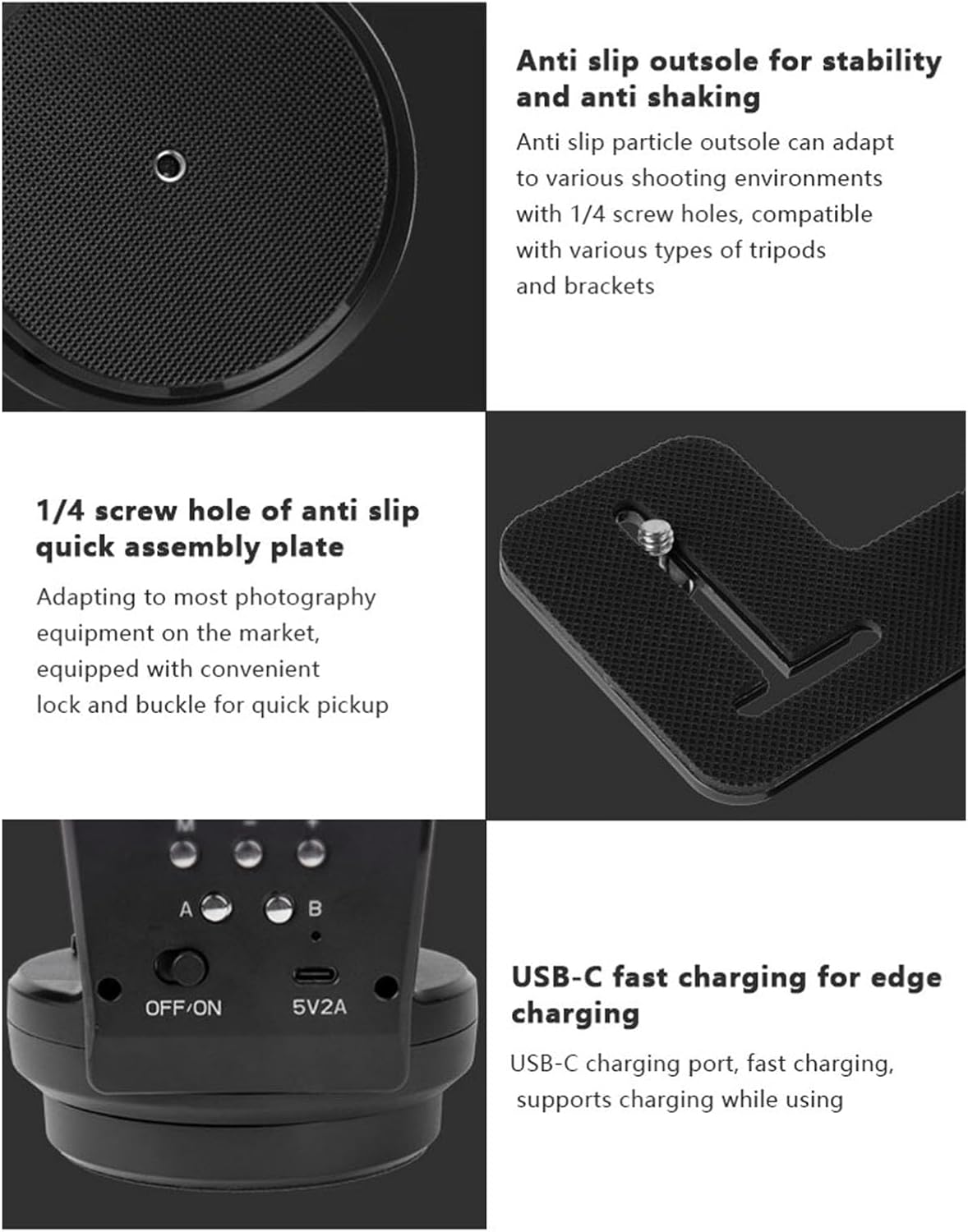
Figure 9.1: Product dimensions of the YT800 Pan-Tilt Head.
10. וואָראַנטי אינפֿאָרמאַציע
דער פּראָדוקט קומט מיט אַ 1 יאָר וואָראַנטי קעגן פאַבריקאַנט חסרונותביטע באַהאַלטן אייער קויפן-באַווייַז פֿאַר וואָראַנטי-קליימז. די וואָראַנטי דעקט חסרונות אין מאַטעריאַלן און אַרבעט אונטער נאָרמאַל נוצן. עס דעקט נישט שעדיקן געפֿירט דורך מיסברויך, אַקסידענט, נישט-אָטעריזירטע מאָדיפיקאַציע, אָדער אומריכטיקע ינסטאַלירונג.
11. קונה שטיצן
If you encounter any issues or have questions regarding your Lazmin112 YT800 Electric Pan-Tilt Rotation Head, please contact our customer support team. Refer to your purchase documentation for specific contact details or visit the official Lazmin112 webפּלאַץ.
פֿאַר די לעצטע אינפֿאָרמאַציע און שטיצע, ביטע באַזוכט: Lazmin112 Official Store on Amazon


