
שאַרף SPC5028AMZ
Sharp Digital Alarm Clock User Manual
מאָדעל: SPC5028AMZ
הקדמה
Thank you for choosing the Sharp Digital Alarm Clock. This manual provides detailed instructions for setting up, operating, and maintaining your new alarm clock. Designed for clarity and convenience, this clock features an easy-to-read LCD display with an optional always-on backlight, dual alarm settings, and a USB charging port for your devices. Please read this manual thoroughly before use to ensure optimal performance and longevity of your product.

פראָנט view of the Sharp Digital Alarm Clock, displaying time, month, date, day, and temperature on its colorful LCD screen.
זיכערקייַט אינפֿאָרמאַציע
Please observe the following safety precautions to prevent damage to the unit or personal injury:
- שטעלט נישט אויס דעם אַפּאַראַט צו עקסטרעמע טעמפּעראַטורן, דירעקטע זונשייַן, אדער הויכע הומידיטי.
- פֿאַרמײַדט צו לאָזן פאַלן אָדער אויסשטעלן דאָס אַפּאַראַט צו שטאַרקע קלאַפּן.
- דו זאלסט נישט מישן אַלט און נייַ באַטעריז, אָדער פאַרשידענע טייפּס פון באַטעריז.
- אַרויסנעמען באַטעריעס אויב די אַפּאַראַט וועט נישט ווערן גענוצט פֿאַר אַ לענגערע צייט צו פאַרמייַדן ליקאַדזש.
- האַלטן די אַפּאַראַט אַוועק פון וואַסער און אנדערע ליקווידס.
- פרובירט נישט צו צענעמען אדער פאררעכטן דעם איינהייט אליין. לאָזט איבער אלע סערוויסעס צו קוואַליפֿיצירטע פּערסאָנעל.
פּעקל אינהאַלט
באַשטעטיקן אַז אַלע זאכן זענען פאַראַן אין פּעקל:
- Sharp Digital Alarm Clock (Model SPC5028AMZ)
- באַניצער מאַנואַל (דעם דאָקומענט)
Note: 3 x AAA batteries are required and not included.
פּראָדוקט איבערview
פראָנט ווייַז

Diagram illustrating key features of the alarm clock, including atomic accuracy, 1.5-inch tall time display, on/off display nightlight, indoor temperature display, calendar display, bright color display, wall mountable or tabletop viewing, and battery operation (3x AAA batteries).
The front of the clock features a clear LCD display that shows the time, month, date, day of the week, and indoor temperature. The main time display is approximately 1.5 inches tall for easy readability.
דערציען טאַפליע און קאָנטראָלס

דעטאַילעד view of the clock's rear panel, showing the location of the battery compartment, various control buttons (Calendar, Time, Alarm, 12/24, Up, °C/°F, Down, Wave), the ON/OFF switch for the nightlight, and the backstand for tabletop viewing. Dimensions (6.45"W x 5"H) are also indicated.
- CALENDAR Set Button: Used to set the date and year.
- TIME Set Button: Used to set the time manually.
- ALARM Set & ON/OFF Button: Used to set and activate/deactivate alarms.
- 12/24 קנעפּל: Toggles between 12-hour and 24-hour time formats.
- UP קנעפּל: Adjusts settings upwards.
- °C/°F קנעפּל: טוישט טעמפּעראַטור אַרויסווייַזונג צווישן צעלזיוס און פאַהרענהייט.
- אַראָפּ קנעפּל: Adjusts settings downwards.
- WAVE (Atomic Search) Button: Initiates a manual search for the atomic time signal.
- ON/OFF Switch (Nightlight): Controls the always-on backlight feature.
- באַטערי אָפּטייל: Holds 3 x AAA batteries.
- Backstand: For tabletop viewing.
- וואַנט מאָונט לאָך: For hanging the clock on a wall.
סעטאַפּ
ייַנמאָנטירונג פון באַטאַרייע
- Open the battery compartment cover on the rear of the clock.
- Insert 3 new AAA batteries, ensuring correct polarity (+ and -).
- פאַרמאַכן די באַטאַרייע אָפּטייל דעקן סיקיורלי.
ערשט מאַכט אויף
Upon battery installation, the clock will power on and attempt to synchronize with the atomic time signal.
Atomic Time Synchronization (WWVB)
The Sharp Digital Alarm Clock is designed to automatically synchronize with the WWVB atomic time signal broadcast from Fort Collins, Colorado, ensuring precise timekeeping.

Map of the United States showing the WWVB radio broadcast signal originating from Fort Collins, Colorado, which the atomic clock uses for synchronization.
- The clock will automatically attempt to receive the signal daily, typically overnight when electronic interference is minimal.
- For optimal reception, place the clock near a window and orient its front or rear panel towards Fort Collins, Colorado.
- A signal strength indicator (antenna icon) on the display will show the reception status.
- To manually initiate a signal search, press the כוואַליע קנעפּל אויף די דערציען טאַפליע.

Graphic depicting a full moon, with text 'LESS ELECTRONIC INTERFERENCE AT NIGHT SET BY MORNING', indicating optimal atomic clock synchronization occurs during nighttime hours.
Setting Time Zone
Even with atomic synchronization, you must manually select your local time zone for the correct hourly time display.
- דריקן און האַלטן די צייט button until the time zone indicator flashes.
- ניצן די UP or אַראָפּ buttons to select your desired time zone (e.g., PST, MST, CST, EST).
- דרוק די צייט קנעפּל ווידער צו באַשטעטיקן און אַרויסגאַנג.
מאַנועלע צייט און דאַטע באַשטעטיקן
If atomic synchronization is not desired or available, you can set the time and date manually.
- צו שטעלן צייט: דריקן און האַלטן די צייט button until the hour flashes. Use UP/אַראָפּ to adjust. Press צייט to move to minutes, then adjust. Press צייט ווידער צו ראַטעווען.
- צו שטעלן טאָג: דריקן און האַלטן די קאַלענדאַר button until the year flashes. Use UP/אַראָפּ to adjust. Press קאַלענדאַר to move to month, then day, adjusting each. Press קאַלענדאַר ווידער צו ראַטעווען.
- 12/24 שעה פֿאָרמאַט: דרוק די 12/24 button to switch between 12-hour (with AM/PM indicator) and 24-hour formats.
אַפּערייטינג ינסטראַקשאַנז
Adjusting Display Brightness and Backlight
The clock features an optional always-on backlight with adjustable brightness for optimal viewינג אין פאַרשידן לייטינג טנאָים.
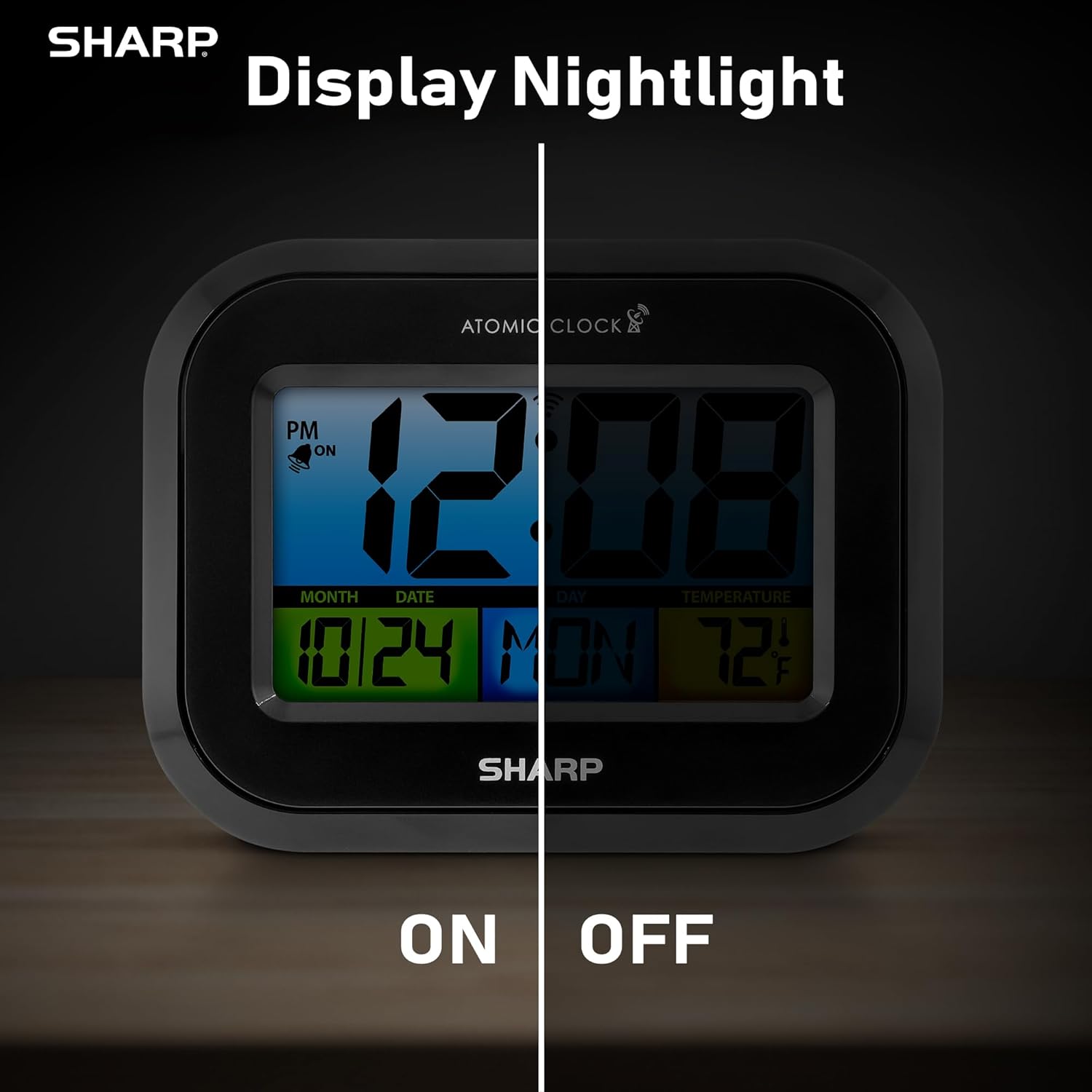
Comparison image showing the clock's display with the nightlight off (dim) and on (illuminated) in both day and night settings.
- Always-On Backlight: ניצן די ON/OFF באַשטימען on the rear panel to activate or deactivate the continuous backlight. When ON, the display will have a soft glow.
- אויף-דעמאַנד באַקלייט: Even if the always-on backlight is OFF, you can momentarily illuminate the display by pressing the באַקלייט button (usually located on the top edge, though not explicitly labeled in the provided image, it's a common feature). This provides a brighter illumination for a few seconds.

Image highlighting the physical ON/OFF switch on the rear of the clock for controlling the display nightlight, indicating its function for soft glowing backlight in the dark.
שטעלן צווייענדיקע אַלאַרמס
The clock supports two independent alarm settings.
- דרוק די שרעק button once to select Alarm 1. Press again for Alarm 2.
- While the alarm time is displayed, press and hold the שרעק קנעפּל ביז די שעה בלינקט.
- ניצן די UP or אַראָפּ קנעפּלעך צו סטרויערן די שעה. דריק שרעק to move to minutes, then adjust.
- דרוק שרעק again to save the alarm time.
- צו אַקטיווירן/דעאַקטיווירן אַן אַלאַרם, דריק די שרעק button repeatedly until the alarm icon (bell) appears/disappears for the desired alarm.
ניצן די וסב טשאַרדזשינג פּאָרט
The clock includes a USB charging port for convenient charging of small electronic devices. Locate the USB port on the side or rear of the unit (specific location not detailed in provided images, but implied by feature bullets). Connect your device's USB cable to this port to begin charging.
טעמפּעראַטור אַרויסווייַזונג (°C/°F)
The clock displays the indoor temperature. To switch between Celsius and Fahrenheit, press the ° C / ° F קנעפּל אויף די דערציען טאַפליע.
Viewing Angle Optimization
Like most LCD screens, this display is best viewed from the front or slightly above. Visibility may appear reduced at sharp side or low angles. For the best viewing experience, use the built-in kickstand to position the clock to face you.

Illustration demonstrating the optimal viewing angle for the LCD display, showing that the clock is best viewed from above or straight on, with a built-in kickstand to position it.
Wall Mounting and Tabletop Use
The clock is designed for versatile placement. Use the integrated backstand for tabletop viewing or the wall mount hole on the rear for hanging it on a wall.

The Sharp Digital Alarm Clock displayed in a home office setting, showing its versatility for both wall mounting and tabletop placement.
וישאַלט
רייניקונג
ווישט אָפּ דעם זייגער מיט אַ ווייכן, טרוקענעם שטאָף. ניצט נישט קיין שרײַבנדיקע רייניגער אָדער סאָלווענטן, ווײַל זיי קענען שאַטן די ייבערפֿלאַך.
באַטערי פאַרבייַט
When the display becomes dim or the clock stops functioning, it's time to replace the batteries. Follow the battery installation steps in the Setup section. It is recommended to replace all three AAA batteries at the same time with new ones.
טראָובלעשאָאָטינג
| פּראָבלעם | מעגלעך לייזונג |
|---|---|
| דער עקראַן איז טונקל אָדער ליידיק. | Check battery polarity and ensure batteries are fresh. Replace all 3 AAA batteries. Ensure the backlight ON/OFF switch is in the 'ON' position if continuous illumination is desired. |
| Atomic time not synchronizing. | Ensure the clock is placed near a window and oriented towards Fort Collins, Colorado. Avoid placing near electronic devices that may cause interference. Try initiating a manual search by pressing the WAVE button. Synchronization is often best overnight. |
| Time or date is incorrect after battery change. | Manually set the time zone. Allow time for atomic synchronization, or manually set the time and date using the TIME and CALENDAR buttons. |
| Display is hard to read from certain angles. | This is a characteristic of LCD technology. Adjust the clock's position using the kickstand to ensure it is viewed straight-on or from slightly above eye level. |
| דער אַלאַרם קלינגט נישט. | Ensure the alarm is set and activated (bell icon visible). Check battery level. |
ספּעסאַפאַקיישאַנז
| פאַרמאָג | ווערט |
|---|---|
| סאָרט | שאַרף |
| מאָדעל נומער | SPC5028AMZ |
| ווייַז טיפּ | לקד |
| קאָליר | שוואַרץ |
| פּראָדוקט דימענשאַנז | 6.45"ברייט x 5"היך |
| פּונקט וואָג | 10.8 אונס (0.31 קילאָגראַמס) |
| מאַכט מקור | Battery Powered (3 x AAA, not included) |
| אָפּעראַציע מאָדע | אַטאָמישע |
| ספּעציעלע פֿעיִקייטן | Cordless, Dual Alarm, USB Charging Port, Indoor Temperature Display, Always-On Backlight |
| מאַונטינג טיפּ | וואנט בארג, טאַבלעטאָפּ |
| ראַם מאַטעריאַל | פּלאַסטיק |
וואָראַנטי און שטיצן
Sharp products are manufactured to the highest quality standards. For warranty information or technical support, please refer to the documentation included with your purchase or visit the official Sharp webזייטל. האַלט אייער קויף קוויטל ווי אַ באַווייַז פון קויפן פֿאַר וואָראַנטי קליימז.

Sharp Time Solutions
Ask a question about this manual
Ask about setup, troubleshooting, compatibility, parts, safety, or missing instructions. Manuals+ will review the question and use this page’s manual context to help answer it.