
1. הקדמה
Thank you for choosing the ARROWMAX SES PRO Electric Precision Screwdriver. This cordless tool is designed for precision tasks, featuring smart motion control and a comprehensive set of 34 magnetic bits. It is ideal for electronics, laptops, glasses, and other delicate applications. This manual provides essential information for safe operation, setup, maintenance, and troubleshooting to ensure optimal performance and longevity of your device.
2. זיכערקייַט אינפֿאָרמאַציע
Please read all safety warnings and instructions carefully before using this product. Failure to follow these instructions may result in electric shock, fire, and/or serious injury.
- האַלטן די אַרבעט געגנט ריין און געזונט-ליט. קלאַטערד אָדער טונקל געביטן פאַרבעטן אַקסאַדאַנץ.
- דו זאלסט נישט אַרבעטן מאַכט מכשירים אין יקספּלאָוסיוו אַטמאָספערעס, אַזאַ ווי אין דעם בייַזייַן פון ברענעוודיק ליקווידס, גאַסאַז אָדער שטויב. מאַכט מכשירים מאַכן ספּאַרקס וואָס קען אָנצינדן די שטויב אָדער פיומז.
- האַלטן קינדער און בייסטאַנדערז אַוועק בשעת אַפּערייטינג אַ מאַכט געצייַג. דיסטראַקשאַנז קענען אָנמאַכן איר צו פאַרלירן קאָנטראָל.
- פֿאַרמײַדט אַקצידענטאַלן אָנצינדן. מאַכט זיכער אַז דער קנעפּל איז אין דער אויסגעלאָשן פּאָזיציע איידער איר פֿאַרבינדט עס צו דער באַטעריע, הייבט עס אויף אָדער טראָגט עס.
- דו זאלסט נישט יבערקערן. האַלטן געהעריק פוטינג און וואָג אין אַלע צייט. דאָס ינייבאַלז בעסער קאָנטראָל פון די מאַכט געצייַג אין אומגעריכט סיטואַטיאָנס.
- אָנטאָן רעכט. דו זאלסט נישט טראָגן פרייַ קליידער אָדער צירונג. האַלטן דיין האָר און קליידער אַוועק פון מאָווינג טיילן. פרייַ קליידער, צירונג אָדער לאַנג האָר קענען זיין געכאפט אין מאָווינג טיילן.
- ניצן פּערזענלעך פּראַטעקטיוו עקוויפּמענט. שטענדיק טראָגן אויג שוץ. פּראַטעקטיוו עקוויפּמענט אַזאַ ווי שטויב מאַסקע, ניט-גליטשיק זיכערקייַט שיכלעך, האַרט הוט, אָדער געהער שוץ געניצט פֿאַר צונעמען טנאָים וועט רעדוצירן פערזענלעכע ינדזשעריז.
- קראָם ליידיק מאַכט מכשירים אויס פון די דערגרייכן פון קינדער און טאָן ניט לאָזן מענטשן וואָס זענען נישט באַקאַנט מיט די מאַכט געצייַג אָדער די ינסטראַקשאַנז צו אַרבעטן די מאַכט געצייַג.
- האַלטן מאַכט מכשירים. קוק פֿאַר מיסאַליינמאַנט אָדער ביינדינג פון מאָווינג טיילן, ברייקידזש פון פּאַרץ און קיין אנדערע צושטאַנד וואָס קען ווירקן די אָפּעראַציע פון די מאַכט געצייַג. אויב דאַמידזשד, האָבן די מאַכט געצייַג ריפּערד איידער נוצן.
- ניצן די מאַכט געצייַג, אַקסעסעריז און געצייַג ביטן אאז"ו ו אין לויט מיט די ינסטראַקשאַנז, גענומען אין חשבון די אַרבעט טנאָים און די אַרבעט צו זיין געטאן. די נוצן פון די מאַכט געצייַג פֿאַר אַפּעריישאַנז אַנדערש פון די בדעה קען פירן צו אַ כאַזערדאַס סיטואַציע.
- ריטשאַרדזש בלויז מיט די טשאַרדזשער ספּעסיפיעד דורך דער פאַבריקאַנט. א טשאַרדזשער וואָס איז פּאַסיק פֿאַר איין טיפּ פון באַטאַרייע פּאַק קען מאַכן אַ ריזיקירן פון פייַער ווען געוויינט מיט אן אנדער באַטאַרייע פּאַק.
- דו זאלסט נישט נוצן די געצייַג אויב די באַשטימען טוט נישט קער עס אויף און אַוועק. קיין מאַכט געצייַג וואָס קענען ניט זיין קאַנטראָולד מיט די באַשטימען איז געפערלעך און מוזן זיין ריפּערד.
- דיסקאַנעקט די באַטאַרייע פּאַק פון די מאַכט געצייַג איידער איר מאַכן קיין אַדזשאַסטמאַנץ, טשאַנגינג אַקסעסעריז אָדער סטאָרינג מאַכט מכשירים. אַזאַ פאַרהיטנדיק זיכערקייַט מיטלען רעדוצירן די ריזיקירן פון סטאַרטינג די מאַכט געצייַג אַקסאַדענאַלי.
3. פּעקל אינהאַלט
The ARROWMAX SES PRO Electric Precision Screwdriver package typically includes the following items:
- 1 x ARROWMAX SES PRO Electric Precision Screwdriver
- 1 x Magnetic Storage Case
- 34 x Magnetic Precision Bits (S2 Steel, 4mm)
- 1 x USB-A צו וסב-C טשאַרדזשינג קאַבלע

Image: The ARROWMAX SES PRO Electric Precision Screwdriver, its magnetic bit case, and the included 34 precision bits.
4. פּראָדוקט איבערview און קאַמפּאָונאַנץ
Familiarize yourself with the main components of your ARROWMAX SES PRO screwdriver:

Image: Labeled diagram of the ARROWMAX SES PRO screwdriver's key components.
- טיפּ C טשאַרדזשינג פּאָרט: Located at the top for recharging the internal battery.
- LED סטאַטוס אַרויסווייַזונג: An OLED screen showing battery level, torque setting, and operational status.
- מאַכט קנעפּל: Used to turn the device on/off and adjust torque settings.
- אַלומינום צומיש גוף: שטאַרקע און לייכטע קאַנסטרוקציע.
- LED לייץ: באַלויכטן דעם אַרבעטס־געגנט פֿאַר בעסערער זעאונג.
- Bit Installation Port: Where precision bits are inserted.
5. סעטאַפּ
5.1 אויפלאָדן דעם שרויפנציהער
- Locate the USB-C charging port at the top of the screwdriver.
- Connect the provided USB-A to USB-C charging cable to the screwdriver and a compatible USB-A power adapter (not included).
- The LED Status Display will indicate the charging progress. A full charge allows for tightening approximately 900 screws.
- וויכטיק באַמערקונג: This electric screwdriver only supports USB-A to USB-C charging and is not compatible with USB-C PD (Power Delivery) chargers.

בילד: איבערview of charging port, battery, torque adjustment, and OLED display.
5.2 Installing Precision Bits
- Select the appropriate precision bit from the magnetic storage case. The case features a pop-up design for easy access.
- Insert the bit firmly into the Bit Installation Port at the tip of the screwdriver. The magnetic holder will secure the bit in place.
- To remove a bit, simply pull it out.
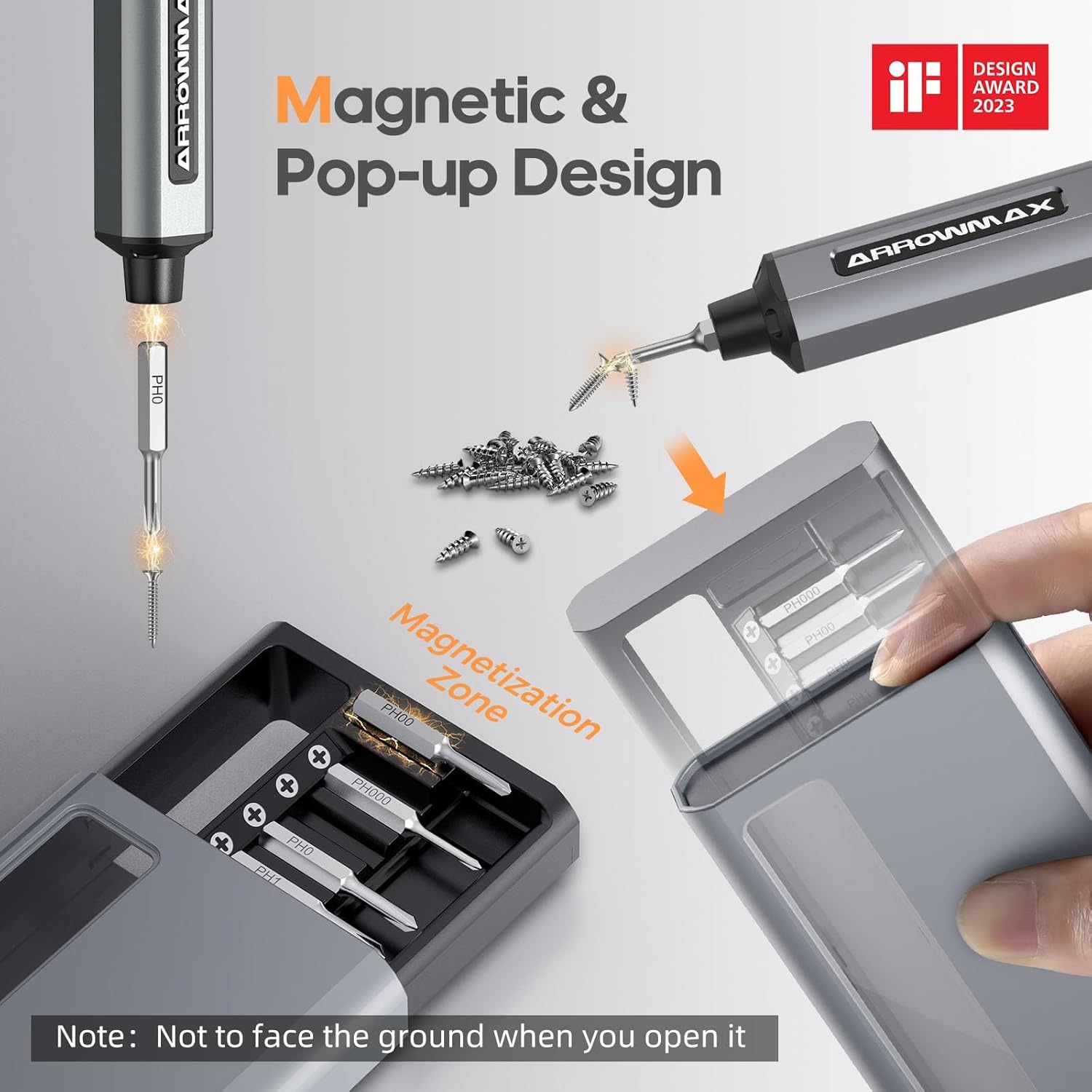
Image: Magnetic pop-up bit case design and bit magnetization zone.
6. אַפּערייטינג ינסטרוקטיאָנס
6.1 פּאַוערינג אויף / אַוועק
Press and hold the Power Button for a few seconds to turn the screwdriver on or off. The OLED screen will illuminate upon activation.
6.2 אַדזשאַסטירן דריימאָמענט סעטטינגס
The SES PRO offers 5 adjustable torque levels, including an auto-sensing mode, to suit various tasks. The electric torque ranges from 0.049 N.m to 0.30-0.35 N.m, with a manual torque of 3 N.m.
- With the screwdriver powered on, press the Power Button three times continuously to cycle through the torque settings.
- The OLED screen will display the current torque level (e.g., 1, 2, 3, 4, A for Auto-Sensing).
- Select a lower torque for delicate items like glasses or small electronics, and higher torque for more robust applications.
- For screws that are too tight for the electric motor, the screwdriver can be used in manual mode by applying direct force.
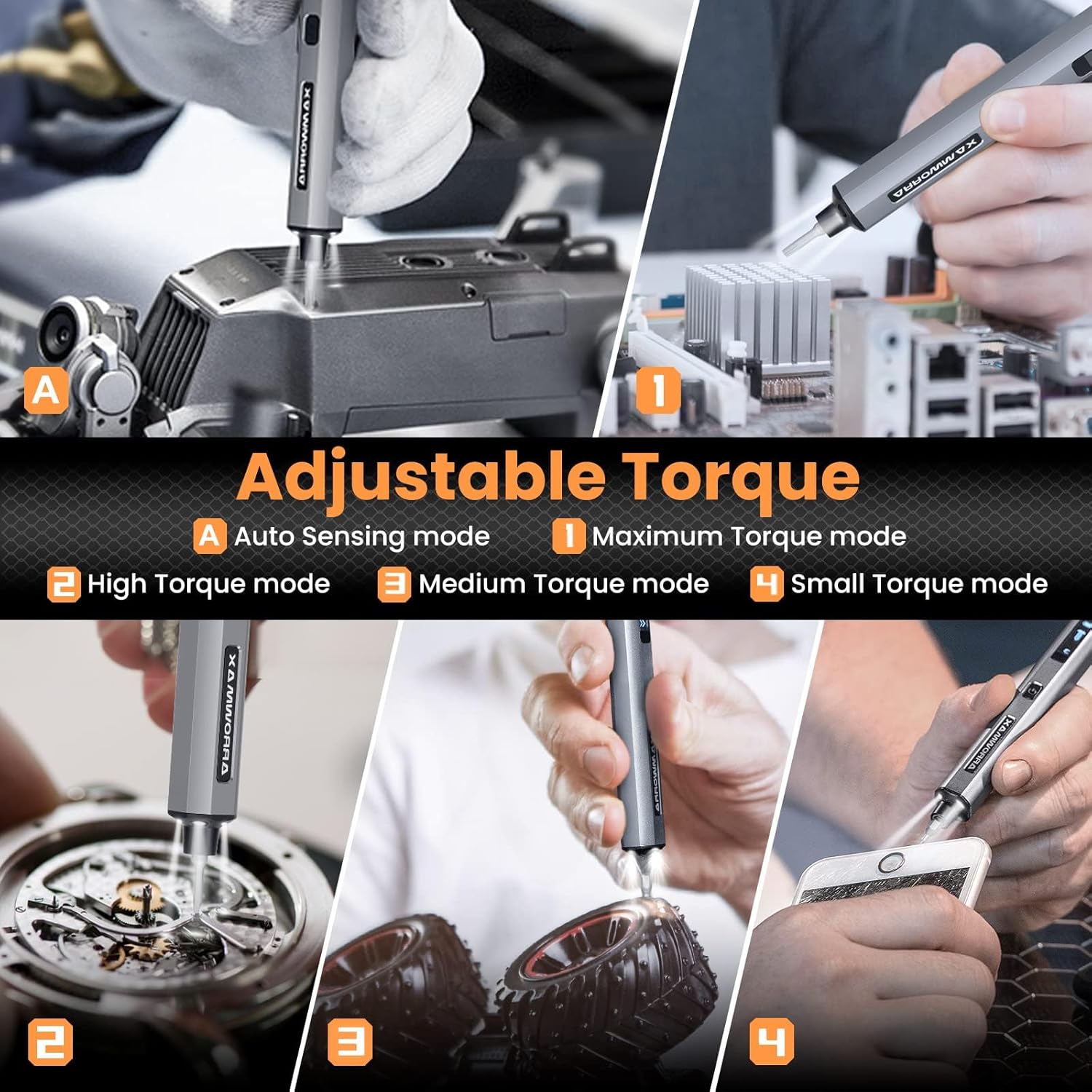
Image: Adjustable torque settings for various applications.
6.3 Body Sensory Dual-Mode (Forward/Reverse)
The SES PRO features a body sensory dual-mode for intuitive control of rotation direction.
- To drive a screw in (tighten), gently rotate your wrist in a clockwise direction while holding the screwdriver.
- To remove a screw (loosen), gently rotate your wrist in a counter-clockwise direction.
- The screwdriver's internal gyroscope detects your wrist movement and activates the motor accordingly.
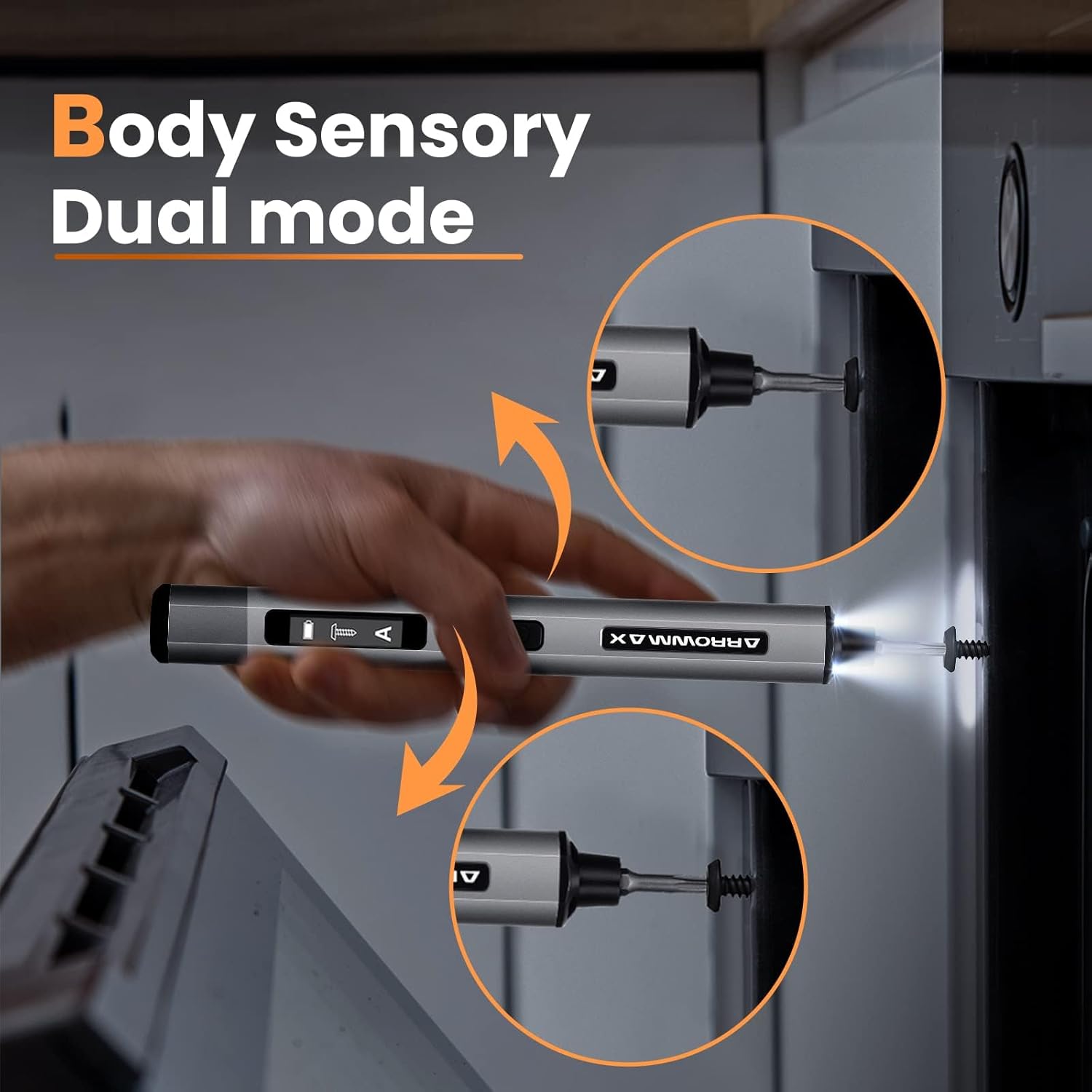
Image: Body sensory dual-mode in action for forward and reverse operation.
6.4 LED Work Lights
The integrated LED lights at the tip of the screwdriver automatically illuminate when the motor is active, providing clear visibility of your work area.
7. וישאַלט
7.1 רייניקונג
- Wipe the screwdriver body with a soft, dry cloth. Do not use abrasive cleaners or solvents.
- Ensure the bit installation port is free of debris.
7.2 באַטערי קער
- כדי צו פארלענגערן די לעבן פון די באַטעריע, זאָל מען נישט אָפט אויסלאָדן די באַטעריע גאָר.
- Store the screwdriver in a cool, dry place when not in use.
- Recharge the battery periodically if stored for extended periods to prevent deep discharge.

Image: The SES PRO's long-lasting battery capacity.
7.3 Bit Care
- Keep the precision bits clean and free of rust.
- Store bits securely in the magnetic case to prevent loss and damage.
8. טראָובלעשאָאָטינג
If you encounter issues with your ARROWMAX SES PRO screwdriver, refer to the following common problems and solutions:
| פּראָבלעם | מעגלעך סיבה | לייזונג |
|---|---|---|
| Screwdriver does not turn on or respond. | Low battery; device is off. | Charge the screwdriver using the provided USB-A to USB-C cable. Ensure the power button is pressed to turn it on. |
| Screwdriver does not charge. | Incorrect charger type; faulty cable/adapter. | Ensure you are using a USB-A to USB-C cable and a standard USB-A power adapter. USB-C PD chargers are not supported. Try a different cable or adapter. |
| Motor lacks power or cannot loosen/tighten screws. | Low battery; incorrect torque setting; screw is too tight for electric mode. | Charge the screwdriver. Increase the torque setting. For very tight screws, manually loosen or tighten them first, then use the electric mode. |
| Directional control (forward/reverse) is inconsistent. | Improper wrist movement; gyroscope calibration issue. | Ensure clear and deliberate wrist movements. If issues persist, try restarting the device. |
| Bits fall out or are not held securely. | Bit installation port is dirty; bit is not fully inserted. | Clean the bit installation port. Ensure the bit is pushed in firmly until it clicks or feels secure. |
9. ספּעסאַפאַקיישאַנז
Key technical specifications for the ARROWMAX SES PRO Electric Precision Screwdriver:
| שטריך | באַשרייַבונג |
|---|---|
| סאָרט | ARROWMAX |
| מאָדעל | SES PRO (AM-199913-G) |
| ספּיד | 200 רפּם |
| מאַכט מקור | באַטאַרייע פּאַוערד |
| Voltage | 3.7 וואלטס (דק) |
| עלעקטרישער דריימאָמענט | 0.049 N.m - 0.30-0.35 N.m (Adjustable) |
| מאַנועלע דריימאָמענט | 3 נם |
| באַטערי טיפּ | ליטיום יאָן (500mAh) |
| טשאַרדזשינג פּאָרט | USB-C (USB-A to USB-C charging only) |
| פּונקט וואָג | 13.7 אונסעס |
| פּעקל דימענשאַנז | 7.48 X 3.43 X 1.73 אינטשעס |
| ספּעציעלע פֿעיִקייטן | OLED Screen, Smart Motion Control, Ergonomic Design, LED Lights |
10. וואָראַנטי און שטיצן
The manufacturer's warranty information for this product is not explicitly provided in the available data. For details regarding warranty coverage, duration, and terms, please refer to the documentation included with your purchase or contact the retailer where the product was acquired.
For technical support, product inquiries, or assistance with troubleshooting that is not covered in this manual, please visit the official ARROWMAX website or contact their customer service department. Contact information can typically be found on the product packaging or the manufacturer's official online channels.