
הקדמה
The Havit Gamenote KB885L mechanical keyboard is engineered for precision, durability, and customization. It features a gasket structure design, providing a soft and stable typing experience while minimizing noise. The full key rollover with multi-key response ensures fast and accurate input, crucial for gaming. With customizable RGB backlighting, you can personalize your keyboard with various lighting modes and effects. The detachable USB-C cable enhances portability and simplifies cable management. This keyboard is built with mechanical switches rated for 50 million key presses, making it suitable for gamers, typists, and professionals who require long-lasting performance.
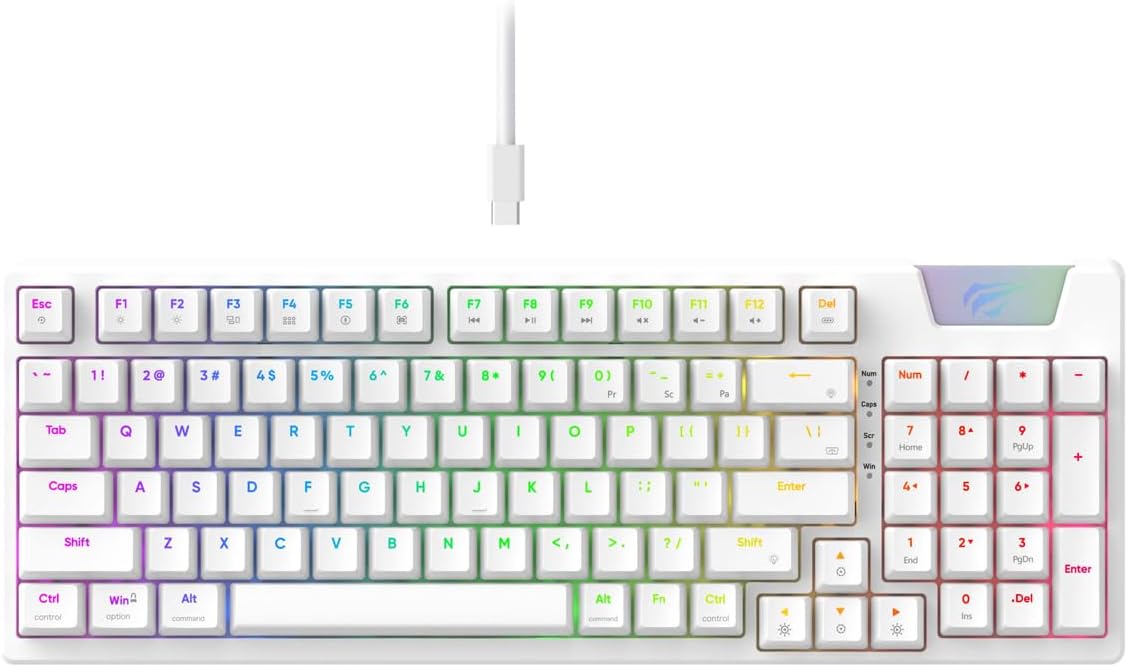
Image: The Havit Gamenote KB885L mechanical keyboard in white, showcasing its full layout and detachable USB-C cable.
סעטאַפּ גייד
Follow these steps to set up your Havit Gamenote KB885L mechanical keyboard:
- ופשליסן די קלאַוויאַטור: נעמט פֿאָרזיכטיק אַרויס די קלאַוויאַטור און אירע אַקסעסאָריעס פֿון דער פּאַקאַדזשינג.
- פֿאַרבינדט דעם USB-C קאַבל: Insert the detachable USB Type-C cable into the port on the keyboard.
- פאַרבינדן צו קאָמפּיוטער: צאַפּן די אנדערע סוף פון די וסב קאַבלע אין אַ בנימצא וסב פּאָרט אויף דיין קאָמפּיוטער.
- דרייווער ינסטאַלירונג: די קלאַוויאַטור איז פּלאַג-און-פּליי און דאַרף טיפּיש נישט קיין נאָך דרייווערס. אייער אָפּערירן סיסטעם זאָל אויטאָמאַטיש דעטעקטירן און אינסטאַלירן די נייטיקע דרייווערס.
- טעסט פאַנגקשאַנאַליטי: Open a text editor or browser to test key presses and ensure all functions are working correctly.

Image: A close-up of the Havit Gamenote KB885L keyboard highlighting its portable design and detachable cable for easy setup and transport.
אַפּערייטינג ינסטראַקשאַנז
The Havit Gamenote KB885L keyboard offers various features for an enhanced user experience:
RGB באַקלייטונג קאָנטראָל
די קלאַוויאַטור פֿאַרמאָגט קאַסטאַמייזאַבאַל RGB באַקלייטונג. ניצט די פֿאָלגנדיקע קנעפּל קאָמבינאַציעס צו סטרויערן די ליכט-עפֿעקטן:
- Fn + [קנעפל]: Cycle through different RGB lighting modes. (Specific key combinations may vary, refer to on-keyboard legends if available).
- Fn + פײַל קנעפּלעך: אַדזשאַסטירן די העלקייט און גיכקייט פון לייטינג עפֿעקטן.

Image: The Havit Gamenote KB885L keyboard displaying its vibrant RGB backlighting, illustrating customizable lighting effects.
Full Key Rollover (NKRO)
This keyboard supports Full Key Rollover, meaning every key press is registered independently, regardless of how many keys are pressed simultaneously. This feature is essential for fast-paced gaming and typing, preventing ghosting or missed inputs.
ערגאָנאָמיק פּלאַן
The keyboard is designed with ergonomics in mind to provide comfort during extended use. Its layout and keycap profile aim to reduce strain on your wrists and fingers.

בילד: א view of the Havit Gamenote KB885L keyboard highlighting its ergonomic design for comfortable use.
וישאַלט
געהעריגע אויפהאלטונג גאראנטירט די לאנגעוויטי און אפטימאלע פערפארמאנס פון אייער קלאַוויאַטור:
- רייניקונג: Regularly clean the keyboard with a soft, dry cloth. For deeper cleaning, use compressed air to remove dust and debris from between the keycaps. For stubborn dirt, a slightly damp א שטאָף מיט מילדן זייף קען גענוצט ווערן, זיכער מאַכנדיק אַז קיין פליסיקייט וועט נישט אַרײַן אין דער קלאַוויאַטור.
- ויסמיידן ספּילז: האַלט פליסיקייטן אַוועק פון די קלאַוויאַטור צו פאַרמייַדן שעדיקן צו די אינעווייניקסטע קאָמפּאָנענטן. אין פאַל פון אַ פאַרגיסונג, גלייך דיסקאַנעקט די קלאַוויאַטור און לאָזן עס גאָר טרוקן איידער איר ווידער קאַנעקץ.
- קאַבלע זאָרגן: Handle the detachable USB-C cable with care. Avoid sharp bends or excessive pulling to prevent damage to the cable or connectors.
- סטאָרידזש: ווען נישט אין באַנוץ, האַלט די קלאַוויאַטור אין אַ ריינער, טרוקענער סביבה אַוועק פון עקסטרעמע טעמפּעראַטורן.
טראָובלעשאָאָטינג
If you encounter issues with your Havit Gamenote KB885L keyboard, try the following solutions:
- קלאַוויאַטור ניט ריספּאַנדינג:
- זיכער מאַכן אַז דער USB-C קאַבל איז זיכער פארבונדן צו ביידע די קלאַוויאַטור און דעם קאָמפּיוטער.
- פרובירט אריינצושטעקן די קלאַוויאַטור אין אַן אַנדער USB פּאָרט אויף אייער קאָמפּיוטער.
- פּרובירט די קלאַוויאַטור אויף אַן אַנדער קאָמפּיוטער צו באַשטימען צי די פּראָבלעם איז מיט דער קלאַוויאַטור אָדער מיט אייער סיסטעם.
- RGB לייץ נישט ארבעטן:
- Check if the lighting is turned off using the Fn key combinations.
- Ensure the keyboard is properly powered via the USB connection.
- שליסלען רעגיסטרירן זיך נישט / גאָוסטינג:
- Due to full key rollover, this is unlikely. However, ensure no debris is lodged under the keycap.
- If a specific key is consistently failing, it might indicate a switch issue. Contact support if the problem persists.
ספּעסאַפאַקיישאַנז
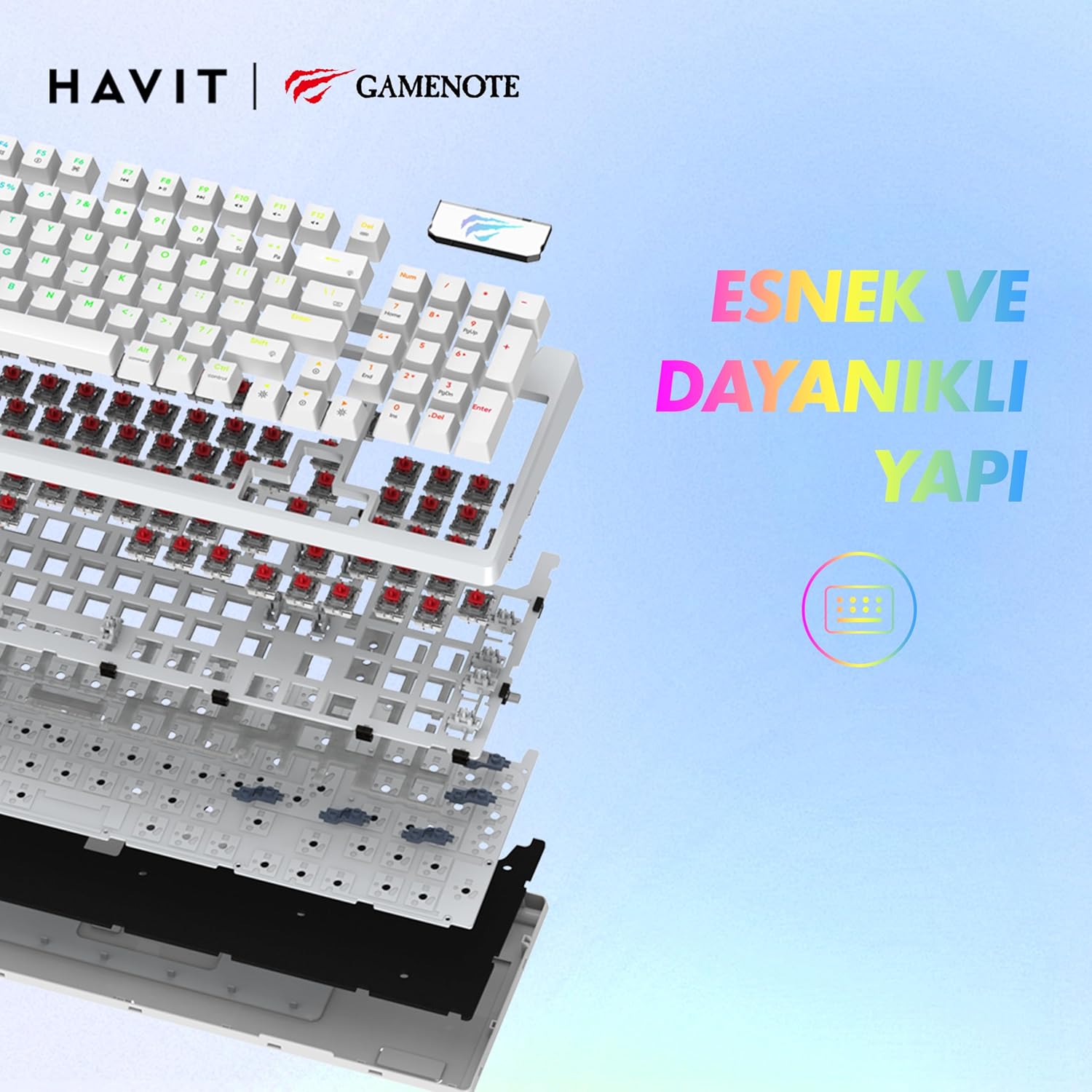
בילד: אן עקספלאדירטע view of the Havit Gamenote KB885L keyboard, illustrating its internal gasket structure for enhanced stability and typing feel.
| שטריך | דעטאַל |
|---|---|
| סאָרט | האַוויט |
| מאָדעל נומער | KB885L |
| קאַמפּאַטאַבאַל דעוויסעס | קאָמפּיוטער |
| קאַנעקטיוויטי טעכנאָלאָגיע | וסב |
| קלאַוויאַטור באַשרייַבונג | גיימינג |
| רעקאָממענדעד ניצט | גיימינג |
| ספּעציעלע שטריך | פּאָרטאַטיוו |
| קאָליר | ווייַס |
| שטיצע פֿאַר באַקלייט קאָליר | RGB (Red, Green, Blue model) |
| סטייל | מאָדערן |
| פּראָדוקט דימענשאַנז (L x W x H) | 38.7 X 14 X 4.5 סענטימעטער |
| שפּראַך | ענגליש |
| מאַכט מקור | וסב מאַכט |
| באַשטימען טיפּ | טאַקטיל |
| קלאַוויאַטור אויסלייג | QWERTY |
| האַנט אָריענטירונג | אַמבידעקסטראַס |
| נומער פון קיז | 95 |
| קנעפּל קוואַנטיטעט | 104 |
| אַרייַנגערעכנט קאַמפּאָונאַנץ | וסב קאַבלע |
| מאַטעריאַל | פּלאַסטיק |
| Key Press Lifespan | 50 Million (from description) |

Image: An illustration highlighting the Havit Gamenote KB885L's durable mechanical switches, rated for a 50 million key press lifespan.
וואָראַנטי אינפֿאָרמאַציע
The Havit Gamenote KB885L Mechanical Keyboard comes with a איין יאָר וואָראַנטי from the date of purchase. This warranty covers manufacturing defects and issues arising from normal use. It does not cover damage caused by misuse, accidents, unauthorized modifications, or improper maintenance. Please retain your proof of purchase for warranty claims.
קונה שטיצן
For further assistance, technical support, or warranty inquiries, please contact Havit customer service through their official website or the retailer where you purchased the product. Have your model number (KB885L) and proof of purchase ready when contacting support.